
Most software built for electrical contractors can dispatch a technician, close a ticket, and cut an invoice. Software for managing complex electrical jobs has to do something harder: Hold a budget open for nine months across a dozen subcontracts, all without losing track of what's been spent, billed, and earned.
Long-term, complex jobs run on a phase list, numerous subcontracts with their own committed costs, and a labor pool split across two sites. Any piece of that can run over budget, and if it's not caught, you get a surprise at closeout that harms your margin.
This complex job management software guide for commercial electrical is built around that path: turning a phase list into a real budget, keeping it accurate while the job's running, and billing it according to your contract.
What Complex Commercial Electrical Projects Demand From Software
Commercial, industrial, and institutional projects are the biggest revenue category for electrical contractors, at 48.5%, according to the 2026 Profile of the Electrical Contractor survey. And the operational logic for these projects is very different from a same-day service call.
Whether it's a tenant fit-out, data center build, school modernization, or industrial retrofit, you're managing a sequence of phases: rough-in, switchgear, fire alarm, low-voltage, trim, testing, and commissioning. Each has its own labor, material, and subcontractor costs, its own draw against a contract, and separate risk of drift between the estimate and actual spend.
| Service call | Complex commercial project | |
|---|---|---|
| Invoicing | One invoice on completion | Progress claims over months |
| Crew | One technician | Multiple crews across sites |
| Cost tracking | Job level | Phase and cost-center level |
| Payment | Paid on completion | Retainage held to completion |
Data centers command an outsized share of today's attention, with U.S. data center construction spending reaching $81.5 billion in the first six months of 2026 — more than the full-year spend in 2025. Electrical work, meanwhile, accounts for 45%–70% of total data center construction cost, according to the International Brotherhood of Electrical Workers.
That's a lot of multi-phase, high-dollar work, but many electrical contractors are running it through the same tools designed for a residential service van.
Break-fix field service software is designed around a single work order, a single technician, and a single invoice — the standard setup for service businesses handling one job at a time. It's not structured to separate labor and material costs by project phase, track a purchase order against committed cost instead of paid cost, or generate a progress bill from a live schedule of values.
Kristin Larson, CEO of Southwest Industrial Electric, spent years looking for the right software: "It was very hard to find a software that allowed us to run both things. There is a lot of software out there that has day-to-day capability, but the larger projects were the problem."
That's the seam being addressed in this electrical job management software guide for commercial work. If you're like most commercial electrical contractors, you're running service work, time and materials (T&M), and complex project billing at the same time — and a tool not built for all three will eventually fail you.
The Software Capabilities That Keep Complex Electrical Projects on Track
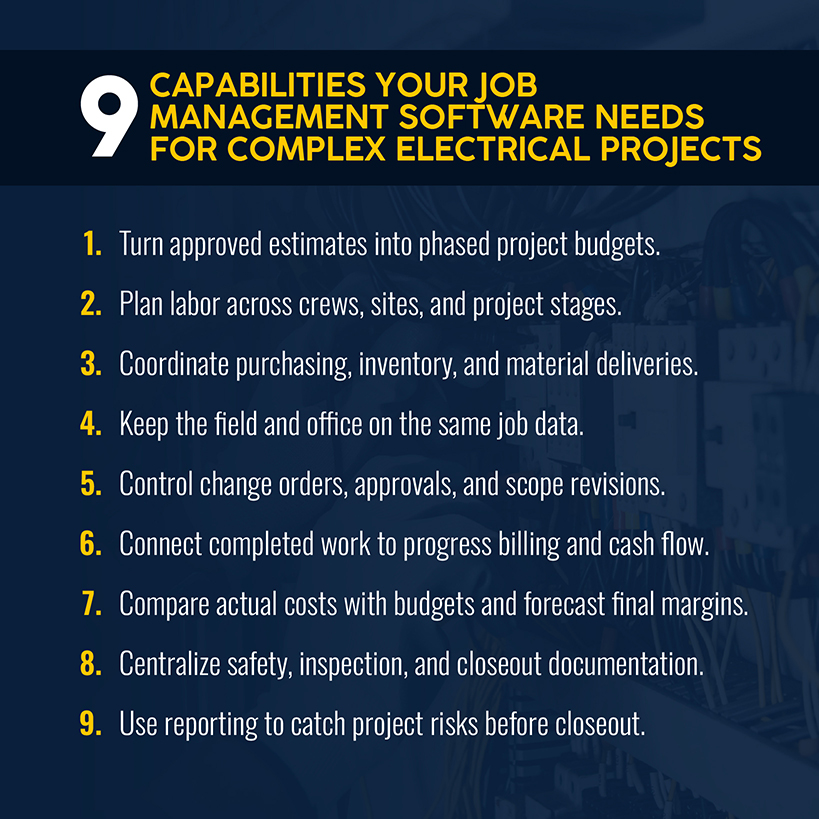
The rest of this software guide for managing multi-stage electrical projects walks through nine capabilities, roughly in the order they show up on a real job. It's the sequence used by most contractors managing a job, whether they realize it or not.
Turn Approved Estimates Into Project Budgets, Phases, and Milestones
Your approved estimate should become the job's baseline budget without anyone re-keying labor rates, material lists, assemblies, or subcontractor allowances into a second system. That handoff is where actual-versus-estimate tracking starts, and it needs to start on day one, not three weeks later after someone's rebuilt the numbers in a spreadsheet.
Your budget's phases should also align with how the work gets done. For example, you should be able to spot leaking switchgear costs while trim-out is still on track, instead of finding out when it's too late to shift crews or renegotiate a sub's scope. When ADJ Electrical Construction Manager Raynor Pierce started breaking projects into stages using Simpro®, it surfaced labor rates the company had been running unchanged for 35 years without anyone noticing.
Related: Our guide to the electrical estimating process shows how to build an estimate that's ready to convert into a phased budget.
Plan Labor Across Crews, Sites, and Project Stages
Complex electrical work runs on multiple crews across multiple sites at once, and a tight labor market makes staffing even tougher. The U.S. employs roughly 818,700 electricians and needs about 81,000 more each year through 2034 just to keep pace with retirements and demand, according to the Bureau of Labor Statistics.
Job scheduling should account for which team members are certified for switchgear work versus low-voltage trim, not just who happens to be free. Every hour of your journeyman's time needs to land against the right cost center, or margin erodes long before the monthly payroll report catches it.
The operational fix: Connect clock-in to the job and phase, with burdened labor cost visible in real time. If a crew is off pace on switchgear, you'll get flagged before the phase closes instead of after.
Coordinate Purchasing, Inventory, and Material Deliveries
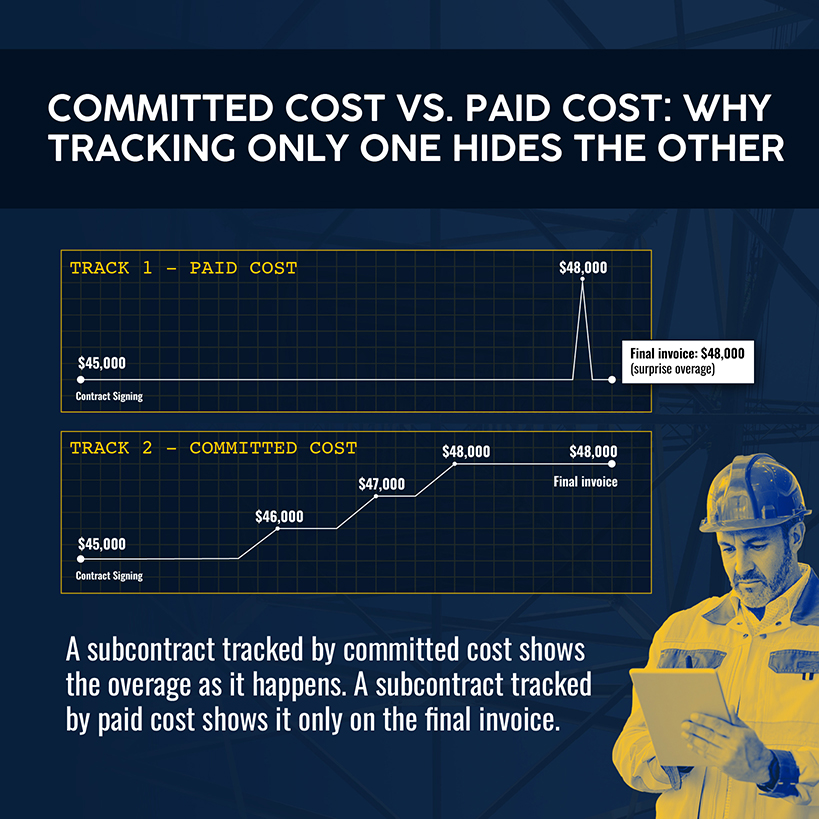
You need to track long-lead switchgear, prefab panels, and specialty low-voltage subcontracts against committed cost, not paid cost. A $45,000 subcontract that creeps to $48,000 through incremental invoices should be visible the moment it happens, not when the final bill lands. Materials also need to land at the job site on schedule, not whenever the supplier gets around to it.
Prefabrication adds another layer worth planning for. Research on electrical prefabrication found that increased prefab use led to labor productivity gains, lower composite labor costs, and increased profit margins. But this move depends on your software treating prefab as its own cost center and inventory workflow instead of folding it into general materials, where the savings get lost in the noise.
Brian LaFrance of All Electric calls switching software "a no-brainer" because of what it did for billing, inventory, and job management together.
Related: Our electrical inventory management guide walks through cost-center visibility for a prefab shop.
Align Field and Office Teams to the Same Job Data
Case studies from contractors repeatedly point to the same failure point: Spreadsheets and paper handoffs between field and office. These handoffs result in lost job cards, duplicate data entry, and delayed visibility in profitability.
A change your crew makes in the field on Tuesday needs to be visible in your office budget by Wednesday, not at the next billing cycle. One way to fix this is via mobile apps that let crews save time by logging job notes, materials, and photos from the field.
The challenge here is less about features and more about usability. Can your field techs update job data in an intuitive interface without a maze of menus? Can your office staff adjust settings without calling in a consultant every time something needs to change?
Control Change Orders, Approvals, and Scope Revisions
Rework tied to client-initiated changes is one of the largest drivers of cost overrun on construction projects. The Construction Industry Institute puts direct field rework at an average of 5% of total project cost, ranging from 2–20% depending on project type. A change order you don't log, price, and approve before the work happens is a change order that shows up as an unexplained variance three weeks later.
The operational fix: Every scope revision gets priced and routed for approval inside the same system tracking the budget. Any changes trigger an update before the crew starts the work.
Connect Completed Work to Progress Billing and Cash Flow
Invoicing and payments on a multi-phase project don't work the same way as on a service call. Commercial project contracts typically bill against a schedule of values using the standard AIA G702/G703 pay application format, where you invoice a percentage of completed work each period. The owner withholds a retainage, commonly 5–10%, until milestones or final completion.
A break-fix system that only understands "invoice on completion" can't represent any of that.
You need native software support: percentage-complete or per-item progress claims, configurable retainage by period and rate, and an alert when a claim comes due at the end of the holding period.
Simpro's Progress Claim and Request for Claim functions support percentage-of-total, manually entered, or per-item claims, a dedicated retainage setting for period, amount, and final claim rebate, and separate invoice types for deposits, claim requests, progress claims, and tax invoices.
Compare Actual Costs With Budgets and Forecast Final Margins
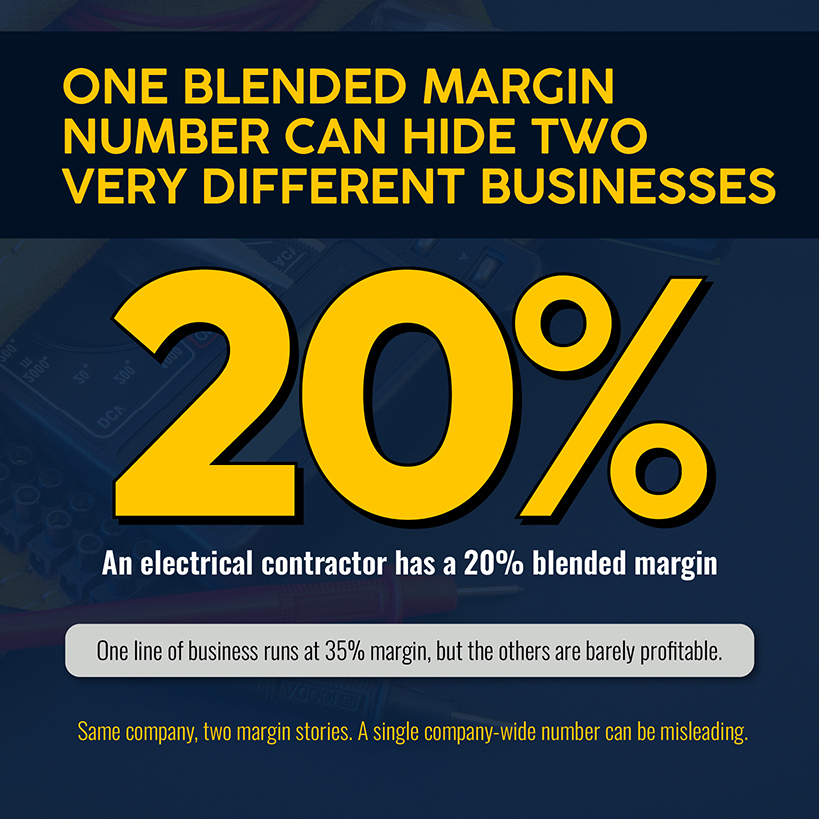
A blended margin number hides more than it reveals. Consider two contractors, each reporting a 20% blended margin. Company A has roughly 20% margin across all lines of work, while Company B has one division posting 35% margins and getting dragged down by barely profitable jobs elsewhere. The lesson: Over-relying on company-wide margin can obscure which parts of the business actually make money.
Simpro's Project Overview function tracks actuals against estimated material and labor costs by job, and lets you compare original, revised, and current budgets in one view.
The operational fix: Run a weekly comparison of what you estimated against what you've actually spent, billed, and earned. The cadence matters: Monthly checks won't catch leaking margin in time.
Related: Our electrical job costing KPI guide breaks down which numbers to watch weekly.
Centralize Safety, Inspection, and Closeout Documentation
Every phase of a multi-month project generates inspection reports, safety documentation, and closeout paperwork. Where does that live in your system? If it's buried in email threads and paper folders, closeout turns into a scavenger hunt and delays your ability to invoice the final claim.
Centralizing all that paperwork against the job record means that when an inspector or owner asks for documentation, everything is already attached to the phase it belongs to and is ready to share.
Use Reporting and AI Insights to Identify Project Risks Earlier
Many contractors struggle to determine a job's true profitability until closeout, when it's far too late. Reports that only confirm what already happened after the fact just tell you what went wrong. AI-powered alerts can catch a cost center drifting off budget while the phase is still open, allowing you to preserve and grow margin.
Related: Our guide on replacing disconnected point solutions shares what to look for when your reporting depends on stitching data together from three tools.
How to Evaluate Software Against Your Electrical Project Workflow
Picking the right software for managing complex electrical jobs comes down to a short list of evaluation questions rather than a feature checklist.
For example, can the platform run both a same-day service call and an eight-month, multi-phase commercial buildout? That was the most difficult requirement Southwest Industrial Electric had to solve for, and if you're relying on separate spreadsheets today, it's probably the same problem you're facing.
Other areas to evaluate include:
- Can your field techs and project managers update job data without a training manual open next to them?
- Does the pricing model punish you for adding technicians or opening a new location?
- How deep does the reporting go at the cost-center level, since that's where a budget problem gets caught early or not at all?
Related: Once you've settled on the capabilities that matter, our electrical job management software roundup compares seven platforms, feature by feature.
Questions to Ask During a Software Demonstration
The key features on a spec sheet won't tell you as much as watching someone use the system in real time. Bring these questions to your next demo:
- Can you show me a job converting from an approved estimate to a phased budget, without re-entering the labor and material data?
- How does the system track a purchase order or subcontract against committed cost, not just what's been paid so far?
- Walk me through creating a progress claim with retainage on a live project. How is the retainage period and release tracked?
- What does a real-time cost comparison look like inside the platform, and how often does it actually refresh?
- Can prefab labor and materials be tracked as their own cost center, separate from general job materials?
- How does a change order flow from field discovery to priced approval to updated budget?
- What happens on a job where the same customer account includes service visits and a multi-phase project?
Build One Connected Workflow for Every Complex Electrical Project
None of these capabilities are sufficient in isolation. The biggest value shows up when your approved estimate, phased budget, labor plan, purchase order, progress claim, and closeout report all live in the same system. Changes to any area update the others automatically instead of requiring manual reentry.
Over 24,000 businesses run their operations on Simpro, which is electrical contractor software with the connected structure required of commercial and industrial work. Estimates convert directly into phased project budgets. Cost centers track actuals against estimates by stage, native progress claims and retainage, purchase orders, and subcontractor tracking. And nearly 55 job-level reports are built for the kind of visibility that catches a problem while there's still time to fix it.
You already know the cost of discovering a budget problem at closeout instead of week three. Schedule a demo to see how Simpro keeps your complex electrical projects profitable at every stage, from the first estimate to the final retainage release.
FAQs
Can electrical job management software support both project and service work?
Yes, and for most commercial electrical contractors, it has to. Very few shops run complex projects exclusively. Your crews and your back office are probably handling same-day service calls, T&M work, and multi-phase commercial jobs simultaneously, so your software needs customer management and job records that support both, along with a service history that doesn't split by job type.
Does electrical job management software replace accounting software?
No. It should seamlessly integrate with your general ledger, typically through a two-way QuickBooks or similar accounting integration. The goal is to have job costing data automatically reconcile with company-level financials. The job management platform owns the field and project data. The accounting software owns the books.
How long does electrical job management software take to implement?
It depends on how many active projects and how much historical job data need to migrate. Standardizing your cost codes before migration matters more. Contractors who migrate with inconsistent cost-code structures tend to import that inaccuracy into the new system's job costing.
When should an electrical contractor replace spreadsheets and point solutions?
When the time spent reconciling data between tools starts costing more than the software would. If your office is manually re-entering estimate data into a separate project tracker, chasing down which spreadsheet has the current change order, or belatedly finding out that a job ran over budget, you're likely at the point where a connected system pays for itself and benefits your electrical business.


 Back to top