
TL;DR
- QuickBooks Online Plus gives you project-level profit and loss. Advanced adds estimates vs. actuals, phase budgets, change orders and WIP reporting for U.S. customers.
- The gaps show up in labor, material, phased work and service calls — each starting with data that reaches QuickBooks late, if at all.
- Missing reports suggest you need to change your QuickBooks plan. Late or wrong data suggests a field problem. Know which is which before paying for a plan upgrade.
Open the QuickBooks job costing report for your last completed job and look at the dates. Labor posted when payroll ran. Copper showed up after someone entered the supplier bill. Both can lag weeks behind when your crew was actually on-site.
Intuit's August 2026 update put phase budgets, AIA-style progress billing, change orders, and work-in-progress (WIP) reporting inside QuickBooks Online Advanced at no added cost. But while this update offers more robust reporting, it doesn’t control when data arrives.
How you respond to this QuickBooks update depends on your plan, payroll setup, and how material reaches a job. The answer will look different for a two-truck electrical shop with one bookkeeper than for a commercial HVAC outfit running phased installs. Keep reading to learn how job costing works in QuickBooks and when you need to bring in field service software.
How Job Costing in QuickBooks Works for Contractors
QuickBooks costs each job based on transactions. You track expenses by tagging each bill, check, expense, or payroll run to a project. The project's income, costs, and profit margin build from whatever has been posted. To track job costing in QuickBooks Online, you’ll need at least the Plus plan to turn on the Projects feature in your account settings.
Intuit lists Plus at $140 a month and Advanced at $340 for job costing. Usage limits apply to each plan cap, as illustrated in this table:
| Plan | What you get for job costing | Where it stops |
|---|---|---|
| Simple Start and Essentials | Income tracked by customer through invoices | No Projects, classes or locations. Can’t tag expenses to a customer |
| Plus | Project-level profit and loss | 5 billable users, 40 combined classes and locations, no estimates vs. actuals |
| Advanced | Estimates vs. actuals; U.S. only: phase budgets, change orders and WIP over- and underbilling | 25 billable users, no cap on classes and locations |
Worth noting: Construction features in Advanced aren't available for users outside the U.S., and since 2024, new customers looking for job costing in QuickBooks Desktop need the Enterprise version.
What QuickBooks Does Well for Job Costing
QuickBooks for contractors’ job costing tracking runs on the general ledger. Every bill, check, and payroll run posts to the same books your accountant already works in. And because so many accountants use QuickBooks, it’s easy for contractors without an in-house finance team to find help.
Labor has a direct path to the job report. When Premium or Elite payroll plans are connected to QuickBooks Time, employees who track time by job send those hours into payroll. From there, labor cost is assigned to the right class, customer, or project when payroll runs. Progress invoicing lets you create multiple invoices from a single estimate as the work progresses.
The Advanced plan adds budgets by phase and change order management to your job cost reporting. Projects also keep a job's estimates, invoices, and expenses in one place, and on Advanced, the project dashboard compares a job’s current cost against its estimate.
Where QuickBooks Job Costing Falls Short for Contractors
Every job costing report in QuickBooks Online reflects what reached the ledger. As such, the four conditions below reflect timing or coding gaps.
We didn't test the software hands-on. Our findings draw on Intuit's product documentation, accounting and benchmark data from CFMA, labor-cost data from the Bureau of Labor Statistics, and G2 reviews of QuickBooks Online Advanced, including reviews from construction companies.
Labor Costs Depend on Accurate Field Time
QuickBooks relies on timesheets and payroll, which can differ from the hours a technician spends on a specific job. With the Premium or Elite payroll plans and QuickBooks Time, hours by job flow into payroll, and labor posts to the project when payroll runs. The result: Job reports can trail the work until the next payroll run.
The Core payroll plan limits you to tagging time to a single project per employee, and job costing in payroll requires the QuickBooks Time integration.
When thinking about labor costs, remember that wages alone don’t reflect the full hourly cost. BLS puts employer cost in construction at $51.96 per hour worked in June 2026, including benefits. On average, that is about 44% more than the wage rate, and that's before vehicles and non-billable time.
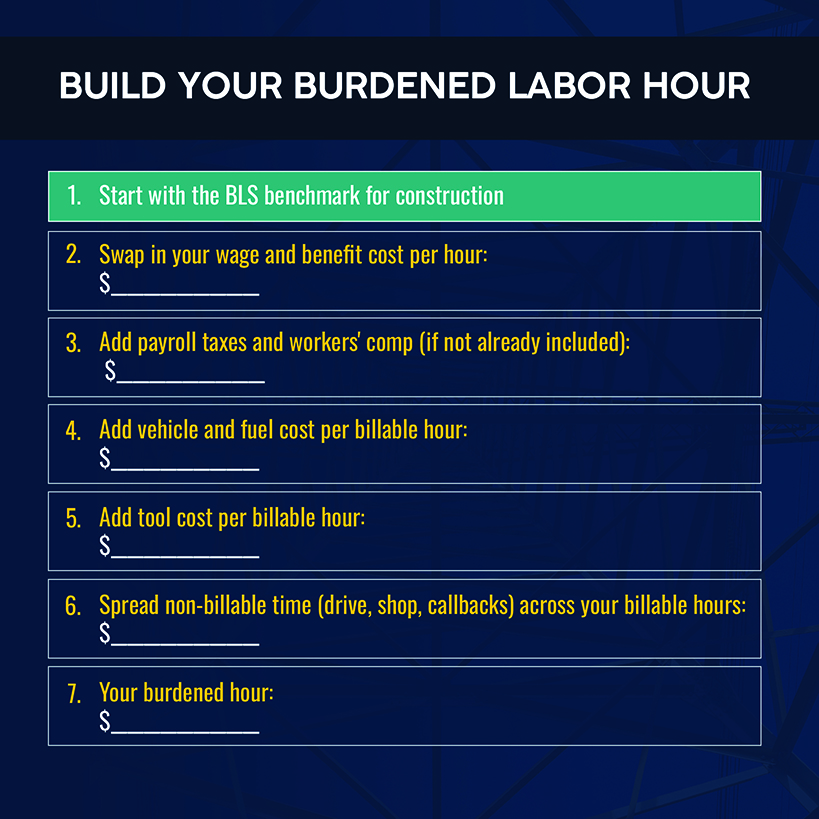
The operational fix: Have technicians clock on and off individual jobs from the truck, log time and expenses against the job before the day ends, approve time daily instead of at payroll, and cost every job at a burdened hourly rate. Rebuild that rate each year from wages, taxes, insurance, vehicles and non-billable time.
Related: If late timesheets are your problem, this explainer on accurate field time tracking shows where they usually go wrong.
Material and Purchasing Costs Reach Accounting Too Late
Material typically lands in project costs when someone enters the supplier bill. Here’s an illustration of this gap: A crew of four sets $12,000 of copper line set and fittings on a Tuesday. If you review the job report before the invoice lands with your bookkeeper, you’ll see $12,000 more profit than the job has.
Material prices can widen that gap further. With BLS's producer price index for nonferrous metals up 33% over the 12 months ended August 2026, a quote written months ago and a bill entered weeks late can both be wrong in the same direction. A purchase order (PO) doesn't close that gap by itself: QuickBooks treats a PO as non-posting, so cost reaches the job only when the PO becomes a bill. And material pulled at a supply house counter or off the truck doesn't have a PO at all.
QuickBooks coding further complicates these calculations. Intuit says that estimates vs. actuals and WIP reports need item-based entries to work. If you’re using categories instead of products in bills, those reports won't work.
The operational fix: Raise the PO against the job before material leaves the supplier and receive it when it lands. At month-end, accrue delivered material that doesn’t have an invoice.
Complex Jobs Create More Gaps Between the Field and the Financials
Phased work stacks two gaps on top of timing. The first is progress to date. Like the rest of QuickBooks' cost reports, a WIP report works from the costs posted and the estimate you gave it. Say rough-in is running 30% over on hours, while 40% of the fixtures are still boxed. The report can't see that, but your project manager can.
An analysis of thousands of audited financial statements found that projected job profitability on WIP reports was, on average, more than 1% higher than actual profit on completed projects. Watch for a gap between WIP projections and what you wind up with.
The second gap is contract accounting. Intuit's construction announcement lists budgets by phase, AIA-style billing, change orders and WIP over- and underbilling, but it doesn't list retainage tracking. Under Accounting Standards Codification 606, retainage tied to conditions other than the passage of time shouldn't be classified as a receivable. It belongs in the contract asset or liability, worked out contract by contract. Confirm with your CPA how your books handle that.
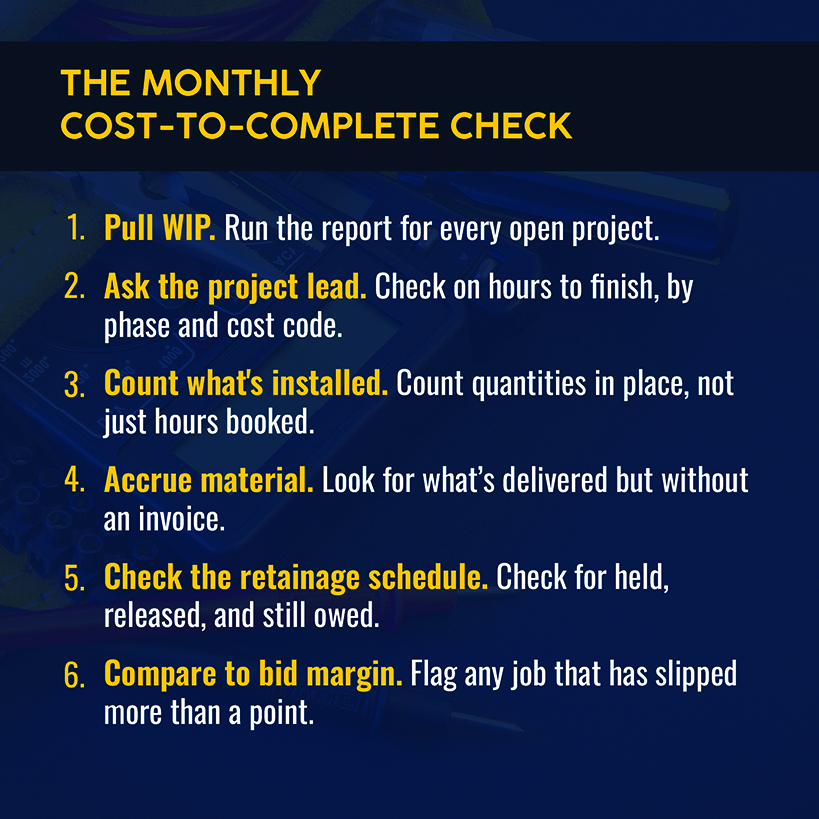
The operational fix: Each month, meet with your project lead to reforecast the cost to complete, using the same cost codes as in the estimate. Count installed quantities and hours, and keep the retainage schedule in a file your CPA can audit.
Related: Check out our breakdown of job costing and margin KPIs to watch.
Service Work Doesn't Fit a Project Model
A QuickBooks project is tied to a single customer. On the Advanced plan, it can also carry a project estimate. By contrast, a service call includes a dispatch time, technician, truck, parts pulled off the van, and sometimes a maintenance agreement, but rarely a project or an estimate.
Take a $450 service call. Its margin depends on who was dispatched, how long they stayed, and what came off the truck, and none of that starts in the ledger.
The operational fix: Cost service work in the system that dispatches it, and let the ledger receive the summarized result.
When You Need a Job Costing Add-On for QuickBooks Online
Determine where your gap lives. If it’s a missing report, look at your QuickBooks plan. If the data is late or incorrect, that’s a different problem. The answer tells you whether your next purchase is a QuickBooks upgrade or a QuickBooks Online job costing add-on.
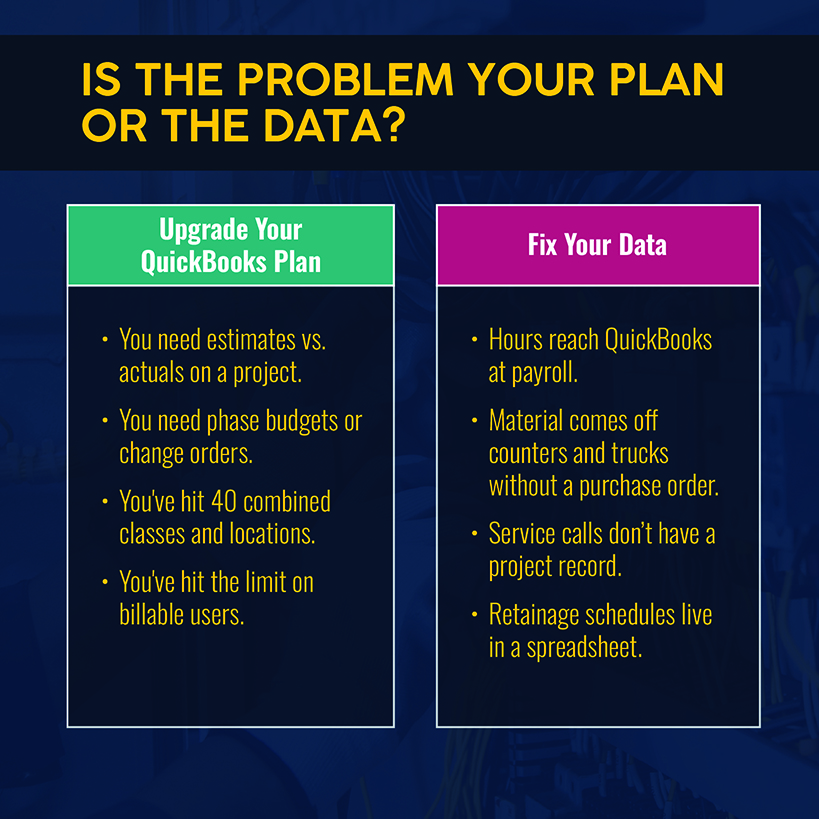
An add-on earns its cost when you face most of these challenges:
- Hours reach QuickBooks at payroll, or you rekey them from paper and texts.
- Material comes off counters and trucks without a PO.
- Service calls, maintenance agreements, and installs share one crew, but only installs get a Project.
- You've run into Plus's cap on users, classes, or locations.
- A bank or surety asks for retainage and contract asset schedules, but you have to build them by hand.
For scale, CFMA's 2025 Benchmarker puts the average specialty trade contractor at 7.7% net income before taxes, with best-in-class contractors hitting 14.2%. If your margin trails that average, check your job records against these five points before you shop.
Any add-on should capture time and material at the source, costing them to the job or phase as they happen. It also should pass the result to QuickBooks so your CPA doesn’t have to switch systems.
Related: Review our roundup of field service software for QuickBooks.
How QuickBooks and Field Service Management Software Work Together
Leave the ledger in QuickBooks and adopt a platform that’s designed to handle costs. Simpro® is purpose-built field service management software for trade businesses, with 250,000+ users.
In the field, Simpro Mobile lets technicians clock on and off, add travel time and record billable and non-billable hours. Timesheets can spread time across cost centers by hours or by share of the time worked.
Purchasing follows the same path. A purchase order created inside a job gives that job a committed cost, and receipting the order finalizes the actual cost. The Breakdown Table then shows actual versus estimated cost by cost center while the job is still open.
With Simpro, you can spot a phase running below target while there’s still time to change something.
Related: For the owner who sends invoices and reviews job costing after dinner, our review of connected field and office workflows shows where those after-hours tasks pile up.
QuickBooks receives the financial result, remaining the source of truth for your CPA. Simpro's link transfers invoices broken down by cost center along with supplier invoices, payments, and inventory journals. Cost centers also let service work and maintenance work report separately in one system, covering the calls a QuickBooks project can't model. A split like that only pays off when you can see the numbers while the job is still open.
Extend QuickBooks Job Costing With Simpro
Simpro works upstream of QuickBooks: Hours and purchase orders are recorded against the job in real time, and the financial results transfer to the accounting you already use. Simpro customers have reported a 30% technician productivity increase after they combine estimating, job costing and progress billing in one connected system.
The goal is a business that makes money on the jobs it wins and can show a bank how that happened. That requires cost data you can act on while the job is still open. Schedule a demo today to see how your own jobs would cost out before the bill arrives.
FAQs About QuickBooks Job Costing
Intuit folded construction financials into QuickBooks Online Advanced in August 2026, so these answers reflect the product as of September 2026.
Can contractors use QuickBooks for job costing?
Yes. Plus and Advanced plans include Projects, which track income, costs, and project profitability for each job. Advanced adds estimates vs. actuals and WIP reporting. The limit is timing. QuickBooks costs a job from posted transactions, so accuracy depends on how quickly hours and supplier bills reach it.
What is the difference between QuickBooks projects and classes?
A project groups one customer's transactions and reports profit for that job. A class tags transactions by business segment, such as a trade or service line. Locations tag them by branch. The Plus plan includes QuickBooks job costing with classes, but with a cap of 40 combined classes and locations. Advanced removes the cap.
Does Simpro integrate with QuickBooks?
Yes. Simpro's QuickBooks Online link transfers customers, invoices and credits, supplier and contractor invoices, payments and inventory journals, and it breaks invoices down by cost center. With tracking enabled in QuickBooks Online, Simpro business groups can arrive as classes.
When should contractors add job costing software to QuickBooks?
Add job costing software when your big challenge is late or erroneous data. A field system is recommended if you’re grappling with hours that don’t reach QuickBooks until payroll, material that’s bought without purchase orders, service work without a project record, or retainage schedules kept in spreadsheets. An upgraded QuickBooks plan won't fix those problems.


 Back to top