
TL;DR
- A commercial HVAC change order is a signed agreement that changes the work and adjusts the price and schedule.
- Get the direction in writing before the crew starts the changed work.
- Price the disruption to unchanged work along with the direct cost.
- Bill every approved change on the next pay application.
- Notice deadlines can be as short as 14 days and start when the change happens. Missing one can cost you some or all of the payment.
You can fill out an HVAC change order form perfectly and still not get paid. That’s because the notice clock usually starts when the event happens or the order is given, not when someone asks for a price. AIA's A201 sets that window at 21 days.
Change orders on commercial HVAC jobs are a common occurrence. A study of 226 mostly large construction industry projects found that change averaged 8% of labor hours, and projects held under 5% beat their planned productivity 60% of the time. Timing adds to the cost: A study of 61 mechanical projects found that the later a change order lands, the more labor efficiency it costs.
Which clock applies to you depends on how your contract defines a change order. This guide covers what change orders are, what causes them, and how to manage them from direction to billing.
What Is a Change Order in Commercial HVAC?
Under AIA A201, a change order is a written agreement signed by the owner, contractor, and architect that records a change in the work and any adjustments to the contract price and contract time. On a subcontract, the subcontract sets who signs.
Without those signatures, a change can sit unapproved for weeks while your crew keeps working.
A mechanical subcontractor might initiate a change order request, a priced proposal sent to the general contractor (GC). (Outside the U.S., this might be called an HVAC variation order.) The GC carries it to the architect and owner. Several events can set off the change order process, including a proposal request, request for information (RFI), and construction change directive (CCD).
Two frequently asked questions about change orders are:
- Who pays for the work in the meantime?
- Who bears the risk if the owner says no?
The answer to both depends on where the change came from.
What Usually Causes Change Orders on Commercial HVAC Jobs?
On commercial HVAC work, change orders originate from the following places:
- Design changes and owner requests, such as added zones, relocated equipment, or a revised tenant layout
- Differing site conditions on retrofits, such as existing ductwork that conflicts with the new route
- Coordination conflicts, such as your trunk line meeting another trade's cable tray
- Equipment substitutions and lead-time problems
- Code, inspector, or commissioning requirements that weren't in the original documents
- Errors or omissions in the drawings
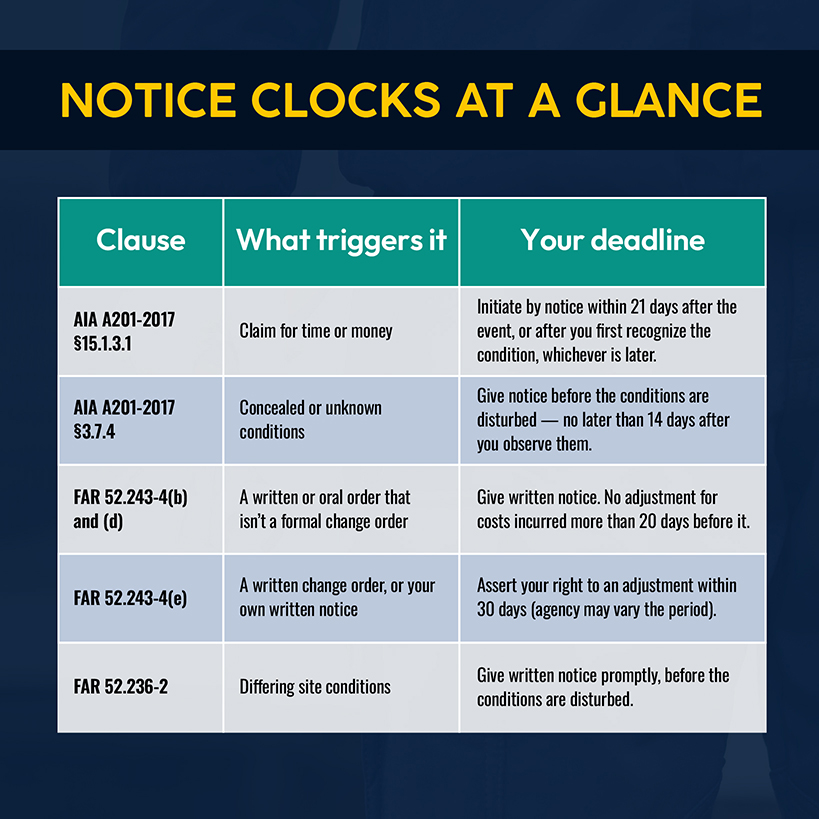
Concealed conditions on retrofits are especially sensitive, as notice must be given when you find them. Under AIA A201-2017 §3.7.4, you must notify the owner and architect before the conditions are disturbed and no later than 14 days after first observing them. On federal work, FAR 52.236-2 requires written notice “promptly, and before the conditions are disturbed.”
A change order request doesn’t mean anyone made a mistake — or that you’re complaining about the drawings. Many modifications result from owner changes, unforeseen conditions, and delays outside anyone’s control. Whatever the source, your response should follow the ordered sequence discussed below.
How to Manage Change Orders on Commercial HVAC Jobs
Managing change orders on commercial HVAC jobs consists of eight steps. Skipping any of them creates the risk of an unpaid line item or dispute down the line. In a clean process, the first six finish before the crew begins the relevant work.
Identify the Scope Change Before Additional Work Starts
Compare the scope’s direction against the bid documents that defined the initial project scope. Changes can vary widely: A revised drawing, RFI answer, verbal instruction, or something your crew uncovers above the ceiling all count, and the clock starts when you recognize it.
AIA sets a 21-day window in A201 §15.1.3.1. For federal work, FAR 52.243-4 gives you 30 days to assert your right to an adjustment, but bars adjustments for costs incurred more than 20 days before you give written notice of an informal order.
The operational fix: Make sure your foreman and lead tech understand that, if it’s not on the bid drawings, they should stop until the project manager has been called.
Document Why the Change Is Required
Capture the facts while the crew is still on the job site. Take photos of the condition, recording the RFI or directive, the name of whoever gave the direction, the drawing sheet and grid line, and the date. If the condition isn't clear, ask the superintendent for a site visit before you price anything.
One reason to track changes promptly and contemporaneously is that the disruption they cause complicates efforts to reconstruct records after the fact. A photo and RFI number take relatively little effort to capture, and they have a long shelf life.
Calculate the Full Cost of the Change
The cost estimation of a change requires three calculations:
- Direct cost: Price labor hours at a burdened rate, material costs from actual quotes, rental equipment, and permits.
- Overhead and profit: Price at the contract rate. Some contracts cap markup on changes, so read the clause before you price.
- Disruption to unchanged work: Estimate the productivity lost on stacked trades, overtime, or a crew that grows or shrinks. For example, the same change should cost more in week 14 than in week 2 because late changes cost more in labor efficiency.
Related: The labor and material side of a change starts with the same takeoff discipline behind estimating commercial HVAC jobs.
Record the Impact on the Project Schedule
Record how many days the change adds to the construction project schedule, which tasks it pushes, and which trades it touches. If you plan to recover lost days with more people or overtime, say so, pricing that recovery under disruption costs.
Your proposal should address the following questions, per AIA's guidance on proposal review:
- Does the change affect the critical path, and with it the completion date?
- Can other activities be adjusted to absorb the delay?
- Is any concurrent delay already yours?
Create the HVAC Change Order
Generate a document that’s formatted per the GC’s contract and includes the revised scope of work, price, and time. Make sure to attach the backup. Per AIA's guidance, the description should be clear enough for a third party to generally understand the change and its impact.
List every attachment with its date. Reference the drawing sheets or bulletin that have changed with a reference to your proposal.
Related: Our guide to pricing HVAC jobs covers allocating overhead and setting target profit margins.
Get Written Authorization Before Proceeding
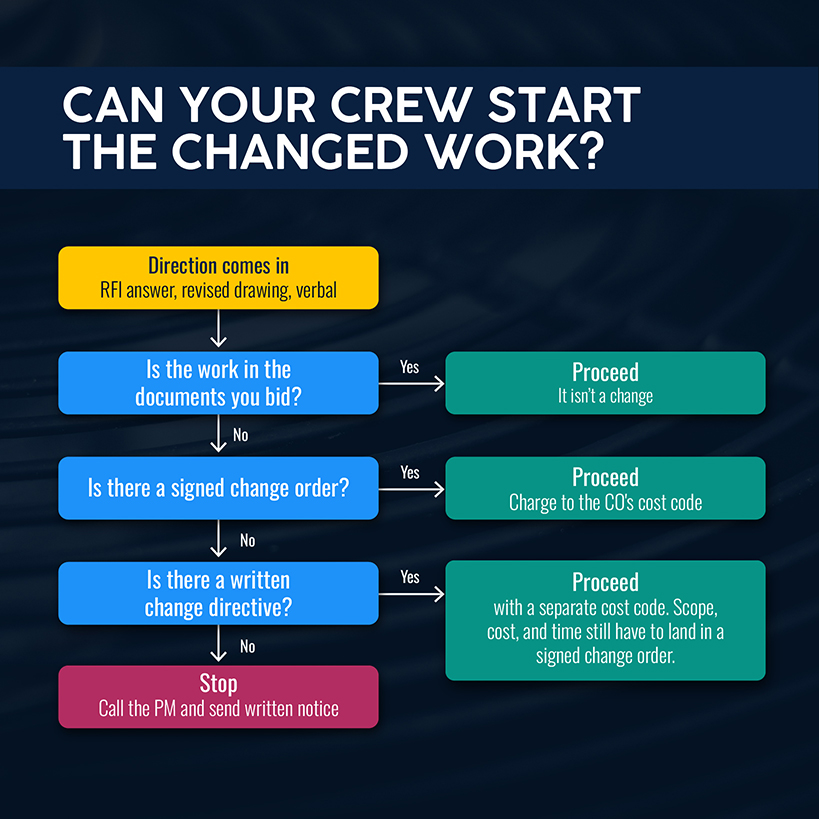
Don’t rely on verbal approval alone. If price and time aren’t settled, ask the GC for written direction. On AIA contracts, that’s a construction change directive, which can order work to proceed before price and time are agreed. Even so, scope, cost, and time must eventually become part of a signed change order.
If you do proceed on a directive, open a separate cost code, tracking labor and material from the first hour.
Speed matters here, too. A study of electrical and mechanical projects named change order processing time as one of the main factors affecting productivity.
The operational fix: Set a pricing deadline for every proposal request, and log the date the GC acknowledged your proposal.
Track Every Change Against the Original Job
Maintain a change log with each change's number, amount, status, and when the last update occurred. Review the log at every project meeting and ask who owns unsigned items.
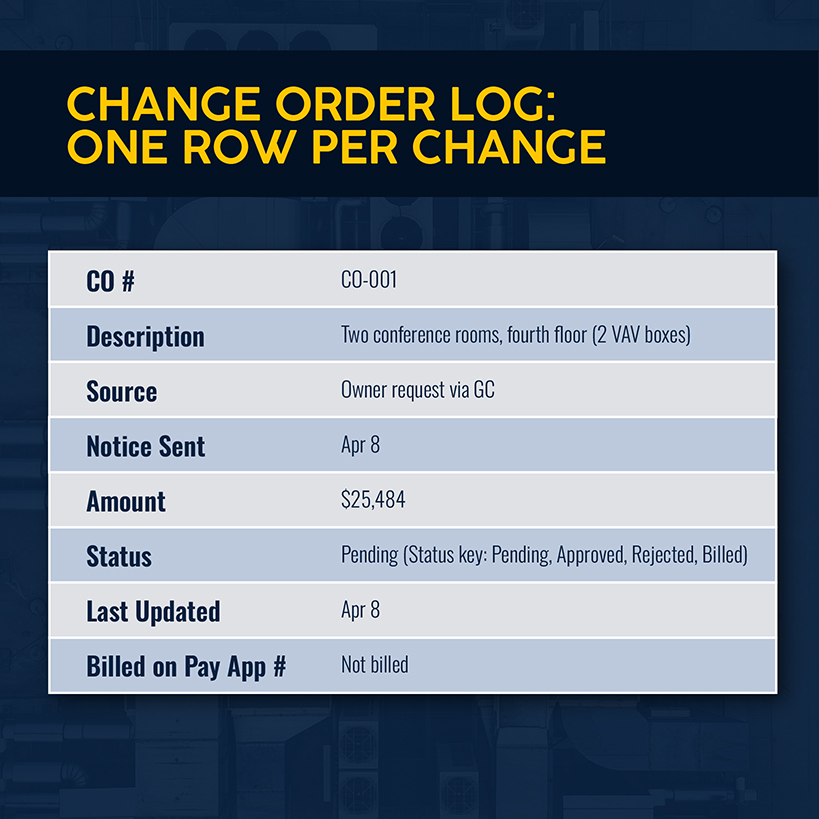
Each change should have its own cost code. That lets you compare actual labor and material against the amount you priced, highlighting whether the change pays for itself and what the original job costs without it.
Simpro® Premium shows estimated and actual costs for parts, labor, contractors, and equipment on each job, so the original job’s numbers and your change costs sit in one system.
Related: Our guide to commercial HVAC job management helps you follow the job from estimate to final invoice.
Bill Approved Changes and Monitor Their Effect on Margin
Don’t delay in seeking payment. Bill approved change orders on the next pay application, each under its own number alongside the base contract’s completed work. As the changed work proceeds, compare what it actually cost against the price you signed. Unplanned overtime, for instance, can reduce a job's margin.
Related: Each approved change adds a line to the billing breakdown, and this guide to the HVAC schedule of values explains how progress billing works against it.
What Should an HVAC Change Order Form Include?
Whether you handle change orders on paper or via software, the signed form is the only record of what the owner agreed to pay for. Here’s what you should include in your change order form template.
| Section | What to capture |
|---|---|
| Project details | Project name, contract number, GC and owner, change order number, date, and whatever triggered the change |
| Description of change | What changed, why, who directed it, drawing sheet and location references, photos, and a dated list of attachments |
| Direct costs | Labor hours by classification at burdened rates, material with supplier quotes, equipment and rentals, permits, and subcontracted work |
| Indirect costs | Overhead and profit at the markup percentage your contract allows on changes |
| Disruption to unchanged work | Productivity loss on unchanged work and other added costs, or a written reservation of the right to price them later |
| Schedule impact | Days added, and the effect on sequence and other trades |
| Authorization | Signatures from every party as required by the contract |
Example of a Commercial HVAC Change Order
This filled-in example illustrates how the arithmetic works on a hypothetical job.
A GC on a four-story office tenant improvement tells your project manager that the owner is adding two conference rooms on the fourth floor after your rough-in is done. The rooms need two VAV boxes with reheat coils, about 90 feet of new duct, and hot water piping tied into the existing loop. A three-person crew can do it in four days. The ceiling wing is already crowded with other trades.
| Item | Detail | Amount |
|---|---|---|
| Labor | 96 hours (3-person crew, 4 days) at $90 burdened | $8,640 |
| Material | 2 VAV boxes with reheat coils, duct, fittings, insulation, piping, valves, diffusers | $9,360 |
| Controls subcontract | Two zone controllers and commissioning | $2,000 |
| Disruption to unchanged work | 24 hours of lost productivity on unchanged work from stacked trades at $90 | $2,160 |
| Overhead and profit | 15% markup on $22,160 | $3,324 |
| Total | $25,484 | |
| Schedule | 4 added working days on fourth-floor ceiling close-in |
Include the impact on unchanged work in the price, or reserve the right to price it later in writing. Many contracts treat a signed change order as a final settlement of all related costs, which can leave you unable to recover disruption costs.
Related: Our guide to HVAC profit margins covers how to calculate gross and net margin by job.
Common Change Order Mistakes That Cost HVAC Contractors Money
The math only holds if you develop the right habits. Here are five avoidable mistakes to watch for:
- Starting on a verbal go-ahead. AIA A201 gives you 21 days to give notice, and under the FAR, costs incurred more than 20 days before written notice aren’t recoverable.
- Pricing direct cost only. Just because a change has been authorized doesn’t mean you’ve determined the full impact yet.
- Absorbing small changes to keep the GC happy. Skipping compensation to earn goodwill sticks you with extra costs and a lower margin.
- Letting pending changes age. Labor keeps getting charged to them; without a review, you won’t know which ones have stalled.
- Skipping the reservation of rights. Buy yourself time to price the impact.
The operational fix: Name one owner for the change log and review weekly. Nothing leaves the log until it’s been billed or rejected in writing.
Related: A job that priced well at bid can still finish in the red. Our guide to unprofitable commercial HVAC jobs lists the warning signs that show up before closeout.
Track HVAC Change Orders Alongside Job Costs With Simpro
How was your last change order processed? If it relied on multiple touchpoints, spreadsheets and disconnected systems, you’re creating risk of leaks and delays.
Simpro tracks forecast and actual job costs for parts, labor, contractors, and equipment in one system, giving you a baseline to hold changed work against. Job progress updates reach the office in real time, with field staff using Simpro Mobile to record notes, take photos, and capture signatures on job cards. The Digital Forms add-on handles custom field forms. Progress invoices and retainage claims come from the same system, and the Schedule Comparison report compares actual results with the original schedule.
Simpro is built for HVAC contractors and other trades, serving more than 24,000 businesses. To see how it handles job costs, field records, and billing around your change orders, schedule a demo today.


 Back to top