
Job costing software for HVAC contractors gets judged in the weeks between the quote and the final invoice. Costs arrive one at a time, on their own schedule. Your HVAC estimating software sets the price in March, and the crew installs the changeout in April. By May, four costs have either reached the job or landed in overhead. The timesheet came in after closeout, and the fittings left the truck without a work order. The subcontractor's invoice arrived after final billing, and nobody priced the change order the crew agreed to on site.
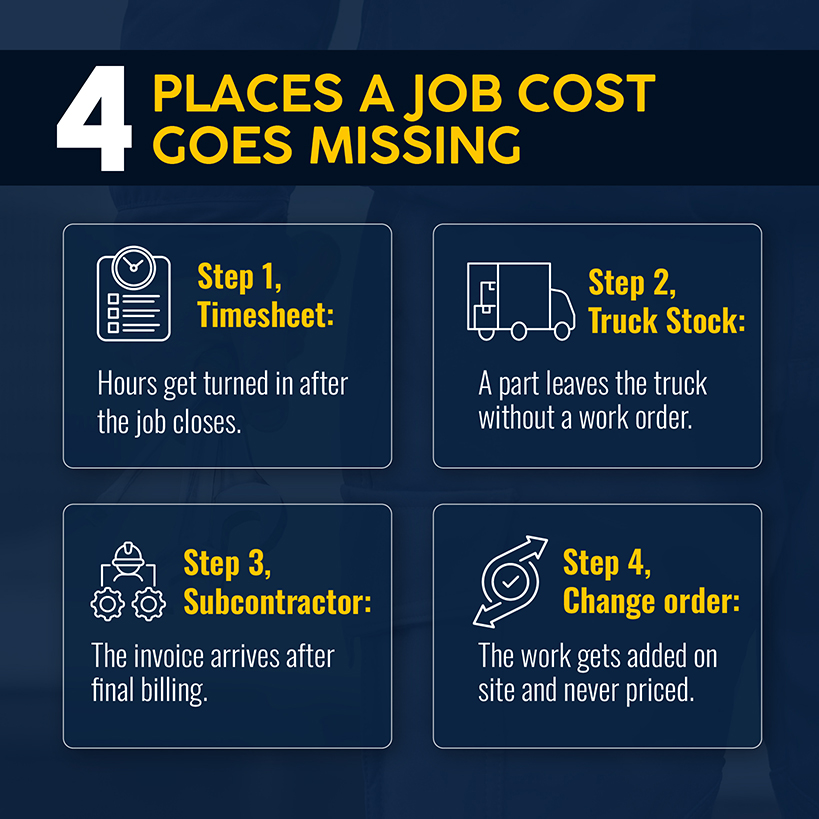
Those misses eat into a thin profit margin. CFMA's 2025 Benchmarker report puts specialty trade contractors at 7.7% net income before taxes, with 74.2% of revenue going to direct costs. At that level, every point of revenue lost to a cost nobody priced takes about 13% of the profit. A blended 7.7% also hides which jobs earned it, so a money-losing changeout can sit behind a month of profitable tune-ups.
Seven tools say they get those costs onto the job in time. They made the cut for HVAC businesses because each one lists job costing on its own site. They appear in no particular order of ranking. Simpro® is one of the seven. We make it, so we stuck to what each vendor posts on its pricing and feature pages as of October 2026. You can check every claim in the comparison yourself.
Best HVAC Job Costing Software for Contractors at a Glance
Prices for HVAC job cost software come from each vendor's pricing page. Vendors that don't publish prices send you to sales.
| Tool | Best for | Job costing as the vendor describes it | Pricing model | Notable limitation |
|---|---|---|---|---|
| Simpro | Growing and commercial contractors | Job cost forecasting and tracking across labor, materials, contractors and equipment | Price for your workflow | Pricing is by request only |
| Housecall Pro | Small to midsize residential contractors | Labor, material and expense costs per job with a plan vs. actual view | $59 to $299 per month, billed annually | Basic plan includes one user |
| FieldPulse | Growing service businesses | Labor, materials and margins tracked in real time | Quote only, seat-based | No published prices |
| Knowify | Project-based contractors | Job costing, WIP reporting, change orders and AIA billing | $99 to $399 per month, Enterprise by quote | Job costing starts on the Advanced plan |
| BuildOps | Large commercial contractors | Job costing, change orders and cost-code purchase tracking on project plans | Quote only, per field and office user | Project tools depend on the plan |
| LiveCosts | Real-time cost tracking | Labor, materials, equipment and subcontractor costs against budget | Contact sales | No published prices |
| QuoteIQ | Small businesses on a budget | Per-job profit from labor and expenses | $29.99 to $699.99 per month | Job costing isn't in the Essentials plan |
1. Simpro: Best for Growing and Commercial HVAC Contractors
Simpro runs service, maintenance and project work on one platform. Its job management page describes forecasting and tracking job costs across labor, materials, contractors and equipment. The workforce reports show job costs per employee. Invoices account for job costs, and approval stages let you check billing before it goes out. Commercial billing covers progress invoices and retainage claims. Simpro supports 250,000+ users worldwide.
Buchanan & Hall is a 25-person commercial HVAC and refrigeration company in Ontario. Operations Manager Joel Anderson found its old software didn't connect quotes and materials to the job. The team moved about 10,000 inventory items and 4,500 customers into Simpro. Once the data was in, they could pull up past job data and build quote templates from it.
Related: The numbers a job gets measured against start at the quote. Our guide to HVAC estimating covers how to build them.
Pros and Cons
Pros:
- Quoting and estimating, inventory and purchasing, scheduling, invoicing and reporting all come in the base plan.
- You can pull job costs per employee, plus profit and loss reports, WIP reports and expected sales on jobs and quotes.
- Deposit invoices sit alongside progress invoices and retainage claims.
- Your techs clock in, clock out and log travel time from the mobile app.
- QuickBooks, Xero, Sage and MYOB integrations appear on the pricing page.
Cons:
- If you want a price, you ask for a demo.
- Takeoffs, Maintenance Planner, Digital Forms and GPS fleet tracking are sold as add-ons.
Add up the add-ons your crews would use before you compare quotes.
Pricing
Simpro doesn't list prices. The pricing page describes one base plan and routes pricing requests to a demo, so your price for your workflow comes out of that conversation.
2. Housecall Pro: Best for Small to Midsize Residential HVAC Contractors
You get job costing on Housecall Pro starting with the Basic plan. Its job costing page says labor covers base pay, employer-paid expenses and commissions. Materials come from the price book with unit costs per line item. You can also add extra job expenses. Each job then shows margin, revenue and total cost in a plan vs. actual view.
Pros and Cons
Pros:
- Job costing starts at the lowest tier, so even a one-person shop gets it.
- Labor includes commissions as well as base pay.
- The price book supplies material costs by line item.
- Essentials adds QuickBooks Online sync and flat rate pricing.
Cons:
- Basic includes one user and Essentials includes five.
- The job costing page's FAQ says the feature doesn't integrate with QuickBooks Online.
If your office runs on QuickBooks Online, ask for a demo that shows where job costs land in the ledger.
Pricing
Basic costs $59 a month billed annually or $79 month to month, and it includes one user. Essentials runs $149 annually or $189 monthly for five users. Max costs $299 annually or $329 monthly and covers eight users. Each user after that costs $35 a month.
Related: A job's costs only protect margin once they reach the price. Our guide on how to price HVAC jobs builds them into the sell price.
3. FieldPulse: Best for Growing HVAC Service Businesses
FieldPulse describes job costing as tracking labor, materials and margins in real time. You estimate margin before work begins. Once the job is done, you confirm the actual profit. A job costing view puts actual cost, actual sales and profit totals beside a line-item breakdown.
Pros and Cons
Pros:
- Estimated margin and actual profit appear on the same job.
- The line-item view shows cost and profit for each line.
- Estimates and invoices, dashboards and reporting, and a QuickBooks integration all appear on the pricing page.
Cons:
- Pricing is by quote only, and no plan prices are listed.
Ask for a demo that costs a labor hour at your own burdened rate.
Pricing
FieldPulse says pricing is seat-based and built around what your team needs. You get a quote through a demo request.
Related: An estimated margin only holds if every job cost shows up while the work is still running, and our post on HVAC profit margins makes that case in full.
4. Knowify: Best for Project-Based HVAC Contractors
Knowify includes change orders, progress billing and AIA G702/G703 billing on every plan. Job costing, real-time WIP reporting and project budgets start on the Advanced plan. Fixed-price contracts work on every plan. Cost-plus and time-and-materials contracts start with Advanced.
Pros and Cons
Pros:
- Change orders, progress billing and AIA billing come with every plan.
- WIP reporting, project budgets, subcontracts and subcontractor management start on Advanced.
- QuickBooks Online, QuickBooks Time and QuickBooks Payments connect on every plan.
- Dispatching, equipment history and appointment reminders come with the Service Pro add-on.
Cons:
- Job costing, WIP reporting and project budgets aren't in the Core plan.
- If you use QuickBooks Desktop, you need Enterprise.
- Inventory management is a paid add-on on Core and Advanced.
If you run service calls beside project work, count the Service Pro add-on in your total.
Pricing
Core runs $99 to $149 a month for one user. Advanced runs $329 to $399 a month for 10 users. The page shows two prices per plan without labeling them, and they look like annual and monthly billing. Extra users cost $29 a month, and Enterprise is quoted with unlimited users. The Service Pro add-on runs $99 to $199 a month.
5. BuildOps: Best for Large Commercial HVAC Contractors
BuildOps targets commercial contractors who run service work, projects or both. Its pricing page lists change orders, submittals, RFIs, daily reports and job costing as project tools on plans that include them. Its accounting page says purchases tie to a job and cost code. You see committed costs before invoices arrive.
Related: Commercial jobs add phases and progress billing. Our guide to commercial HVAC job management walks through how that work moves from estimate to final invoice.
Pros and Cons
Pros:
- Change orders and job costing are listed among the project tools.
- Purchases tied to jobs and cost codes show committed costs early.
- QuickBooks, Sage Intacct, NetSuite and Viewpoint are among its integrations.
- BuildOps handles implementation and onboarding on every plan.
Cons:
- Prices aren't published. Users, trades, modules and integrations all move the quote.
- Service-only plans cover dispatching, maintenance agreements, quoting and invoicing, with project tools added on top.
Ask which plan includes the project tools before you compare a BuildOps quote to anyone else's.
Pricing
BuildOps prices by the number of field and office users. Trades, plan features, modules and integrations also move the quote. It publishes no price list.
6. LiveCosts: Best for Real-Time HVAC Job Cost Tracking
LiveCosts says its dashboards show budget against actual project costs. The dashboards update as new costs come in. Digital timesheets, supplier orders and subcontractor costs feed them. AI scans invoices and assigns the costs to projects.
Pros and Cons
Pros:
- Dashboards compare budget and actual costs for each project.
- Supplier orders track in real time, so you see ordered costs before the invoice lands.
- AI invoice scanning allocates costs to projects.
- Xero, Sage and QuickBooks connect directly.
Cons:
- No prices or plans are published.
- Dashboards and invoice allocation are organized by project.
Ask how a service call, as opposed to a construction project, gets its own cost record.
Pricing
LiveCosts lists no plans or prices. Its pricing page sends you to sales.
Related: Linking parts usage to job costs is one of the ten practices in our post on HVAC inventory management.
7. QuoteIQ: Best for Small HVAC Businesses on a Budget
QuoteIQ calculates profit per job as total price minus labor and expenses. Labor is each employee's hourly rate times the hours logged in its time tracking. Expenses cover whatever you add to the job: materials, supplies, subcontractor fees and equipment rental. Each job gets a Report tab. It shows the breakdown and a margin bar.
Pros and Cons
Pros:
- One report tab shows labor, expenses and margin for each job.
- Estimates, invoices, a price book and scheduling come with every plan.
- You get QuickBooks integration starting on the Pro plan.
Cons:
- Job costing isn't in the Essentials plan.
- The job costing page covers actual material expenses against the quote but describes no full estimate vs. actual report.
Run your trial on a closed job first, so you can see how its numbers compare to your books.
Pricing
Essentials costs $29.99 a month for one user. Beginner costs $99.99 for two users, Pro $199.99 for four, Elite $299.99 for 10 and Max $699.99 for 20. Extra users cost $25 a month, and annual billing includes two months free. You need a card to start the 14-day free trial.
How to Choose HVAC Job Costing Software
Contractors shopping for the best HVAC job costing software can test each option against eight capabilities.
- Costs captured where the work happens. Hours come from mobile timesheets with travel time. Materials come from purchase orders and truck stock. Subcontractor costs come from invoices matched to the job.
- Estimate vs. actual by job and phase. You see both numbers while the job is open, not in a report run after closeout.
- Burdened labor rate. Construction employers spent $36.13 an hour on wages and $15.84 an hour on benefits in June 2026. Labor runs about 44% above wages alone.
- Change order tracking against the original budget.
- Commercial billing. Commercial HVAC contractors who bill by phase need progress billing, retainage and WIP reporting.
- Accounting integration, so you know which system is the source of truth.
- Fit with how you work. Residential service, commercial maintenance and project work are different job types. Each stresses job costing differently, as do crew size and pricing model.
- How clear the pricing is and how much work setup takes.
 )
)
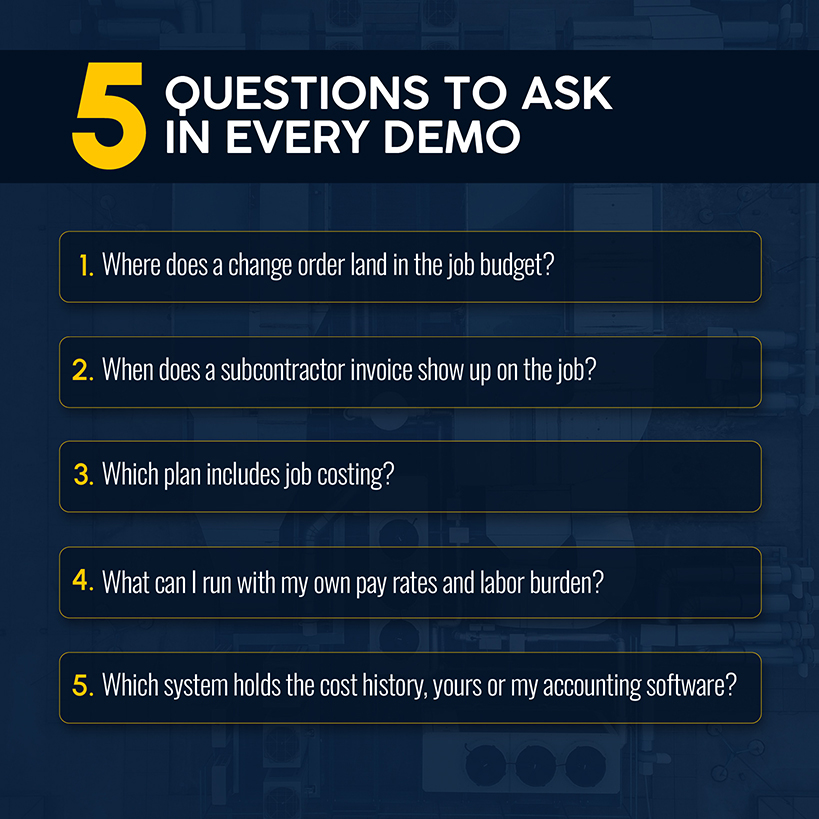
Knowify and BuildOps name change orders on their pricing pages. For the other tools, ask for a demo of how a change order reaches the job budget.
Related: Unpriced change orders and vague scopes are two of the ten warning signs in our list of unprofitable HVAC jobs.
A condenser pulled from the shop without a work order never reaches the job. The margin report never knows. Parts recorded against the job from supplier orders and truck stock keep copper, equipment and fittings out of overhead.
Take a two-tech changeout that runs three days, which is 48 hours of labor. At the $36.13 construction wage average, that costs about $1,734, but at the $51.97 total cost it runs about $2,495. A tool that costs the job at wages understates its labor cost by about $760.
The operational fix: Ask every vendor to cost one of your closed jobs in a demo, using your pay rates and labor burden. Then add one change order. Whatever the software can't show, your office will keep working out in a spreadsheet.
Manage HVAC Job Costs With Simpro
Suppose the estimate lives in one system while the timesheets, supplier orders and invoices live in three others. You find out what the job did to your bottom line at closeout, after you've spent the money.
Simpro puts quoting, scheduling, inventory and purchasing, timesheets and invoicing on one platform. It forecasts and tracks job costs there, and those costs carry into your invoices. That gives you the numbers to protect the margin you quoted while changing course is still cheap. Schedule a demo to learn more.
Frequently Asked Questions About HVAC Job Costing Software
Job costing questions mostly come down to timing: when a cost reaches the job, and who has to enter it.
What Costs Should HVAC Contractors Track on Each Job?
Track everything that touches the job. That means burdened labor, materials, equipment, subcontractor invoices and job-specific expenses such as permits and disposal fees. Costs that never reach the job also never reach the price, so labor burden and overhead belong in the numbers too.
Can HVAC Job Costing Software Track Costs in Real Time?
Yes, for the costs that reach the system as they happen. FieldPulse, BuildOps and LiveCosts all describe real-time tracking. A subcontractor invoice sitting in an inbox doesn't count until someone enters it.
What Is the Difference Between HVAC Job Costing Software and Accounting Software?
Accounting software records costs by account after they post. Job costing assigns them to individual jobs as crews and buyers enter them. The ledger shows what the company earned this quarter. The job cost report shows which jobs earned it and what they cost.
Can QuickBooks Handle HVAC Job Costing?
Partly. Intuit's August 2026 update put budget-versus-actuals monitoring, AIA-style invoicing, change order management and WIP reporting into QuickBooks Online Advanced. QuickBooks still shows only what gets entered. Hours from the field and parts from the truck reach a job once someone enters them. All seven tools advertise a QuickBooks integration. The open question is which system holds the job's cost history.
How Much Does HVAC Job Costing Software Cost?
Among tools that publish prices, the lowest plan that includes job costing is Housecall Pro's Basic. It costs $59 a month billed annually for one user. QuoteIQ lists a $29.99 Essentials plan, but job costing isn't in it. Knowify's job costing starts on Advanced at $329 to $399 a month for 10 users. Simpro, FieldPulse, BuildOps and LiveCosts quote by request. Users, modules and add-ons move the number, so price the crew that will actually use the software.


 Back to top