
A rooftop unit can sit craned into place for weeks before it actually runs. Installed and running aren't the same thing, but most schedules of values bill them like they are.
That distinction matters when talking about schedule of values and progress billing for commercial HVAC jobs. Blur it, and you either bill for work that isn't finished or sit on cash for work that already is.
This guide walks you through what an HVAC schedule of values (SOV) looks like and how to properly build it.
What Is an HVAC Schedule of Values?
A schedule of values (SOV) is a line-item breakdown of your project's scope of work, with a dollar value attached to each item. Add them up to get the sum of the construction contract.
Instead of billing "HVAC installation" as one number, you bill each piece as it progresses. For a commercial HVAC job, that means splitting the contract into line items that an architect or owner can independently verify: rooftop units, ductwork, piping, controls, startup and commissioning.
That structure makes progress billing possible. Progress billing (or progress payments) uses your SOV to request payment for work completed and materials stored during a cycle, rather than billing only after the job wraps. On most U.S. commercial projects, progress payment requests travel through standard forms like the AIA's G702 and G703, which are covered in detail later on.
Your SOV is the financial skeleton of the job. Everything you bill traces back to it.
8 Steps to Build and Use an HVAC Schedule of Values
These steps are meant to be followed in order. Skipping from step 3 to step 6, for instance, is how SOVs go wrong, as you get vague line items that aren’t verified and haven’t been checked against the contract. That's true across construction projects of any size, whether you're building a schedule of values for HVAC contractors on your first job or your 50th.
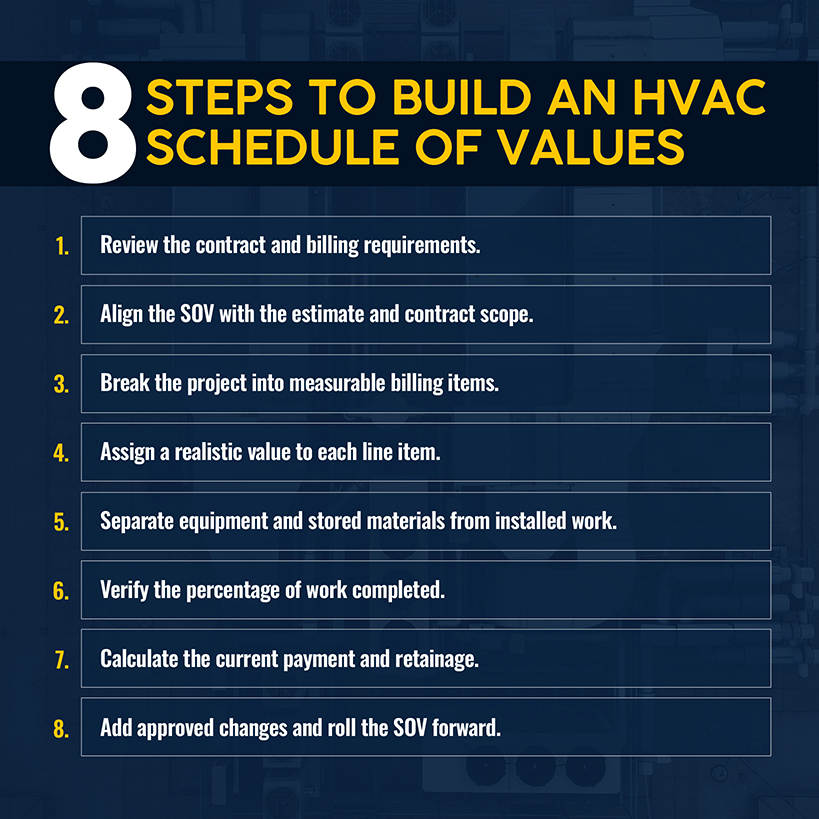
Work through these steps in order.
1. Review the Contract and Billing Requirements
Before you write line items, read the contract's payment terms. Does it require AIA G702/G703 forms, or does the owner accept a format like ConsensusDocs 293? What's the retainage rate, and does it step down at a milestone? Is there a notarization requirement?
Missing any of these on your first submission increases the risk of a pay application bouncing back and your 30-day clock resetting to zero.
Related: If you're still shaping the bid, our guide to bidding commercial HVAC jobs covers the terms worth negotiating.
2. Align the SOV With the Estimate and Contract Scope
Your SOV isn’t a fresh document. It’s your estimate, restructured for billing. Start with what the contract pays you, then map that onto the scope you’ve already priced. Include equipment, ductwork, piping, controls, labor, general conditions, and any other categories your estimator used.
Send a rough version to the owner and architect before you lock it in. Catching a scope disagreement at this stage is easier to fix and avoids a rejected invoice.
Related: Our guide to pricing HVAC jobs covers how to build a bid that holds up once the job starts.
3. Break the HVAC Project Into Measurable Billing Items
"HVAC installation" as a line-item description is a good way for your pay app to get flagged. It can't be verified, so it can't be certified with confidence. Break the scope down until each item can be measured on its own, such as rooftop unit installation, ductwork fabrication for the second floor, piping and hydronics, controls startup and commissioning.
On a 40-ton rooftop unit replacement at a distribution center, that might mean five or six line items instead of one, each tied to something you can confirm with a site visit.
The operational fix: If you can't describe how someone would verify a line item is 50% done by looking at the job site or the delivery log, the line item is too broad. Split it.
4. Assign a Realistic Value to Each Line Item
Every line item needs a dollar value that covers direct and indirect costs, with those values precisely matching the total contract sum. Round numbers that don't reconcile are a red flag to whoever's reviewing the pay app.
Avoid the temptation to front-load early line items like mobilization or equipment to get paid faster. Owners and architects watch for this, and getting caught can damage the relationship for the rest of the job.
Related: A schedule of values is only as good as the estimate underneath it. Our HVAC bid template breaks down cost categories.
5. Separate Equipment and Stored Materials From Installed Work
Imagine that three package units show up on-site three weeks before the crane crew is scheduled to set them. If your contract allows it, you don't have to wait until installation day to bill for that equipment.
AIA billing has a lane for materials you've already bought but haven't installed, which is tracked separately from finished work. Keep the purchase invoice, the delivery receipt, and a dated photo for every shipment. Anything stored off-site also needs an insurance certificate proving it's covered and segregated from other jobs' materials.
Once the crane sets those units, their value moves to the completed-work side of the form. What you've billed doesn't change. It's just tracked differently until the equipment is in.
The operational fix: Build your documentation habit before you need it. Photograph every delivery the day it lands, not whenever you're assembling a pay app.
6. Verify the Percentage of Work Completed
"About 70% done" is an opinion. An architect can't certify an opinion, and a careful one won't try. What you need is proof they can check against the job site, such as units set, milestones hit, or what's been delivered and signed for.
Photograph as you go, create daily logs, and keep delivery tickets and inspection sign-offs in one place. That type of documentation acts as your proof when someone questions a number and ensures you get paid without an argument.
7. Calculate the Current Payment and Retainage
Every progress payment gets a chunk held back, usually 5% or 10%, until the project closes out or you hit a negotiated release point. It's calculated against your completed-and-stored amount because stored materials get held back at the same rate as installed work, unless the contract says otherwise.
Consider a $10 million job: 10% retainage holds back a full $1 million. That's cash you can’t use to cover payroll and materials on your next job.
Retainage is commonly capped at 5–10% in many states, but it's not uniform, and federal contracts follow their own rules. Check your contract and jurisdiction before assuming a number.
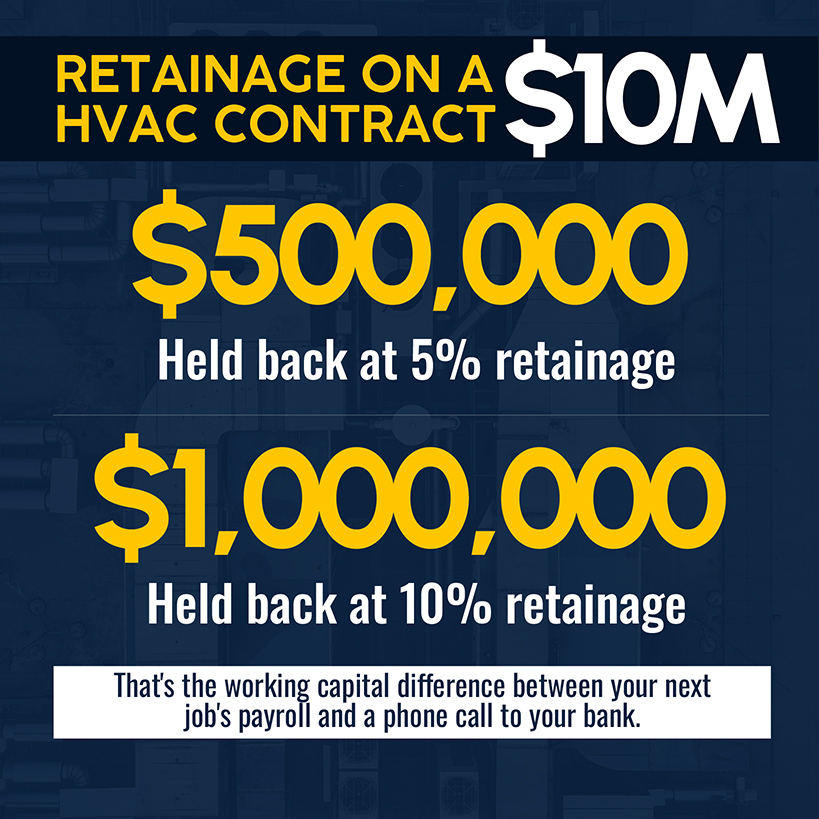
The operational fix: Ask for a step-down provision, a clause that reduces the retention rate once the project reaches a milestone, such as 50% completion. Ask before signing the contract, not after retainage has piled up.
8. Add Approved Changes and Roll the SOV Forward
Once a change order gets signed, give it its own line on the SOV and label it clearly enough that nobody has to guess what it covers.
Make sure the approved change order is reflected on the next pay app. Otherwise, you’re sitting on unbilled work and creating a cash-flow problem for yourself. Wait too long, and you might face a dispute over whether that work was ever outside the original scope.
Commercial HVAC Schedule of Values Example
Here's a simplified SOV for a $750,000 mechanical upgrade on a midsize commercial building, as shown at pay application No. 4.
| Line Item | Scheduled Value | % Complete | Value Completed | Balance to Finish |
|---|---|---|---|---|
| Mobilization & General Conditions | $35,000 | 100% | $35,000 | $0 |
| Rooftop Units (Equipment) | $210,000 | 60% | $126,000 | $84,000 |
| Ductwork Fabrication & Installation | $165,000 | 45% | $74,250 | $90,750 |
| Piping & Hydronics | $95,000 | 30% | $28,500 | $66,500 |
| Controls & BAS Integration | $85,000 | 15% | $12,750 | $72,250 |
| Insulation | $40,000 | 25% | $10,000 | $30,000 |
| Testing, Adjusting & Balancing | $35,000 | 0% | $0 | $35,000 |
| Startup & Commissioning | $65,000 | 0% | $0 | $65,000 |
| Closeout Documentation & As-Builts | $20,000 | 0% | $0 | $20,000 |
| Total | $750,000 | 38% | $286,500 | $463,500 |
Notice what this table shows and what it doesn't. Rooftop units are 60% complete because the equipment is on-site and partially set, but startup and commissioning remain at 0% until the units are running and balanced.
That's the point of granular line items. Equipment delivered isn't equipment commissioned, but billing them the same is how a general contractor ends up overbilled against uncompleted work.
How AIA G702 and G703 Forms Use an HVAC SOV
On most U.S. commercial jobs, your SOV feeds into AIA’s G702 and G703. G702 is the Application and Certificate for Payment, which an architect reviews, signs, and forwards to the owner for payment. G703 is the supporting Continuation Sheet. It breaks down requests into the same line items as your SOV, with added columns for percent complete, materials stored, and retainage.
Think of G702 as your ask and G703 as your evidence. If a contractor fills out G702 but not G703, they’re asking an architect to certify numbers without supporting evidence.
Both documents should align, with every figure on the G702 tracing back to the G703. Run a comparison before you submit to avoid costly delays and corrections later on.

Common HVAC Progress Billing Mistakes That Delay Payment
Most rejected or delayed pay apps trace back to one of four habits, all of which are fixable before a contractor submits paperwork:
- Vague line items. When you lump the scope into one entry ("Electrical Work" or "HVAC Installation"), you make it impossible to identify and defend a percentage of it.
- SOV drift. Whenever a drawing gets revised or the contract scope shifts, your SOV needs to adjust in the same cycle. Closing gaps is tougher than preventing them.
- Change orders sitting unbilled. A change order approved in March but not added to the SOV until May is unbilled work and a cash-flow gap.
- Subjective percent-complete. "About 70% done" without photos, logs, or delivery tickets to back it up gives an architect nothing to certify against. A cautious architect will hold the payment rather than take your word for it.
Slow payments are already a challenge, costing the U.S. construction industry roughly $280 billion in 2024 alone, with 82% of contractors saying they’ve experienced payment delays of 30+ days.
A poorly built SOV can entangle your pay application in further delays. If your days sales outstanding (DSO) is 45 to 90 days, a mistake that adds three weeks can wipe much of your HVAC profit margin.
Related: Once your billing process is solid, the next place that cash leaks is HVAC invoicing.
Keep HVAC Project Costs and Progress Billing Connected With Simpro®
Most of these mistakes trace to a root cause: the SOV lives in one place (a spreadsheet, a PDF, someone’s inbox) while the job data lives somewhere else, forcing someone to manually reconcile them before every pay app.
Simpro keeps your data connected. Project-level cost tracking gives your billing administrator a real-time source of truth for percent-complete and completed-value data that’s pulled from actual job data instead of reconstructed from memory.
Progress invoicing runs against defined project milestones or phases, with the same logic as an SOV line item hitting a verified completion threshold. When a change order gets approved, it flows into the job's cost and billing structure instead of sitting in an inbox.
Simpro supports over 250,000 users managing this kind of project-based billing, with productivity gains of up to 30% reported by contractors who cut manual reconciliation out of the cycle.
Related: Simpro's project management tools give you visibility into completed value, outstanding retainage, and billing status across every active job.
Build a Progress Billing Process That Keeps Cash Flow Moving
Too many HVAC contractors are building a schedule of values from scratch every time or having to make major modifications. The fix is building a process that you can repeat every cycle. That means granular line items, documentation for anything stored, objective percent-complete, and change orders that get added the day they're approved.
That process keeps retainage from becoming a surprise and a 90-day industry average from becoming your average. Simpro connects the field data behind percent-complete to the billing document that turns it into cash.
Ready to see how it works on your jobs? Schedule a demo.
Frequently Asked Questions
These are the frequently asked questions that come up most often once a contractor is working through the process above, usually after the second or third time a pay app gets questioned.
Who prepares the schedule of values for an HVAC project?
Usually the contractor — most often a project manager, estimator, or project accountant — drafts the SOV from the estimate and contract scope. A preliminary version goes to the owner and architect for review before both sides finalize it.
Can HVAC equipment be billed before it is installed?
Yes, as long as your contract allows it and you can back the request up on paper. You’ll need, at minimum, an invoice, delivery receipt, and a photo of the equipment on-site. If staged off-site, add proof that it's insured and kept separate from other projects' materials.
What is the difference between an SOV and a project schedule?
An SOV breaks the contract sum into billable dollar values by scope item. A project schedule tracks the timeline and sequence of activities. They're related, but they're different documents serving different purposes.
How is percentage complete calculated for HVAC work?
By what you can actually point to on-site, not a gut-feel number. Count what's installed, note which milestones you've hit, and keep dated photos and daily logs to back it up. An architect can certify numbers that have evidence. They can't certify a guess.
How does retainage affect HVAC progress billing?
It withholds 5% to 10% of every progress payment until the project reaches completion or a negotiated release point. On a large job, that accumulated balance can equal or exceed your profit margin. Negotiate a step-down clause or line-item retainage release before you sign, not after.
Can change orders be added to an existing schedule of values?
Yes. As soon as one gets approved, add it to the SOV before you build your next pay app. That ensures the document matches the contract you're working under, instead of a version that's already a cycle or two out of date.
Are AIA G702 and G703 forms always required?
No. They're the default for many US commercial projects, but ConsensusDocs 293 is a comparable non-AIA template, particularly for jobs that don't specify AIA documents. Whichever format your contract calls for, the underlying discipline (granular line items reconciled against actual progress) stays the same.


 Back to top