
Real-time job-cost tracking on commercial HVAC projects is the difference between catching a labor overrun while the work is happening versus finding out in next month's close, long after the crew has moved on. Consider a rooftop variable air volume retrofit that's four weeks into a 12-week schedule, with a dozen technicians on-site and five open purchase orders. If you have no visibility into job costing, your margin will disappear without anyone noticing.
The mechanism for real-time job costing is straightforward: Labor hours, materials, committed costs and approved change orders get coded and compared against the estimate within a day or two, not 30 days later.
This is especially important if you're moving from HVAC service calls to commercial HVAC projects, which can run for months and span multiple phases, crews and job types on a shared budget. HVAC businesses can't reliably track all that on a monthly accounting cycle. This article will help you understand how to structure job-cost tracking for commercial work, where it typically breaks down, and which metrics to monitor.
How to Track Commercial HVAC Project Costs in Real Time
The sequence below follows how projects typically work, from the estimate handoff to the final change order. Each step closes a gap between when costs occur in the field and when you see them.
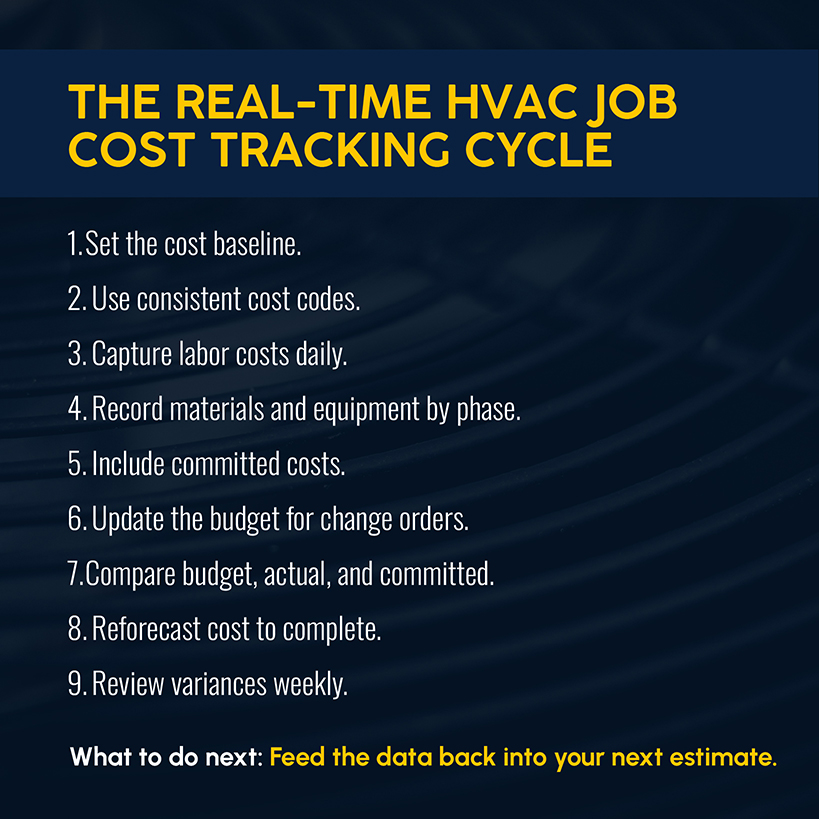
1. Set the Cost Baseline Before the HVAC Project Starts
The estimate that won the bid isn't always usable as a cost baseline. A New Horizons Foundation report on productivity tracking warns against handing the estimate straight to accounting for budget setup. The bid's line items rarely match how you will actually sequence and install the work — that's a decision for your project manager and field manager.
A short project activity list generates the cost code structure:
- For contractors under $50 million in revenue, 3–5 cost codes are usually enough.
- Add codes when the added detail changes a decision.
- Focus on the codes that cover the biggest share of the work. Those are worth the daily discipline of coding time against.
Align that taxonomy to CSI MasterFormat Division 23 so your numbers reconcile with the specs from the general contractor and owner. Then, watch the boundary divisions. Duct insulation sits in Division 07, building automation controls in Division 25, and the electrical interlocks that serve your equipment in Division 26. Items in those areas are frequently claimed by one subcontractor and excluded by another — creating gaps that can reemerge as a request for information or a change order against your budget.
Related: Learn how to estimate HVAC jobs so each project inherits numbers worth tracking against.
2. Use Consistent Cost Codes Across Estimating and Project Delivery
Cost codes only work as a tracking tool when they're consistently used across your bid spreadsheet, field timesheets, and monthly cost reports. That's what lets foremen on different floors charge hours to "Install hangers" without having to reconcile different naming conventions at month's end.
Build HVAC job costing to scale with the project instead of fighting it. For example, segmenting by area by keeping the same activity code (0300.01 for "Install hangers") and varying a leading area identifier instead (A.0300.01, B.0300.01, etc.). That helps you track a large job, floor by floor, without the code list multiplying past the point of usefulness.
3. Capture Labor Costs as Technicians Work
Time tracking is where real-time job costing pays off fastest, as labor can be one of the largest cost categories on HVAC projects — anywhere from 30–70%, depending on the type of work, according to the New Horizons Foundation.
Today's best practices call for real-time or near-real-time time entry, which requires mobile apps or shop-floor kiosks instead of paper time cards. Technicians should enter their hours and installed quantities against specific cost codes before leaving the site. Done right, their entries match the code structure in your estimate, and no one has to re-key data.
The operational fix: Code those hours at the technician's burdened rate: Base wage plus payroll taxes, workers' comp, and benefits. Relying on wages alone will understate the labor cost on every job.
Related: Use our labor burden rate calculator to get the most precise figures for your next commercial job.
4. Record Materials and Equipment Against the Correct Project Phase
Duct, pipe, hangers, controls and dry-side equipment all need to land against the same phase and cost code as the labor installing them. Without phase-level detail, you might see that a project spent $180,000 on materials, but you can't tell whether that tracks with what got installed on the last three floors. Those materials might instead be sitting in a laydown area, waiting on rough-in.
Equipment allocation is an area that many contractors can overlook. Lifts, cranes, welders and service vehicles cost money regardless of whether you apply a rate to them. Left unassigned, they stay invisible, with the cost getting absorbed into overhead but not showing up in the job's numbers.
Related: See how HVAC inventory management ties issued stock back to the job that consumed it.
5. Include Committed Costs Before Supplier Invoices Arrive
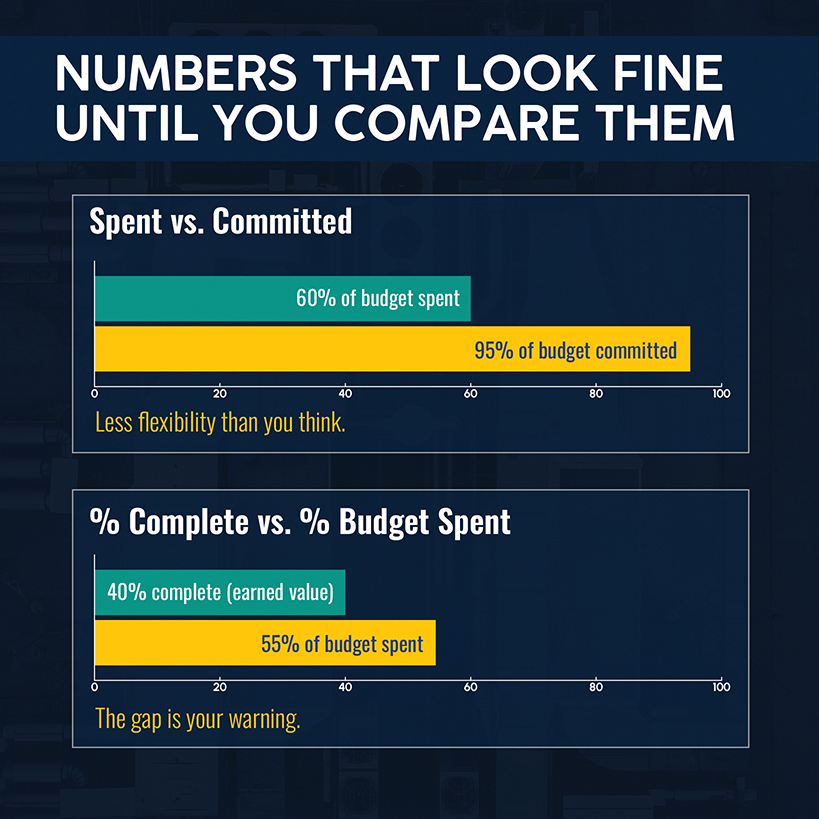
Cost is committed the moment you issue a purchase order or subcontract, not when the invoice posts. A job-costing system that only records cost after the invoice clears can show a project at 60% of budget while open purchase orders have committed 95%. Without visibility, you won't realize how little flexibility remains for the rest of the work and any surprises.
The gap between spent and committed directly affects cash flow. It can be the difference between catching an overrun while the duct is still exposed and catching it after the ceilings are closed.
6. Update the Project Budget for Approved Change Orders
There are two types of change orders. One is verbally approved in a site meeting but doesn't reach the budget until the next billing cycle. Every variance calculation from that point forward measures the wrong thing. The other type is quickly priced, documented, and updated in the budget.
Unpriced and unresolved change orders can also age past the contractual notice windows that would let you recover the cost.
The operational fix: Update the budget the same week that a change order is approved to keep your cost report current while preserving contract remedies.
7. Compare Budget, Actual and Committed Costs by Project Phase
Once labor, materials, equipment and committed costs are coded consistently, the comparison follows a standard earned value framework. The Department of Energy's earned value management reference defines the following:
- Cost performance index (CPI) = earned value (EV) ÷ actual cost (AC)
- Schedule performance index (SPI) = EV ÷ planned value.
A CPI below 1.0 means over budget; an SPI below 1.0 means behind schedule.
You'll also want to calculate these figures:
- Percent complete = EV ÷ budget at completion
- Percent of budget spent = AC ÷ budget.
Those figures answer different questions but can be useful to contrast. When there's a gap — say, a project that's 40% complete but has spent 55% of budget — that's an early warning sign you can act on.
Related: Our job cost formula explains how budget, actual costs, and committed costs roll up into a single number you can act on.
8. Reforecast the Cost to Complete and Project Margin
A budget-to-actual comparison tells you where the project stands today. Forecasting tells you where it will land. Estimate at completion (EAC) factors into a few standard formulas:
- EAC = AC + estimate to complete
- EAC = Budget at completion ÷ cumulative CPI
- Variance at completion = Budget at completion — EAC
Forecast timing also matters, particularly on mechanical jobs that run 6–12 months. A cumulative CPI averages everything since day one, so a strong start can mask a recent decline. Guidance from the Department of Energy allows for shorter windows, such as the last three months. That way, you can quickly detect a crew running 15% over on labor during the past six weeks, rather than the stronger overall average.
9. Review Cost Variances While There's Still Time to Act
Data and formulas are only helpful when reviewed on a regular cadence. Each week, look at hours, installed quantities, cost codes, and productivity ratios. Every two weeks or monthly, roll that data into a cost-to-complete reforecast by code and a reconciled change-order log. Next, update the work-in-progress schedule and follow up with the project manager on an EAC/VAC review.
The operational fix: Don't forget to feed measured performance back into estimating. A season's worth of actual unit rates by cost code can become next year's bid inputs.
Related: Explore these nine job costing tips for field service businesses that answer frequently asked questions about job order costing systems.
Which HVAC Job Cost Metrics Should Project Managers Monitor?
Weekly reviews are more effective when the numbers predict trouble instead of describing it after the fact.
| Metric | What It Measures | Warning Sign |
|---|---|---|
| Earned Hours / Actual Hours | Labor productivity against the estimate's unit rates | Below 1.0: Consuming more hours than the estimate budgeted for work completed |
| CPI (EV / AC) | Cost efficiency of work performed so far | Below 1.0: spending more than the value of work earned |
| SPI (EV / PV) | Schedule efficiency against the planned pace | Below 1.0: less work earned than planned by this point |
| % complete vs. % spent | Earned progress against budget consumed | A widening gap is the earliest sign of margin erosion |
| Committed vs. actual cost | Open POs and subcontracts against what has posted | A large committed balance with low actual cost means much of the spend is pending |
| EAC / VAC | Forecast final cost against the original budget | A shrinking VAC over consecutive weeks means the forecast is trending toward overrun |
Note that earned hours depend on the rules of credit you set before the project starts; they can't exceed what was budgeted.
For ductwork, you might credit 25% when hangers go up, 50% once the duct main is in the air, and 100% only after supply lines are attached and correctly oriented.
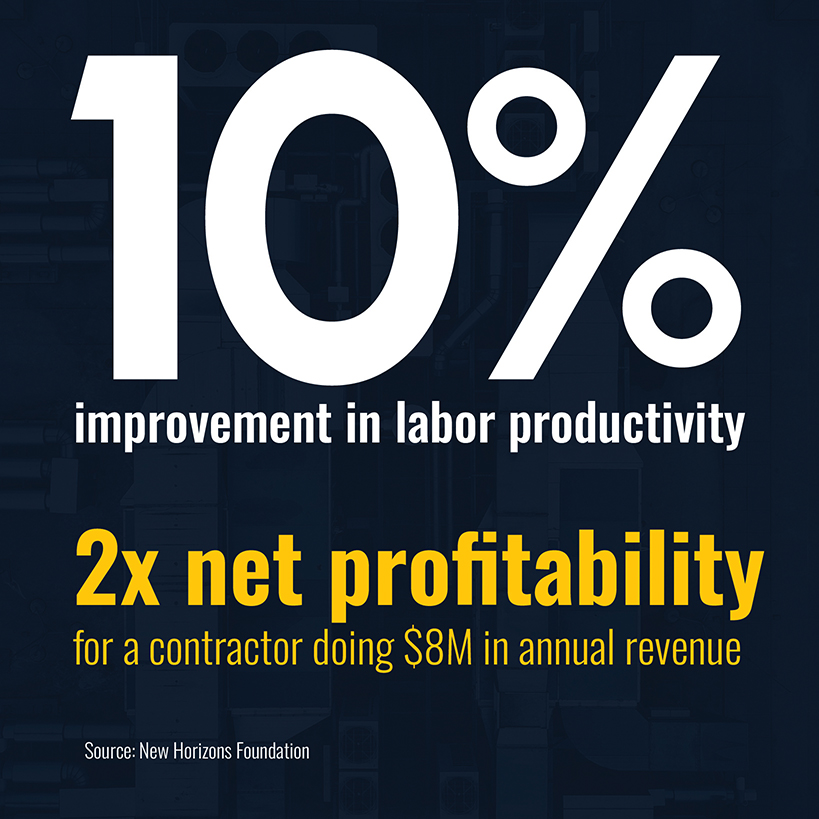
Similarly, a crew logging 90 actual hours against 80 earned hours is running a productivity ratio of 0.889, meaning they're consuming hours faster than what the estimate budgeted for the work completed. The New Horizons Foundation's modeling shows why that number deserves attention: A contractor doing $8 million in annual revenue can roughly double net profitability with a 10% improvement in labor productivity across detailing, fabrication, and installation.
Related: Commercial project management software pools these metrics in one place instead of disconnected spreadsheets and manual updates.
Where Real-Time HVAC Job Cost Tracking Usually Breaks Down
Even with a solid cost-code structure and a real system underneath, you can still lose the real-time edge. Fortunately, most of these danger zones can be anticipated and addressed. Here are three to watch for:
Rework gets charged to the wrong code. When you log rework to the same code as the original installation, any report will blend those hours, making it impossible to tell which work was productive or why.
Give rework its own code from the start of the job, so the report separates original scope from redo work automatically.
Blended margins hide what's working. Much like with logging installs and rework to the same code, relying on blended gross margin across commercial projects doesn't give you the true picture of profitability. For example, a 22% margin job can mask two other jobs running at 4%.
Report profit margin by job and by phase every week, not as a rolled-up portfolio number once a month.
Labor rates and crew mixes drift, making the estimating template out of date. Contractors across the trades are struggling to find workers, with 76% challenged to find qualified HVAC technicians, according to AGC of America's 2026 workforce survey. Wages in a tight market move quickly, and a stale estimating template is wrong on every new bid.
Move your labor-rate review to quarterly, and watch the weekly productivity ratio for signs of a drifted crew mix. If a crew suddenly needs more hours per unit of work, you can recognize the shift while there's time to rebalance.
Track HVAC Project Costs in Real Time With Job Costing Software
You probably know which job-costing gaps are costing you the most. Maybe it's rework hiding in installation work, struggling to track labor or materials costs, or having to wait until close to uncover problems you could have fixed sooner.
Closing the gap by hand is difficult — and almost impossible when you have multiple large projects running at once, each with technicians in the field, open purchase orders, in-flight change orders, and different schedules.
Simpro® connects those data streams instead of asking you to reconcile them manually. A technician's mobile timesheet entry lands against the same cost code and phase your estimate used, without a re-key. Purchase orders and subcontracts commit their cost the moment they're issued, not when the invoice posts. Materials, equipment and labor roll up into a single cost-to-date per code, with the weekly profitability report comparing them against budget. Simpro feeds those numbers into QuickBooks Online or whatever accounting software you already run.
More than 250,000 users across over 24,000 businesses run that kind of connected job costing today. See it in action in Simpro's customer stories.
Having a current cost picture empowers you to make informed decisions that improve outcomes. Whether it's adjusting the crew mix mid-phase or walking into next year's bid with real unit rates instead of last year's guess, Simpro gives you HVAC project cost tracking that runs in real time instead of month's end.
Schedule a demo to see how Simpro ties field time entry, committed costs, and WIP reporting into one job-costing system purpose-built for commercial trade contractors running multiple projects at once.


 Back to top