
TL;DR
- A change order that isn't signed before work starts becomes an argument after it's done.
- Price-changed work with its own labor units and a markup you can defend against the contract.
- Notice windows are short. AIA's A201-2017 sets 21 days for claims that arise before the corrections period ends.
- Code hours to each change order in construction from day one, then bill it as its own line.
A GC superintendent points at a ceiling grid and asks your foreman to add six more drops while the lift is already up there. Your foreman, who wants the next job from this GC, says sure even though nobody on that lift is holding an electrical change order form.
By Friday, the six drops have become eleven, an apprentice has spent most of two days pulling and terminating them, and nothing in writing connects any of it to a price. The hours land on the job code the bid was built on, so the original contract takes the blame for work outside its scope.
In a 2012 study in an ASCE journal, William Ibbs found that about 40% of the construction projects he examined ran more than 10% change, so change at that volume is routine.
Managing change orders on commercial electrical jobs is mostly front-loaded work. Most of the fix happens before the crew picks up a tool, and the first step is a one-line email a foreman can send from the lift.
What Is a Change Order on a Commercial Electrical Job?
A change order on a commercial electrical job is a signed amendment to your contract that records three things: the change in scope of work, the adjustment to the contract price, and the adjustment to the schedule.
On most commercial work, you sign it with the general contractor that holds your subcontract. If you’re contracted directly with the owner, the owner signs, and under AIA-style agreements the architect usually does too.
If scope, price, or time is missing, you’re still in a conversation.
If you work under Australian or UK-style contracts, you'll see the same document called an electrical variation order.
When an owner wants work to start before price and time are settled, a construction change directive covers the gap, and the pricing conversation waits until your crew has already spent the hours.
Related: If you're juggling open changes across several jobs, our guide to commercial electrical project management covers the wider workflow.
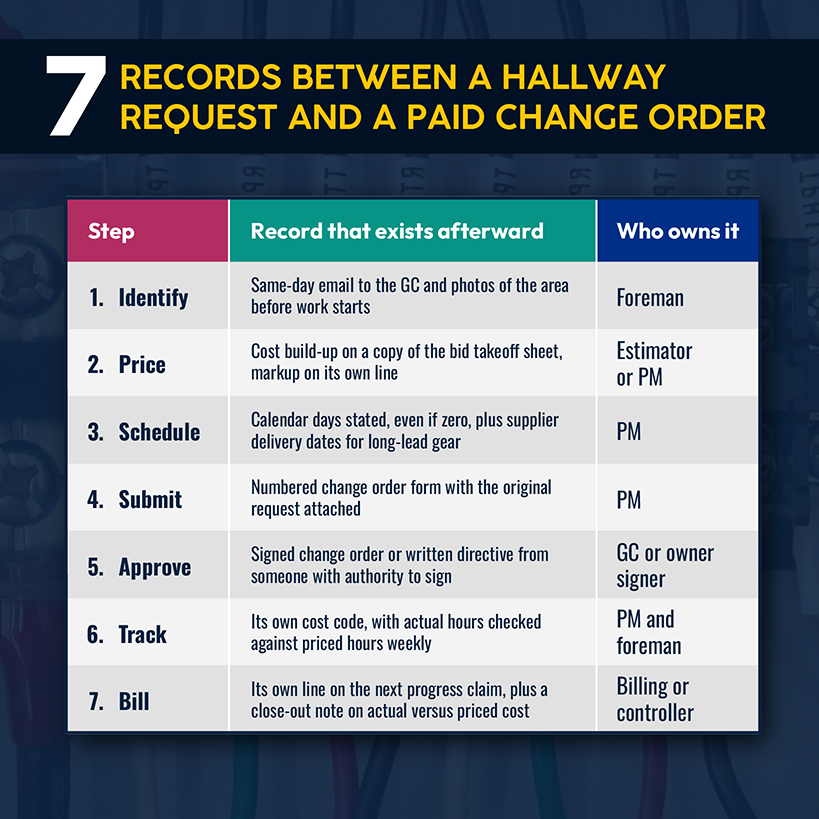
A change travels from a verbal request on site to a line on an invoice, and the records you create along the way decide whether it gets paid.
7 Steps to Manage Change Orders on Commercial Electrical Jobs
Each step creates the record the next step needs. An early gap forces whoever prices or bills the work to rebuild events from memory.
1. Identify and Document the Scope Change
Properly document the request the day it happens. Record who asked and what they asked for, then note which drawing sheet or spec section covered the original scope and what moved. Photograph the area before anyone touches it.
The A201-2017 summary says that claims that arise before the corrections period ends are subject to a 21-day notice period. It also says a contractor who proceeds with a minor change in the work directed by the architect, without noting that cost or time should adjust, waives any right to a change for that work. Your contract terms may set a shorter window, so read the notice clause before the first change arrives.
The operational fix: Start your change order process with a one-line email every foreman sends the same day, such as "Per today's conversation, you've asked for six additional drops in Room 214. Pricing to follow before we start." It puts a dated notice in the GC's inbox.
2. Calculate the Additional Labor and Material Costs
Price the change from the conditions you'll be working in, which can differ from the conditions you bid. Eighteen fixtures added above a closed ceiling take longer per fixture than the same fixtures in an open grid, so the labor units in your original takeoff may not fit the changed area.
NECA's labor factor score sheet gives that judgment some structure: 36 conditions, including change order quantity and timing, each scored from 1 to 5. Totals of 36 to 75 count as normal conditions and 135 to 175 as very difficult. Score the changed area, then price the hours from the matching column.
Related: For a refresher on labor units, takeoff, and the difference between markup and margin, read our walkthrough of the electrical estimating process.
Then split the cost into direct (the labor and material you'll install), indirect (the supervision and project management time behind it), and consequential (damage to other work, like a crew pulled off another floor).
Check your markup against the construction contract. The contract terms decide how much overhead and profit you can add to changed work, and that allowance may differ from what your bid carried. Know the number before you price, because it decides whether the change earns any profit.
Material prices need an expiration date. In BLS Producer Price Index data, nonferrous metals were up about 33% over the 12 months ending August 2026, and transformers and power regulators were up about 8%.
The operational fix: Price every change on a copy of your bid takeoff sheet, so labor, material, and markup get entered in one place and reviewed once by your project manager.
3. Assess the Impact on the Project Schedule
Check the schedule before the document leaves your office. Is the work on the critical path? Does it need material with a long lead time? Will it put your crew in the same space as another trade? A yes to any of them means you're pricing days as well as dollars.
Ibbs' paper, citing earlier research, notes that a change's timing can sometimes double its effect on productivity, so a change after rough-in deserves a harder look at labor than one in week one.
Put the schedule effect on the change order in calendar days, even when the answer is zero. If the revision adds gear with a long lead time, quote the supplier's delivery date instead of promising an install date you can't control.
4. Create and Submit the Electrical Change Order
Put the priced change on one numbered form that carries the cost build-up and the schedule days, with a signature block at the bottom. Attach the original request and the photos you took when it arrived.
Show the markup as its own line instead of burying it in the unit prices. A reviewer who sees overhead and profit separately has a number to negotiate. One who can't see them tends to cut the total.
Related: Markup and margin aren't the same number, and our guide to electrical profit margins explains why a 25% markup produces a 20% margin.
Send it to the person with authority to sign, and log the date. A general contractor's project engineer can accept a document without approving it.
5. Get Written Approval Before Starting the Changed Work
Start the crew after the signature, and give the foreman a copy of every change document so the crew isn't guessing what was approved.
A superintendent's verbal go-ahead and a signed construction change order look the same to your crew and very different to your controller at billing time. If the owner needs work to start first, ask for a written directive and log labor and material daily against it.
The operational fix: No cost code for changed work opens without a signed change order or directive attached.
6. Update the Project Budget and Track the Actual Costs
Once the change order is signed, add it to the job budget as a revision so the original number stays visible beside the new one. Open a separate cost code for each change order, and code the timesheets, material pulls, and purchase orders to it from day one. When a change shares a code with the base-contract work, the project cost report can't show whether it made or lost money.
Simpro® Project Overview tracks actuals against estimated material and labor costs by job and lets you compare original, revised, and current budgets in one view, so a signed change order sits against the number you bid.
Related: If you run multi-phase jobs with several crews, our guide to managing complex electrical jobs covers software for phased budgets and approvals.
Compare the actual hours to the priced hours every week. Say a change order has burned 70% of its priced hours by the halfway point. That needs a conversation while the GC still has budget to talk.
7. Bill and Close Out the Change Order
Bill an approved change order as its own line on the next progress claim, so the pay application matches the signed document. Approved changes that skip the claim sit in a drawer while the base contract keeps billing.
Close it out when the work finishes by comparing actual cost to priced cost and writing down the gap. If labor ran over, the next change of that type gets a higher labor unit. A form missing one field hands the other side a reason to send it back.
Related: Our guide to electrical progress billing covers building the schedule of values and getting each line onto the claim.
What Should an Electrical Change Order Form Include?
Each block of the form answers a question the reviewer will ask before signing.
| Section | What to enter | Illustrative entry |
|---|---|---|
| Project details | Project, parties involved, contract number, change order number, date | CO-014, Level 3 tenant fit-out |
| Description of change | Scope in plain language, the triggering request or drawing sheet, inclusions and exclusions | Add 18 fixtures per revised sheet E-201; ceiling already closed |
| Direct costs | Labor hours by classification, material, equipment, subcontractors | 48 labor hours, 18 fixtures, 2 days of lift rental |
| Indirect costs | Supervision, project management, office time, overhead | Foreman and PM time |
| Consequential costs | Lost productivity, resequencing, recovery overtime, with the calculation | Crew pulled off Level 4 for two days |
| Schedule impact | Calendar days requested, affected activities, long-lead delivery dates | 3 calendar days |
| Authorization | Signature, name, title, and date for each signer, plus price validity | Price valid 7 days from issue |
Indirect and consequential costs are the easiest lines to question, so show the math instead of a lump sum. A reviewer who can follow your numbers has less reason to cut them.
Use the same form on every change, numbered in sequence, so you can spot a missing CO-015 between CO-014 and CO-016.
Forms get filled out in response to something, and knowing the usual sources helps foremen catch changes before the work gets done.
What Usually Triggers a Change Order on a Commercial Electrical Project?
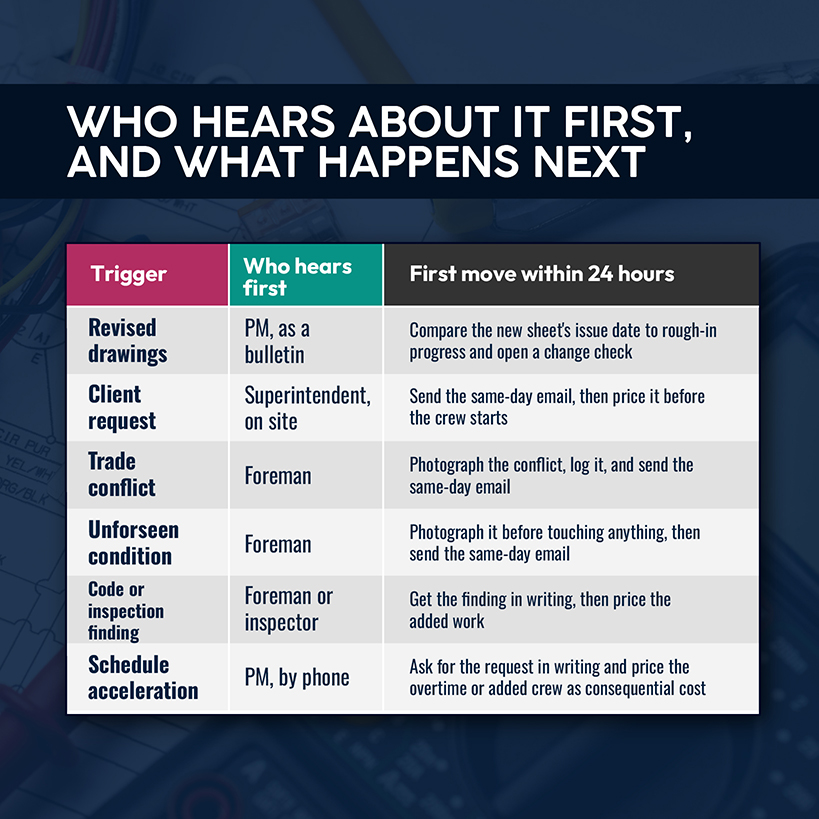
On any construction project, changes cluster around a handful of sources, and each reaches you through a different person.
- Revised drawings. A new sheet issue moves a panel or adds a circuit after rough-in has started.
- Client requests. Owners and tenants add outlets, relocate lighting, or approve a layout on a walkthrough.
- Trade conflicts. Ductwork or structure sits where your conduit run was routed.
- Unforeseen site conditions. Existing panels or feeders don't match the drawings.
- Code and inspection findings. The authority having jurisdiction requires work the plans didn't show.
- Schedule acceleration. The GC asks for overtime or added crews to recover lost time.
Your PM sees revisions first, as bulletins and acceleration requests, usually by phone. Your foreman sees whatever shows up in the field, from trade conflicts to feeders that aren't where the drawings put them. Whoever hears first should treat it as the trigger for the same-day email.
A change that skips the process costs more than the added labor, and the difference hits margin.
The operational fix: Every Monday, compare the drawing revision log against the sheets your crew is building from, and flag any sheet issued after rough-in started for a change order check.
How Poorly Managed Change Orders Eat Into Electrical Project Profit
Unpriced change work lands on the base contract as extra hours, and the forecast margin shrinks each week it goes unrecorded. The job looks like an estimating miss or a slow crew, so nobody fixes the cause.
Ibbs' data shows how quickly change costs labor. In his study, productivity beat the plan on 60% of the projects when change stayed under 5%, and the paper's abstract reports that it never reached planned rates once change exceeded 20%.
Related: Work finished without an approved change order is one of seven warning signs in our guide to spotting unprofitable electrical jobs.
CFMA's 2025 Construction Financial Benchmarker reports a gross profit margin of 22.4% for specialty trade contractors in fiscal 2024, up from 21.9% the year before. That's a blended figure. It averages jobs that held their margin with jobs whose changes never got priced, and it won't tell you which is which.
Say a $12,000 tenant fit-out change gets priced at cost. It earns no gross profit, which leaves a hole in the 22.4% exactly where your crew worked under the most disruption.
The operational fix: Hold a 15-minute weekly change order review on each active job that counts changes identified, changes signed, and changes billed. An identified change without a signature is work at risk. A signed change without an invoice is cash waiting on a pay application.
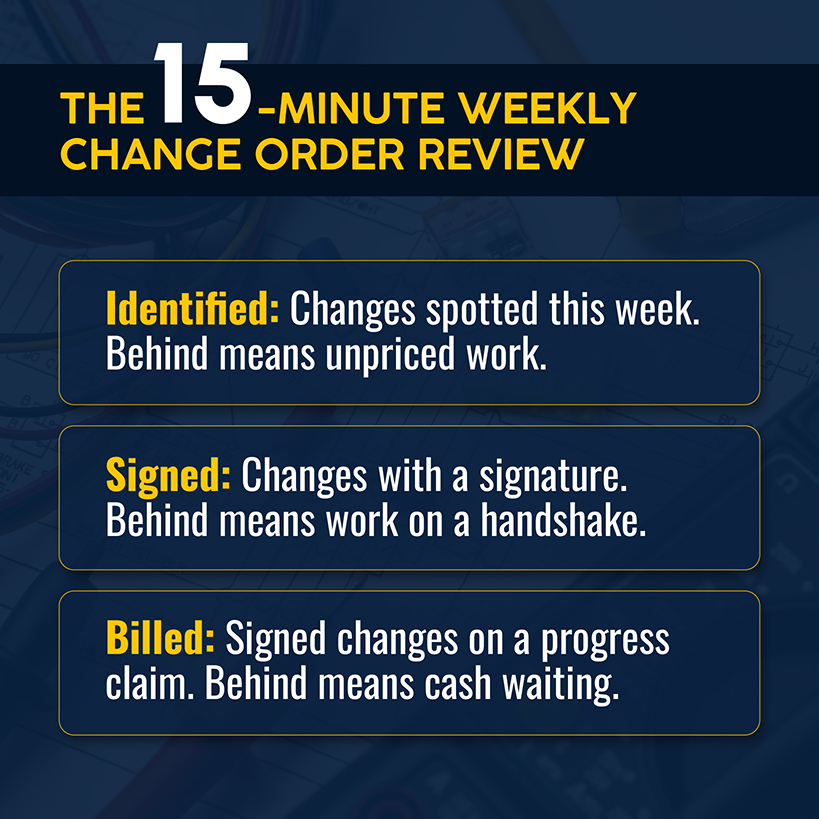
Counting changes identified, signed, and billed by hand gets harder with every active job you add.
Keep Commercial Electrical Changes Connected With Simpro
When you're managing change orders on commercial electrical jobs across five or six projects at once, one change leaves a trail in several places. The request sits in an inbox and the price in a spreadsheet. Hours land on timesheets, and accounting builds the invoice later.
Simpro is field service management software built for the trades, serving 24,000+ businesses with one record for each job, from change order management through billing. Its change order and variation workflows turn unapproved extra work into a tracked, priced, and dated queue, and its Progress Claim and Request for Claim functions support percentage-of-total, manually entered, or per-item claims, so an approved change can reach a pay application as its own line.
Enhanced Electrical, an electrical contractor in Sparks, Nevada, compares original estimated hours against actual hours on its jobs in Simpro, and its invoice generation dropped from four to six weeks to within a few days.
Where does your last change order sit right now: approved but unbilled, priced but unsigned, or still on a foreman's phone? With one record behind each change, you can answer that on one screen, and the margin you bid stays one you can defend at closeout. Schedule a demo to learn more.


 Back to top