
Your plumber clocked 40 hours last week. The invoices show 22. The other 18 went somewhere: a holiday, eight hours of driving, a callback nobody paid for, an afternoon staging parts. Technician utilization rate tells you how much of that paid time turned into billable work, and where the rest went.
If you have a technician utilization benchmark, you know the clean number that good shops should hit. These benchmarks are easy to cite but hard to check because there’s no government standard, and the 65–75% range quoted around the web rarely traces back to primary data.
So, how do you define your benchmark? Do you count drive time as billable? Do holidays count as available time? Your benchmark and someone else’s can look very different because they’re measuring different things.
However you set it up, benchmarking technician utilization is increasingly important amid high demand for skilled labor. With the Bureau of Labor Statistics (BLS) projecting 40,600 openings a year for HVAC technicians, 42,000 for plumbers, and 72,700 for electricians through 2035, finding qualified technicians will only get harder.
This guide covers how to define and calculate technician utilization, set a target that fits your shop, and why having reliable field data is an essential step.
What Is Technician Utilization Rate?
Technician utilization rate is the percentage of a technician's available hours that get billed to customers. It shows how much of the time you pay for generates revenue. For example, a technician who bills 26 of 40 available hours runs at 65% utilization.
Technician utilization rate = (billable hours ÷ available hours) × 100
Search for technician utilization rate and measuring billable efficiency, and you’ll see the same formula over and over. As straightforward as it seems, the inputs can get murky when filling them in for a real-life week.
How to Calculate Technician Utilization Rate
These four steps produce a utilization rate based on your time records and definitions.
Start With Billable Hours
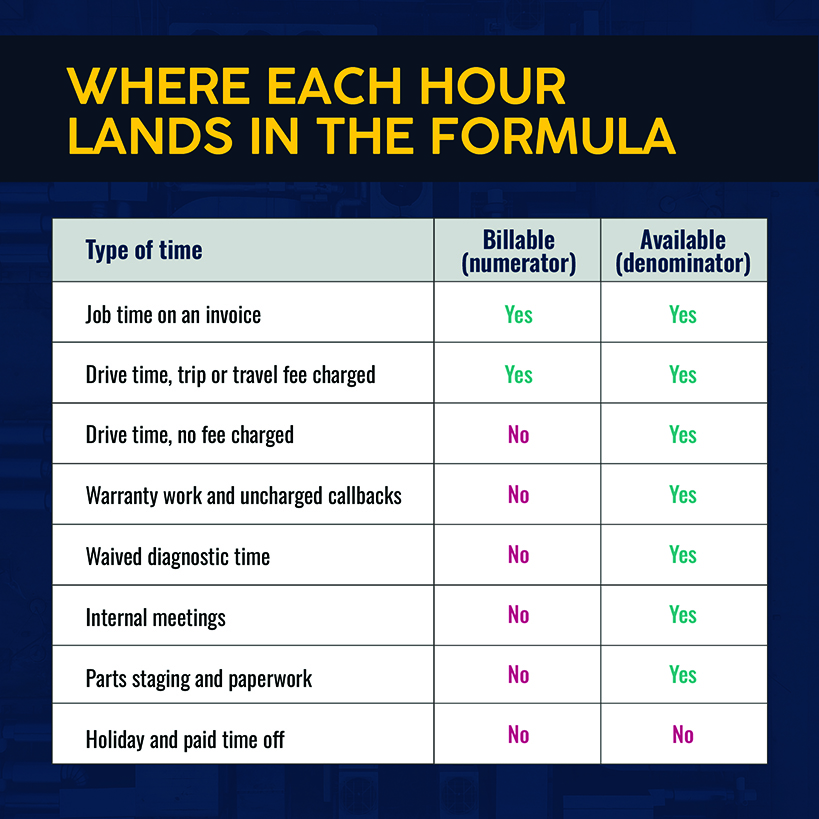
Billable hours are what the customer pays for, either directly on a time-and-materials (T&M) invoice or through a flat-price structure. Warranty work, uncharged callbacks, waived diagnostic time, and internal meetings are non-billable under this definition. Give each its own time code so you can see where paid hours go.
Drive time has a legal side and a pricing side. The Department of Labor counts travel from job site to job site during the workday as hours worked, so you pay for it. It counts as billable only if you charge a trip or travel fee. Either way, it counts as available time.
Determine Available Technician Hours
This is a simple formula:
Total available hours = paid hours — paid time off and holidays
Beware of preventable mistakes. For example, dividing by all paid hours penalizes you for holidays where no one was scheduled, while dividing only by hours scheduled on jobs erases the idle time you're trying to isolate.
Apply the Technician Utilization Formula
Take a plumber's week: 40 paid hours, but four hours are holiday, leaving 36 available hours. The timesheet shows 22 hours billed to customers, eight hours driving between jobs, three hours on an uncharged callback, and three hours on parts staging and paperwork. Three reasonable-looking calculations produce three answers.
| Method | Calculation | Result |
|---|---|---|
| Billable hours ÷ all paid hours | 22 ÷ 40 | 55% |
| Billable hours ÷ available hours | 22 ÷ 36 | 61% |
| (Billable hours + charged drive time) ÷ available hours | 30 ÷ 36 | 83% |
The middle row is the default because it sets invoiced hours against hours the plumber could have worked. The last row makes sense for shops that charge for travel on every call. Pick one, make it official, and apply it to every technician.
Calculate Billable Hours Percentage Across a Team
Here’s what a team-based utilization rate looks like:
Team utilization rate = total billable hours ÷ total available hours × 100
Beware of averaging percentages across all workers, as that doesn’t properly account for part-time workers. Consider a 40-hour week: A full-time technician billing 30 available hours and a half-timer billing 10 hours generates a team rate of 67%. Averaging the two percentages drags the utilization rate down to 62.5% because it gives the half-timer's 20 hours the same weight as the full-timer's 40.
Report results by technician, by trade, and by work type. A blended 65% utilization rate might hide a service team at 80% and an install crew at 50%. By splitting it up, you see which group is losing hours.
The next question is which number to hold your shop to.
Related: Utilization is one of dozens of field service metrics worth knowing about.
What Is a Good Technician Utilization Rate?
No official national technician utilization rate exists, but industry surveys and government-collected wage data can inform your calculations.
The closest published benchmark is the Mechanical Service Contractors of America's 2025 benchmark survey, which lists non-billable technician time at 4-7% annually for its best-in-class contractors. Nearly all (97%) reported less than 16% non-billable tech time. A couple of caveats with that survey:
- Respondents primarily provided air conditioning, heating, plumbing, and controls services.
- The survey notes that non-billable time can include vacation, sick days, holidays, on-call time, training, and estimating. If you calculate non-billable time differently, this won’t be a 1:1 comparison.
BLS labor cost data also offers additional insights. Average compensation for private-industry construction workers was $51.96 an hour in June 2026, including wages and benefits but not trucks or overhead. That means a 40-hour week costs you roughly $2,080 per technician. From there, the utilization rate tells you how much revenue you need to recover with each billed hour.
At 60% utilization, the technician bills 24 hours per week, and each hour must recover about $87 of labor cost. At 75% utilization and 30 hours weekly, the recoverable target drops to about $69 — a 20% reduction before the costs of trucks or overhead.
Those percentages are illustrative. Set your own result against what you charge for labor. The closer those figures are, the less wiggle room for overhead and profit.
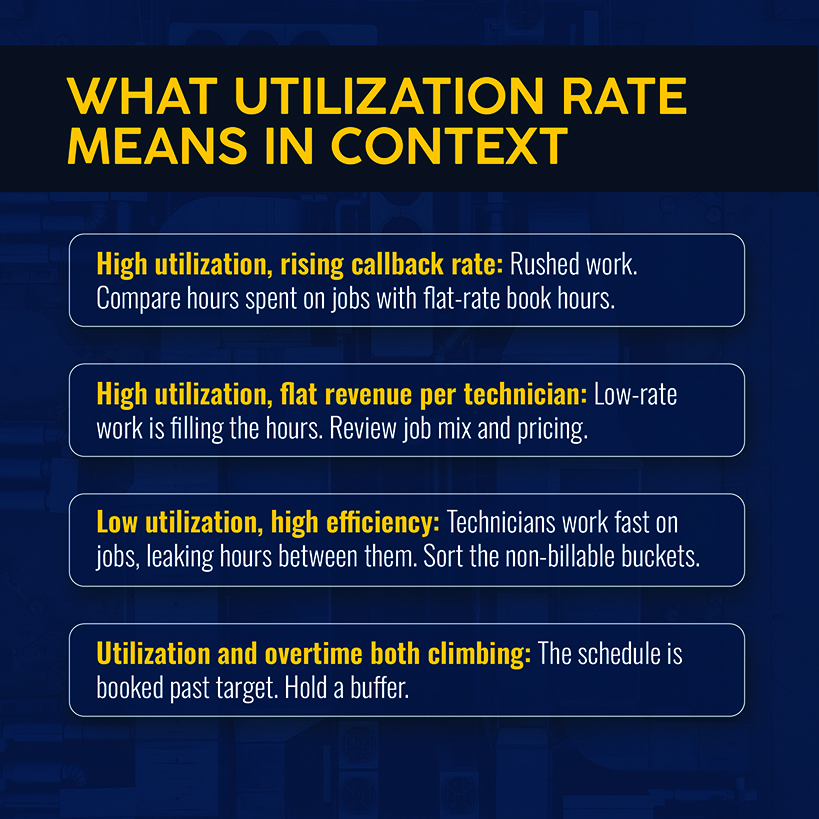
Finally, watch for overutilization. A schedule booked to the last billable minute leaves no room for emergency calls, and the cost shows up as callbacks and overtime. Track both. If either climbs alongside utilization, you've pushed too far. A low rate means hours are leaking, and the next step is finding where.
Related: Labor cost is just one lever available for protecting field service margins.
Why Technician Utilization Rates Fall
There are four ways that paid working hours can leak:
- Routing by booking order. HVAC technicians, for example, might travel to several locations throughout the day, with dispatch setting the order. Picture your five-technician shop in July, dispatching tune-ups and no-cool calls as they arrive. A technician who crosses the service area twice a day, at 35 minutes a crossing, drives an extra 70 minutes daily. This extrapolates to 29 hours a week across the five technicians.
- Missing parts. An electrician who diagnoses a failed contactor but isn’t carrying one must travel to a supply house and make a return visit to complete the job. That’s wasted time that adds up across technicians.
- Callbacks. A plumbing shop running 200 jobs a month and a 5% callback rate is making 10 return visits, each one reducing your first-time fix rate. At 1.5 hours for each callback, that's 15 hours of paid labor each month, with nothing on the invoice.
- Scheduling gaps. A 9 a.m. cancellation without a backfill leaves a technician with a two-hour hole in client work during a fully paid day.
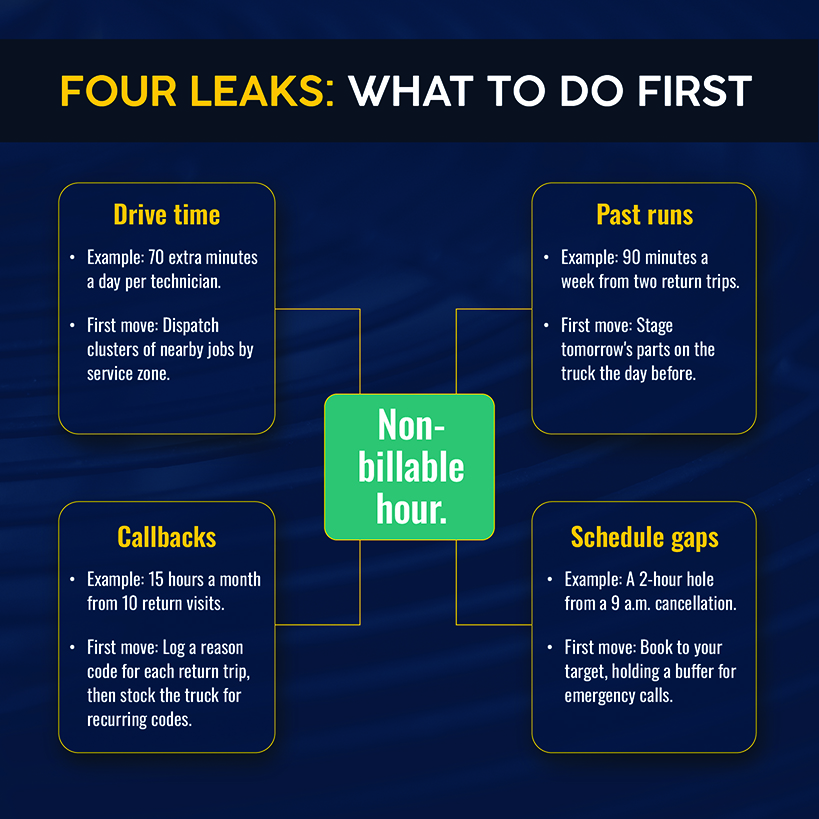
The operational fix: Pull last month's timesheets, and sort every non-billable hour into one of four buckets: drive time, parts runs, callbacks, and schedule gaps. Start with the largest bucket.
Related: Routing and dispatch decisions feed most of these leaks. Check out our guide to field service operations for the tools you need.
How to Improve Technician Utilization Without Overloading Your Team
The most straightforward way to improve technician utilization is by pushing your technicians harder. The downsides include more overtime and higher turnover, especially when technicians have to stay late for data entry and other administrative tasks. Try these approaches:
- Dispatch clusters of nearby jobs by service zone. The route should follow the map.
- Stage tomorrow's parts on the truck the day before, starting with the first three jobs on each route.
- Log a reason code on each return trip. Stock the truck for recurring codes.
- Book to your target, hold a buffer for the emergency call, and assign a fixed slot for admin tasks so they stop spilling into job time.
A rising utilization percentage indicates your technicians are working, but it doesn’t tell you by itself how well they’re working. That takes a second measure.
Related: Staging the right parts starts with the right technician job preparation, including a job brief.
Look Beyond Utilization to Understand Technician Performance
Utilization measures the share of available time that was billable. Efficiency tracks how productive that time was — usually by comparing hours spent on jobs with the flat-rate book hours those jobs were priced at. The formula: Efficiency = book hours ÷ actual hours worked.
Here’s an example of how utilization and efficiency work in the real world: Two technicians are working under flat-rate pricing with 40 available hours each. The first technician spends 30 hours on a job priced at 24 book hours. This results in a 75% utilization and 80% efficiency. The second technician spends 24 hours on a similar job that’s also priced at 24 book hours. That’s 60% utilization and 100% efficiency.
The first technician looks 15 points better on utilization, but took six extra hours to generate revenue on the same 24 book hours.
Efficiency rewards speed, so pair it with callback rate to catch rushed work. Revenue per technician is a second check. If it stays flat as utilization rises, lower-priced work may be filling the hours.
These measures depend on the same raw material: accurate time entries.
Related: Our rundown of trade services KPIs sets utilization next to job costing and job cycle time.
Track Technician Utilization With Reliable Field Data
To calculate utilization, you need a clear record of when work began and ended. Tracking billable hours requires three such timestamps: when the technician started driving, when the job began, and when it ended.
Too many contractors reconstruct those figures from memory at the end of the week. They might fold travel into job time or apply the wrong job code to callbacks. All of them create errors that make your utilization rate less accurate and useful.
Simpro® Mobile lets your technicians clock in and out on timesheets, recording travel time as the work happens. Job costing in Simpro Premium manages billable and non-billable labor on each job, and labor reports show job costs per employee. The Schedule Comparison report sets each team member's actual results against the originally scheduled timeframe, which exposes the two-hour hole or the job that ran long. Scheduling also includes a distance calculation so your dispatchers can send the closest available staff member.
With trustworthy hours in hand, the remaining job is putting the capacity they uncover to work.
Related: Learn more about accurate time tracking in field service work.
Turn Technician Capacity Into More Profitable Work With Simpro
You likely know which bucket eats the most paid hours but suspect your timesheets undercount it. Fixing that requires a schedule that puts every recovered hour on a job that pays, along with field data that’s entered in real time.
Simpro is built for trade businesses and field service organizations like yours, supporting over 250,000 users worldwide. Scheduling, job costing, and field timesheets all run on one platform. When those pieces share one record, an hour recovered from drive time or callbacks becomes billable work and a steadier margin.
Schedule a demo to see what this looks like for your business.
Frequently Asked Questions
These answers share one definition: billable hours over available hours, with drive time counted as available time.
What is technician utilization rate?
It's the percentage of a technician's available hours that get billed to customers. A technician with 30 billable hours out of 40 available sits at 75%.
How do you calculate technician utilization rate?
Take billable hours, divide them by available hours (paid hours minus paid time off and holidays), and multiply the result by 100.
What is a good technician utilization rate?
There’s no single benchmark that’s an exact match for your timesheets. Instead, set the target from labor cost. For example, at a $52-per-hour labor cost, moving from 60% to 75% utilization reduces the amount you need to recover from roughly $87 to $69 per billed hour.
What percentage of technician hours should be billable?
There's no standard percentage because the answer depends on what you count as billable activities. Shops that charge trip fees can count drive time as billable; available hours depend on how you treat holidays and paid time off. Measure your current rate against your definitions, then sort non-billable hours into drive time, parts runs, callbacks, and schedule gaps.
What is the difference between technician utilization and efficiency?
Utilization asks what share of a technician's available time gets billed. Efficiency asks how productively billable tasks get done, such as hours spent on jobs against flat-rate book hours. A technician with 40 available hours who spends 30 hours on a 24-hour book job posts 75% utilization and 80% efficiency.
Does travel time count toward technician utilization?
Travel between job sites during the workday counts as available time by default, because federal wage-and-hour rules treat it as hours worked. It counts as billable only if you charge a trip or travel fee.


 Back to top