
A crew finishes a service upgrade on Thursday, leaves the panel directory blank, and gets the call on Friday. NEC 408.4 requires every circuit on that directory to be legibly identified, and nothing in the crew's electrical project management templates asked anyone to fill it in. The re-inspection costs another trip, another block of a journeyman's day, and a customer who was already told the job was done.
The blank directory is one of several lines electrical jobs add. Lockout tags need a place, too. So do the code edition your inspector enforces and the date on every wire price. Six templates, one for each stage from scope to closeout, hold those lines.
Each one opens with the same header.
What Should Electrical Project Management Templates Include?
Electrical project management templates are the forms your crew fills out at fixed points in a job. All six templates include the same five fields at the top:
- Job number and cost code, so hours and material land on the right line.
- Site address and the authority having jurisdiction (AHJ) that will inspect it.
- The code edition that jurisdiction has adopted, plus any local amendments.
- The date, because prices, permits and outage windows all expire.
- Roles and responsibilities, meaning who filled it out and who signed off.
The body changes by stage. The header stays put, whether the job is a 50-amp EV charger circuit or a tenant fit-out. The third field decides which compliance lines apply to you. NEC adoption varies by jurisdiction, and states amend what they adopt. Michigan's rules, for example, modify 230.85, the emergency disconnect requirement, according to a township's summary of 2023 NEC changes for one- and two-family dwellings. If you work across county or state lines, you may keep two versions of the same checklist.
The rest of each template depends on where the job stands, starting with the work you do before anyone mobilizes.
Essential Electrical Project Management Templates by Project Stage
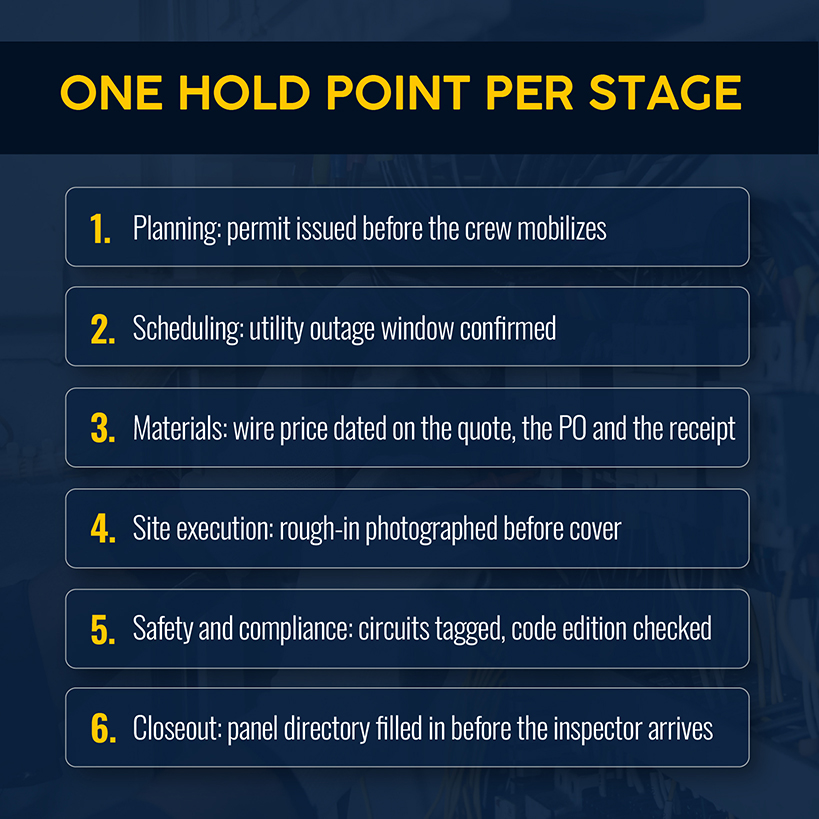
Six templates cover planning and execution, from the first site walk to the last signature. Each project phase has a moment when your crew has to fill out its template. Late forms stall the next phase.
Planning and Scope Templates
Project planning templates get filled in before the crew mobilizes, and four of them carry most of the weight:
- A load calculation sheet that records service size, the existing panel's rating and its spare capacity.
- A utility coordination log with who was called, the work order number and the outage window offered.
- A permit tracker showing what's submitted, what's issued and which inspections are required.
- A scope and exclusions sheet, or on larger jobs WBS templates that break the work into rough-in, panel and trim with a cost code on each.
The exclusions line earns its space. A customer assumes trenching, drywall patching, painting and panel relocation are included unless the quote says otherwise. Write them down before day one and a Friday argument over a $600 patch job becomes a Monday change order.
Related: For pricing scope, use the free electrical estimate template from Simpro® to itemize labor and materials before a quote goes out.
Scope and permits settle the project objectives, and the next template has to fit that work around dates your crew doesn't set.
Scheduling and Resource Templates
The utility and the inspector set most of those dates, so your project timeline template holds the fixed dates first and the crew assignments second:
- The utility outage window and who confirmed it.
- Inspection holds, including the rough-in inspection before walls close.
- Resource allocation for rented equipment, with dates for delivery and pickup.
- Crew assignments by license level and by how many hours the job can absorb.
Take a panel swap in a four-unit building. The utility offers a Tuesday disconnect from 8 a.m. to noon. Three electricians need to be on site at 8 with the panel, the breakers and the tenant notice already staged. Four hours without power is all the patience four households will spend. The window is fixed. The crew is the variable, so a Gantt chart template that lists the crew without the window has the order backward.
Fixed dates also tell you when the next stage's costs start arriving, and the price of what goes into the wall is the part that moves.
Materials and Cost Tracking Templates
Track materials by cost code, one line per item per job: quantity quoted, quantity used, unit price, the date you got that price, and the supplier. The date column matters more for wire than for anything else on the sheet. The BLS producer price index for copper wire and cable stood at 607.705 in September 2026, against 464.522 a year earlier, a rise of 30.8%.

Producer prices are wholesale and your supply house will charge something different, but the direction hits long jobs. If you built a bid on January's index (530.917) and order in September, you face an index 14.5% higher. On $18,000 of wire and cable, that's about $2,600 of margin nobody priced. A blended "materials" total can also hide which line moved, since wire can run well over while fittings come in under and the total still looks like a rounding error.
The operational fix: Record the price and its date on the quote, again on the purchase order, and again on the delivery receipt. Pick a variance threshold, say 5%, and require a decision on any cost code that crosses it before you place the next order: re-price the remaining work, issue a change order, or buy the rest of the wire now.
Site Execution and Reporting Templates
Project execution runs through the daily log, the one template every crew touches, so it has to take under two minutes to fill out. Log it before the crew leaves. A log written Friday from memory drops the deliveries and the shorts first. Build it so you can track progress by area: crew and hours by name, work completed, deliveries received and shorts, inspections passed or failed, and issues with the name of who was told.
Add a photo line for rough-in before cover. Once drywall closes, a photo of cable routing, box locations and the inside of the panel is the only record of what's behind the wall. It also answers where a run goes without opening one.
The same log carries your change order record. Extra work gets a line the day someone asks for it, with a price and a signature, before anyone pulls cable. Five "while you're in there" requests at an hour each add up to most of a day that never makes it to the invoice.
Related: Signed change orders only pay when they reach the final bill, so check the free electrician invoice template if you're unsure where permits and deposits go.
Site records show project progress and what it cost, and the next template shows whether the work was safe and will pass inspection.
Safety, Compliance, and Quality Templates
BLS counted 53 fatal work injuries among electricians in 2024, a rate of 5.3 per 100,000 full-time workers. OSHA's rule on lockout and tagging of circuits for any construction project requires tags on de-energized equipment and circuits at every point where they could be re-energized. The tags have to plainly identify what's being worked on. Your template records the circuit, who applied the tag, time on, time off and who verified it dead.
Compliance lines depend on the edition your header field names. These are the ones worth pre-filling for residential service work:
| Code or rule | Template line |
|---|---|
| NEC 230.67 | Surge-protective device at the service, rated at least 10 kA nominal discharge current |
| NEC 230.85 | Labeled emergency disconnect in a readily accessible outdoor location |
| NEC 210.8(A) | GFCI protection on kitchen receptacles anywhere in the kitchen, beyond the countertop |
| NEC 408.4 | Circuit directory complete and legible |
The SPD and emergency disconnect lines date to the 2020 NEC, so pre-fill them for any jurisdiction on 2020 or later. The 2023 edition tightened both, and the same township summary covers the details, including the 10 kA rating and when 230.85 reaches existing services with panel changes. It also covers the kitchen-wide GFCI rule, which is new in 2023. Strike any line your inspector doesn’t enforce.
Add one more line for older houses. EPA's renovation, repair and painting rule covers electrical work that disturbs paint in pre-1978 housing. Your firm needs certification unless the job disturbs six square feet or less of paint per room indoors.
Quality lines record test results with the date and the initials of whoever ran them, starting with circuit testing and polarity checks. A failed GFCI found at the customer's walk-through costs a short visit. The same failure found after move-in costs a callback.
Closeout and Handover Templates
The panel directory belongs on the closeout template, and it belongs there before the inspector arrives. NEC 408.4 asks that each circuit's purpose be clear and specific. The directory can sit on the panel cover or in an approved spot beside it, per the City of St. Paul's inspection checklist for dwelling services and subpanels. "Misc" and "?" don't meet that.
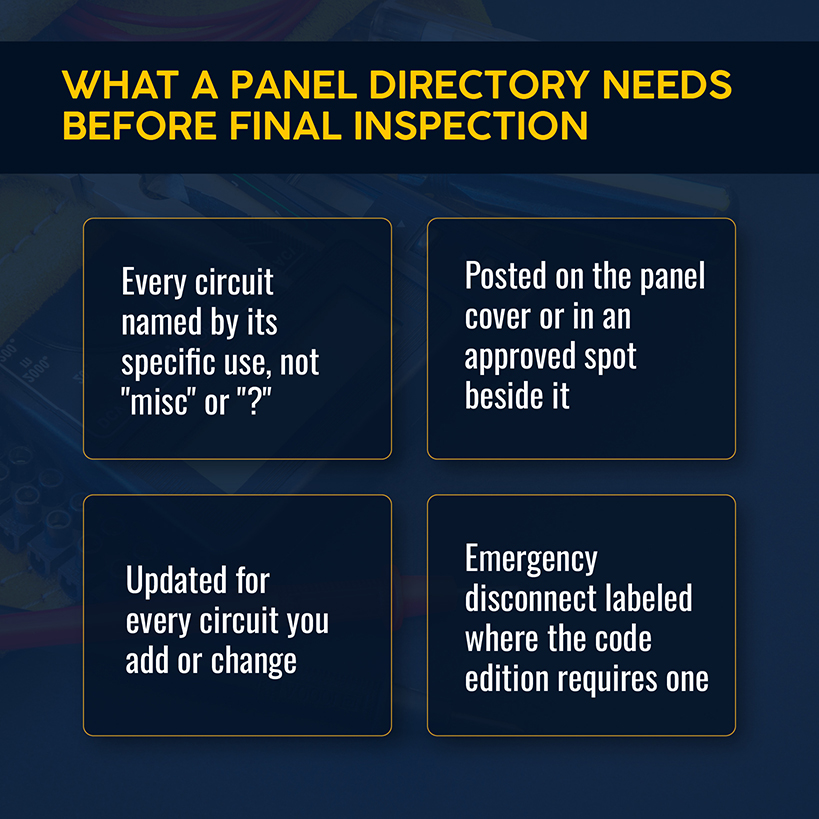
A successful project ends with a closeout template that carries these lines:
- Panel directory filled in before the inspector arrives.
- Emergency disconnect labeled where the code edition requires one.
- Test results attached.
- Final inspection passed, with the date and the inspector's name.
- As-builts or a marked-up panel schedule.
- Warranty terms.
- Customer walk-through with a signature.
Related: A customer who just signed off on a clean panel is also the easiest person to ask for a review, and the guide to electrician marketing strategies covers what to do with it.
After a quarter of running all six, the question shifts from what belongs on the forms to how many people are editing them.
When Electrical Contractors Should Move Beyond Templates
Project management templates for electrical work hold up when one person fills them out and another reads them. On complex projects, where several people edit copies, they fail. Four signs show it:
- Two project managers keep their own copy of the materials sheet, and the totals disagree.
- Wire and gear prices on the sheet are weeks old by the time the PO goes out.
- Change orders live in email threads, and invoices leave without half of them.
- Daily logs sit in a folder with no link to job cost, so nobody can check logged hours against billed hours.
One of those is housekeeping. If two or more describe your shop, the templates are doing a job project management software should do. The office hours spent reconciling copies come out of your estimating time.
Middlebury Electric, an industrial and commercial contractor in Goshen, Indiana, was there before it moved to a single system. Its president, Jason Wogoman, described running five or six programs between quoting and invoicing, with errors turning up constantly.
How Simpro Helps Electrical Contractors Manage Projects
Simpro has 250,000+ users at 24,000+ businesses, and its project tools line up with the stages above:
- Quotes convert into project jobs, and you add variations as extra work comes up.
- Takeoffs link to blueprints and calculate cable and conduit lengths automatically.
- A drag-and-drop board lets you assign tasks to your team by skill set and availability.
- Operational costs are separated by phase, with estimated against actual costs on each project.
- More than 70 pre-built reports cover job costing and work in progress.
- Digital Forms capture site data, signatures and photos from the field.
- Progress, final and retention claims are generated from the project.
Related: For quoting, dispatch, job costing and invoicing in one place, see how Simpro works as electrical job management software for contractors.
Middlebury has 40 employees and runs around 200 jobs at a time. Wogoman said in the case study that he knows his cost "on every single job to date within seconds." A weekly Price Discrepancies report flags where suppliers billed the wrong price, and he says the savings pay for the software. That report does the job of the dated price column in your materials template, without anyone having to update a spreadsheet.
Conclusion
Most shops already have some of these templates, and the useful test is which ones your crew fills out at the truck and which ones wait until Friday. The late ones are where callbacks and unbilled extras start. Project success and a stable, profitable shop both depend on those lines getting filled in on the day and read by whoever prices the next bid.
Simpro keeps the quote, the schedule, the forms and the job cost in one system, so the lines your templates ask for feed the numbers behind the next bid. Schedule a demo to see how your own templates map to jobs and costs.


 Back to top
