
TL;DR
- A change order is the signed agreement on what changed, what it costs, and how many days it adds. Work done before the signature is work done at your own risk.
- Notice clocks run in days. On federal work, FAR 52.243-4 gives you 30 days to assert an adjustment, and your subcontract sets its own window.
- Price three layers: direct cost, overhead and profit, and impact. MCAA labor factors and the measured mile are two ways to price impact.
- Open a cost code for the change in the first hour and bill the approved amount on the next pay application.
Change orders on commercial plumbing jobs often start as a sentence in a hallway. The general contractor's superintendent tells your foreman to add two floor drains while the crew is already roughing in the mechanical room. The foreman says yes because the schedule is tight. The conversation takes ten seconds and leaves no paper. Three weeks later, the pay application goes in, the drains are in the slab, and the labor and material sit in your job-cost report as an overrun with no revenue beside it.
The CFMA 2025 Benchmarker put specialty trade contractors at 7.7% net income before taxes. That leaves little room for a change as small as two floor drains to go unbilled. A change gets paid only when four things exist before the work does: written notice to the GC, a price that includes the impact, a signature from the parties your contract requires, and its own cost code.
Start with what the contract counts as a change, because that definition decides what your signature protects.
What Is a Change Order on a Commercial Plumbing Job?
A change order on a commercial plumbing job is a written instrument that amends the contract by stating the change in the work, any adjustment to the contract price, and any adjustment to the contract time. Section 7.2.1 of the AIA A201-2017 general conditions defines it as prepared by the architect and signed by the owner, contractor, and architect, and Section 7.1.2 requires it to rest on agreement among those three parties.
The A201 calls the price the contract sum. Section 7.1.1 names three instruments that modify the contract after signing: a change order, a construction change directive, or an order for a minor change in the work.
You usually price a change order request for the GC, who carries it through the owner's approval process. Until that approval comes back, the change exists only as your estimate.
The same contract provides a construction change directive. It's a written order, signed by the owner and architect, that directs a change in the work before anyone has agreed on the adjustment to cost or time. A change order records those numbers once they're settled. A verbal "go ahead" from a superintendent carries the pressure of a directive and none of the paper.
If your contract calls the document a plumbing variation order, the paperwork still has to state what changed, what it costs, and how many days it adds.
None of that paperwork helps if the crew has already worked past the trigger by the time anyone notices it.
What Typically Causes Plumbing Change Orders?
Plumbing changes arrive from six directions, and each one reaches you through a different person.
- Owner or tenant changes, such as added fixtures or a relocated restroom.
- Concealed or differing conditions in renovations, where the existing pipe doesn't match the drawings. On federal work, FAR 52.236-2 requires prompt written notice before the conditions are disturbed.
- Drawing errors, omissions, and conflicts with structure or other MEP trades.
- Fixture and equipment substitutions or lead-time swaps that change the rough-in.
- Code requirements the documents didn't show, such as backflow prevention or grease interceptors.
- Schedule acceleration and trade stacking, which show up as overtime.
Related: Set up job costing first and review KPIs weekly to keep the field and the office working from the same facts, and these plumbing management tips cover both.
The last trigger changes no drawing, so nobody calls it a change. It still costs hours, and you can price those hours. Once you recognize a trigger, eight steps carry it to payment.
How to Manage Change Orders on Commercial Plumbing Jobs
A change moves through the change order process in eight steps, from the field observation to the next pay application. Each step creates the record the next one needs.
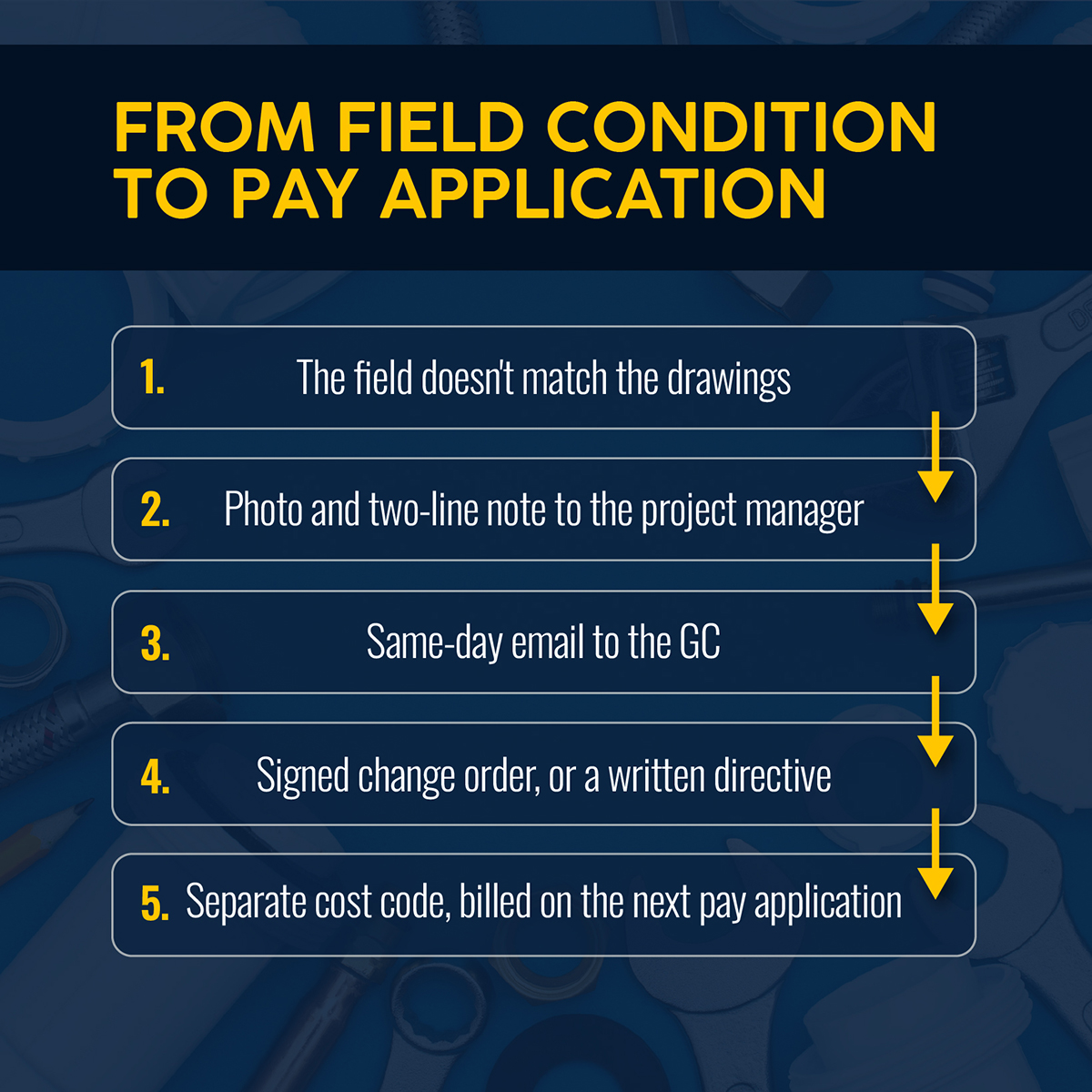
1. Identify and Document the Change in the Field
A change usually arrives before the paper does. It might be a verbal direction, a conflict in the ceiling, or a revised sheet nobody flagged. Your foreman sees it first and starts the paper trail.
Say a three-person crew opens the ceiling on a tenant renovation and finds the existing 4-inch cast iron sanitary line 14 inches lower than the drawings show. The foreman needs to capture that condition before anyone cuts. FAR 52.236-2 requires notice before disturbing conditions on federal work, and the same habit protects you on private work. Four items go to the project manager in a same-day note: what changed, who directed it or found it, where it sits on the drawings, and photos.
The operational fix: Give every foreman a two-line note template and a rule: nothing gets cut until the photos and the note reach the project manager.
2. Check the Original Scope and Contract Requirements
Before you price anything, decide whether the change falls outside your scope. Compare it with the contract documents, your base bid, its exclusions and allowances, and any unit pricing. Some changes end up falling within an allowance you already carry.
Related: A fixture missed in the commercial plumbing takeoff tends to surface later as a change order dispute.
Then read the contract terms on notice and changes in your subcontract and in the prime contract it flows from. Deadlines determine whether a claim survives. The FAR shows how tight they can run.
On a federal contract, FAR 52.243-4 gives you 30 days to assert your right to an adjustment after you receive a written change order or furnish written notice. When you flag a change by notice, costs incurred more than 20 days before that notice drop out of the adjustment. Private contracts on commercial projects set their own windows, so find yours before the first change shows up.
3. Calculate the Full Cost and Schedule Impact
Price a change in three layers. Direct cost covers labor at burdened rates and material costs at current quotes. Equipment rental, permits, and subcontracted work belong here too. Overhead and profit go on top at your contract rate. Impact comes last, and contractors most often leave it out of the price.
Price the cast iron offset. Forty-two hours of labor at a $92 burdened rate comes to $3,864. Add $2,150 in fittings and hangers and a $380 lift rental, and direct cost is $6,394. Overhead and profit at 15% adds $959, so the base price is about $7,350. The offset also put the electrical and mechanical crews in the same ceiling cavity for three extra days, and your plumbers worked weekend overtime to hold the rough-in inspection date. None of that shows up in the $7,350, so the job absorbs three days of crowding and a weekend of overtime at no extra cost.

MCAA's labor productivity factors give you a documented way to price that impact. The list includes trade stacking, overtime fatigue, and diluted supervision, among others. The factors are additive, and each one is rated from minor to severe. MCAA recommends choosing three to six that match the conditions and backing them with contemporaneous written records.
The measured mile is the other method. It compares your actual productivity during the impacted period with a similar period that wasn't impacted. The comparison holds up only when the two periods are sufficiently alike.
Close the calculation with the days it adds to the project timeline, and note any effect on inspections and other trades.
4. Create the Plumbing Change Order Form
A plumbing change order form should answer the frequently asked questions a GC's project manager would otherwise call you about. Seven sections cover it:
| Section | What to capture |
|---|---|
| Project details | Project name, contract number, GC and owner, change order number, date, and the RFI, ASI, or bulletin that triggered it |
| Description of change | What changed, why, who directed it, drawing and location references, and photos |
| Direct costs | Hours by classification at burdened rates, including field supervision, materials with quotes, equipment and rental, permits, and subcontracted work |
| Overhead and profit | Markup at the rate your contract allows for changed work |
| Consequential costs | Lost productivity and impact factors, other added costs, or an explicit reservation of rights to price them later |
| Schedule impact | Days added, plus the effect on sequence and other trades |
| Authorization | Signatures from the parties the contract requires, collected before work proceeds |
If the impact numbers aren't ready, write the reservation of rights in the consequential costs row. A blank field reads as zero.
5. Get Written Approval Before Proceeding
Work that starts before the signature runs on trust. Collect signatures from all parties involved, as your contract requires, and hold the crew on the changed work until they arrive. When the schedule won't wait, ask for a written directive that tells you to proceed and records that price and time are still open. On AIA contracts, the construction change directive does that job.
The hallway request for two floor drains is the moment to start the paper. Reply the same day with a short email. Name the room, the date, and both floor drains. Promise a price within five working days and ask the superintendent to confirm.
The operational fix: Make the confirming email the foreman's job and the pricing the project manager's, so neither waits on the other.
6. Update the Job, Budget, and Schedule
Once a change is approved, put it where the crew and the office can both see it. Add the approved amount to the job's revenue, and the change's project cost to a budget line that sits beside the original, not inside it, so the original margin stays readable. Move the project schedule by the approved days. Release any material orders that were waiting on the signature.
7. Track the Changed Work Separately
Open a separate cost code for the change from the first hour of field work, even while pricing is pending. Crews book hours to that code and purchasing tags materials to it, so the actual cost of the change is a number you can read rather than an estimate you rebuild at closeout. Keep a change log that shows each item's status (priced, submitted, approved, or billed) and review it at every project meeting with the GC.
8. Include the Approved Change in Billing and Close It Out
Bill the approved change on the next pay application. A change approved in month two and billed in month ten has been financed by your company for eight months. At closeout, compare actual hours and cost on each change code against what you priced, and carry the variance back to your estimators.
Related: Approved changes ride on the same pay application as your base contract, and this guide to plumbing progress billing shows how retainage and approved change orders are recorded in the schedule of values.
Billing every approved change protects each job. A few habits across all your jobs protect the margin.
How to Prevent Change Orders From Eroding Plumbing Project Margins
Managing change orders on commercial plumbing jobs gets easier when you watch two numbers beyond the individual change: the cumulative change on a job and the margin left to absorb it.
On cumulative change, Ibbs's study of 226 projects found that change orders averaged 8% of a project's hours. When change stayed under 5%, productivity beat plan 60% of the time. The sample covered construction projects broadly rather than plumbing alone, but it gives you a line to watch. When changes on a job pass 5% of its hours, review crew productivity weekly instead of waiting for closeout.
Related: Extra work that starts before the change order is approved is one warning sign in this guide to commercial plumbing job profitability.
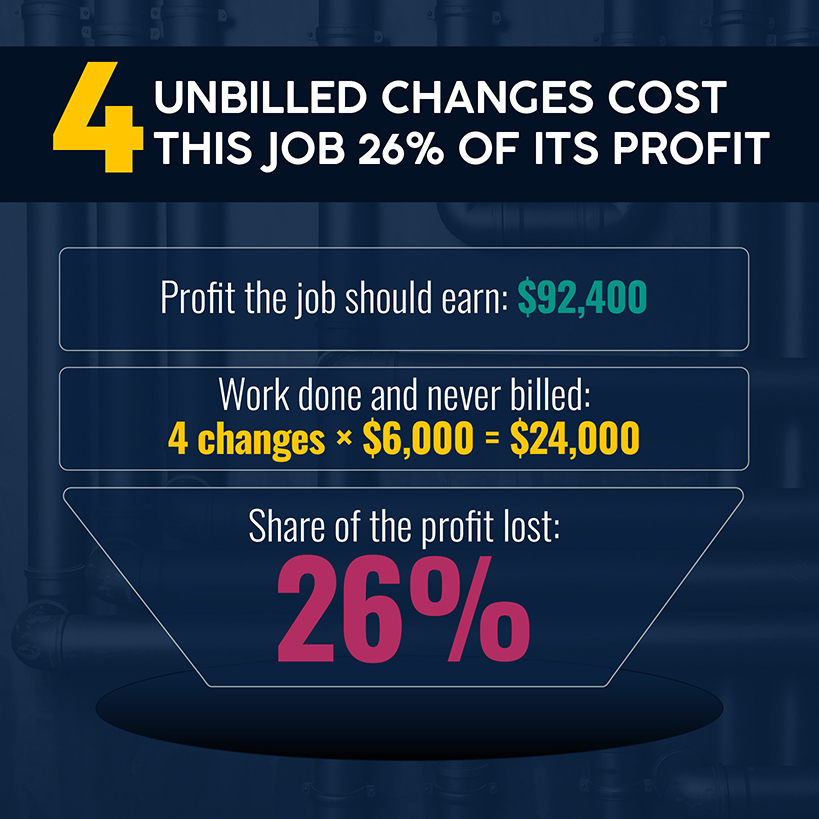
On margin, picture a $1.2 million plumbing contract at the 7.7% specialty trade average. That's $92,400 of net income before taxes. Four unbilled changes at $6,000 each cost $24,000, which is 26% of the job's profit. That money surfaces later as the difference between the profit you projected and the profit you booked. A CFMA study of five years of audited statements found that difference averaged a little over 1%, and unbilled changes are one way it gets there.
The operational fix: Add two lines to the weekly job review: cumulative change as a share of labor hours, and the dollar value of changes performed but not yet approved or billed.
Those weekly numbers only help if the project teams who own them work from the same job record.
Keep Change Orders Connected to the Rest of the Plumbing Project
A change order touches the field and the office. When each piece lives in a different file, the approved amount reaches billing late or not at all. Project management software closes that gap by keeping both on one job record.
Simpro® is field service management software built for trade businesses, including plumbing contractors, and supports more than 250,000 users worldwide. In Simpro Premium, you can forecast and track job costs for labor and parts as well as contractors and equipment. On the billing side, Simpro Premium lets you:
- Generate invoices that automatically account for costs from your job.
- Set approval stages for billing accuracy.
- Generate progress invoices and retainage claims.
Related: Each approved change lands in a job phase, and this guide to commercial plumbing project management covers those phases and how to document changes before additional work proceeds.
Foster Plumbing, a Colorado contractor focused on tenant improvement work, used Simpro’s real-time job costing and Over/Under Bill report to spot profit erosion while projects were still running. Former CEO Amy Carnrick says the company “stopped incurring losses on projects almost entirely,” its margins rose by roughly 10%, and its collection period dropped from about 90 days to 60.
Look at your last three commercial jobs. How many changes made it from the field to a pay application, and how many are still sitting in the job-cost report as unbilled hours? A commercial plumbing business that invoices every approved change keeps the margin it bid. Schedule a demo and see how Simpro handles change orders on a commercial plumbing job.


 Back to top