
The work order says "backflow test, mechanical room," and the customer file lists one assembly. A customer equipment register that plumbing technicians can read on a phone would have shown three. There’s a 2-inch reduced pressure unit on the domestic main, a 1-inch assembly on the irrigation line, and a 3/4-inch assembly feeding a boiler. Without that record, the technician tests whichever one sits closest to the door, and the other two stay outside the contract and the utility's records.
Those two assemblies were never priced or scheduled because the contract came from an equipment list with one line. Tag every device on the site walk and write every visit back to the record. Then you can answer a customer's question about a specific valve on the spot. If you're working from a spreadsheet and memory, you find the gaps at renewal.
The register that closes those gaps starts on the site walk, and it stays accurate only if every visit after that feeds it.
What Is a Commercial Plumbing Asset Register?
A commercial plumbing asset register is a structured record of every piece of plumbing equipment you maintain at a customer site. Each entry pairs the asset's nameplate data and location with the maintenance it needs and the work already done.
Your bid's equipment list is a snapshot built once to price the contract. The register stays live: every visit adds to it, and at renewal it shows what you actually covered.
Multi-site customers add a hierarchy: customer, site, floor, system, then asset. Get that right, and a facilities director with nine locations gets one answer instead of nine. Next, decide which equipment belongs in it.
What Plumbing Equipment Should Be Included in the Register?
A plumbing equipment list for maintenance contracts should cover anything you inspect, test, service, or get called to repair. It should also cover anything that shuts down a tenant when it fails. The table groups the usual line items and shows what else you should capture for each.
| Equipment | Extra fields to capture | Why it gets its own line |
|---|---|---|
| Backflow prevention assemblies | Assembly type, size, last test date, tester, test gauge calibration date | Testing is certified, scheduled, and reported to the water utility |
| Water heaters and boilers | Fuel type, capacity, install date, last flush | Age and repair history drive replacement quotes |
| Thermostatic mixing valves | Set point, last verified outlet temperature | Temperature checks recur and protect occupants from scalding |
| Grease interceptors and traps | Capacity, pump-out interval, hauler | Pump-out frequency sets the visit schedule |
| Sump and sewage ejector pumps | Horsepower, voltage, float type, alarm status | A failed pump floods a basement fast |
| Booster and circulation pumps | Horsepower, controls, serial number | Tenant build-outs add them and a walk can miss them |
| Pressure-reducing valves and expansion tanks | Size, set pressure, install date | Out-of-range pressure shortens the life of everything downstream |
| Main shutoffs and isolation valves | Location, size, last exercised date | Someone has to find them fast in an emergency |
| Restroom and fixture groups | Fixture counts by type, flush valve model, last inspection | One line per group keeps the register usable |
Fixtures take judgment. A line per faucet turns a 200-fixture building into 200 rows, so use one line per restroom group and let the contract say where you stop.
Some entries are on the register because a rule says so. Local water utilities set cross-connection requirements, and the pattern repeats from city to city: certified testers and annual tests with filed reports. Phoenix, for example, requires backflow assemblies to be tested at least on an annual schedule after installation.
Buildings that need a Legionella water management program give you another reason. CDC calls these programs an industry standard for many buildings, and its toolkit has owners describe their building water systems on a flow diagram. You service the equipment on that diagram, so a register that matches the building's plumbing system saves the customer's team from rebuilding it.
What Information Should You Record for Each Plumbing Asset?
For each plumbing asset, record its identity, location, maintenance requirements, and service history. Four groups cover it:
- Identity. Asset ID, equipment type, manufacturer, model, serial number, size or capacity, install date, and warranty end date.
- Location. Customer, site, building, floor, and room, plus an access note such as the key, the roof hatch, or the ceiling tile above the valve.
- Maintenance requirements. Tasks, frequency, the standard behind the frequency, who must perform the work, and the labor time for each task.
- Condition and history. Visit dates, readings, parts used, photos, deficiencies found, quotes sent, and a condition rating.
Then cut any field nobody will use. If a technician has to fill it in, somebody will skip it on the fifth stop of the day. With the fields set, building the register takes seven steps.
How to Build and Maintain a Plumbing Asset Register
The first three steps happen before the first scheduled visit, and the last four keep the record accurate for the life of the contract.
1. Define the Customer Sites and Maintenance Scope
Customer asset & equipment registers for commercial plumbing maintenance start from the contract's scope: the sites and systems covered, and the exclusions in writing. A customer who signs for domestic water and backflow hasn't signed for drainage, and a register that lists drains promises plumbing services nobody priced.
Related: You can match each exclusion to a clause in your plumbing maintenance agreement so the register and the contract draw the same boundary.
Keep ownership straight too: the customer's physical assets go on the register, and your own tools, trucks, and rental gear go on a separate list. With scope and ownership settled, the site walk fills in the register.
2. Conduct a Site Walk and Inventory the Equipment
Walk every mechanical room, roof, kitchen, restroom group, and below-grade space with the customer's facilities contact. Carry the as-built drawings if the building has them. Drawings lag behind tenant build-outs. Photograph each nameplate, since tenants paint over labels, and log serial numbers on the spot. Mark anything you couldn't reach as "not inspected" so nobody reads a gap as a passed inspection.
Related: A plumbing inspection checklist lists what to check in each space, so crews don't walk a site from memory.
Picture a restaurant group that hands you a list of 12 locations, each with one water heater and one grease interceptor. You bid $1,800 per site per year against that list. The walk turns up an extra water heater, a booster pump, and a mixing valve on the hot line at four of the sites.
At roughly 3 hours of added annual labor per site and $120 an hour, that's $1,440 of work the contract never counted. If you find it before signing, it goes into the price. If you find it after, you absorb it or argue for a change order.
The operational fix: Don’t price a site until every space on the walk is either logged or marked “not inspected,” and the customer has signed off on the difference from their list.
3. Give Every Asset a Consistent Identifier
Pick one naming rule for every site. Build the ID from site code, asset type, and sequence, such as DEN02-BF-01 for the first backflow assembly at site DEN02. That pattern sorts cleanly and reads on a tag. Put the same ID on the asset’s tag, in the register, and on all of its work orders. If you retire an asset, never reuse its ID, or its history merges with the replacement’s.
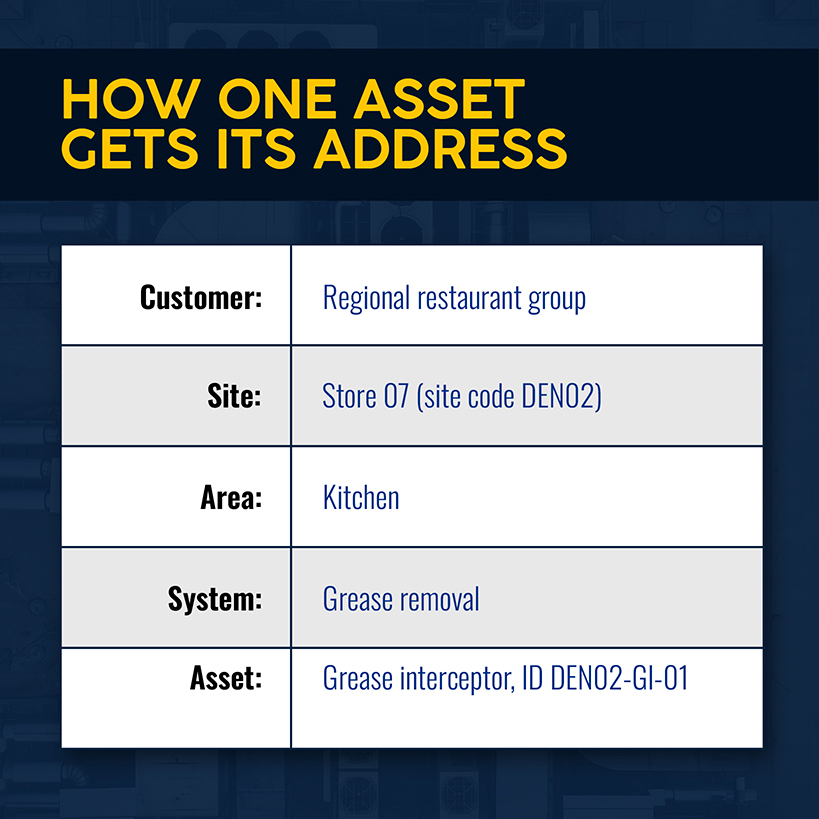
Large owners already work this way. Columbia University's facilities asset protocol gives each new piece of equipment an assigned ID and has the contractor attach the tag to the asset.
The operational fix: Decide the ID format before the first site walk, put it on one page, and hand that page to every crew.
4. Connect Each Asset to Its Maintenance Requirements
Once an asset has an ID, it needs a list of maintenance tasks, a frequency, and the standard behind the frequency. Backflow assemblies follow the utility's schedule. Routine maintenance on water heaters and mixing valves follows the manufacturer's guidance plus whatever the customer agreed to. Record the labor minutes next to each task so you can plan maintenance and price it per asset instead of per visit.
For backflow work, store the tester's certification and the test gauge's calibration date with each result. Phoenix requires the gauge to have passed calibration within 12 months of the test report date. That puts the calibration date in the record next to the pass or fail. Each visit then updates that record.
5. Record Work Against the Asset During Every Service Visit
Every maintenance service visit writes four things back to the asset: what you did, what you measured, what you replaced, and what's wrong. "Serviced water heater" tells next year's technician nothing. "Flushed, 14 oz of sediment, relief valve weeping, quote sent" tells them where to start. Deficiencies matter most, because each unresolved one is a quote waiting to go out.
Related: With a standard job sheet template, technicians complete work and log it in the same fields at every stop.
Retention rules vary by jurisdiction. Phoenix requires customers to keep backflow test records for three years from the test date. Iowa requires registered testers to keep each assembly's record for at least five years. Keep records long enough to satisfy the strictest rule in your service area. Those records also have to follow the site as it changes.
6. Add, Replace, and Retire Assets as Sites Change
Sites change between visits. A tenant adds a coffee bar with its own water heater, or a landlord swaps a failed circulation pump. Each event changes the register. Add the new asset, link a replacement to the one it displaced, and archive the retired one with its history intact. That history settles disputes about when a unit failed.
Change orders belong in this loop. If a change order adds a booster pump or a second water heater, create the asset record that same week and amend the contract's scope and price. Skip that, and you maintain the pump free until renewal.
The operational fix: No job closes until the register matches what the technician left on site.
7. Review the Register Before Contract Renewal
Everything the first six steps record pays off 90 days before renewal, when you audit the register against the building. Count what's on site against what's on the record, read the maintenance history, and compare each asset's age with how often you've repaired it.
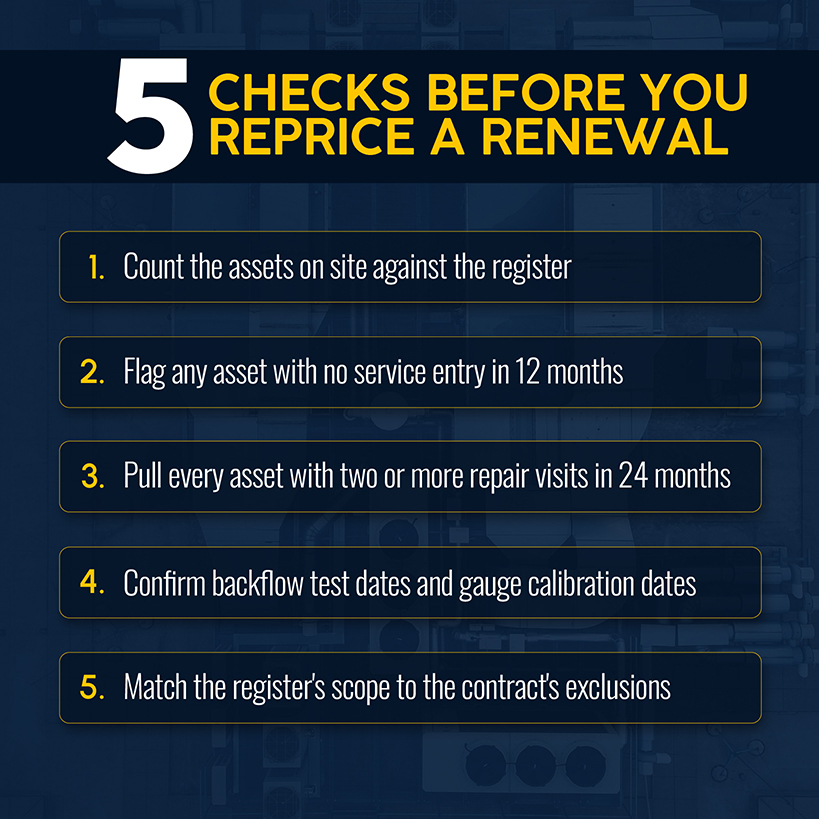
Say a four-technician shop's nine-site contract renews at $62,000 a year. The register shows 3 of 14 water heaters installed in 2014, each with two repair visits in the last 24 months. At $650 a visit, that's $3,900 in repairs on three units. Put a planned replacement of those three heaters in the renewal proposal before the next round of emergency repairs. That turns a repair log into a long-term capital plan the customer can budget for. The customer's equipment history makes the case, not your rate sheet.
The operational fix: Put the renewal review on the calendar 90 days before every contract date, and don’t send a renewal price until the asset count on the register matches the count on site.
How an Asset Register Helps You Manage Commercial Plumbing Maintenance Contracts
A register changes how you run the contract. Each asset's task list and labor minutes feed the price, so the bid reflects each asset's maintenance cost instead of a square-footage guess. The register's service frequencies drive maintenance scheduling, so visits no longer depend on a dispatcher's memory. Billing can follow the asset, with scheduled maintenance on one line and repairs on another. A utility or auditor asking for a test report becomes a search instead of a trip through the file cabinet.
Related: This work's pursuit side, from prequalification to the bid walk, is covered in a guide to winning commercial plumbing maintenance contracts.
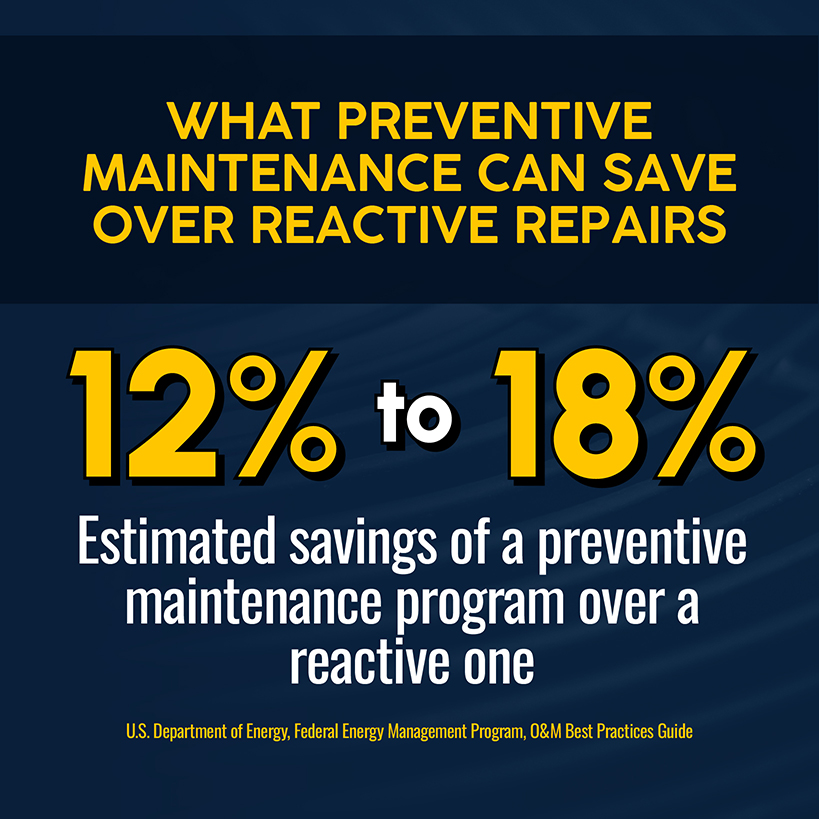
The savings case rests on the preventive work you schedule from the register. The DOE's Federal Energy Management Program O&M guide cites studies indicating preventive maintenance can save 12% to 18% over a reactive program. The guide frames that as an estimate for building equipment broadly, so present it to customers as DOE's number. To see where it could apply to your book, divide repair visits by scheduled visits for each asset type. The highest ratios mark equipment the scheduled work isn't reaching. Keeping that ratio visible by hand gets harder as the contract book grows.
Spreadsheet vs. Field Service Software for Plumbing Asset Registers
A spreadsheet works for plumbing businesses with one site and a few dozen assets. It starts costing you when:
- Several sites carry hundreds of assets, and every visit needs history
- Technicians need the record in real time on a phone at the equipment
- Someone builds recurring jobs by hand from the sheet
- Deficiencies found in the field wait for retyping before they become quotes
- Two people hold two versions and nobody knows which is current
Simpro® Premium is field service management software built for trade businesses, and it treats the register as part of the job workflow. In Simpro, a customer asset is equipment installed at a customer site that you maintain on the customer's behalf. Plant items, the tools and equipment your company owns, stay separate. You create assets from the site card or the Utilities menu, or add them during a quote or job. Assets are organized by asset type and then by customer site, and you can transfer them when equipment moves between sites. Archived assets stay viewable.
Tequa, a 100-person plumbing and civil contractor in Victoria, Australia, ran on paper-based processes before moving to Simpro®. One of its planned preventive maintenance contracts now automatically generates “200 routine maintenance jobs per month,” with no one rebuilding the schedule by hand.
Related: Contractors comparing tools for the field side of this work can start by comparing work order management software for commercial contractors.
The Maintenance Planner add-on, which requires an Enterprise build or higher, adds scheduling. Service levels set each asset's service and testing frequency. Failure notifications turn assets that fail a test into rectification jobs or quotes. Asset types define what information gets captured, and nested assets let child assets inherit a parent's service levels. Flat-rate pre-builds bill an asset's scheduled maintenance as a single line. Technicians can also search assets by barcode in the field. None of that helps if the register goes stale after the first audit.
Keep the Register Useful After the Initial Asset Audit
Pick your largest maintenance contract and imagine its biggest customer calling about the third-floor water heater right now. What would your dispatcher see?
Over time, registers go stale. The file stays frozen on the day of the site walk while tenants move and equipment gets swapped. Keeping one current by hand across 40 sites takes hours the contract never priced.
Simpro supports more than 250,000 users worldwide, and its customer assets and Maintenance Planner keep the record attached to every job. Schedule a demo to learn more.


 Back to top