A job sheet template is a reusable form your technician completes on site for one job. It records customer and site details, the work carried out, parts used, labor hours, and sign-off. This guide gives you a free job sheet template to download, shows which fields to include, and explains how it fits your field workflow.
Paper job cards still run the day-to-day at small field service businesses. They cost almost nothing to start with, but they pile up, go missing, and slow down invoicing. A clear job sheet template fixes the first problem. It makes every technician record the same details on every visit, so the office invoices fast and stands behind the work.
Owners, service managers, dispatchers, and technicians all touch the same job sheet. When the form is clear, each of them spends less time deciphering handwriting or calling the field for a missing part number. That shared clarity is the whole point of a template.

The Nitty Gritty
A job sheet records what a technician did on a job, from parts used to customer sign-off
A job sheet isn’t a work order: the work order authorizes the job, the job sheet records it
Free job sheet templates come in PDF, Word, and Google Docs formats you brand and print
Paper templates suit small teams but slow down once you scale or need fast invoicing
Digital job sheets and job management software remove re-typing and speed up job-to-invoice time
Download free job sheet templates
Every job sheet template below captures the same core details: customer, site, work done, parts, labor, and sign-off. Download the version that fits how your team works. Print the PDF and fill it in by hand, or open the Word and Google Docs versions to add your logo and edit the fields.
Download your free job sheet template:
- Job sheet template (PDF) for printing and filling in by hand
- Job sheet template (Google Docs) to copy and edit online
- Job sheet template (Word) to brand and edit on your computer
Add your business name, logo, and contact details to the top of the template. Then set up a simple system for job numbers so nothing slips through the cracks. Each job number ties the sheet to the quote, the schedule, and the invoice, which keeps your paperwork in order as the volume grows. Store the completed sheets in one place so the office finds them fast.
Match the template to your trade. An electrical job sheet needs room for circuit details and test results. A plumbing job sheet needs parts and pressure readings. An HVAC job sheet needs unit models and refrigerant checks. Start from the same core template and add the handful of fields your work demands, rather than building a new form from scratch.
What should you include in a job sheet template?
A strong job sheet template captures everything the office needs to invoice and everything the customer needs to trust the work. Group the fields into identification, work performed, materials, time, and sign-off. Leave one out and someone chases the technician later, which is exactly where paper job cards cost you time.
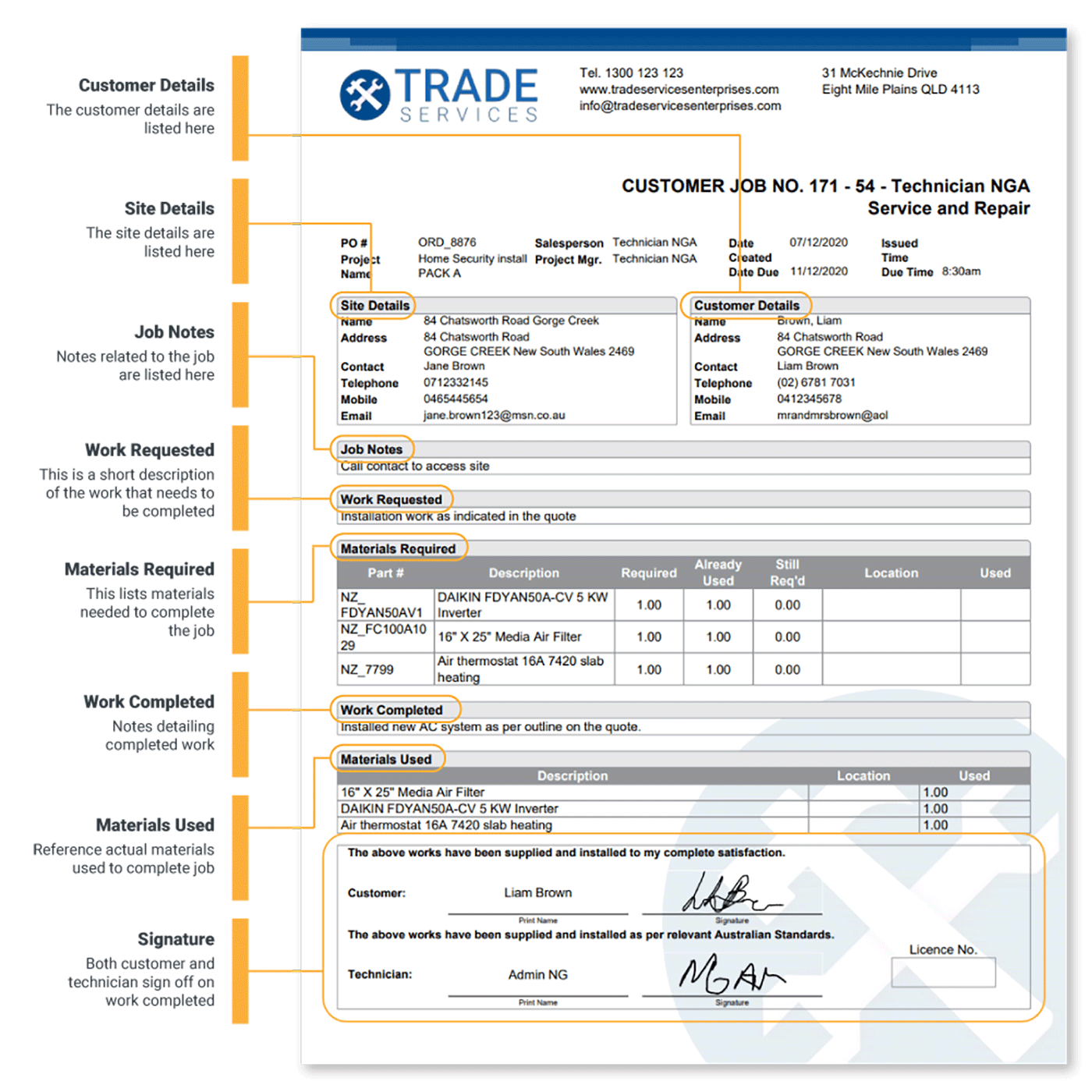
Include these fields on your job sheet template:
- Job or reference number
- Customer name, site address, and contact details
- Date, time on site, and time completed
- Reported fault or request
- Work carried out
- Parts and materials used, with quantities
- Labor hours
- Safety and inspection notes
- Photos and attachments
- Technician notes
- Customer and technician sign-off
Each group of fields earns its place. Identification ties the job to the right customer and quote. Work and materials justify the invoice line by line. Time fields protect your labor billing. Sign-off closes the loop and gives you proof the customer accepted the work.
Drop the fields that do not apply to your trade, but keep the structure the same across jobs. A consistent job sheet template means any technician, new or experienced, records a job the same way, and any office staffer reads it the same way. Consistency is what makes the form fast to fill and fast to bill. New hires get up to speed faster when every sheet looks the same.
Safety and inspection notes matter beyond the invoice. For regulated trades, a completed job sheet doubles as a compliance record, so line up those fields with your OSHA recordkeeping requirements and keep the evidence on file.
Once your team fills the same fields on every visit, a template on paper becomes the bottleneck. A set of paperless compliance forms turns that same layout into a mobile form technicians complete on their phone, with the required fields built in.
Job sheet vs job card vs work order: what's the difference?
Job sheets and job cards mean the same thing: the on-site record of work completed. A work order is different. It authorizes the work before it starts, and the job sheet records what happened. One document tells the technician what to do, and the other proves they did it.
| Document | Purpose | Created |
|---|---|---|
| Work order | Authorises and instructs the job | Before work starts |
| Job sheet or job card | Records the work completed on site | During and after the job |
Picture an HVAC callout. The office raises a work order that authorizes a technician to service a rooftop unit on Tuesday morning. The technician arrives, services the unit, and fills in the job sheet with the model number, the refrigerant added, the parts replaced, and the customer signature. The work order set the job up. The job sheet proves it happened.
Keep the two documents distinct in your process — work order management software keeps the work order flowing out to the field, and the job sheet flowing back with the results. If you also issue the paperwork that authorizes jobs, pair these downloads with our free work order templates so each stage of the job has its own record.
How to use a job sheet template in field service work
Templates only help when they fit your workflow. The office issues the job, the technician records details on site, the customer signs, and the office invoices from the finished sheet. Every handoff risks losing information, so keep the template short and the routine the same on every job.
Here's the workflow a job sheet template supports:
- The dispatcher creates the job and hands the technician a sheet with the customer, site, and reported fault filled in.
- On site, the technician records the work carried out, parts used, and labor hours while the details are fresh.
- The technician adds photos, notes any follow-up work, and gets the customer to sign off.
- Back at the office, the team invoices from the completed job sheet and files it for records.
Paper breaks down at the edges. A sheet gets rained on in the truck, a technician forgets to note a part, or the office struggles to read the total. Each gap turns into a phone call, a delayed invoice, or a write-off. A tight template shrinks those gaps, and a digital version closes most of them for good.
Hold on to completed job sheets. They back up your invoices and support your business recordkeeping if a customer ever disputes a charge or a warranty claim lands months later. A tidy archive turns a dispute into a quick lookup instead of a scramble.
Paper adds one stubborn step: someone re-types the job sheet into your system before anyone invoices. A mobile app for technicians removes that step by capturing the same details in the field, even with no signal, and syncing them when the van gets back into range.
When should you move from job sheet templates to job management software?
A template is a fine starting point. You outgrow it when you run more jobs than one person tracks, when re-typing sheets eats your admin hours, or when slow invoicing squeezes cash flow. At that point, job management software turns the job sheet into live data instead of a static form, and the same details drive scheduling, invoicing, and reporting.
Watch for the warning signs:
- Invoices go out days after the job
- Technicians re-explain their notes over the phone
- Two people key the same numbers into two systems
- Jobs slip through without a bill
Each of these is a tax on growth that paper leaves in place.
BWE Engineering, a small field service team, hit that ceiling with paper. After the company moved off paper job cards, it reduced job-to-invoice time by 50% (BWE Engineering results).
"Job cards take minutes, invoicing happens straight away."
- Thomas Roberts, BWE Engineering
That's the real payoff. The template teaches your team which details to capture, and digital tools capture them once, in the field, with no second entry. When you reach that point, field service software for trades replaces the printed sheet with live jobs, forms, and invoicing in one place.
Ready to move beyond job sheet templates?
Start with the free job sheet template above. It brings order to your paperwork today and gives every technician the same checklist on every job. Office staff also get a clean, consistent record to bill from. When paper starts slowing you down, digital job management is the natural next step.
See how job management software that runs jobs from quote to cash builds on the same job sheet your technicians already know, so the move from template to software feels like an upgrade, not a rebuild.
Frequently Asked Questions
What is a job sheet?
It is the on-site record a technician completes for a single job. The sheet captures the customer, the work carried out, parts used, labor, and sign-off. The dictionary definition matches how the trades use it: the paper where a technician records the work and the time it takes.
What should a job sheet template include?
Include the job or reference number, customer and site details, and the reported fault. Add the work carried out, parts and materials used, labor hours, safety notes, photos, and customer and technician sign-off. Those fields let the office invoice without chasing the technician afterward.
What formats are available?
Free job sheet templates come in three formats: PDF for printing and filling in by hand, and Word or Google Docs for editing on a computer. Pick the PDF for the field and an editable format for the office. This template doesn't include an Excel version.
Do I need software to use a job sheet template?
No. Print the PDF and fill it in by hand, or edit the Word and Google Docs versions with common office tools. Software isn't required to start. It earns its place once you want to skip re-typing job sheets and invoice straight from the field.
How are digital job sheets beneficial?
Digital job sheets remove the slowest part of paper: re-typing. Technicians complete the form on a phone, attach photos, and capture signatures on site. Your office sees the finished job right away and invoices from it. Nothing gets lost between the van and the desk.


 Back to top