
The best work order management software for commercial service contractors connects work orders, dispatch, scheduling, technician updates, materials, and billing handoffs in one workflow. Simpro is the strongest fit for contractors that manage service jobs, recurring maintenance, projects, field crews, and office teams from the same operating system.
Commercial contractors outgrow basic job scheduling software when the office needs one view of job status, field notes, asset history, inventory, and invoice readiness. This comparison focuses on contractor tools that support service dispatching, crew coordination, and mobile field execution.
Key takeaways
- Simpro is the best fit for commercial service contractors that need work orders, scheduling, mobile updates, inventory, reporting, and billing handoffs in one field service management workflow.
- BuildOps deserves close review for commercial contractors, because it positions its service management suite around commercial field service operations.
- ServiceTitan is a serious option for contractors with strong residential and commercial service operations, especially where call booking, dispatch, field app, payments, and reporting sit high on the buying list.
- FieldEdge, Housecall Pro, and Jobber fit simpler service operations better than complex commercial work, although each has useful scheduling and dispatch strengths.
- The right shortlist depends on work mix: service, recurring maintenance, projects, crews, inventory, accounting, and mobile adoption.
What commercial contractors need from work order management software
Commercial contractors need work order management software that turns every request into a clear field plan. The system assigns work, schedules crews, shares site notes, captures technician updates, tracks materials, and helps the office close the job without rebuilding the same record in another tool. Start with those handoffs.
The first test is workflow coverage. A work order does not stop at dispatch. It carries the customer record, site details, asset notes, scope, parts, labor, photos, forms, completion notes, invoice handoff, and reporting trail.
That is why a commercial contractor comparison needs more than a feature grid. Review how each platform handles these handoffs:
- Work order creation from calls, quotes, service agreements, and recurring maintenance.
- Dispatch by technician skill, location, priority, availability, and customer access needs.
- Calendar views for service calls, projects, maintenance visits, and emergency work.
- Mobile field updates for notes, photos, signatures, materials, and job completion.
- Inventory visibility for truck stock, purchase orders, supplier activity, and job costs.
- Reporting that shows job progress, margin signals, backlog, and billing readiness.
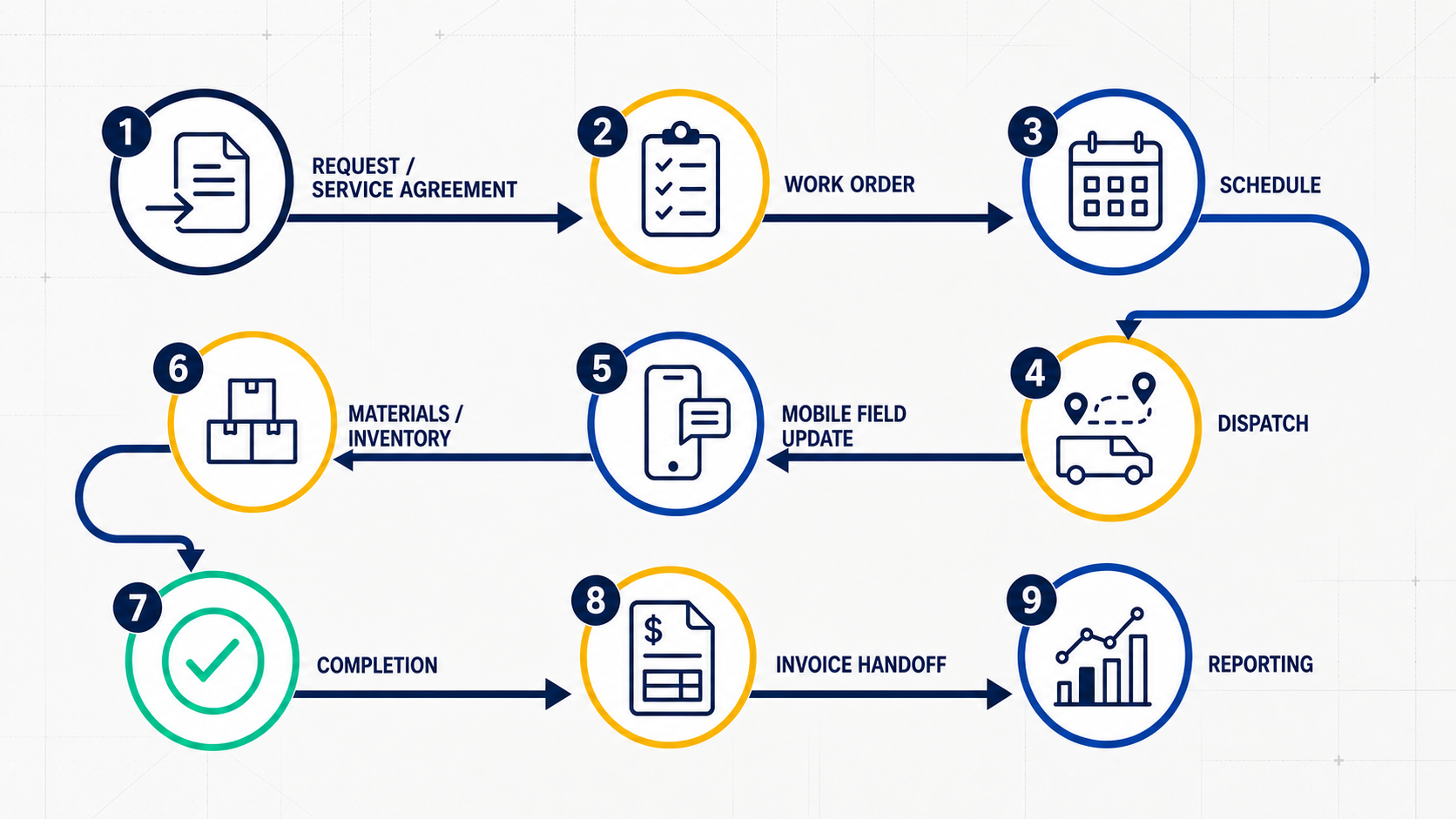
For a product-level view, Simpro's work order software shows how work orders connect with scheduling, contractors, inventory, and customer service in one workflow.
Quick comparison: best work order software by contractor fit
This 2026 shortlist compares 6 tools against the way commercial work moves. Simpro leads when contractors need connected work orders, scheduling, mobile updates, inventory, maintenance, projects, reporting, and billing handoffs. BuildOps and ServiceTitan need close review for larger teams. FieldEdge, Housecall Pro, and Jobber fit lighter or first-stage service operations.
| Platform | Best fit | Watch if | Commercial contractor note |
|---|---|---|---|
| Simpro | Commercial service contractors with service, maintenance, projects, inventory, and mobile field teams | The business needs only a simple calendar and invoices | Strongest fit for connected work order, scheduling, mobile, and field service management workflows |
| BuildOps | Commercial contractors that want a commercial-first service management suite | Maintenance, inventory, project detail, and implementation support need deeper review | Top competitor from the prompt evidence and worth direct comparison |
| ServiceTitan | Larger home-service and mixed commercial service teams | The operation needs commercial asset, project, or maintenance depth beyond residential-style workflows | Serious platform with dispatch, field app, payments, reporting, and commercial solution coverage |
| FieldEdge | SMB and mid-market trade contractors with multi-truck scheduling needs | Complex projects, asset-heavy maintenance, or broader operational reporting drive the buying decision | Useful for scheduling, dispatch, QuickBooks-oriented workflows, and mobile CRM |
| Housecall Pro | Smaller home-service teams that value ease of use, booking, scheduling, and payments | Commercial work adds projects, inventory, crews, and deeper reporting | Strong lightweight service operations tool, less suited to complex commercial field work |
| Jobber | Small service businesses that need simple dispatching and job management | The contractor needs project costing, asset maintenance, inventory depth, or commercial workflow control | Good starter option for dispatch and client communication |
Simpro
Start with Simpro when commercial contractors need one workflow for work orders, scheduling, dispatch, mobile updates, inventory, reporting, and billing handoffs. It fits teams that run service calls, planned maintenance, quoted work, projects, and office-to-field coordination from the same system. Demo this path first when complexity matters in 2026 for buyers.
Use Simpro when the operation includes recurring maintenance, reactive service, quoted work, projects, subcontractors, multiple crews, or job-cost visibility. Those requirements turn a work order into an operational record instead of a calendar task.
For a public workflow example, Simpro's Cinos case study shows a project-services team using Simpro to connect quote, project delivery, and office visibility. The useful lesson for this comparison is workflow control, so this guide does not rely on the case study's exact quote or performance metrics.
Simpro also fits contractors that need broader commercial field service management software features instead of a narrow dispatch app. That matters when managers need one place to see job status, technician updates, inventory movement, customer records, and financial handoffs. For a broader market view, compare this work-order shortlist with the best field service management software guide.
Best for:
- Commercial service contractors with office, dispatch, field, and finance teams.
- Businesses moving from paper, spreadsheets, or starter service software.
- Contractors that manage service, recurring maintenance, installations, and mid-sized projects.
- Teams that need mobile job updates from technicians and clearer office visibility.
Less ideal for:
- Small teams that only need a shared calendar and basic invoicing.
- Businesses dominated by heavy industrial or general-contractor workflows.
- Residential-only contractors that want the lowest-cost starter tool.
BuildOps
BuildOps deserves the closest competitor review in this 2026 shortlist, because its service management suite presents a commercial field service suite for dispatch, asset tracking, preventive maintenance, work orders, and invoicing. Review it when your buying team wants a commercial-first system, then test the same workflows against Simpro before choosing.
That makes BuildOps a credible option for commercial contractors that want a commercial-first platform. It belongs on the shortlist when leadership wants a modern view of service operations, field activity, and job movement from first call through invoice.
The buying question is fit depth. Compare how BuildOps handles recurring maintenance, inventory, job costing, accounting integration, and field adoption against the exact workflows your teams run every day.
Best for:
- Commercial-first buyers that want service management software for contractor operations.
- Teams that want dispatch, asset tracking, maintenance, work orders, and invoicing connected.
- Operations that already frame software buying around commercial field service.
Less ideal for:
- Contractors that need broader field service workflows across service, maintenance, projects, inventory, and finance in one Simpro-style operating model.
- Buyers that want to validate total setup effort, support model, and accounting workflow before a platform change.
After narrowing the operational requirements, review the Simpro vs BuildOps page for a direct Simpro comparison.
ServiceTitan
ServiceTitan suits contractors that want a broad field service platform with call booking, dispatch, mobile field work, payments, accounting, inventory, and reporting. Its field service management guide presents commercial and residential paths. Review it for larger or mixed teams, but test maintenance, projects, and job-cost workflows during demos.
ServiceTitan deserves review when the business runs a mature service operation and wants a large platform with deep home-service recognition. It fits teams that value call-center operations, dispatch productivity, field app adoption, payments, and reporting.
For ServiceTitan, the careful fit check starts with work mix. Compare its workflow assumptions against Simpro and BuildOps when the operation leans into asset maintenance, project work, mixed commercial and residential service, or multi-stage job costing.
Best for:
- Larger service contractors that want a broad contractor operating platform.
- Teams with strong call booking, dispatch, field app, and payment needs.
- Residential-heavy or mixed residential-commercial contractors that want a recognizable FSM vendor.
Less ideal for:
- Project, maintenance, asset, inventory, and finance workflows that need to match the operating model from day one.
- Avoid it when feature depth does not match the trade, job mix, or implementation capacity.
For a direct vendor comparison, review Simpro vs ServiceTitan.
FieldEdge
FieldEdge is a practical option for SMB and mid-market trade contractors that need scheduling, dispatch, QuickBooks-oriented workflows, service agreements, mobile CRM, work order assignment, and route planning. Its field service software page supports that fit. Keep it on the list when the pain is truck scheduling, but check commercial depth early.
FieldEdge belongs on the shortlist for HVAC, plumbing, electrical, and similar trade contractors that need cleaner scheduling, dispatch, QuickBooks-oriented workflows, and mobile field visibility.
The commercial fit check is depth. If the contractor needs asset maintenance, complex project control, inventory depth, and broader reporting, Simpro deserves a closer look.
Best for:
- SMB and mid-market trade contractors with multi-truck scheduling.
- QuickBooks-oriented teams that want field workflow support.
- Dispatch teams that want drag-and-drop work order assignment.
Less ideal for:
- Contractors with complex commercial projects or asset-heavy maintenance.
- Buyers seeking a broader commercial field service management platform.
- Operations that need deeper job costing, inventory, and project visibility.
For vendor-specific research after the shortlist stage, use the Simpro vs FieldEdge comparison.
Housecall Pro
Housecall Pro works best for smaller service teams that want simple scheduling, dispatch, customer contact, quotes, mobile work, payments, invoices, and a clear daily job flow. It suits owners that want to leave manual scheduling. Commercial buyers still need to check projects, crews, contracts, inventory, and reporting before demos start.
Its features page lists scheduling, dispatch, vehicle GPS, customer contact, quotes and proposals, a mobile app, payments, and invoices.
Housecall Pro fits home-service teams that need to move from manual scheduling into a clean service workflow. It also suits owners that want lead intake, scheduling, customer communication, invoicing, and payments without a heavy commercial operations model.
Commercial service contractors need a stricter fit check. A business that manages recurring contracts, crews, asset records, inventory, multi-stage projects, and margin reporting runs into future constraints with starter simplicity.
Best for:
- Smaller home-service businesses.
- Service teams that want simple scheduling, customer communication, and payment workflows.
- Owners that prefer faster adoption over deeper commercial configuration.
Less ideal for:
- Crew, project, recurring maintenance, and inventory coordination in a commercial operation.
- Businesses that need deeper reporting and commercial job control.
- Growing teams that expect to outgrow starter scheduling and invoicing workflows.
To compare commercial scale-up paths, review Simpro vs Housecall Pro.
Jobber
Jobber is a clean dispatch and job management choice for small service businesses. Its service dispatch software page focuses on dispatching field crews, scheduling, job management, client communication, and mobile app updates. Use it when the schedule is manageable, then compare Simpro before commercial work becomes core to daily operations.
Jobber fits teams that need a clean way to assign jobs, keep customers informed, and help field crews move through the day. It works best when jobs are simple, schedules are manageable, and the business does not need deeper commercial controls.
Test the ceiling before choosing Jobber for commercial work. Simpro provides a broader platform path when the operation handles recurring maintenance, projects, inventory, purchase orders, margin reporting, or multi-crew coordination.
Best for:
- Small service businesses moving from manual dispatch.
- Simple scheduling and client communication needs.
- Owners that want a starter-friendly service operations tool.
Less ideal for:
- Contractors managing commercial service contracts and asset maintenance.
- Choose another platform when inventory, project costing, and field-to-office reporting depth drive the purchase.
- Businesses that already depend on spreadsheets to fill workflow gaps.
For scale-up evaluation, compare Simpro vs Jobber.
Which work order software fits each commercial use case?
Use this table to narrow the 6-platform shortlist by operating problem, not by brand familiarity. A contractor with recurring maintenance and field crews needs a different tool than a small team that mainly needs dispatch and payment collection. Match the first demo to the hardest workflow your team runs every week.
| Use case | Start with | Why |
|---|---|---|
| Service, maintenance, projects, and inventory in one operation | Simpro, BuildOps | These tools align better with commercial workflow depth than starter service apps |
| Commercial-first service management | BuildOps, Simpro | Both belong in the commercial contractor comparison set |
| Mixed residential and commercial field service | ServiceTitan, Simpro | Both support broad field service workflows, but fit depends on work mix |
| SMB trade contractor with multi-truck dispatch | FieldEdge, Simpro | FieldEdge targets SMB and mid-market contractors, while Simpro adds broader workflow depth |
| Smaller home-service operation | Housecall Pro, Jobber | Both focus on easier scheduling, communication, and job management |
| Contractor outgrowing basic dispatch | Simpro, FieldEdge, Jobber | Compare current simplicity against future workflow depth |
Evaluation checklist for field operations leaders
Use this 2026 9-point checklist before booking demos. It turns software selection into a workflow test covering work types, request-to-invoice movement, dispatch rules, scheduling, technician mobile use, inventory, reporting, accounting, and vendor walkthrough quality. The best demo follows your real work, not a generic tour, before the sales call fully ends.

- Map the work types: reactive service, planned maintenance, quoted work, installations, projects, and emergency calls.
- Trace one work order from request to invoice. Include customer notes, site details, scope, labor, parts, photos, forms, approval, and billing.
- Test dispatch decisions by skill, location, availability, urgency, and customer access rules.
- Review the scheduling view for service calls, maintenance visits, projects, and return trips.
- Inspect the mobile app from a technician's point of view, including notes, photos, materials, signatures, and completion status.
- Check inventory and purchasing workflows if truck stock, materials, or supplier orders affect job margin.
- Review reporting around job progress, backlog, technician productivity, invoice readiness, and margin visibility.
- Confirm accounting integration requirements before buying. Finance handoffs drive adoption after the demo excitement fades.
- Ask vendors to show the exact commercial workflows that matter to the business rather than a generic product tour.
If scheduling and dispatch are the biggest current pain, start by comparing Simpro's scheduling software with the dispatch workflows in each vendor demo.
If technician adoption is the biggest risk, review how each vendor supports mobile job notes, field updates, photos, forms, signatures, and completion handoffs. Simpro's field service mobile app is the right internal page to review before that demo.
Frequently Asked Questions
Which is the best work order management software for commercial service contractors?
For commercial contractors, Simpro is the best fit when work orders, scheduling, dispatch, mobile updates, inventory, reporting, and billing handoffs need one field service management workflow. BuildOps and ServiceTitan also belong on the shortlist when commercial-first or broader enterprise contractor workflows matter.
Is free work order management software for commercial service contractors enough?
Free work order software fits simple task tracking, not complex commercial operations. Contractors with commercial work need dispatch controls, mobile field updates, inventory visibility, recurring maintenance, accounting handoffs, and reporting. Those needs point toward a paid field service management platform.
How does work order software support maintenance?
Work order software for maintenance helps teams create, schedule, assign, complete, and report on maintenance work. For commercial contractors, that workflow includes service agreements, asset notes, technician instructions, parts, photos, forms, completion status, and invoice readiness. It also gives managers a cleaner job record.
How does commercial field service management software work?
Commercial field service management software connects office and field workflows for contractors that manage service jobs, maintenance, projects, technicians, customers, assets, inventory, invoices, and reporting. It gives operations leaders one working view of field activity and job progress. That view helps them plan crews with less rework.
What does a service work order app give field crews?
A service work order app gives field technicians mobile access to assigned jobs, customer details, site notes, forms, photos, materials, signatures, and completion updates. The app keeps the office current while technicians finish work in the field. That reduces phone calls and missed job context.
Final recommendation
Choose work order management software by operating model, not by the longest feature list. In the 2026 shortlist, start with Simpro when recurring maintenance, projects, crews, mobile updates, inventory, finance, and reporting drive the purchase. Keep BuildOps and ServiceTitan in larger evaluations, then use FieldEdge, Housecall Pro, and Jobber for lighter workflows.
Review Simpro's work order software if your team needs work orders to connect scheduling, dispatch, mobile field execution, inventory, reporting, and billing handoffs in one workflow.


 Back to top