
Counting fixtures. Tracing pipe runs. Cross-checking specs against a schedule that changed twice since the drawings went out.
All that work to create a commercial takeoff used to take plumbing estimators at least a full afternoon. Learning how to use AI for plumbing estimating cuts that commitment to minutes. Whether you’re a multimillion-dollar business or a two-van residential shop, the pain is identical: Every hour spent building a quote by hand is an hour not spent on billable work.
Estimating errors compound that cost. An inaccurate estimate costs roughly 3% in lost profit on every won tender. In a $600,000 plumbing business, that's about $18,000 a year in margin that never should have left the building. Speed matters just as much: Many customers will contact multiple plumbers, and the first to respond with a reasonable, accurate quote often wins their business.
This article walks you through seven ways companies are putting AI to work on plumbing projects. You’ll learn when artificial intelligence (AI) is ideal for takeoffs and estimates, the mistakes that turn a fast quote into an inaccurate one, and how a connected workflow protects the margin created by fast quoting.
7 Ways Plumbing Companies Can Use AI for Faster Estimating and Takeoffs
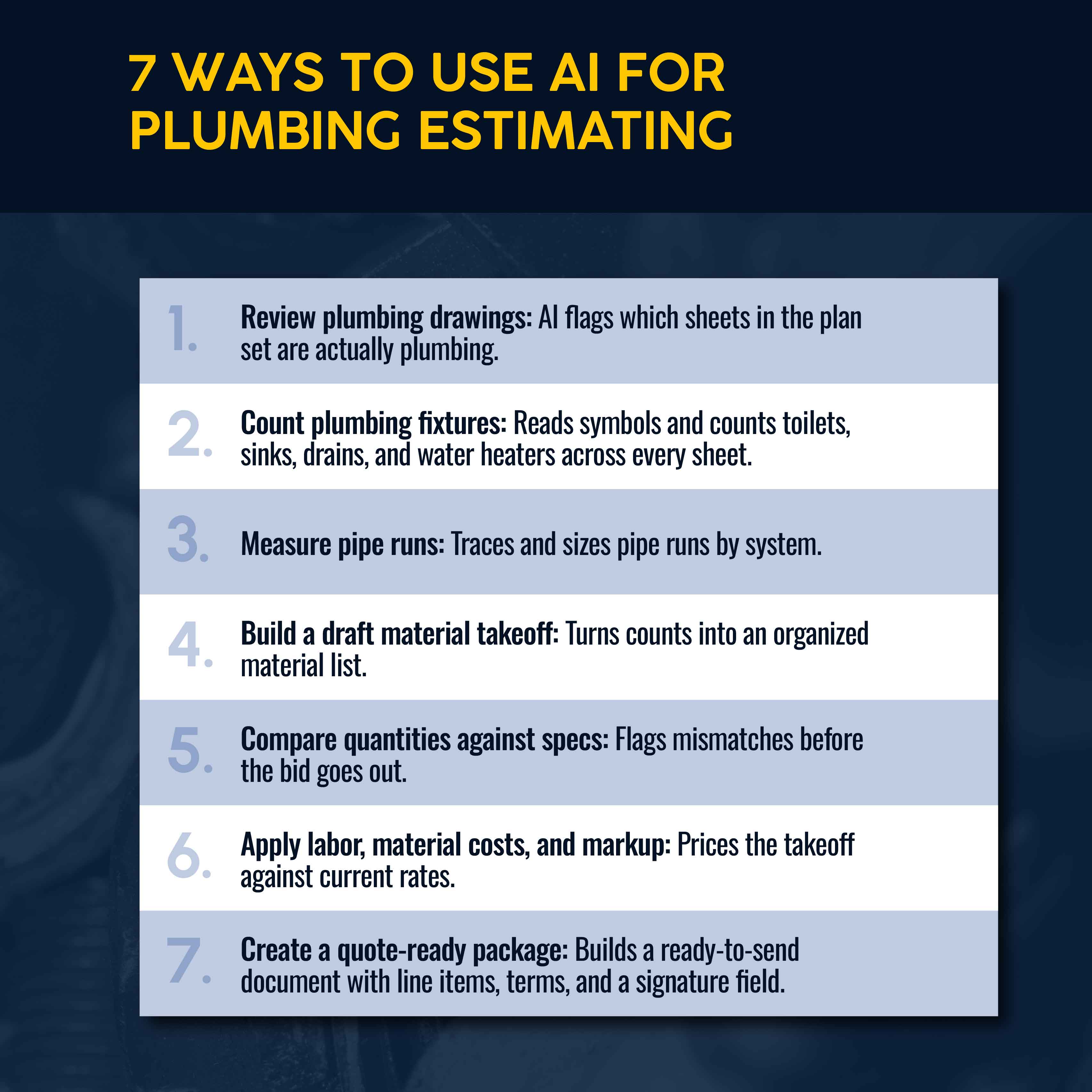
Each of these steps maps to a specific point in the takeoff process, from the first look at drawings to the finished quote. AI-powered takeoffs handle the counting and measuring, but a human still owns the final number.
1. Review Plumbing Drawings Before Beginning a Manual Takeoff
Before anyone measures a single pipe run, AI can scan uploaded PDF plumbing plans and flag which sheets are plumbing-relevant. Commercial plan sets often bundle electrical, mechanical, and architectural drawings alongside plumbing. Human estimators can easily burn 30–60 minutes just sorting sheets without making progress on the actual takeoff. On a 25-sheet set, sorting time alone can eat 10% of the hours budgeted for the bid.
AI scope-filtering tools read the full set and isolate plumbing-relevant pages and line items, allowing estimators to focus on the relevant drawings instead of paging past HVAC ductwork and electrical panel schedules in search of plumbing riser diagrams. AI especially earns its keep with multi-trade commercial sets. General contractors send the same drawing package to every trade bidding on the job and expect each sub to extract only their scope.
2. Count Plumbing Fixtures From PDFs
Fixture counts (toilets, sinks, floor drains, water heaters) are the most repetitive part of manual counting for plumbing estimators. They're also the easiest to get wrong. If you miscount a bank of fixtures on the third floor because a symbol got rotated 90 degrees from the legend, that error won’t be noticed until the crew is on-site and short on material.
AI performs most reliably in this step. AI-powered takeoff software reads symbol legends and counts matching fixtures across every sheet, including those where symbols are rotated or mirrored. What takes an estimator an hour of manual tick-marking gets completed in a few minutes, and the estimator can check the fixture schedule against the drawings rather than build from scratch. On new construction or clean commercial drawings, this is the safest place in the whole takeoff to lean on automation.
3. Measure Pipe Runs By System, Size, and Location
Pipe runs are harder to automate than fixture counts because the length, size, and system type all have to line up correctly. AI takeoff tools trace pipe runs across a scaled drawing and break them out by system (sanitary, vent, water supply, gas) and by size. Each one gets its own linear footage total.
Scale accuracy matters most here: An estimator still has to confirm that the AI set a correct scale before trusting any of the linear footage it produces.
4. Build a Draft Material Takeoff
Once fixtures are counted and pipe runs are measured, AI uses that data to generate accurate material takeoffs instead of building a draft list by hand.
Pre-builds make this faster. A pre-build is a templated assembly — such as for a water heater installation, bathroom rough-in, or floor-drain set — that bundles the materials, valves, fittings, and labor always needed by the job type. Instead of a blank material list, AI takeoff quantities feed directly into pre-builds. The draft takeoff arrives organized by job type instead of as a parts list that the estimator has to sort by hand.
The difference shows up most on repetitive scope. A commercial building with 40 identical bathroom rough-ins doesn't need 40 separate material lists built from scratch. Once one rough-in is mapped to a pre-build, the AI-generated fixture count multiplies that assembly across every matching instance on the drawing set. The estimator reviews one template instead of 40 separate line-item lists, each built with manual effort.
5. Compare Takeoff Quantities Against Specs and Schedules
Your draft takeoff must match real-life specs, and that’s another place AI can help. AI cross-references quantities against the plan set’s spec sheets, as well as fittings and fixtures schedules. If the fixture count or pipe size doesn’t match the documentation, they get flagged before the estimate goes any further.
That's how AI can help reduce errors. Catching a mismatch at this stage is cheap, while catching it after the bid gets submitted is costly.
6. Apply Labor, Material Costs, and Markup
With quantities confirmed, AI applies labor rates, current material pricing, and the markup rules already built into the estimating system. Doing so generates accurate estimates without humans doing so much math. Manually applying unit costs to a confirmed commercial takeoff, line by line, is one of the more tedious parts of the process. With pricing rules already loaded, AI does it in a few minutes instead of an estimator needing an afternoon.
None of that works without the right price list, however. AI estimating tools are only as accurate as the data on labor rates, material costs, and markup rules. Getting an accurate cost relies on having current data that’s regularly updated and synced.
Related: Learn how to price plumbing jobs.
7. Turn the Estimate Into a Quote-Ready Package
This last step converts the priced takeoff into a formatted, client-ready quote with line items, terms, and a digital signature field. Using AI lets you receive the plan set and send a quote the same day instead of three days later. In plumbing bidding, that lets you be faster and more thorough all at once.
On residential jobs, the same packaging step lets a technician send a quote from the driveway instead of from the office later that evening. The longer a quote sits unsent, the colder the lead gets. The shelf life on high-urgency plumbing work is short. Waiting until the next day risks losing the job to whichever contractor answered first. Sending the quote while the technician is on-site eliminates that risk and shows great customer service.
Related: Download a plumbing estimate template to see how a finished, itemized estimate should be structured.
AI Plumbing Takeoffs Still Need Human Review
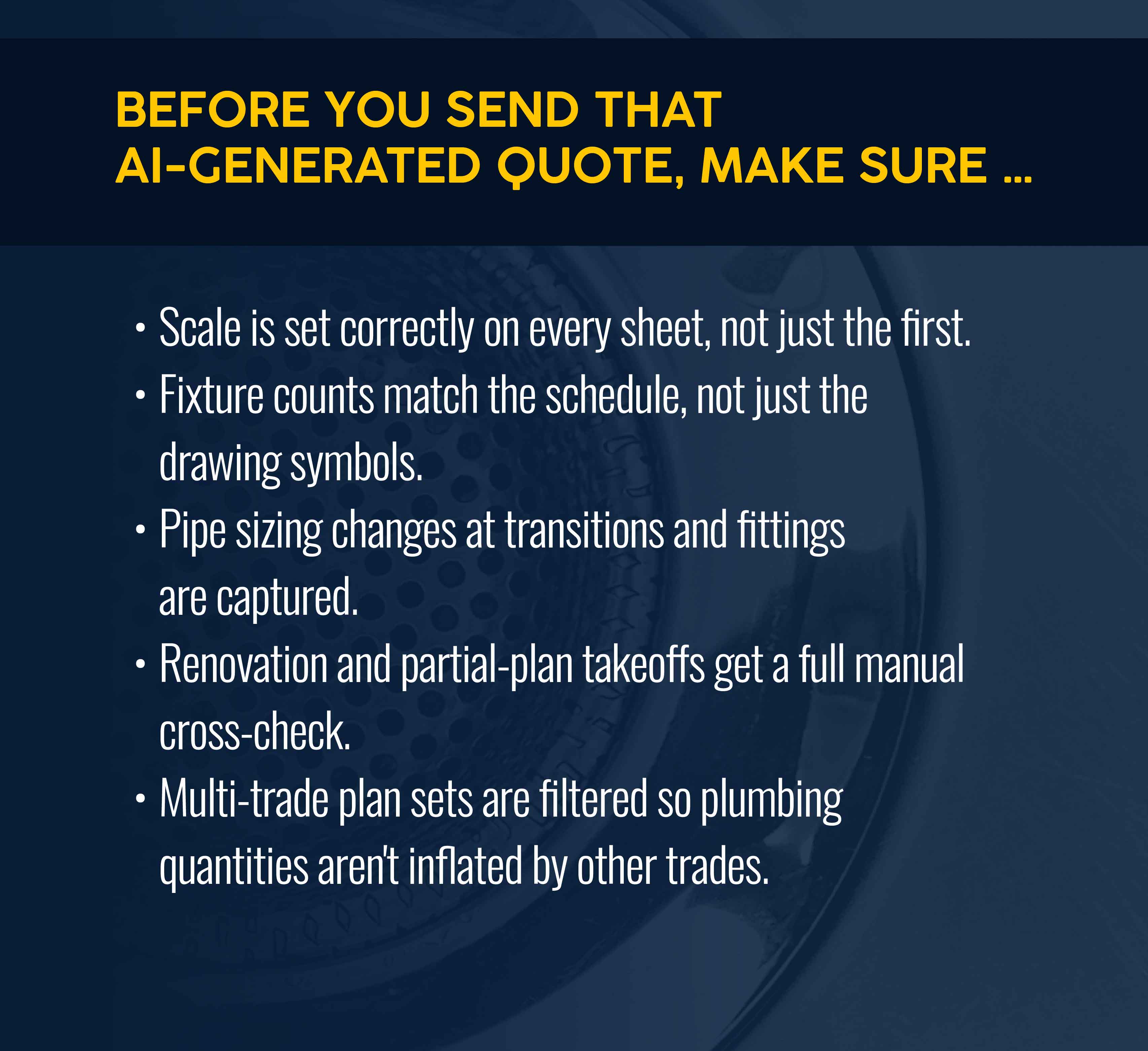
Knowing how to use AI for plumbing takeoffs is only half the job. None of these seven steps should run unsupervised. In fact, the assumption is that a human reviews output, even in the best-case scenario.
AI performs best on clean, new-build drawings. It’s noticeably less reliable on renovation work with partial or unclear plans. Before sending an estimate, confirm that:
- The scale is set correctly on every sheet, not just the first one.
- Fixture counts match the schedule, not just the drawing symbols.
- Pipe-sizing changes at transitions and fittings are captured, not smoothed over.
- Renovation and partial-plan takeoffs get a full manual cross-check, since AI accuracy declines on incomplete drawings.
- Multi-trade plan sets have been correctly filtered so plumbing quantities aren't inflated by mechanical or fire protection scope.
Treat AI output as a fast first draft, not a ready-to-submit bid.
Common Mistakes When Using AI for Plumbing Estimating
Most AI estimating failures trace back to the setup, not the software. The tool didn't fail. Rather, someone skipped a step. Here are five mistakes to watch out for:
- Omitting an item library. Plumbing estimating software pulls its numbers from whatever price list is loaded. If you turn on AI quoting before building a price list, the AI tool will still be fast, but it’ll also be horribly wrong. Loading labor rates, material costs, and pre-builds takes about half a day, with another two weeks to refine templates against real jobs.
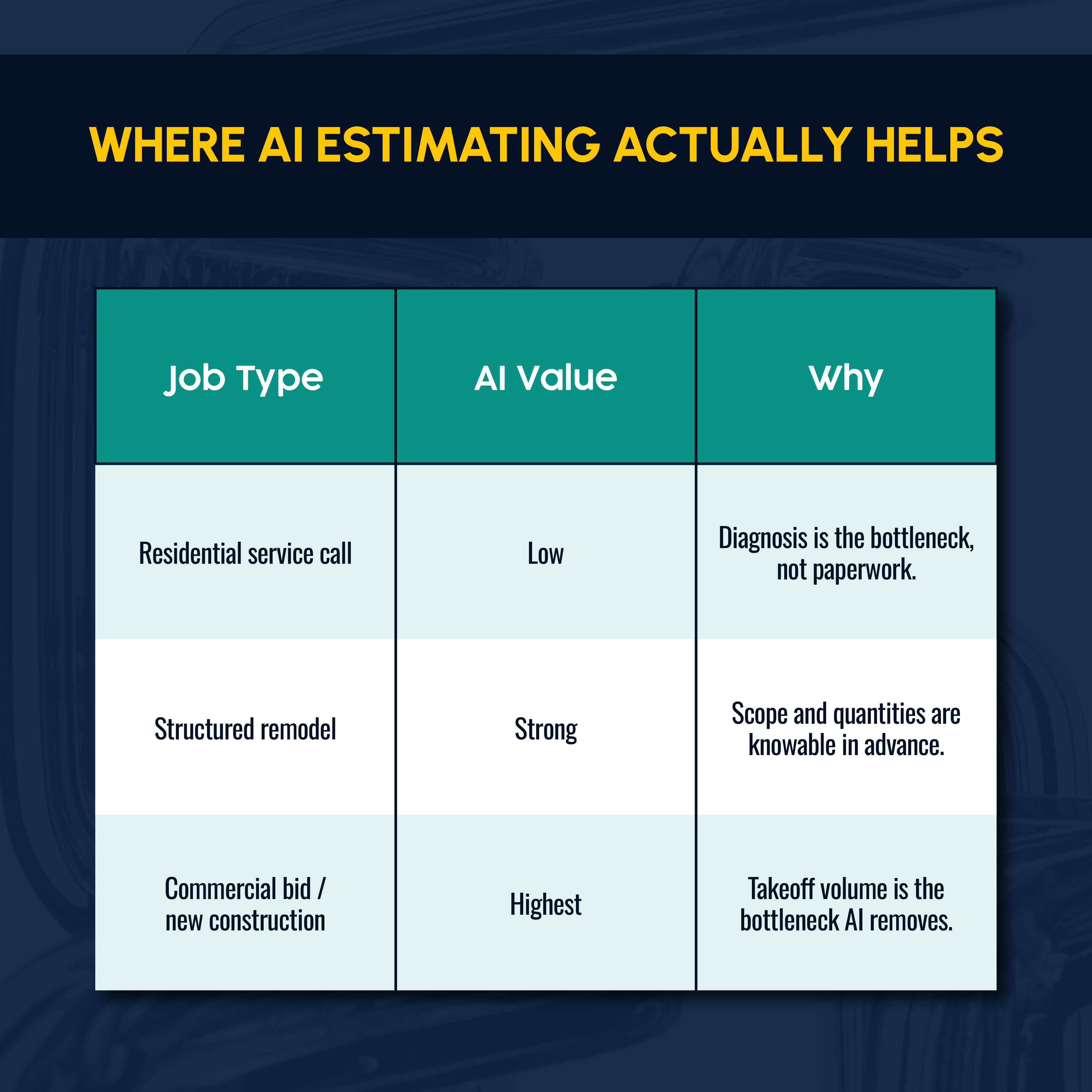
- Applying AI to the wrong job type. AI delivers the most value on takeoff-heavy work like commercial bids and structured remodels, where quantity counting is the bottleneck. On a residential service call, the bottleneck is diagnosis, not paperwork, so AI quoting adds little there. Match the tool to the job type for more realistic expectations — and results.
- Not reviewing renovation jobs. Accuracy drops noticeably on incomplete drawings, especially compared with clean commercial sets. A plumbing takeoff built from partial plans needs the closest review of all. Estimators who gloss over such takeoffs end up missing errors that haunt the business later on.
- Not connecting the takeoff tool to the quoting platform. Some plumbing estimating apps are standalone takeoff tools, which means employees must re-enter quantities into a separate quoting system. That reintroduces the manual transcription errors AI was supposed to eliminate. Takeoff output should flow directly into pre-builds and pricing without a second entry.
- Mistaking a fast quote for the finish line. Speed helps you stay in the race, but it doesn’t win the job by itself. Don’t forget to follow up on open quotes. A meaningful share of unconverted quotes will close with a single timely follow-up. By contrast, sending AI-generated quotes without a follow-up leaves recoverable revenue on the table. Shops running a two-step automated follow-up sequence (for example, outreach on day 3 and day 7) will convert better than shops that send a quote and wait.
The operational fix: Build the item library first, match AI to takeoff-heavy job types, apply full manual review on renovation work, and connect takeoff output directly to quoting so nothing gets re-keyed.
What Faster Takeoffs Look Like in Practice
Zebra Plumbing, a six-employee residential plumbing shop in Melbourne, cut quoting time from 15-45 minutes to under one minute using Simpro® estimating software. Productivity increased, with technicians completing four jobs a day instead of three. Average job value rose from $800 to $1,500, and profit margins doubled to 70%. The lesson is simple: Faster, more consistent quoting changed what technicians could get done in a day.
Businesses using Simpro report 10x faster estimates and a 30% productivity increase compared to manual processes. BGE Digital, an electrical contractor running a similar takeoff-to-quote workflow, puts it plainly: "We can probably put a quote out 10 times quicker than what we were doing from spreadsheets."
For plumbing contractors bidding on commercial work, greater speed compounds into higher bid volume. Shave hours off every commercial submission, allowing your estimating team to put together more bids each month without adding headcount. That's the real lever behind winning more commercial work.
Related: Check current plumbing industry statistics to see how these numbers compare.
AI Can Speed Up Plumbing Estimates, But Connected Workflows Protect Profit
Knowing how to use AI for plumbing estimating is about more than generating faster takeoffs. Speed really pays off when it helps you win jobs. And quotes are faster and more accurate when they’re built on current pricing and reviewed by humans before going out. That's the difference between AI as a standalone takeoff tool and AI as part of connected digital takeoff and estimating software.
Simpro handles it all in a single, purpose-built platform for the trades. Use Simpro Takeoffs to read uploaded PDF blueprints, set the scale, and count and measure fixtures across every orientation — on-site with a tablet or on a laptop in the office. Quantities flow directly into pre-builds and takeoff templates, eliminating the need for manual re-entry into a separate pricing system. Pricing pulls from catalog and supplier data that updates automatically when material costs change. For businesses running multiple trades or integrating supplier catalogs directly, ePlumbing estimators integrations connect that pricing data straight into the estimate.
Once a takeoff moves from AI-assisted counting to a submitted quote, more bids go out without needing to hire additional estimators. That's the value proposition: Fewer hours per bid, more bids per month, more business and revenue.
See what a faster, connected estimating workflow looks like for your business with Simpro AI for field service management. Schedule a demo today.


 Back to top