
The best AI office assistant for field service is one that drafts jobs, customers and quotes in your field service software for your team to approve. Simpro JustDo, the AI office assistant built into Simpro Lightning, suits offices re-keying emails, photos, PDFs and spreadsheets, while FieldPulse Maverick suits offices that want customers, jobs, estimates and invoices drafted, each on an approval card.
Moreover, QuoteIQ AI Autopilot suits small crews, with plans from $29.99 per month. If your office lives in email and spreadsheets rather than job records, Microsoft 365 Copilot drafts emails and summarizes threads. ChatGPT Business connects to the tools your team already uses. Built-in assistants come with their field service platform, so choosing one means choosing the platform too. Simpro makes JustDo, so it gets the same questions as every other tool here.
Key takeaways
- Pick an AI office admin that drafts records where your jobs live, so nobody copies results from one system into another.
- Insist on a review or confirmation step before any record changes, and on access limits that follow each user's permissions.
- Match the tool to the paperwork that buries your office: inbox requests, customer photos, site spreadsheets, supplier PDFs or receipts.
- Read each vendor's release status: a feature is live, in early access or marked coming soon.
Best AI office assistant for field service at a glance
Most AI office assistants on this list come built into field service management (FSM) software, so they draft work inside the platform that already holds your jobs, customers and quotes. Simpro JustDo runs inside Simpro, FieldPulse Maverick inside FieldPulse and Jobber AI inside Jobber, while Copilot, ChatGPT Business and Gemini work outside your FSM job records. Find the row that matches the paperwork your office re-keys most, then check which FSM platform the assistant runs in and how its vendor prices it.
| Tool | Best for | What it reads or drafts | Where the work happens | Starting price (as of November 2026) |
|---|---|---|---|---|
| Simpro JustDo | Field service offices re-keying inbox paperwork | Drafts a job, customer or quote from plain English or a document | Inside Simpro | Comes with Simpro Lightning and uses credits. Early Access from November 9, 2026, general access from November 15, 2026 |
| FieldPulse Maverick | Offices that want each drafted record held on an approval card | Customers, jobs, estimates, invoices and 13+ more record types, each on a card you approve | Inside FieldPulse | Included on all plans. FieldPulse is seat-based with a custom quote |
| QuoteIQ AI Autopilot | Small crews that want a published price | Reads customers, jobs, estimates and invoices, plus attached photos and PDFs | Inside QuoteIQ | From $29.99 per month, AI tools on every plan |
| Fergus Assistant | Contractors who quote from supplier PDFs | Creates a job in one sentence and turns a supplier's PDF into a quote | Inside Fergus | Fergus Essentials from $31 per month |
| Jobber AI | Owners who create quotes and jobs by voice in the field | Drafts quotes, and Voice mode creates quotes, jobs and other records | Inside Jobber, with actions available to admin users | Jobber AI is available on all plans |
| Housecall Pro AI Team | Home service teams that want follow-up chased | Books jobs and chases leads, estimates and invoices | Inside Housecall Pro | From $59/mo with a 14-day free trial |
| ServiceTitan Atlas | Quick customer and equipment history lookups | Answers from ServiceTitan data, with Atlas in the Office marked coming soon | Inside ServiceTitan | Atlas is a Core product available to all ServiceTitan customers |
| BuildOps Agents | Commercial contractors moving work from quote to cash | Drafted quotes from tech recommendations and contract-based billing | Inside BuildOps | Pricing tailored to each contractor's operation |
| Microsoft 365 Copilot | Offices that live in Outlook and Excel | Drafts emails, summarizes threads, analyzes spreadsheets | Inside Microsoft 365, outside your job records | $18.00 user/month paid yearly under a discount offer until December 31, 2026 (originally $21.00) |
| ChatGPT Business | Teams that want one assistant across connected tools | Works across the tools you connect | Outside your job records unless connected | $25 per user per month, or $20 billed annually |
| Gemini in Google Workspace | Teams that work in Gmail and Docs | Gmail on Starter, plus Docs, Meet and more on Standard | In Google Workspace, outside your job records | Listed from Feb 23, 2027: Starter $7.00, Standard $14.00 per user/month, before tax |
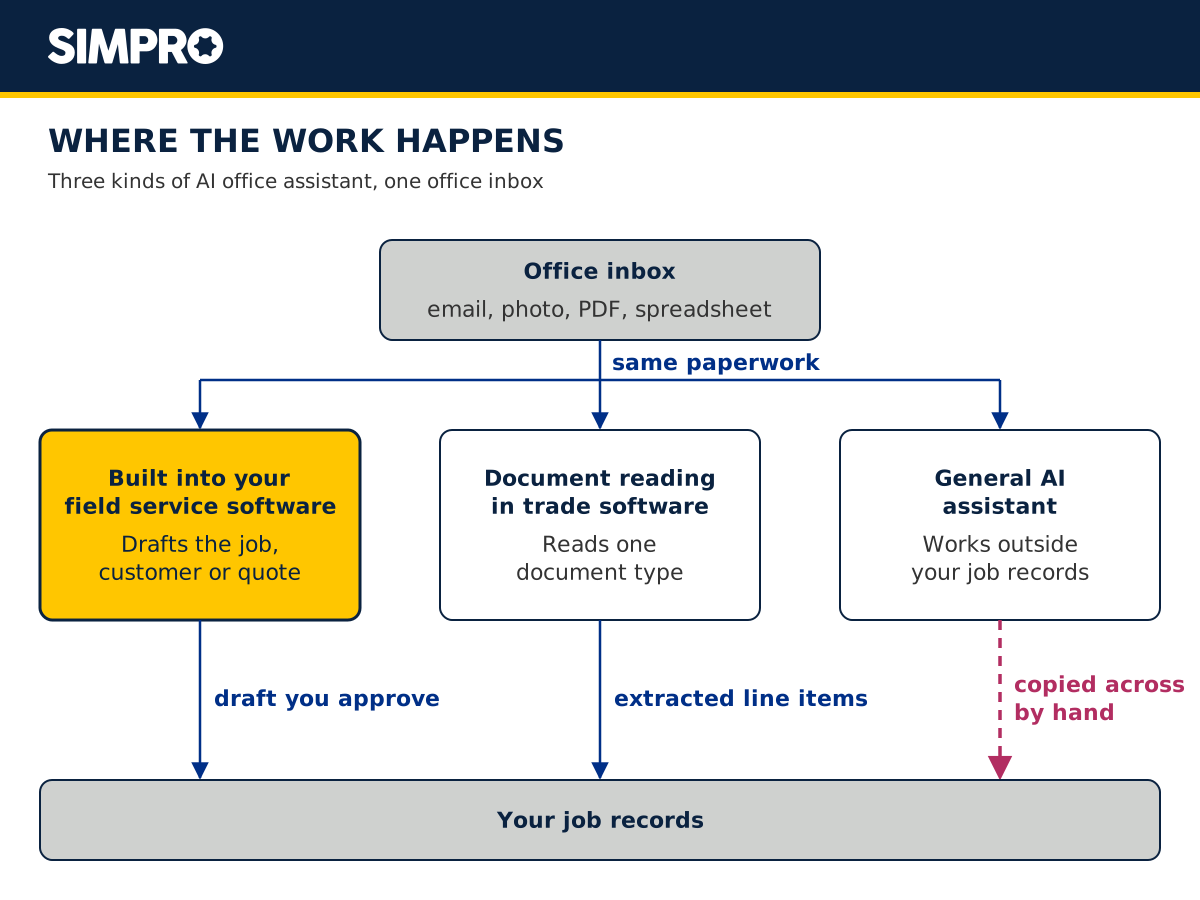
What is an AI office admin for field service?
An AI office assistant handles routine office tasks from plain-English instructions and everyday documents. For a field service business, an AI admin assistant's job is the inbox: requests, photos, PDFs and spreadsheets that someone otherwise types into the system before anyone schedules the job.
That inbox is the bottleneck. AI data entry takes over the typing and leaves your team to check the draft.
Don't confuse an AI office assistant with an AI receptionist. A receptionist answers the phone. An office assistant works the paperwork that arrives after the call.
If missed calls are your bigger problem, read about the Pulse AI receptionist that answers your calls instead. For automation from booking to payment, see AI agents across the field service job lifecycle.
How we compared AI office assistants
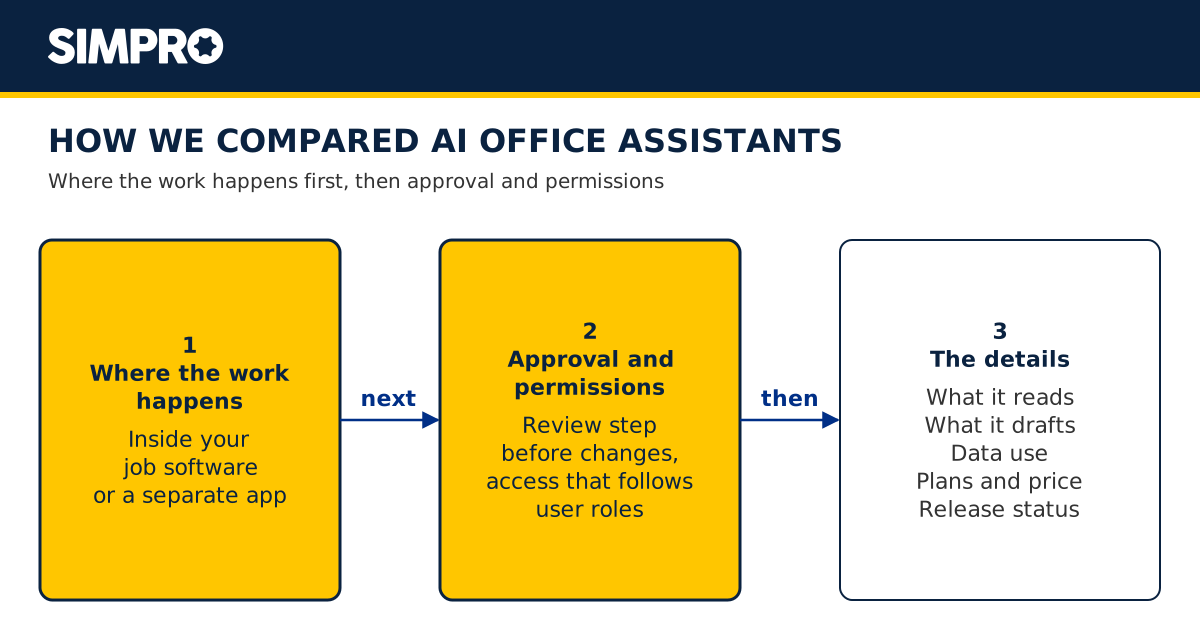
We put the same questions to every tool below, JustDo included. We looked at where the work happens first, because a draft inside your job records removes the copy-and-paste step that text from a separate app still needs. Approval and permissions came next, because an assistant that changes records needs limits.
- Where the work happens. Inside the field service software that holds your jobs, or in a separate app.
- What it reads. Typed or spoken instructions, emails, photos, PDFs, spreadsheets or receipts.
- What it drafts. Jobs, customers, quotes, invoices, expenses or schedule changes.
- Approval before changes. Whether the vendor states a review, confirmation or approval step.
- Permissions and data access. Whether access follows each user's permissions or an admin setting.
- Data use. What the vendor states about training models on your data.
- Plans and price. Whether the assistant comes with every plan, a higher tier, an add-on or a custom quote.
- Release status. Live, early access or marked coming soon.
AI office assistants built into field service software
Built-in AI office assistants work inside the platform that already holds your customers, jobs and prices. That removes the copy-and-paste step, but an AI assistant for contractors built this way comes with its platform. Each entry below covers what the tool drafts, the approval and permission controls its vendor states, and what it costs.
Simpro JustDo: the AI office admin in Simpro Lightning
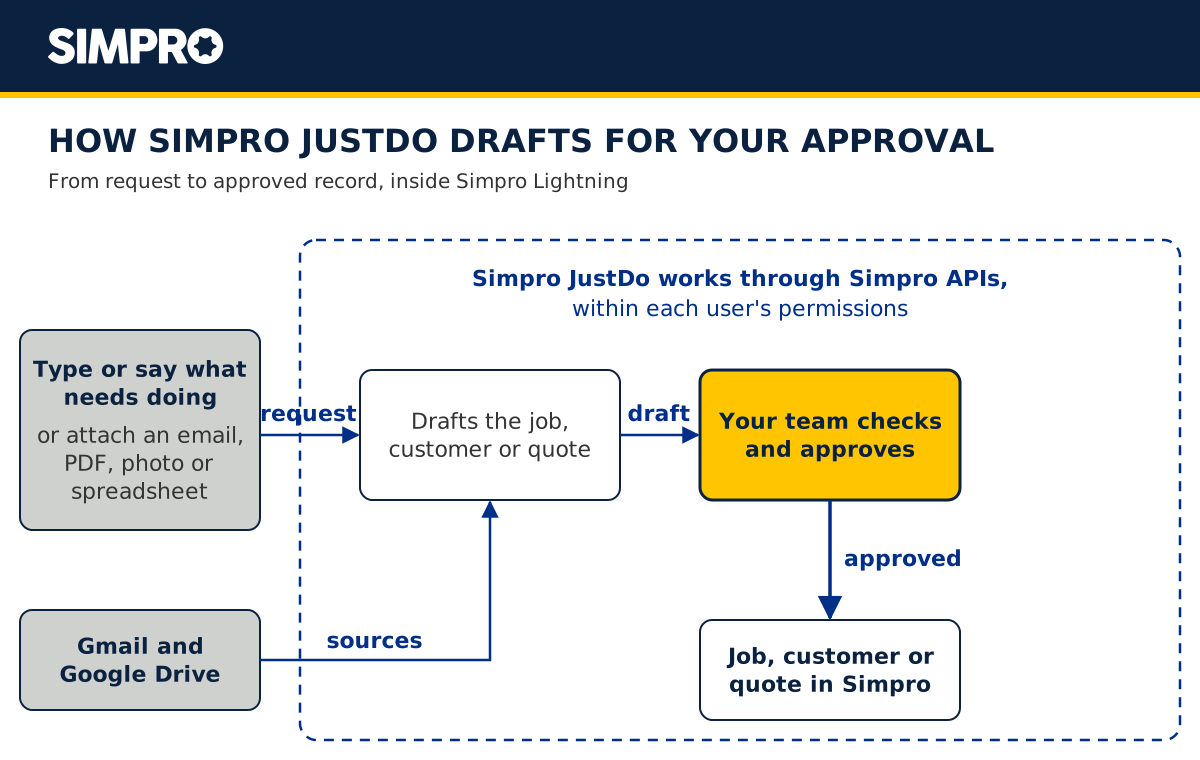
JustDo is Simpro's AI office assistant, or AI operations agent, for field service businesses. Tell it what needs doing in plain English, or hand it an email, PDF, photo or spreadsheet, and it drafts the job, customer or quote in Simpro Lightning, according to the JustDo feature page.
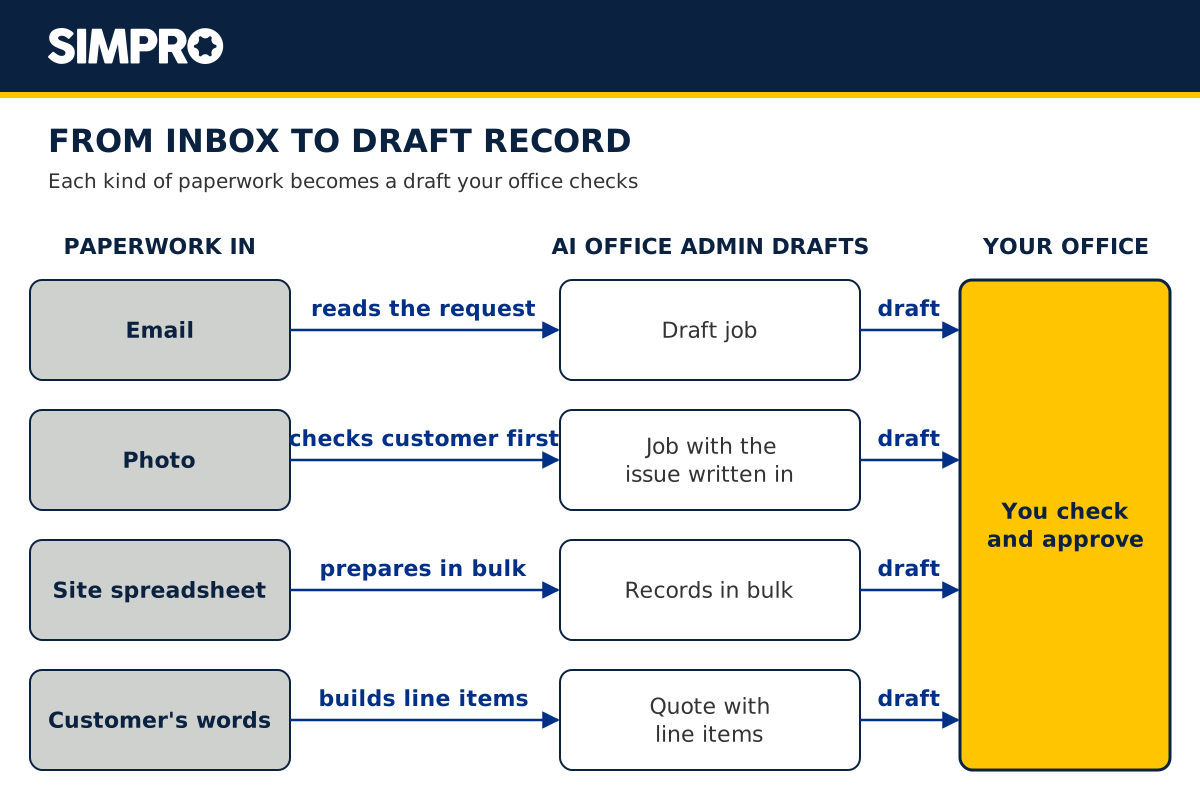
Attach an email and say "make this a job", and JustDo drafts it for you to check. Send it a customer's photo, and it checks for an existing customer first, reads the photo and writes the issue into the job description. Attach a spreadsheet of sites or planned maintenance visits, and it prepares the records in bulk for you to review. Hand it a customer's email or PDF describing the work, and JustDo builds the quote from the customer's own words, with line items for you to review.
Watch the JustDo video on YouTube
You type or say what needs doing. Gmail and Google Drive connect as sources. JustDo reaches your job data through Simpro's own APIs, within each user's permissions. Your team checks every draft and approves it before anything sensitive happens.
You get JustDo with AI field service software, Simpro Lightning, and it draws on the same credit allotment as your other Simpro Lightning features. When credits run out, usage stops rather than billing automatically.
Early Access starts November 9, 2026, and general access starts November 15, 2026, per the JustDo page. Simpro notes that JustDo won't cover every edge case yet, and feedback on every response goes to the JustDo team.
JustAsk and JustDo are separate digital workers in Simpro Lightning, and you're able to use them together. JustAsk is business intelligence that answers questions about your jobs, schedule or numbers. JustDo is the operations agent that prepares the work for you to approve.
- Who JustDo suits: electrical, plumbing, HVAC, security and fire protection offices that re-key the paperwork arriving in the inbox.
- Pricing: comes with Simpro Lightning, and usage draws on Simpro Lightning credits.
FieldPulse Maverick
FieldPulse calls Maverick the AI assistant for your office. Maverick drafts customers, jobs, estimates, invoices and 13+ more record types from plain language, typed or dictated, and every record stops on a card you review and approve. It drafts using your item list and prices, and when a customer calls for a job it finds available times with the right team.
- Who Maverick suits: offices that want one assistant to draft customers, jobs, estimates, invoices and more, each behind an approval card.
- Pricing: FieldPulse includes Maverick on all plans and prices by seat, with a custom quote.
QuoteIQ AI Autopilot
According to QuoteIQ, Autopilot reads your customers, jobs, estimates and invoices, prepares the work as a card, and nothing changes until you confirm it. It prepares invoices, books jobs, moves a rain day and builds reports. Batch actions, and actions that touch five or more records, ask you to type CONFIRM first. Attach a photo or a PDF, such as a receipt, and ask Autopilot to read it.
- Who Autopilot suits: small crews that want an AI office admin with a published monthly price.
- Pricing: QuoteIQ pricing runs from $29.99 to $699.99 per month across five plans, with AI tools included on every plan.
Fergus Assistant
Fergus says its Assistant creates a new job in one sentence and turns a supplier's PDF into a quote. It also finds information, builds and reviews quotes, prepares invoices, adjusts the schedule, drafts customer messages and runs reports. Before it creates, changes or sends anything, it shows a confirmation step, and it works with each person's Fergus user type and permissions. Fergus lists the United States among the markets it serves.
- Who Fergus Assistant suits: contractors who build quotes from supplier PDFs.
- Pricing: Fergus Essentials, built for contractors, is from $31 per month.
Jobber AI
Jobber says Jobber AI drafts quotes, and Voice in the field handles tasks like creating quotes or rescheduling jobs. Creating new items such as quotes, jobs or other records works only in Voice mode, and taking actions is available to admin users. Jobber also says you upload or forward supplier invoices and photograph receipts, and it then creates each expense and matches it to the right job.
- Who Jobber AI suits: owners who create quotes and jobs by voice from the van.
- Pricing: Jobber AI is available on all plans, and Jobber Plus includes automated expense capture.
Housecall Pro AI Team
According to Housecall Pro, its AI Team takes on repetitive tasks like booking jobs, creating marketing emails, generating business insights and analyzing data, and chases down leads, estimates and invoices. Housecall Pro includes Marketing AI, CSR AI (chat), Analyst AI, Coach AI and Help AI on all plans, while CSR AI 24/7 call answering is a paid feature.
- Who the AI Team suits: home service teams that want follow-up on estimates and invoices handled.
- Pricing: Housecall Pro plans start from $59/mo with a 14-day free trial.
ServiceTitan Atlas
ServiceTitan describes Atlas today as instant information about customer and equipment history, pulled from ServiceTitan through a conversational chatbot. It marks Atlas in the Office as coming soon, describing support for CSRs and invoice review for accounts receivable. Administrators control which Atlas capabilities each employee gets, and ServiceTitan tells users to verify details before acting.
- Who Atlas suits: fast customer and equipment lookups, with Atlas in the Office marked coming soon.
- Pricing: Atlas is a Core product available to all ServiceTitan customers.
BuildOps Agents
BuildOps describes its Agents as AI-powered support for the back office, moving work from quote to cash. Tech recommendations turn into drafted quotes, and its billing agent bills each customer the way their contract says, with only exceptions coming to your team for review. BuildOps announced that its Revenue Agent is in early access. The full Service Agent Team becomes available to BuildOps customers in January 2027, according to a BuildOps press release on Construction Dive.
- Who BuildOps Agents suit: commercial contractors with contract billing.
- Pricing: BuildOps tailors pricing to each contractor's operation.
AI document reading inside field service software
Tradify and Commusoft add AI that reads documents, such as invoice photos and supplier PDFs. These AI data entry features cut re-keying on one document type, which helps when supplier paperwork, more than the inbox, holds up your office. They're worth checking if you already know which document your office re-keys most.
Tradify says you snap a photo of any invoice and it extracts the details, and it generates descriptions from quote and invoice line items. Tradify Lite costs $47 USD per user per month.
Commusoft says its AI:den lets you drag and drop supplier PDFs to extract line items, totals and purchase order details without manual data entry. It also summarizes phone calls, drafts quotes and produces customer-ready job reports.
General AI assistants: Microsoft 365 Copilot, ChatGPT and Gemini
Outside field service software, a general AI assistant for small business handles writing and analysis. Copilot drafts emails and analyzes spreadsheets, ChatGPT Business works across the tools you connect, and Gemini works in Gmail, Docs and Meet. Below, each vendor's own page sets out what its assistant does, what it says about your data and what it costs.
Microsoft says Copilot in Outlook drafts emails and summarizes threads, and Copilot in Excel analyzes data and creates formulas and visuals. Copilot only surfaces organizational data each user already has permission to view, and prompts and responses aren't used to train foundation models. The Copilot Business add-on is from $18.00 user/month paid yearly, down from $21.00. That discount offer is available between July 1, 2026, and December 31, 2026, and the add-on requires an eligible Microsoft 365 Business plan.
ChatGPT Business connects to the tools your team already uses to find context, take action and complete work across your workflows, inside a workspace with admin controls. OpenAI prices a standard seat at $25 per user per month, or $20 billed annually, requires at least 2 seats, and won't train on your workspace's data.
Google Workspace Business Starter includes the Gemini AI assistant in Gmail, and Standard adds Gemini in Gmail, Docs, Meet and more. From Feb 23, 2027 onward, Google lists Starter at $7.00 and Standard at $14.00 per user/month, before tax. Google says it doesn't use your data for generative AI model training outside your domain without permission.
Simpro's JustDo comparison of general AI assistants puts the difference this way: with a general assistant, the work happens outside Simpro, with results copied across. JustDo works inside Simpro, on the records you already use.
Office tasks an AI office admin takes on today
The sections above go tool by tool. This map goes task by task across the tools above, so you see which ones state they handle the paperwork your office repeats every day. Start with the task that takes the most hours, and test each tool on that task with your real paperwork.
| Task | What the AI office admin does | Tools whose own pages state it |
|---|---|---|
| Email to job | Reads the request and drafts the job for you to check | Simpro JustDo |
| Photo to job | Checks for an existing customer, reads the photo, writes the issue into the job | Simpro JustDo, and QuoteIQ AI Autopilot reads attached photos and PDFs |
| Site spreadsheet to records | Prepares records in bulk for review | Simpro JustDo |
| Customer's words to quote | Builds a quote with line items from the customer's request | Simpro JustDo, FieldPulse Maverick and Jobber AI |
| Supplier PDF to quote | Turns a supplier document into a quote or line items | Fergus Assistant and Commusoft AI:den |
| Receipt to expense | Reads the receipt and fills in the expense | Jobber automated expense capture (on Jobber Plus), QuoteIQ AI Autopilot (Beginner and up) and Tradify (invoice photos) |
| Voice to record | Creates or drafts records from spoken requests | Jobber AI in Voice mode (quotes, jobs and other records), and Simpro JustDo, where you type or say what needs doing |
| Schedule changes | Finds times or moves jobs | FieldPulse Maverick finds available times, QuoteIQ AI Autopilot moves a rain day, and Fergus Assistant adjusts the schedule |
| Questions about the business | Answers from your own data | Housecall Pro Analyst AI, ServiceTitan Atlas, and Simpro JustAsk, separate from JustDo |
Double entry is worth cutting with or without AI. In the Infinite Audio Video Solutions case study, the business reports that 50% less time is spent on data entry. That result comes from the customer's use of Simpro, not from JustDo or any AI tool.
Tim B., a senior manager, made a similar point about the Simpro platform in a Capterra review of Simpro: "This allows a business to grow without adding the extra admin." His review predates JustDo, so it speaks to the platform, not to the AI office assistant.
How AI office assistant pricing works
AI office assistant pricing follows five models: included on every plan, included from a higher plan, a per-user add-on, a tailored or custom quote, or usage credits. The model matters more than the headline figure, because an add-on per user grows with your office team while an included assistant doesn't. Check which model applies before you compare prices.
-
Included on every plan. FieldPulse includes Maverick on all plans, Jobber makes Jobber AI available on all plans, and QuoteIQ includes AI tools on every plan from $29.99 per month.
-
Included from a higher plan. Jobber includes automated expense capture in Jobber Plus.
-
Per-user add-on. Microsoft 365 Copilot Business is from $18.00 a user per month, paid yearly, under its 2026 discount offer. ChatGPT Business is $25 per user per month or $20 billed annually.
-
Tailored or custom quote. BuildOps tailors pricing to each contractor's operation, and FieldPulse is seat-based with a custom quote.
-
Usage credits. Simpro JustDo comes with Simpro Lightning and draws on the same credit allotment as your other Simpro Lightning features.
If you're still choosing a platform, compare the AI features in field service software alongside the assistant, since a built-in assistant works inside the platform you pick.
Best AI office assistant by situation
Pick two or three AI office assistants to trial from the row that sounds most like your office. Each row pairs a business situation with the tools whose own pages state the features it needs. Then run the checklist below on each tool you shortlist before it touches a live job record.
| Your situation | Shortlist to trial | Why these tools fit |
|---|---|---|
| Emailed repair requests, customer photos and site spreadsheets fill your inbox | Simpro JustDo, QuoteIQ AI Autopilot | JustDo turns an emailed request into a draft job and prepares spreadsheet records in bulk for review. Autopilot reads attached photos and PDFs |
| You want an assistant that drafts records behind an approval step | FieldPulse Maverick, Simpro JustDo | Maverick puts each drafted record on a card you approve. JustDo asks for approval before anything sensitive happens |
| A small crew watching the monthly bill | QuoteIQ AI Autopilot, Fergus Assistant | QuoteIQ starts at $29.99 a month with AI tools on every plan. Fergus Essentials is from $31 per month |
| Your quotes start from supplier PDFs | Fergus Assistant, Commusoft AI:den | Fergus turns a supplier's PDF into a quote. AI:den extracts line items, totals and purchase order details |
| You'd rather say what needs doing than type it | Jobber AI, Simpro JustDo | Jobber's Voice mode creates quotes, jobs and other records, with actions available to admin users. With JustDo, you type or say what needs doing |
| Receipts and supplier invoices pile up | Jobber (automated expense capture), QuoteIQ AI Autopilot, Tradify | Jobber's expense capture comes with Jobber Plus. QuoteIQ reads receipts on Beginner and up. Tradify extracts details from an invoice photo |
| Your office lives in Outlook, Excel, Gmail or Docs | Microsoft 365 Copilot, Gemini in Google Workspace, ChatGPT Business | Copilot drafts emails and analyzes spreadsheets. Gemini works in Gmail, and in Docs on Standard. ChatGPT Business connects to the tools your team already uses. Copilot and Gemini work outside your job records |
Before an AI office assistant touches your job records: a checklist
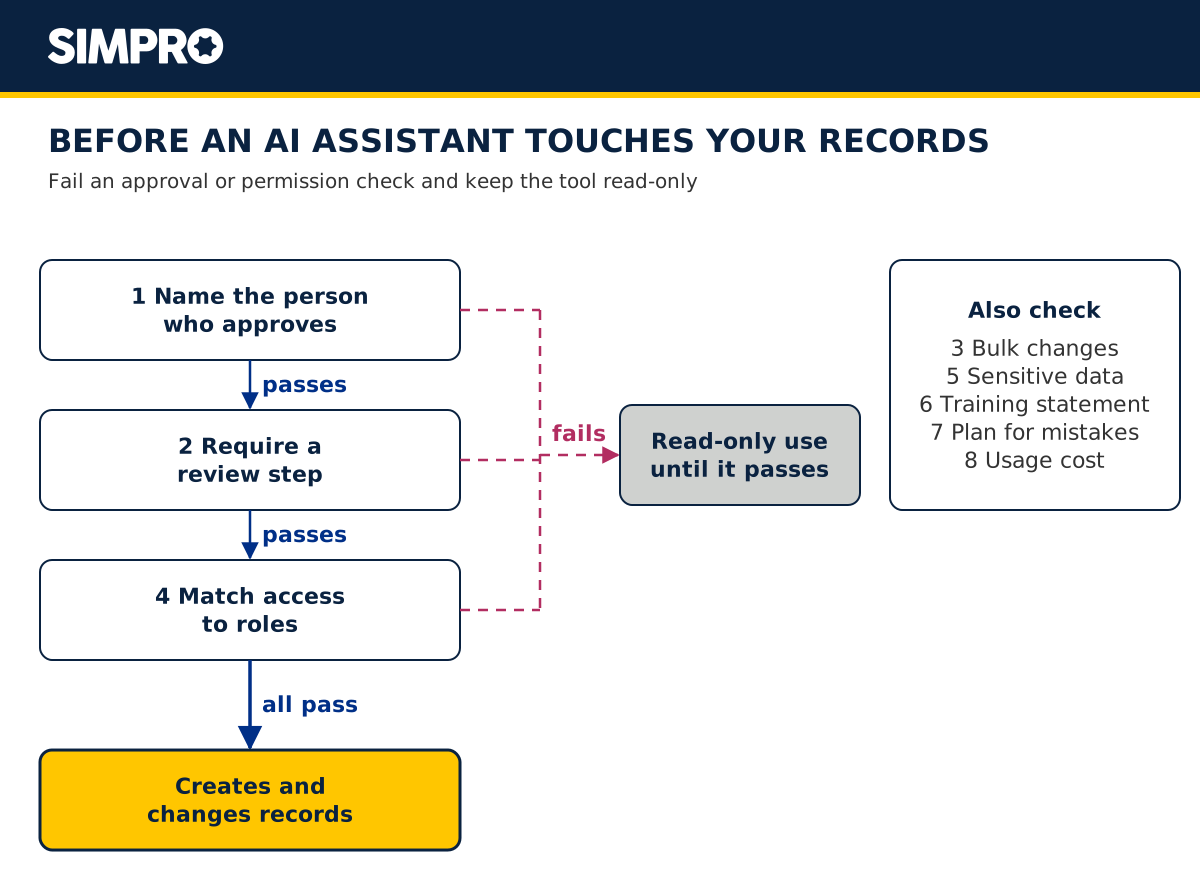
Run these checks before you let any AI office assistant create or change a record. Send every vendor on your shortlist the same questions in writing, and compare their answers with the controls in this list. Keep a tool that fails the approval or permission checks in read-only use until it passes.
-
Name the person who approves. The NIST AI Risk Management Framework says human roles and responsibilities in decision making and overseeing AI systems "need to be clearly defined and differentiated." Human-AI setups range from fully autonomous to fully manual, so decide where yours sits.
-
Require a review step. Simpro JustDo asks for approval before anything sensitive happens. FieldPulse stops every record on a card you approve, QuoteIQ changes nothing until you confirm, and Fergus shows a confirmation step before it creates, changes or sends anything.
-
Guard bulk changes. QuoteIQ asks you to type CONFIRM before actions that touch five or more records. Ask every vendor how its assistant handles a bulk update.
-
Match access to roles. JustDo works within each user's permissions, and Fergus Assistant follows each person's user type and permissions. ServiceTitan administrators control which Atlas capabilities each employee gets, and Jobber makes taking actions available to admin users.
-
Limit the sensitive data you share. SBA guidance for small businesses advises having another person review AI output and not feeding sensitive data or proprietary information into AI tools. NIST also lists privacy values such as confidentiality and control as guides for AI design and deployment, per its AI RMF trustworthiness characteristics.
-
Read the training statement. Microsoft says Copilot prompts and responses aren't used to train foundation models. OpenAI says it won't train on a ChatGPT Business workspace's data. Google Workspace says your data isn't used for generative AI model training outside your domain without permission.
-
Plan for mistakes. ServiceTitan warns that Atlas "may generate inaccurate, incomplete, or outdated responses", and Simpro notes that JustDo won't cover every edge case yet. Spot-check the first few weeks of drafts.
-
Know what usage costs. Ask each vendor whether it caps usage, includes it in the plan or bills it per seat, and check which pricing model above applies.
Frequently asked questions
What is the best AI office assistant for a field service business?
The best AI office assistant for a field service business drafts jobs, customers and quotes inside your field service software and waits for your approval. Simpro JustDo, the AI office assistant that drafts jobs inside Simpro Lightning, suits offices re-keying emails, photos, PDFs and spreadsheets. For other needs, compare FieldPulse Maverick, QuoteIQ AI Autopilot and the other tools above.
What does an AI office admin do?
An AI office admin handles routine office tasks from plain-English instructions and everyday documents, as Simpro's JustDo feature page defines an AI office assistant. In field service, that means turning an emailed repair request, a customer photo or a site spreadsheet into draft jobs, customers or quotes that your team checks and approves.
What is the difference between an AI office admin, an AI office assistant and an AI operations agent?
All three names describe AI that takes routine office work off your team. Simpro's JustDo page calls JustDo both its AI office assistant and its AI office admin. Commercial Integrator calls it an AI operations agent that handles routine office admin inside Simpro Group's field service platforms.
Whatever the name, judge the tool by what it drafts, where the work happens and whether it waits for your approval.
Can AI do data entry from emails, PDFs and photos?
Yes. JustDo drafts the job, customer or quote in Simpro Lightning from an email, PDF, photo or spreadsheet for you to review. From a customer's photo, it checks for an existing customer first. Review each draft before you approve it, whichever assistant you choose.
Should an AI office assistant make changes without approval?
No. Keep a named person approving changes to jobs, customers and invoices. The NIST AI Risk Management Framework says human roles in decision making and overseeing AI systems "need to be clearly defined and differentiated." Choose an assistant that shows a review or confirmation step, and spot-check its drafts while your team learns how it behaves.
Is it safe to let an AI assistant use your customer data?
Set limits before you share customer data: choose an assistant that works within each user's permissions, and keep sensitive data out of it. SBA guidance for small businesses advises against feeding sensitive data or proprietary information into AI tools. An assistant inside your platform, such as JustDo, reaches job data through Simpro's own APIs, within each user's permissions.
Do I need Simpro Lightning to use JustDo?
Yes. JustDo comes with Simpro Lightning, according to the JustDo feature page, and it draws on the same credit allotment as your other Simpro Lightning features. When credits run out, usage stops rather than billing automatically. Early Access starts November 9, 2026, and general access starts November 15, 2026.
See JustDo turn an email into a job
If your office spends its day re-keying emails, photos and spreadsheets, test an AI office assistant on that paperwork. Bring a real repair request, a site spreadsheet and a supplier PDF, and see what each AI office admin drafts and asks you to approve. Book a Simpro demo and watch JustDo turn that repair request into a job you approve.


 Back to top
