
A technician opens an electrical room panel and finds a switchboard with an illegible tag and no service history. They have to stop working and call the office for guidance. A contractor who's serious about managing customer assets and equipment registers for commercial electrical maintenance shouldn't be fielding either problem.
For too many contractors, that information is probably sitting in a spreadsheet or PDF, along with last year's test results. The same transformer might be logged twice under different names. Those gaps can go unnoticed until a customer asks for proof before signing a maintenance renewal. If you can't produce it, you're negotiating from behind — and might lose the account to a better-prepared competitor.
Now that NFPA 70B is a standard for commercial electrical systems, an insurer or jurisdictional authority can cite the standard directly. But the standard is also an opportunity: Having a register that tracks condition scores, test history, and documented intervals proves you're following the maintenance plan included in the contract.
What Is an Electrical Asset Register?
An electrical asset register encompasses every switchboard, panelboard, transformer, motor control center, automatic transfer switch, uninterruptible power supply system, generator, and lighting control system under contract. The register ties each asset to its physical location, condition, and what work has been performed. It's built to be searched, scheduled against, and audited, not just read top to bottom.
A general customer database or static equipment list might look similar to an asset register, as they each describe what's out there. A working electrical asset register goes further and informs what happens next: which assets are due for service, which are trending toward failure, and which are aging out of useful life.
What Should an Electrical Asset Register Include?
A standalone electrical equipment register might list every piece of gear, but that won't get you past the first renewal conversation unless it also lists location, criticality, and condition. NFPA 70B requires equipment to be uniquely identified and tracked, with maintenance history that's tied to each asset.
The table below illustrates what that looks like on a commercial electrical job.
| Register Field | What It Captures |
|---|---|
| Nameplate data | Manufacturer, model, serial number, voltage, ampacity, AIC/interrupting rating, phase, kVA/kW rating, and year of manufacture |
| Unique asset ID | A tag number that remains even after a replacement |
| Location hierarchy | Customer, site, building, floor, and electrical room, down to the upstream feeder or panel |
| Criticality | How much operational or safety impact a failure would cause |
| Operating environment | Heat, moisture, dust, vibration, or other conditions that accelerate wear |
| Condition score | Current physical state, as rated on a defined scale |
| Test and inspection history | Insulation resistance, contact resistance, breaker trip timing, thermography, and other results, trended over time |
| Arc-flash label status | Whether the label matches the current study and when it was last updated |
| Warranty coverage | Start date, end date, and what's covered |
| Photos and documents | Nameplate photos, test reports, and inspection records attached to the asset |
Filling in the table once is easy. The trickier task is keeping it accurate over time — and across every customer, site, and maintenance visit.
How to Manage Customer Electrical Asset Registers Across Commercial Maintenance Work
Below are nine best practices for maintaining a register as part of a commercial maintenance program. Skipping even one of them can turn a promising register stale within a year.
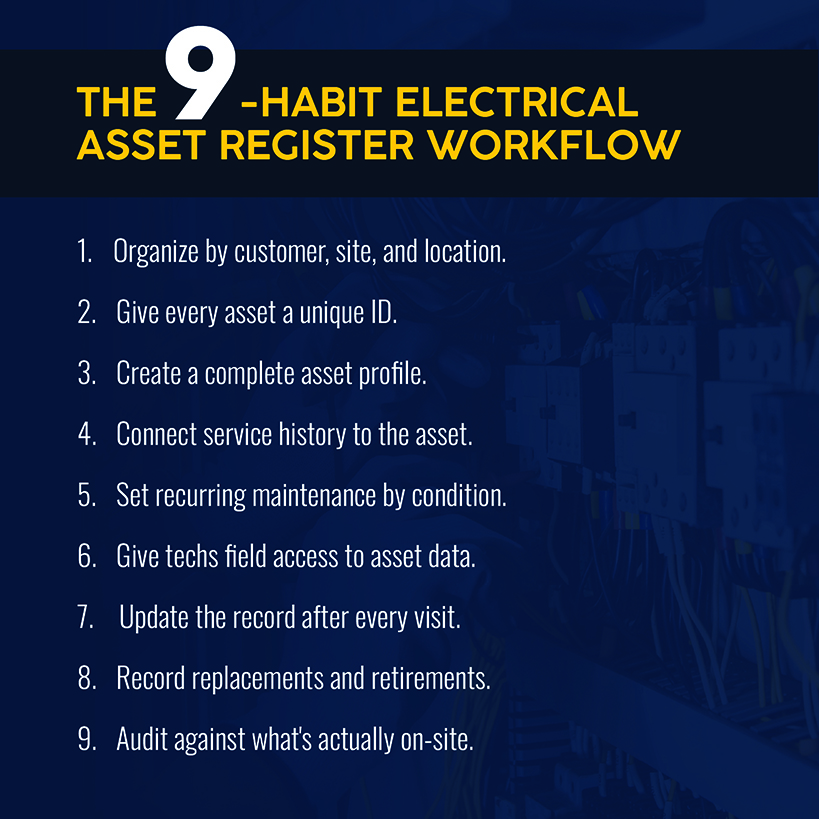
Organize Assets by Customer, Site and Location
Every asset needs a location path with the following hierarchy:
- Customer
- Site
- Building or unit
- Floor
- Electrical room, panel, or feeder it hangs off
Skip a level, and multisite accounts become a flat list that's difficult to parse when customers have more than two or three properties.
Another consideration is when the handoff includes Construction Operations Building Information Exchange (COBie) or building information modeling (BIM) data. The NBIMS-US COBie specification organizes equipment using OmniClass categories, with individual installed assets mapped to a type record and a room. Aligning your building and room levels to that structure — with customer and site layered above — avoids creating a second, disconnected asset list.
Related: Find out how to improve your customer asset management practices.
Give Every Electrical Asset a Unique ID
Duplicate assets are the most common way a register becomes unreliable: A field tech can't find the panel they're looking for, assumes it was never logged, and creates a new entry. Now the same transformer has two records with different service histories, and neither is complete.
The fix is assigning a unique tag number that's printed or engraved onto the asset. Never reassign it, even if you replace the physical unit. In addition, create a controlled naming convention for manufacturer and equipment type, instead of free text. That way, you can detect duplicates based on serial number plus location, instead of relying on a tech's memory.
Create a Complete Asset Profile
Complete asset profiles have every field filled out when the asset gets created, including a mandatory nameplate photo, as a blurry or missing nameplate creates confusion in the field.
Condition scoring belongs in the asset profile, too. NFPA 70B's equipment condition assessment requires separate scores covering physical condition, criticality, and operating environment. The maintenance interval is set by whichever score comes back worst. A worst-case score can result from multiple avenues: missed cycles, continuous condition monitoring, and predictive techniques flagging a problem.
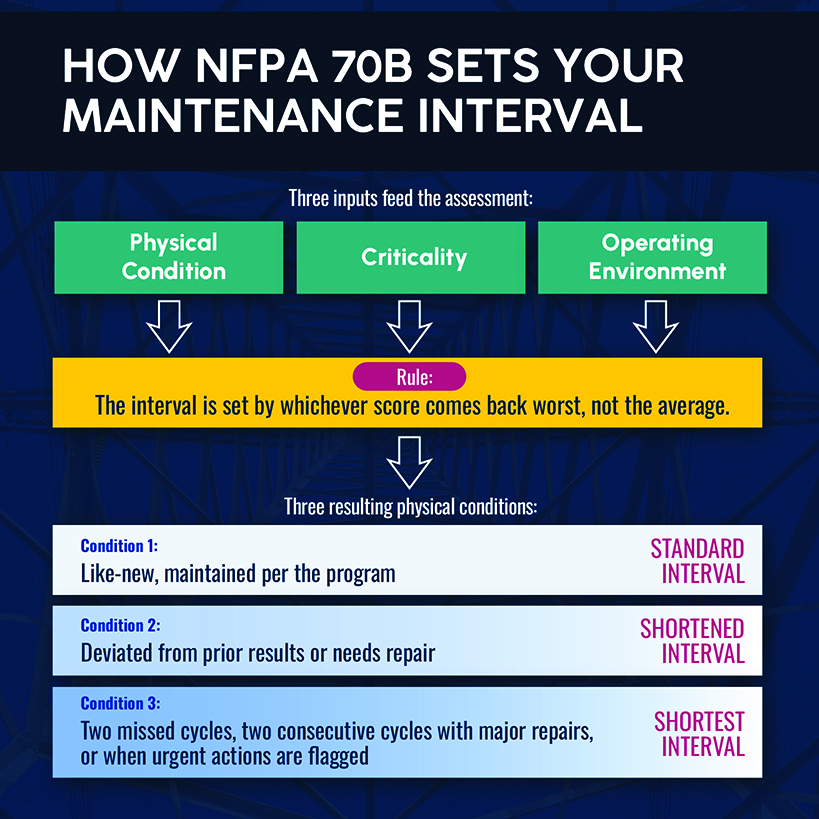
For example, an asset is in like-new physical shape but sits inside a hot, dusty mechanical room. It receives a shorter interval because of the environment score, even though the physical condition suggests a longer interval.
For an operational fix, store the three individual scores and the assessment date together so the resulting schedule can be audited later.
Connect Service History to the Individual Asset
Every job, test result, checklist, and deficiency should attach to the specific asset it touched, not just to the work order or site visit.
A work order tells you what happened on one Tuesday. An asset-level history tells you whether that transformer's insulation resistance has dropped for three visits running — the kind of baseline deviation that likely meets NFPA 70B's Condition 2 criteria. Without that trend line attached to the asset, every visit gets evaluated in isolation, without the warning signs that could prevent a full failure.
Set Recurring Maintenance Against the Assets That Require It
Some electrical contractors default every asset to an annual preventive maintenance visit. But a better strategy is setting intervals by asset.
The Department of Energy's operations and maintenance guidance lays out these steps for reliability-centered maintenance:
- Build a master equipment list
- Prioritize components by criticality
- Group them logically
- Set task type and frequency using manufacturer guidance, history, and engineering judgment.
Failing to follow these or similar steps means you're guessing at intervals. The same DOE guidance puts a number on that guess: Reactive maintenance runs about $18 per horsepower per year against $13 for preventive maintenance, while predictive maintenance is even more cost-effective.
Related: Our guide to recurring maintenance shows how to scale without sacrificing quality.
Give Technicians Access to Asset Information Before and During the Job
Your register's asset data is more effective when techs can show up to a customer site armed with the asset's maintenance history, nameplate photo, and last condition score. Without that data, routine visits turn into extra truck rolls simply because the necessary information wasn't available on demand.
Mobile access to the register — scoped to the specific job — closes that gap. In-the-field access also allows field techs to input data against the correct asset ID instead of creating a new line item, which maintains the register's accuracy and freshness.
Related: Learn which electrical job management software gives field teams what they need on a commercial job.
Update the Asset Record After Each Service Visit
Your register loses accuracy if the record isn't updated as work gets performed. Here's what a proper update looks like:
- Condition scores get reassessed, not copied forward.
- Test results get logged against the specific asset, not filed as a PDF in a shared drive.
- Any deficiency gets flagged with a level of severity and a recommended fix.
Help your technicians by offering tightly defined, structured fields for a condition rescore, test result, or deficiency, rather than a free-text box that invites a paragraph a supervisor has to parse later.
Related: Start with an electrical inspection checklist to standardize what gets checked and logged on every visit.
Record Equipment Replacements and Retirements
When a panel, transformer, or other piece of electric equipment gets swapped, the register should be clearly updated to reflect that. The retired asset gets marked as replaced, with a link forward to the new asset ID so anyone pulling up the service history can trace the life cycle.
This especially matters when working on older buildings, where switchboards and panels might have been installed decades earlier without thorough logging. When your register tracks replacements cleanly, you convert that age profile into a long-term forecast.
Audit the Register Against What's On-Site
A register that hasn't been checked against the field can't be trusted, no matter how complete it looks on screen. Between audits, records lose their parent location, duplicate entries emerge, and nameplates go missing or are illegible.
A quarterly walk-through can reconcile the register against what's physically on-site, catching any drift before it becomes part of an uncomfortable renewal conversation. Report the completeness score to the customer's facility manager each time, with the audit becoming part of the proof. The audit doesn't need to be exhaustive every quarter, just consistent enough that gaps get caught quickly.
What to Look for in Electrical Asset Management Software
A well-run electrical asset register quickly outgrows spreadsheets, often after a contractor picks up their third or fourth multi-site account. Here's what to look for in dedicated software:
- Site/asset hierarchy mapping: This structure nests from the customer down through site, sub-site, asset, and component — mirroring the location hierarchy that owners already expect. Asset tracking stays consistent across multi-building portfolios.
- Condition-based scheduling: Maintenance schedules adjust automatically when a condition score changes, instead of staying frozen until someone remembers to update them.
- Asset-level service history: Every job, test result, checklist, and deficiency is attached to the specific asset. Test results trend over time, so a downward pattern emerges before it becomes a failure.
- Deficiency-to-quote conversion: Findings from the field become quotes without manual re-entry. Register-wide filters (age, worst condition score, expired warranty, repeat findings) surface candidates for prioritized repair and replacement.
These features turn your register's data into a renewal and upsell pipeline, reducing downtime on the assets that put maintenance contracts at risk.
Simpro® is built around that same structure. The asset register holds nameplate and attribute data, photos, and documents, all mapped to a customer-to-site-to-asset hierarchy. The maintenance planner turns condition scores into scheduled jobs, tasks, and test checklists, so intervals shift automatically as condition changes. Every job, test result, and deficiency attaches to the individual asset, producing the year-over-year trend line that turns a renewal conversation into a data-driven decision instead of a guess.
Register-wide filters surface the deficiencies worth quoting, and those findings convert to quotes without anyone re-entering them by hand. It's the same workflow that more than 250,000 users worldwide rely on to run their service businesses.
Related: Learn about the asset maintenance strategy software that supports this kind of maintenance program.
Turn Your Electrical Asset Register Into a Working Maintenance System
Your team is probably already following some of these recommendations. Most commercial electrical contractors have addressed the steps that caused them pain in the past, but maybe they haven't tackled the others quite yet.
Simpro connects your asset register, maintenance planner, mobile field app, and quoting workflow so tag numbers, condition rescores, and deficiency-to-quote conversion happen inside the same system your technicians are already using to close out jobs. Field data turns into informed decisions instead of guesses.
With the right software, your register moves from the maintenance team's side project into something that survives staff turnover, holds up when a customer asks for proof, and keeps your maintenance business from having to win every contract on price.
Schedule a demo to see what that looks like running on your accounts.


 Back to top