
The average commercial trade business closes the year at 6% net profit. The best-run operations are at 24%, and AI in field service management is a big part of how they're pulling ahead.
That 18-point gap rarely comes down to better technicians or trucks. It’s about what happens between the initial call and the invoice getting paid: how fast a job gets scheduled, whether the tech has all the details before knocking on the door, how long it takes to write up the job afterward, and whether anyone catches equipment failures before they occur. Closing the gap starts by fixing those parts of the job because they’re eating hours without adding revenue.
This guide covers where AI-driven tools fit in a job's life cycle, seven concrete ways they change daily operations, how to measure success, and what's coming next as AI agents take on more of the end-to-end work.
What Is AI in Field Service Management?
It's easy to talk about artificial intelligence like it's one general-purpose tool, but in field service, AI has several distinct capabilities. AI in field service management is software that uses machine learning, natural language processing, and predictive analytics to handle tasks that used to require a person reading through job histories or consulting a map.
Point AI at scheduling, and it dispatches technicians by skill and location. The Simpro RAIN AI field service management release wave is relevant where that scheduling context needs more intelligence. Point AI at a technician speaking out loud, and voice notes become a structured job record without anyone typing a word.
The difference between AI in field service and generic business AI comes down to the data you’re using. AI-powered tools built on job data, not just generic text, produce recommendations a dispatcher can act on. That's the practical test for AI field service management software: Does it improve the decisions your team makes today?
Related: Field service management software features: See what a connected FSM platform looks like before layering in AI.
Where AI Fits Across the Field Service Job Life Cycle
Most conversations about AI for field service management jump straight to a feature list. It's more useful to go through the timeline of a real-life job, as that’s where you get the ROI — or don’t.
Before the Job: Better Intake, Quoting, and Job Preparation
Job prep starts before a technician gets in the truck. AI-driven job-preparation tools pull customer history, equipment records, site notes, and prior service calls into a single briefing, giving the tech a simple, two-minute review document. For electrical contractors running commercial service calls, that briefing might flag capacity issues in the customer's panel from eight months ago, along with the parts required for similar jobs.
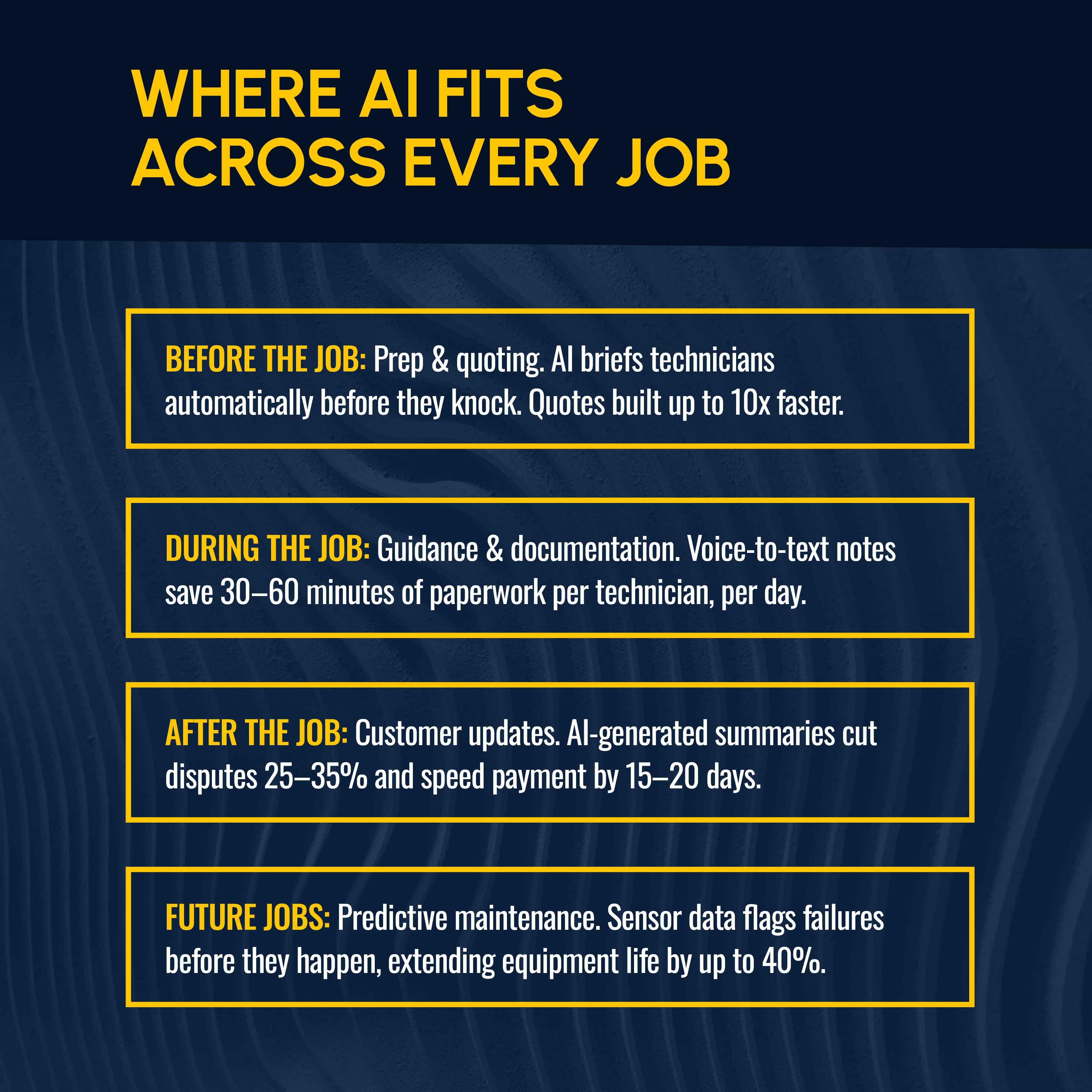
AI-assisted quoting compresses the other end of this stage. When Simpro® customers generate estimates with AI-assisted job prep and pricing tools, they report building quotes up to 10x faster than manual write-ups. Faster quoting correlates to revenue, as many customers go with whichever company sends a reasonable quote quickest.
Simpro Lightning's JobReady agent builds that pre-job briefing automatically, potentially increasing first-time fix rates to 90% or more compared with the industry average of 75%.
The operational fix: If technicians show up to jobs without knowing what happened on the last visit, that's a data access problem. Solve that first with AI-driven job prep.
During the Job: Technician Guidance and Faster Documentation
Field technicians lose time on two things once they're on-site: figuring out what's wrong, and writing down what they did afterward. Both cost billable hours.
AI job-support tools handle diagnostics by surfacing troubleshooting guidance and equipment manuals for the exact model. Your technicians can access this on their phone or tablet instead of calling back to the shop or guessing.
For example, a plumbing technician encounters an unfamiliar tankless water heater. Rather than sit around waiting for a supervisor to call back, they can pull model-specific fault codes on the spot. That speed and accuracy can make the difference between a first-time fix and a second truck roll.
AI tools handle documentation with voice-to-text technology: A technician talks through what they found and fixed, and the system turns it into a structured job record automatically.
Here’s the math on documentation: A technician loses 45 minutes a day to paperwork, which adds up to nearly 190 hours a year — more than 4 full workweeks of billable time. Apply that to a 10-technician HVAC crew at a $75 loaded hourly rate, and that's roughly $141,000 a year in lost billable capacity. All because your technicians are writing job notes.
Simpro Lightning's JobScribe agent is built to close that gap, cutting 30–60 minutes of daily paperwork per technician.
The operational fix: Voice-to-structured-record documentation saves time without adding headcount. It's the fastest payback of any AI tool on this list because the biggest cost is what you’re paying for nonbillable hours.
After the Job: Clear Customer Updates and Fewer Billing Disputes
The job isn't done when the technician leaves. A plumbing contractor who makes an emergency water heater replacement still has to invoice accurately, explain what was done, and get paid while avoiding disputes about the bill. Many trade businesses lose margin not on the work performed, but when customers push back on an invoice they don’t understand.
AI-generated job summaries turn technician notes into a clear, customer-facing explanation of the work and the charges, and they’re automatically sent after the visit. This step alone creates a better customer experience than an itemized bill with no context.
Simpro Lightning's JobBrief agent cuts post-job disputes by 25%–35% and accelerates payment by 15–20 days. For a business collecting $80,000 a month in receivables, shaving even 15 days off the average payment cycle frees up significant working capital.
The operational fix: Tighten up the documentation feeding the invoice. When customers understand the charges, they pay faster and without complaint.
Across Future Jobs: Predictive Maintenance and Proactive Service
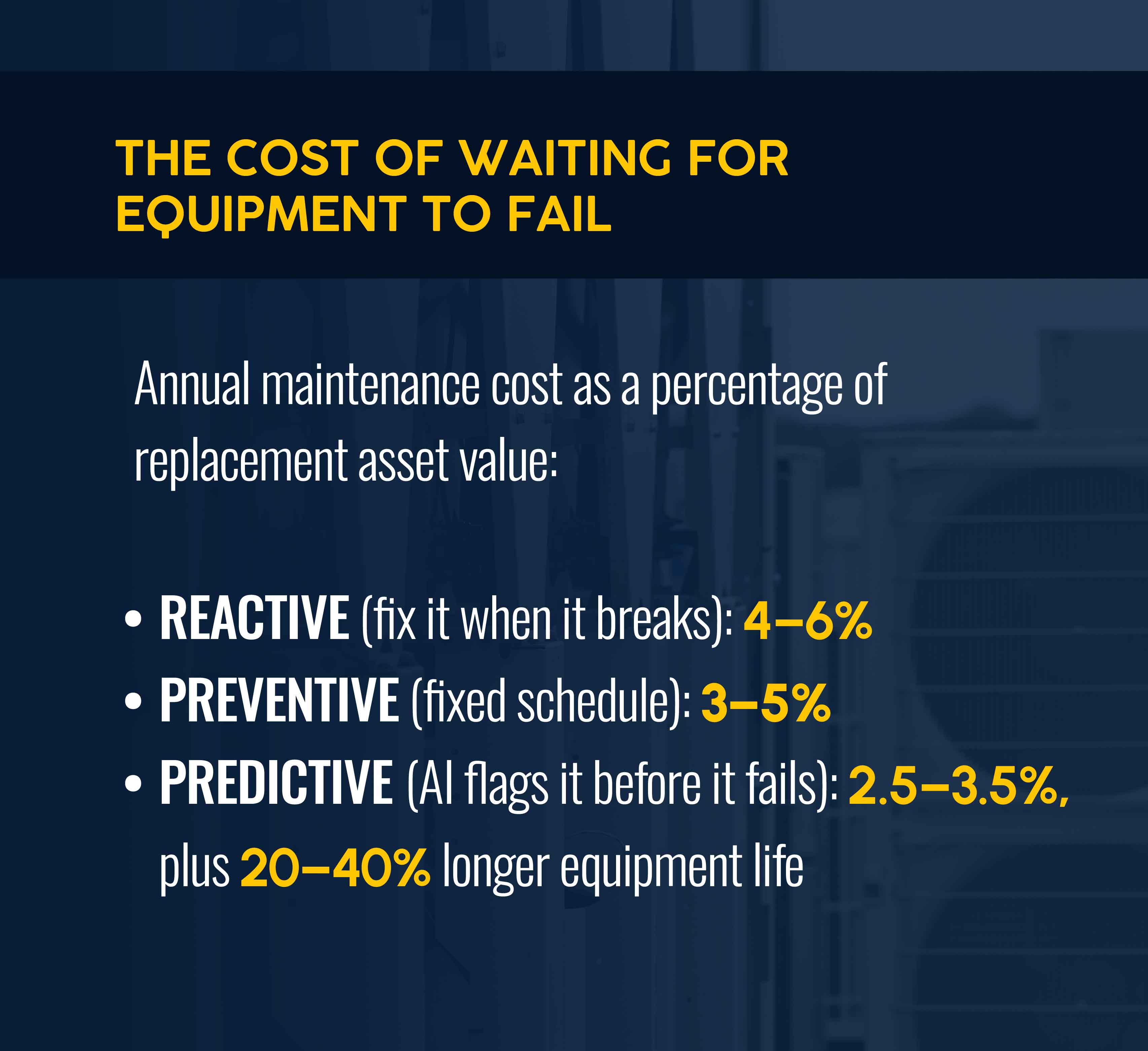
Predictive maintenance (a form of proactive maintenance) is where the return compounds. Instead of reacting after a unit fails or tying scheduled maintenance to a fixed calendar, AI analyzes sensor data, service history, and usage patterns to flag when equipment is likely to fail. In effect, it learns to predict maintenance needs before they turn into emergency calls.
Predictive maintenance is long-established as a benefit. The U.S. Department of Energy estimates that predictive maintenance saves 8–12% over fixed-schedule preventive programs and up to 40% over reactive maintenance. Mature predictive programs, meanwhile, can extend equipment life by 20–40% and reduce unplanned downtime by 30–50%, according to McKinsey.
For HVAC contractors offering maintenance agreements, this is the highest-value use case of AI, but also the least commonly deployed. Start by deploying IoT sensors on customer equipment during routine maintenance visits, and build a failure-pattern dataset over six to 12 months.
The operational fix: Treat every maintenance visit as an opportunity to collect data. That's what turns predictive maintenance from a sales pitch into a habit that compounds.
Related: See real contractor results from Simpro customers who offer predictive service programs.
7 Ways AI Improves Field Service Operations
If you're researching AI for field service and trying to figure out where to start, the top use cases cluster around seven areas that touch nearly every part of service delivery. Most apply whether you're running HVAC, electrical, plumbing, or some combination:
- AI-powered scheduling and dispatch. Assign technicians by skill, certification, location, and urgency in seconds instead of waiting for a dispatcher to work the board. Smart dispatch alone delivers a 20–30% productivity lift, according to Boston Consulting Group's 2025 field service research.
- Real-time route optimization. Cut total mileage 15–30% while reducing travel time between stops, per Geotab's 2025 State of Field Service report. Let’s assume a 10-truck fleet averages 1010 miles a day per truck, with variable operating costs of $0.35–$0.50 per mile. A 15% mileage reduction saves $13,000–$18,500 annually before accounting for reduced vehicle wear and tear.
- Predictive maintenance. Flag failing equipment before it fails, reducing maintenance costs by 30–40% versus a reactive approach, per the U.S. Department of Energy.
- Voice-to-text job documentation. Turn spoken technician notes into structured job records, cutting daily admin time. You also avoid the copy-paste errors that come from writing notes hours later instead of on-site.
- Inventory and parts forecasting. Predict which parts you’ll need based on job type and history. Trucks stock what's most likely to get used instead of guessing. Treating inventory management as a scheduling input means fewer trips back to the supply house and more billable hours in the day.
- AI-powered customer communication. Handle after-hours calls and automatic status updates, closing the customer service gap outside business hours. Roughly 45% of inbound calls go unanswered at home services businesses. For a $2 million plumbing or HVAC business, that gap represents hundreds of thousands of dollars in potential revenue you never learn about.
- Conversational reporting. Ask a plain-English question about job profitability or technician performance and get an answer instantly based on real-time data. Decisions are data-driven rather than by feel. Simpro's JustAsk agent works this way.
How to Measure the Impact of AI in Field Service Management
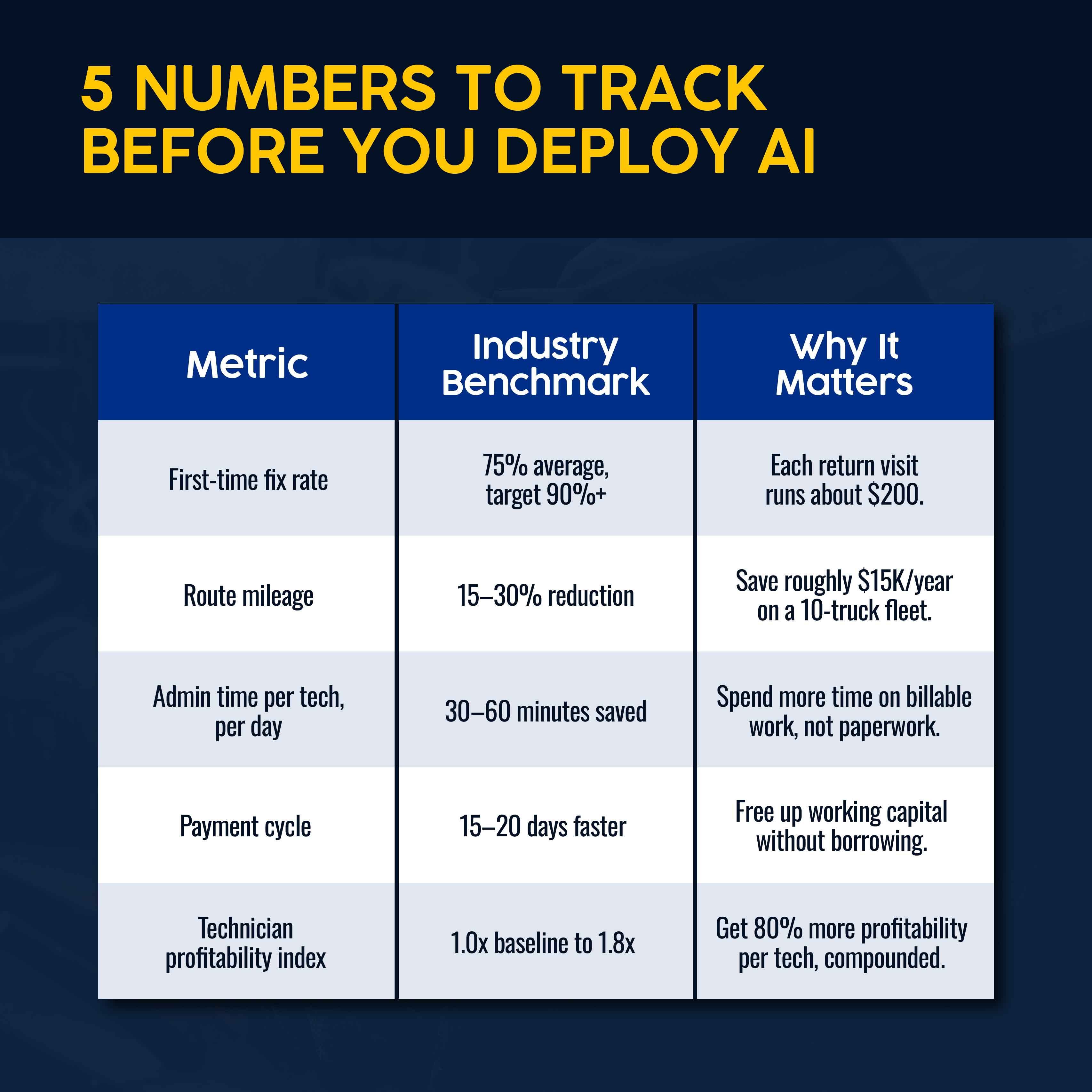
Deploying AI is the easy part. Knowing whether it's working requires choosing which metrics to track and establishing a baseline for comparison. But many field service teams skip those steps in their rush to get started. Here are metrics you’ll want to consider:
- First-time fix rate. The industry average is 75%. Each return visit runs roughly $200 in technician time, fuel, and rescheduling. On a 10-technician team completing 80 jobs a day, moving FTFR from 75% to 85% eliminates about eight return visits a day. That’s worth about $400,000 a year in recovered productivity. If your FTFR is below 75%, start here.
- Route mileage and fuel cost. Benchmark against a 15–30% mileage reduction within the first three months of deploying AI. If you fall short, fine-tune the routing logic.
- Admin time per technician per day. Aim for 30–60 minutes saved daily with voice-to-record documentation. Most businesses haven’t timed this, so you’ll want to get a baseline first.
- Payment cycle time. Benchmark against 15–20 days faster collection with AI-generated job summaries. If your average is 30 days or more, improvement will generate an immediate financial impact.
- Aggregate technician output. BCG's field service model shows the compounding effect of higher technician productivity. Companies can see an 80% increase in per-technician profit once scheduling, guidance, admin, and routing all work together instead of in isolation.
The operational fix: Avoid vanity metrics. The businesses getting the most out of AI field service management platforms track a small number of diagnostic metrics before and after deployment.
Why Some AI Rollouts Stall
Not every AI deployment pays off, and it's worth understanding why.
The first challenge is education. Some operators might not be sure how AI can help their business, or they might think they’re too small to benefit. But if you’re a contractor with revenue between $1 million and $10 million, AI offers real potential. The key is starting with a single high-ROI use case and measuring the before and after.
Another challenge is data quality. With clean data, AI can improve almost every stage of a job, but a shaky data foundation quickly cancels out the benefit.
A third obstacle isn’t about the AI itself, but about infrastructure and people: 59% of field service companies cite legacy system integration as their top barrier, and internal resistance to change runs close behind at 55%.
BCG's research on successful rollouts points to where the effort should actually go: 70% to change management, 20% to data and technology, and just 10% to the AI tool. In practice, here’s what that looks like:
- Train technicians before go-live, not after complaints start piling up.
- Clean up job records before asking AI to learn from them.
- Roll out one high-ROI use case at a time instead of five tools simultaneously.
These steps aren’t exciting, which is why many contractors skip them.
The operational fix: Pick the highest-ROI, lowest-disruption use case first. That’s usually scheduling or documentation. Demonstrate results with one crew, then make a case for the next rollout.
The Future Of Field Service AI Is Connected
The next stage of field service AI is agentic: software that undertakes a task on its own, follows guardrails set by the business owner, and reports back when it's done. No dashboard required.
That's the shift behind agentic AI for field service, and it's already showing up in back-office functions as much as in the truck. For example, Simpro's Fast Cash tool follows up on unpaid invoices automatically, applying an agentic AI approach to accounts receivable instead of just flagging a report for someone to act on.
Related: How agentic AI is changing accounts receivable for trade businesses.
That same agentic direction also targets field service's most acute constraint: The technician labor shortage. With an aging workforce near retirement and not enough new workers joining, most contractors can't hire their way out of the gap. They need to be more productive with the crews they have.
Simpro Lightning's FieldReady agent addresses this by reducing technician onboarding from 12–16 weeks down to days, training new hires on company-specific data instead of generic material.
The broader industry is moving toward round-the-clock autonomous support instead of office-hours-only automation. For a trade business, the practical value is additional capacity, with your 10-technician crew covering more ground without adding headcount.
Simpro Lightning is built around this shift, with Cooper acting as the operating layer that connects individual agents like FieldReady, JobReady, JobScribe, and JobBrief into one system that learns a business's patterns over time instead of running each tool in isolation.
More than 20 specialist AI agents are on the public roadmap, with new ones added monthly. And each new AI agent plugs into your existing data instead of starting from zero.
Run Smarter Field Service Operations With Simpro
If you've read this far, you know that AI in field service management enhances operations like yours. The next step is figuring out what to tackle first: scheduling, documentation, maintenance, or billing.
AI field service management with Simpro Lightning connects scheduling, documentation, and billing. It’s purpose-built to serve trade businesses from a single connected platform, backed by data from 250,000+ users across 24,000+ trade businesses. Cooper, JustAsk, JobReady, JobScribe, and JobBrief work from the same job history and customer records, so an improvement in one area shows up everywhere instead of staying siloed.
Better visibility into your numbers is one thing. But with Simpro, you can see the results: higher net margin, a team freed from paperwork, and technicians who spend more of the day on billable work than on guesswork. Schedule a demo to see what that looks like for your operation.


 Back to top