
The best plumbing pricing apps do more than speed up quoting. They make consistent, accurate pricing possible at any team size, so the margin you think you're making is the margin you're actually keeping.
When pricing lives in someone's head, it doesn't scale. If you're still pricing jobs off memory, gut feel, or a laminated sheet that's three years out of date, the problem isn't effort. It's infrastructure and process.
How do you know which top plumbing pricing apps are worth putting on your shortlist? You need to understand what each one does well, where it falls short, and which tool best matches your plumbing business.
Overview of the Best Plumbing Pricing Apps
| Tool | Best For | Key Pricing Features | Mobile App | Starting Price |
|---|---|---|---|---|
| Simpro® | Growing and commercial plumbing businesses | Estimating engine, job costing, margin analysis, vendor pricing | Yes | Price for your workflow |
| Housecall Pro | Residential service businesses | Flat-rate pricebook, Profit Rhino integration, bulk price adjuster | Yes | From $59/month |
| Jobber | Small to midsize shops wanting simple quoting | Dynamic pricebook, good/better/best options, client portal | Yes | From $29/month |
| FieldEdge | Multi-truck operations prioritizing QuickBooks | FieldEdge Flat Rate, Proposal Pro, consistently updated pricebook | Yes | ~$100–$125/user/month |
| Workiz | Small businesses transitioning from paper | Built-in pricebook (free plan), flat rate on Ultimate, Genius AI | Yes | Free–$325+/month |
| The New Flat Rate | Any contractor wanting a proven menu-based upsell system | Five-option menus, done-for-you setup, 100% upsell prompt rate | Yes | $99/tech/month |
1. Simpro
Best for: Growing plumbing businesses and commercial teams that need pricing tied to broader job management.
Most pricing tools force shops to pick a lane, which doesn’t work when you answer residential service calls and perform commercial install work. Simpro® doesn't. It handles both, accommodating your Monday water-heater swap and your Thursday multi-phase commercial rough-in.
The estimating engine lets you build quotes from catalog items, take-off templates, and pre-built assemblies. You can pull in labor and materials rates that reflect your actual costs, see the impact of changes on gross and net margin in real time, and move from estimate to work order to invoice without re-entering data at every step.
Techs can create estimates from the job site using Simpro Mobile — which functions as a full app for plumbers — so nothing waits until they're back in the office. For 24,000 businesses globally, that closed loop is what keeps a 10-tech operation from drowning in admin tasks.
Where Simpro separates from residential-only tools is job costing. You can view budgeted versus actual costs on any job, track which technicians are profitable, and tie that data back into how you quote similar work. At $1 million+ in revenue, tracking the right KPIs for your plumbing business stops being optional — and Simpro is built to surface them.
The operational fix: Simpro's vendor catalog and pricing comparison module means when copper costs jump 12% in Q3, you catch it before it eats your margins — not after.
Pros:
- Handles both service and project-based workflows in one platform
- Advanced job costing and work-in-progress (WIP) reporting
- Vendor pricing comparisons built into inventory
- Strong accounting software integrations (QuickBooks, Xero, Sage, MYOB) that cover everything plumbing companies actually use
- Designed for multi-location and multi-company operations
Cons:
- Steeper learning curve than simpler tools
- No standalone flat-rate pricebook in the style of Profit Rhino or The New Flat Rate
- Best suited for businesses with commercial or project work; lighter polish for high-volume residential-only shops
2. Housecall Pro
Best for: Residential plumbing businesses that want flat-rate pricing and fast, on-site estimates.
Housecall Pro is built for the residential service tech who needs to price a job, collect payment, and get to the next call. The pricebook is customizable and photo-enabled across all tiers. The bulk price adjuster lets you increase or decrease all service items by a percentage in one step — a genuine differentiator when material costs shift.
The Profit Rhino integration adds a pre-built flat-rate pricebook for plumbing, HVAC, drain cleaning, and electrical with quarterly updates, though it runs an extra $199/month on top of your subscription.
The operational fix: If your techs are still quoting off memory or paper, Housecall Pro's visual pricebook and mobile quoting capability can standardize pricing across your whole team within a week.
Pros:
- Strong mobile-first experience for residential service techs
- Bulk price adjuster for inflation management
- Profit Rhino integration for fast, flat-rate setup
- 14-day free trial, with transparent published pricing
Cons:
- Per-user fees even on the MAX plan ($299 for base covers only eight users; $35/mo for every additional user)
- Extra costs for Profit Rhino pricebook
- Advanced reporting locked to MAX tier
- Not built for commercial or project-based workflows
3. Jobber
Best for: Small to midsize plumbing businesses that want simple quoting and invoicing.
Jobber doesn't try to do everything. It focuses on the basics, and that’s often enough for a smaller (one to 10 techs) residential shop that wants to get off paper fast. The pricebook auto-populates flat rates into quotes and job orders, the client portal lets customers approve quotes without a phone call, and good/better/best options are available on higher tiers. The mobile app handles on-site quoting, invoicing, and payment collection without making the tech return to the office.
The operational fix: For shops still sending handwritten estimates, Jobber's drag-and-drop quote builder and automated follow-up reminders alone can close the gap between sent and signed.
Pros:
- Most user-friendly interface in the category
- Transparent pricing with no implementation fees
- Month-to-month option — no long-term contract required
- Strong for shops with 10 or fewer techs that want to digitize quickly
Cons:
- Not designed for commercial or project-based work
- Most pricing and automation features locked to Connect or Grow tiers
- No bulk price adjuster — pricebook items must be updated individually
- User caps on every tier
4. FieldEdge
Best for: Multi-truck plumbing operations that run QuickBooks.
FieldEdge's strongest claim is its QuickBooks integration, which syncs changes instantly across the office, field, and accounting. That’s a real differentiator if your bookkeeping already lives in QuickBooks and you've been re-entering data by hand.
The FieldEdge Flat Rate module provides a consistently updated pricebook across trade categories, and the Proposal Pro feature lets techs present good/better/best options in the field to convert jobs at higher ticket values.
The operational fix: For operations with 5–15 trucks where office staff spend hours each week on QuickBooks reconciliation, FieldEdge's automated syncing reclaims that time and reduces entry errors.
Pros:
- Best QuickBooks integration in the category
- Consistently updated flat-rate pricebook
- Proposal Pro good/better/best system increases average ticket values
- Claims 20+ hours per week in time savings
Cons:
- Pricing not publicly listed — requires a demo
- No free trial
- Interface considered less modern than newer platforms
- Less customization depth than Simpro
5. Workiz
Best for: Small plumbing businesses transitioning from free or minimal tools.
Workiz stands out for having a free plan that includes a pricebook. That’s a great starting point for a solo plumber or two-tech operation needing to digitize without spending more. Built-in customer communication tools and mobile access are stronger than most competitors at this price point.
Flat-rate pricing and sales proposals are locked to the Ultimate tier. The Genius AI feature on Ultimate adds workflow automation whose practical impact is sometimes narrower than the marketing suggests.
The operational fix: For small shops relying on paper, spreadsheets, and memory to price jobs, Workiz's free Lite plan is a no-risk way to standardize quoting before investing in a full field service management (FSM) platform.
Pros:
- Pricebook availability in the free plan
- Strong built-in customer communication tools, with phone system integration on paid plans
- Mobile access to customer information, job details, and pricebook from the field
- Can get started without long-term contracts
Cons:
- Flat-rate pricing and sales proposals locked to Ultimate (custom pricing)
- Expensive Standard tier ($275/month for five users) relative to the feature set
- Not designed for commercial or project-based work
- Less developed job costing and reporting than Simpro
6. The New Flat Rate
Best for: Any trade contractor who wants a proven menu-based upsell system.
The New Flat Rate isn't a FSM platform — it's a pricing presentation system that removes the decision from the technician. You upload your billable hour rate and service fee, and within 24 hours, you have pre-built, five-option menus for every plumbing repair. The customer self-selects a tier, the tech doesn't negotiate, and the upsell prompts are automatic.
The New Flat Rate claims that clients average $92,000 in additional revenue per truck per year, and the tool integrates with tools like Housecall Pro and others — laying on top of your existing FSM rather than replacing it.
The operational fix: If your FSM has weak flat-rate tooling, or you're not ready to switch platforms, The New Flat Rate deploys in a day and shows ROI within 30 days without disrupting the rest of your stack.
Pros:
- Fastest path to flat-rate pricing — live within one day
- Eliminates the need for techs to "sell" because the menu does it
- Automatic, quarterly pricing updates
- No long-term contracts
Cons:
- Not a full FSM platform — requires a separate system for scheduling, dispatch, and invoicing
- Costly for large teams at $99/tech/month, plus primary FSM costs
- Pre-built menus not necessarily synced to actual business cost structures
How to Choose the Right Plumbing Pricing App
The wrong way to evaluate these tools is by feature count. The right way is to match software complexity to where your business actually is. Whatever you choose, understand how it will ultimately help your team work better and more efficiently.
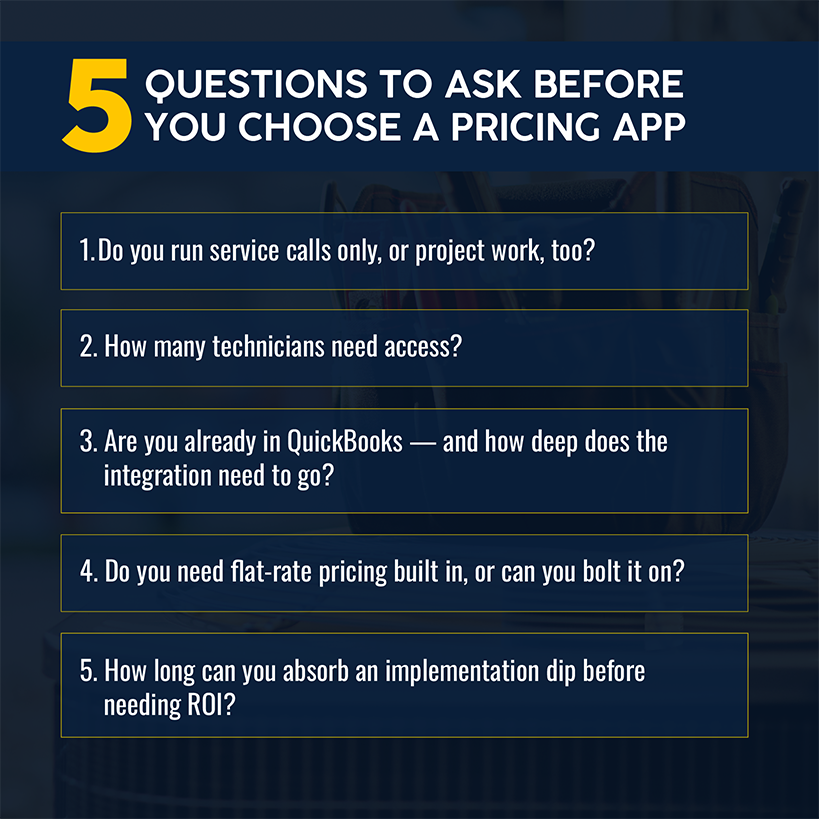
Team Size Is the First Filter
Jobber and Housecall Pro are built for 1–15 tech residential operations that want to standardize and scale without a long onboarding process. Simpro and FieldEdge are built for 5–50+ tech operations — the kind of plumbing software plumbing contractors need when they're managing commercial workflows, multiple locations, or advanced job costing. Paying for complexity your team won't use creates adoption friction that negates any ROI.
Budget for Implementation, Not Just Subscription Cost
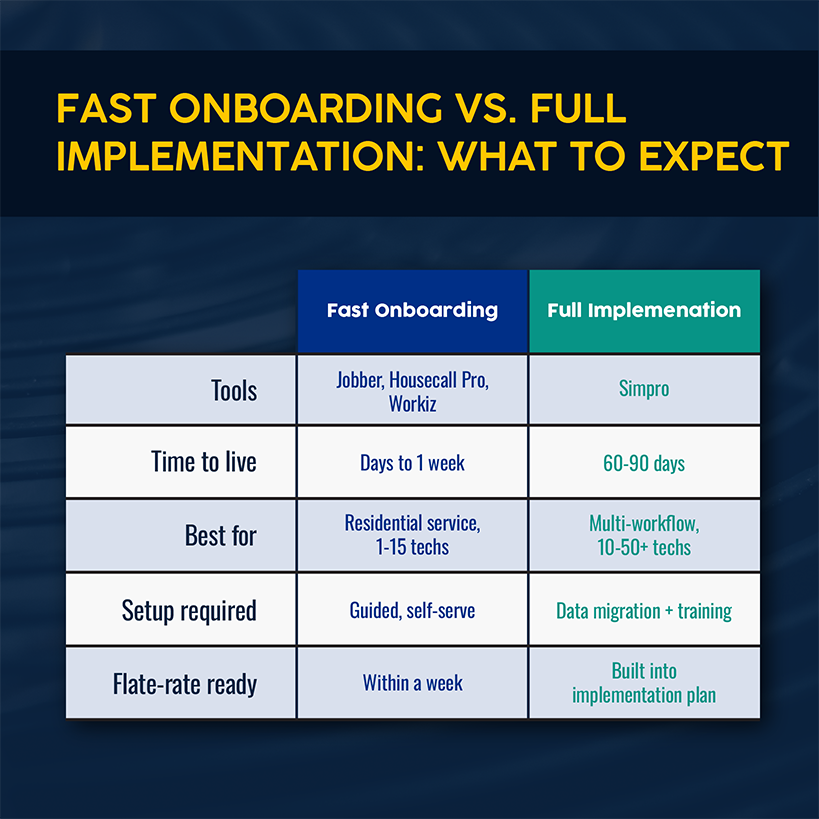
Tools like Simpro require significant setup, data migration, and training. Budget 60–90 days for a full rollout, and factor in productivity dips during the transition. Tools like Jobber and Housecall Pro have faster onboarding. They’re designed for companies that want to manage scheduling, invoicing, and quoting without a monthslong implementation process. Most can handle scheduling invoicing workflows within a week of going live.
Flat-Rate Is Worth the Switch
If you're still quoting time-and-materials for residential service work, the data is clear: 92% of homeowners prefer upfront flat-rate pricing. Flat-rate structures unlock higher average ticket values without requiring your techs to negotiate. If your current FSM has weak flat-rate tooling, tools like Profit Rhino or The New Flat Rate can bolt on quickly without requiring a full platform migration. Make sure you know how to price plumbing jobs correctly before adding new tools.
Find the Plumbing Pricing App That Fits How You Work
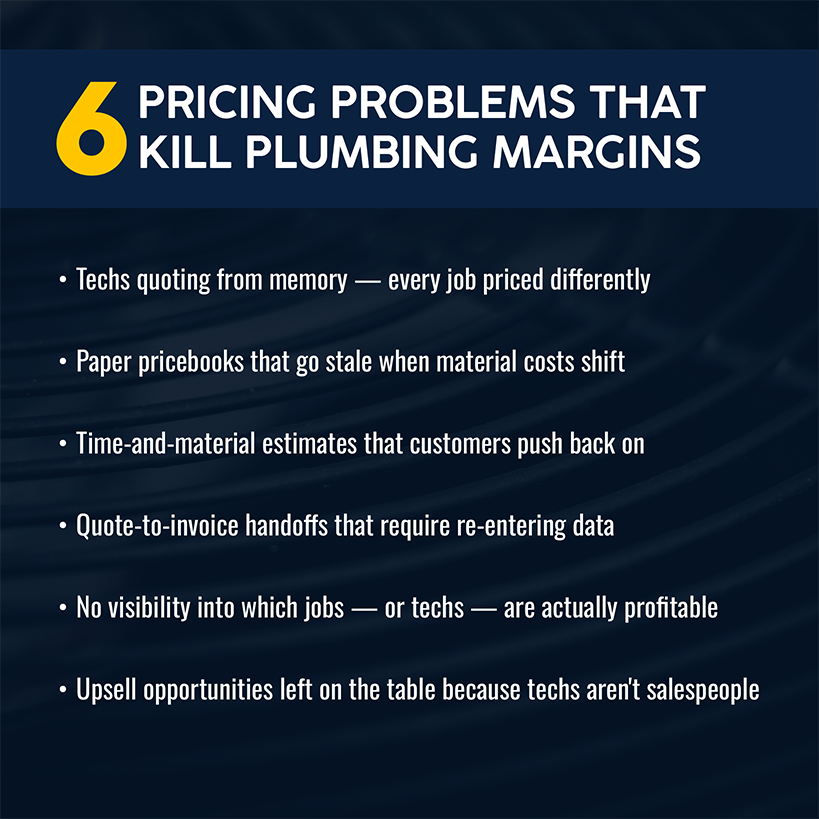
Inconsistent pricing costs more than any software subscription. A $50 underprice across 200 service calls a month is $120,000 in annual margin erosion before you've looked at the scoreboard.
Consider Simpro if your business does service and project work — or if you're planning on growing your plumbing business beyond residential service into commercial. It's purpose-built for trade businesses that have outgrown tools that were designed for simpler workflows.
Schedule a demo to see how Simpro handles pricing, job costing, and the full job life cycle for a plumbing operation at your scale.
Frequently Asked Questions About the Best Plumbing Pricing Apps
How much do plumbing pricing apps usually cost?
Pricing ranges widely depending on the platform and your team size. Entry-level tools like Jobber start around $29/month for a single user, while platforms like Housecall Pro run $59–$299+/month, depending on user count and features. Enterprise platforms like Simpro use custom pricing based on your operation. You’ll need to budget anywhere from several hundred to several thousand dollars per month for larger teams when you factor in all users and add-on modules. Standalone tools like The New Flat Rate charge $99/tech/month on top of whatever FSM you're already running.
Can plumbing pricing apps work offline in the field?
Most major platforms — including Simpro, Housecall Pro, Jobber, FieldEdge, and Workiz — have mobile apps that retain core functionality offline. This typically includes viewing job details, accessing the pricebook, and building quotes. Syncing with the back office requires a connection, so technicians in areas with poor cell coverage should confirm offline capability before committing to any platform.
How long does it take to set up a plumbing pricebook in a new app?
Setup time varies by approach. Tools like Jobber and Housecall Pro have guided setup flows that can deliver a basic pricebook within a day. Profit Rhino and The New Flat Rate offer pre-built pricebooks that can be live within 24 hours. Platforms like Simpro require more structured implementation — including data migration, training, and configuration — and should be budgeted at 30–90 days for a full rollout.
Can a plumbing pricing app connect with inventory or parts tracking?
Yes, most mid-tier and enterprise platforms include inventory management or integrate with inventory tools. Simpro has a full inventory module with vendor catalog integration and purchase order management built in. FieldEdge includes parts and inventory tracking. Housecall Pro and Jobber have lighter inventory features — they handle pricebook items and basic parts lists, but they aren't designed for full warehouse or stock management.


 Back to top