
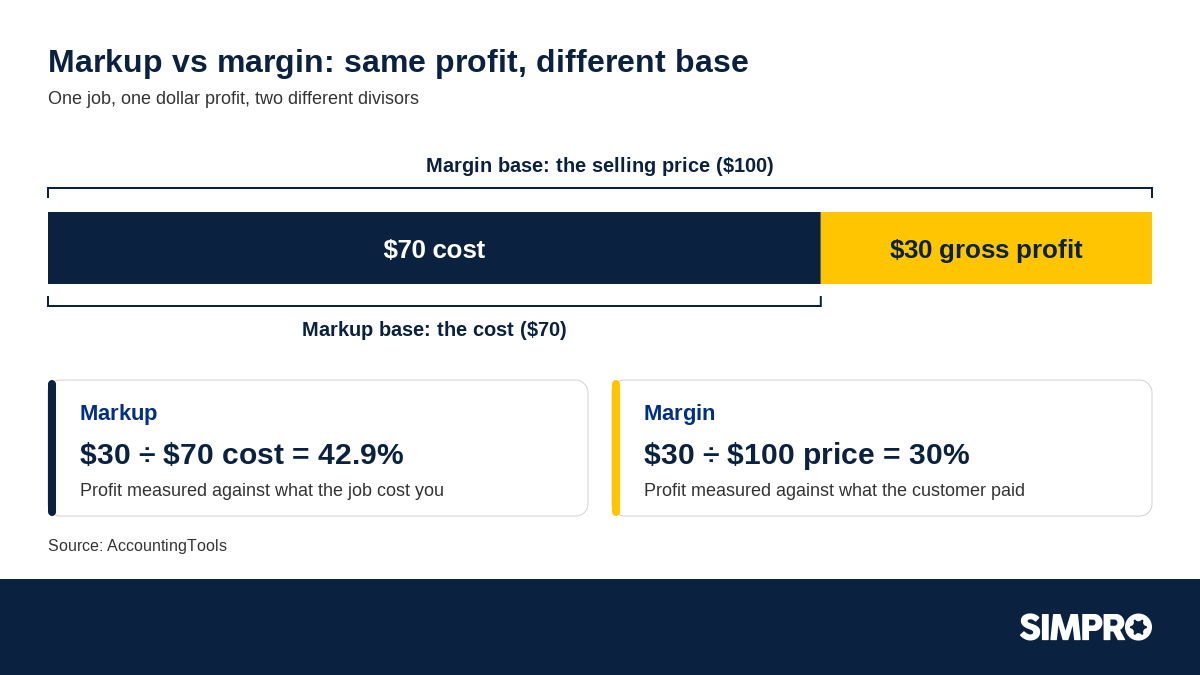
Markup vs margin is the difference between measuring profit against what a job costs you and against what the customer pays. Markup is gross profit divided by cost, and margin is gross profit divided by the selling price, as AccountingTools explains. An item that costs $70 and sells for $100 is a 42.9% markup but a 30% margin.
Quote a margin target as a markup and the job closes with less gross profit than the estimate promised. If your HVAC, plumbing, electrical, fire protection or security business prices with a markup and reports with a margin, you need both formulas. You also need a chart to quote from, a way to price for the margin you want, and a check on that margin once the job closes.
Key takeaways
-
Markup divides gross profit by cost. Margin divides gross profit by the selling price.
-
For the same job, the markup percentage is always larger than the gross margin percentage.
-
A margin target needs a bigger markup than the same percentage, so never quote a margin target as a markup.
-
Price for a target margin by dividing cost by one minus the margin you want.
-
Compare quoted margin with actual margin on every job, because on a fixed-price quote, cost that rises after the quote comes out of gross profit.
Markup vs margin at a glance
In margin vs markup, both numbers start from the same job's cost and selling price, and only the divisor changes. Markup divides gross profit by cost, so it shows how far you raised the price. Margin divides gross profit by the selling price, so it shows how much of each sale you keep.
| Markup | Margin | |
|---|---|---|
| Calculated on | Cost | Selling price (revenue) |
| Formula | Gross profit ÷ cost | Gross profit ÷ selling price |
| Main use | Setting the price on a quote | Measuring how much of each sale you keep |
| Which is higher | The larger percentage | The smaller percentage for the same job |
Sales, cost of sales and gross profit: the three numbers you need
Every markup and margin calculation starts with three numbers from the job. Sales is the price the customer pays on the invoice. Cost of sales is what you spend to deliver the job: equipment, materials, labor, subcontractors and permits. Gross profit is sales minus cost of sales, the same subtraction the IRS small business tax guide uses.
Keep those three numbers for each job, not only for the month. A single blended figure hides the jobs that lose money behind the jobs that make it.
How to calculate markup
Markup is the amount you add to cost, shown as a percentage of that cost. Put another way, markup is the difference between selling price and cost, expressed as a percentage of the cost. Subtract cost from the selling price to get gross profit, then divide gross profit by cost.
Markup % = (selling price - cost) ÷ cost
A product that costs $10 and sells for $15 carries a 50% markup, because the difference between price and cost equals half of the cost (Corporate Finance Institute).
On a field service quote, cost means the full direct cost of the job, not only the equipment or parts. If labor hours, materials or permit fees are missing from the cost, the markup on paper is higher than the markup you earn.
How to calculate margin
Margin, or gross margin, is the share of the selling price you keep as gross profit. In formula terms, gross profit margin is gross profit divided by sales price. To calculate it, subtract cost from the selling price, then divide that gross profit by the selling price, not by cost.
Margin % = (selling price - cost) ÷ selling price
Why markup is always higher than margin
On any job priced above cost, markup is the higher percentage for the same job. The dollar profit is the same either way, but markup divides it by the smaller number. Put simply, whenever cost is lower than revenue, the markup percentage is always higher than the margin percentage for that job.
Go back to the item at the top of this guide. Its single dollar profit reads as the smaller margin and the larger markup. Both numbers describe the same job and the same profit, which is the whole markup vs profit margin question in one example.
When markup comes out lower than margin, check the math. Either the formula swaps cost and selling price, or you priced the job below cost.
Markup vs margin chart
Use this markup vs margin chart when you know the margin you want and need the markup to put on the quote. A 20% margin needs a 25.0% markup, a 30% margin needs 42.9%, and a 50% margin needs 100.0%, per the AccountingTools margin and markup list. Read across from your target margin.
| Target gross margin | Markup needed on cost |
|---|---|
| 10% | 11.1% |
| 20% | 25.0% |
| 30% | 42.9% |
| 40% | 66.7% |
| 50% | 100.0% |
Read the chart the other way and the trap shows up. Penn State Extension's example takes an item, adds 30% to it, and finds the seller made only 23% gross profit. A 30% markup leaves about 23% margin, not 30%.
The gap between the two columns in the chart widens as the target margin rises. A margin target entered as a markup costs the most on your highest-margin work.
How to price a field service job for a target margin
To price for a target margin, divide the job's direct cost by one minus the target margin. Written out, the formula is selling price equals cost of goods sold divided by one minus the desired gross margin. This method sets the margin first, then lets the markup follow, which avoids the markup trap above.
Selling price = direct cost ÷ (1 - target margin)
In a Mississippi State University Extension product example, a $2.25 cost at a 40% target margin gives $2.25 ÷ 60%, a selling price of $3.75. The example is a retail product, but the arithmetic is the same for a single service call, a maintenance visit or a full installation in any trade.
Steps to price a field service quote for a target margin
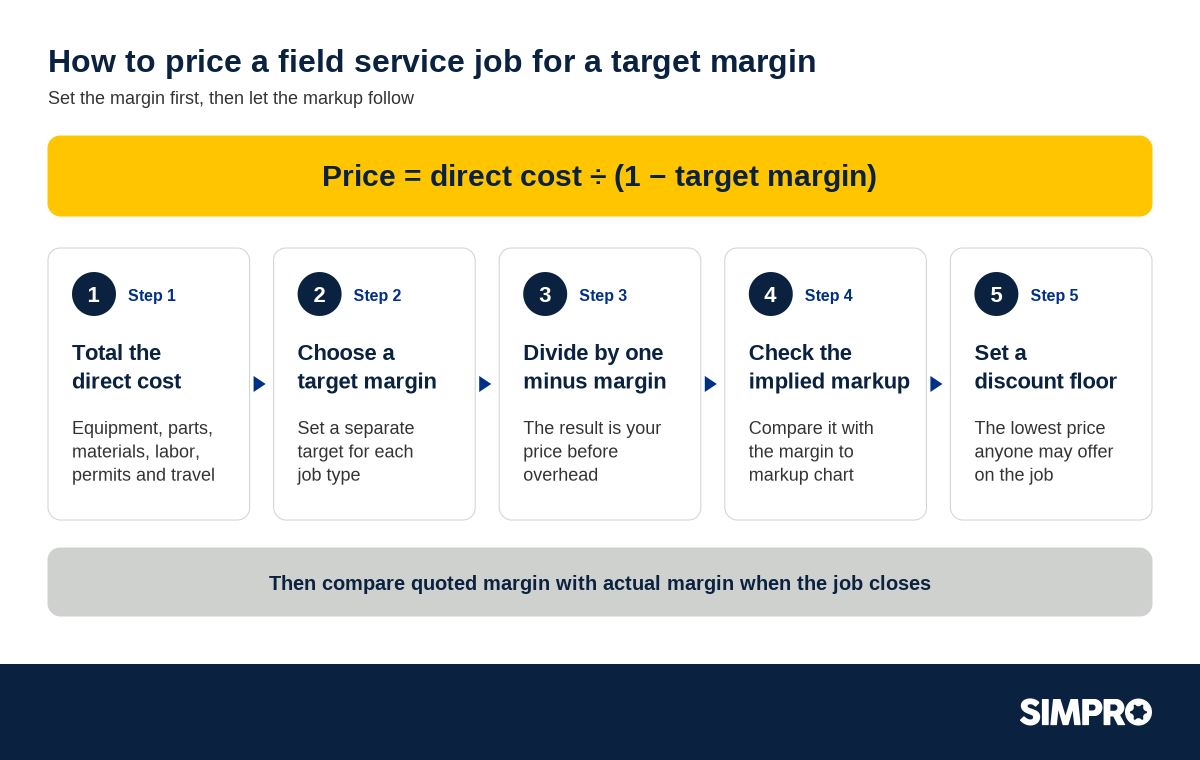
Step 1: Total the direct cost of the job. Include equipment, parts, materials, labor hours at your loaded labor rate, subcontractors, permits, disposal and travel. Anything left out shrinks the margin you earn.
Step 2: Choose the target gross margin for that job type. Set a separate target for each job type, such as service calls, maintenance contracts and installation projects, from your own job history and overhead.
Step 3: Divide direct cost by one minus the target margin. The result is the price that leaves your target gross margin before overhead.
Step 4: Check the implied markup against the chart. When your team quotes from a markup table or price book, confirm the markup matches the target margin row.
Step 5: Set a discount floor. Write down the lowest price an estimator or technician may offer, so the job never drops below your minimum margin.
Once you set the price logic, the risk shifts to each estimator applying it a little differently. Simpro estimating and quoting software helps you create accurate, profitable quotes quickly and stay in control of your jobs from start to finish.
Gross margin vs net margin
Gross margin shows what is left after the direct costs of the job. Net margin shows what is left after everything, including overhead, taxes and interest. AccountingTools explains net income margin as net income divided by sales, where net income is net of all expenses. A healthy gross margin on a job doesn't guarantee the business makes money.
That is why the margin you price for has to cover overhead first. Gross margin is the share of sales dollars available to pay fixed costs and return a profit.
Markup and margin mistakes field service contractors make
The four mistakes below are quoting a margin target as a markup and using one markup for every job type. The other two are leaving overhead out of the markup and discounting without checking the margin left. Each one leaves less profit than planned without showing up as an error on the quote. Use them as a price book checklist.
Quoting a margin target as a markup
If the plan calls for a margin and the estimator adds that same percentage to cost, the job lands below target, the same trap the chart above shows. Use the chart or the target-margin formula instead.
Using one markup for every job type
A flat markup applies the same percentage to every job type, whatever its cost mix. Pick a target margin by job type, then let the formula set each price. For a trade-specific walkthrough of pricing methods, see our guide on how to price HVAC jobs.
Leaving overhead out of the markup
AccountingTools notes that service providers add a percentage over their direct costs to cover overhead and profit. Set a markup that covers profit only, and rent, trucks, office staff and software come out of that profit.
Discounting without checking the margin left
A discount comes straight out of gross profit, because the cost of the job doesn't change. Before you approve one, recalculate the margin on the discounted price and compare it with the floor you set in Step 5.
Compare quoted margin to actual margin on every job
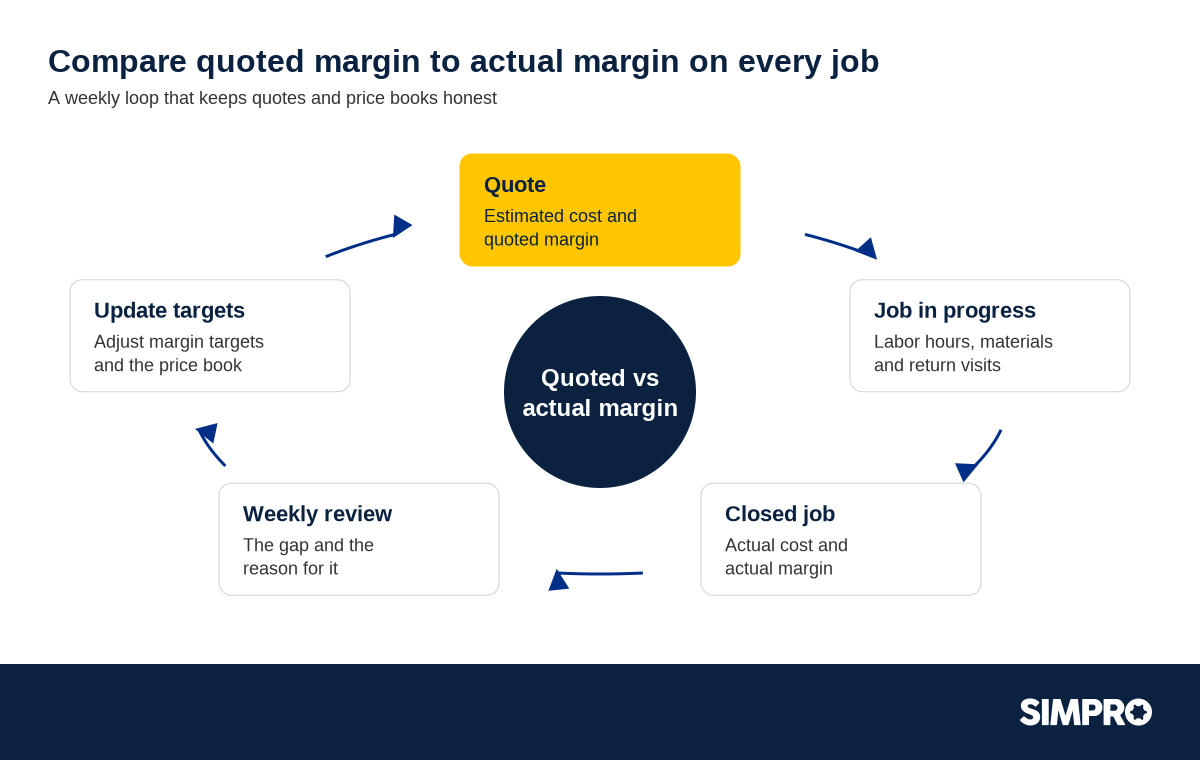
The margin on a quote is a forecast. The margin on a closed job is the result. On a fixed-price quote, labor overruns, extra materials and return visits left unbilled come out of gross profit. Getting markup vs margin right on the quote is half the job. Comparing quoted and actual margin on every job is the other half.
Start with a simple weekly review: quoted margin, actual margin and the reason for any gap. Our guide to job cost variance covers estimate versus actual job costs in more depth.
Simpro field service management software connects your office and field teams on a single platform, from estimating and scheduling to job execution, invoicing, and reporting. For HVAC contractors, Simpro HVAC software tracks estimated vs actual labor, equipment, and job costs in real time across service calls, contracts, and installation projects. That puts estimated and actual costs side by side while the job is still running.
In a G2 review of Simpro, Larissa F. wrote: "Being able to see exactly where gross profit margin leakage occurs is the biggest factor for our business."
Results differ by business. South Island Electrical, which uses Simpro, reports a 35% improvement in profit margins.
To see quoted and actual margin side by side on your own jobs, book a personalized demo.
Frequently asked questions
How to calculate margin percentage?
To calculate margin percentage, subtract the job's cost from its selling price to get gross profit. Then divide gross profit by the selling price and express the result as a percentage. Penn State Extension defines gross profit margin as gross profit divided by sales price. Use the invoiced selling price, not the cost, as the base.
What is the formula for calculating sales margin?
The formula for sales margin, also called gross margin, is (sales - cost of goods sold) ÷ sales. AccountingTools defines margin, also known as gross margin, as sales minus the cost of goods sold. Dividing that gross profit by sales turns it into a percentage you compare across jobs of any size.
What is the difference between markup percentage and gross profit percentage?
Markup percentage divides gross profit by cost, while gross profit percentage, or gross margin, divides gross profit by the selling price. AccountingTools sums it up: margin measures profit as a percentage of sales revenue, and markup measures it as a percentage of cost. Use markup to set a price and margin to judge what you kept.
What is the markup percentage and how is it calculated?
Markup percentage is the amount added to cost to set a price, shown as a percentage of cost. Calculate it by subtracting cost from the selling price, then dividing the result by cost. In the Corporate Finance Institute example, a product that costs $10 and sells for $15 carries a 50% markup.


 Back to top
