
The best HVAC flat-rate pricing apps solve a problem every HVAC contractor eventually hits: pricing that's inconsistent in the field, slow to approve, and hard to defend at the door.
The math for switching is straightforward — standardized prices, faster approvals, fewer invoice disputes, and higher average tickets. The harder questions: Which of the top HVAC flat-rate pricing apps actually delivers? And do you need a standalone pricebook tool, a sales presentation layer, or a full field service platform with the flat rate baked in?
We’ve evaluated the options available in 2026 based on pricebook depth, integration options, technician usability, whether you're running five trucks or 50, and whether you serve residential customers, commercial accounts, or both. These tools for HVAC service businesses have meaningful differences, and the wrong choice can cost you much more than a monthly subscription fee.
Compare the Best HVAC Flat-Rate Pricing Apps
The sections below cover seven tools. Each entry includes key features, pricing where publicly available, and what the platform is actually best for.
| Software | Best For | Key Features | Pricing Model |
|---|---|---|---|
| Simpro® | $1M+ multi-service and commercial HVAC | Pre-builds/assemblies, live supplier catalogs, job costing, good/better/best proposals | Price for your workflow |
| FieldEdge Flat Rate (Coolfront) | Small and midsize residential HVAC | 25,000+ repair database, QuickBooks sync, offline access | Per user/month (~$125–$150) |
| Profit Rhino | Any size; add-on pricing layer | Expert-built pricebook, quarterly updates, OEM search, five-option upsell board | Per user/month (From $39) |
| The New Flat Rate | 2–20 truck residential | Five-option menu system, done-for-you setup, financing integration | Per tech/month ($99) |
| Housecall Pro | $500K–$3M residential | Profit Rhino integration, good/better/best proposals, real-time margins | From $59/month |
| Service Fusion | Under $1M/independents | Pricebook builder, unlimited users, QuickBooks sync | Depends on tier |
| BuildOps | Commercial HVAC, large operations | Commercial workflow integration, asset tracking, multi-location dispatch | Custom |
Top HVAC Flat-Rate Pricing App Choices for 2026
Simpro — Best HVAC Flat-Rate Pricing App for Growing Operations
Simpro® is a field service management (FSM) platform purpose-built for trade businesses — HVAC, plumbing, electrical, and multi-trade operations. Flat-rate pricing in Simpro isn't a standalone feature or a bolt-on add-on. It's built into the estimating and job management infrastructure, which means every quoted price connects directly to scheduling, procurement, job costing, and invoicing in one system.
Key pricing and estimating features:
- Pre-builds and assemblies: Standardized templates bundle materials and labor for common HVAC jobs. Technicians quote from pre-configured cost structures instead of building estimates from scratch.
- Live supplier catalogs: Material costs pull from current supplier pricing automatically. No more quoting last year's refrigerant prices.
- Good/better/best proposals: Technicians build and present three-tier options, digitally and on-site.
- Schedule rates: Overhead and labor burden multipliers are built directly into labor rates — every hour logged applies the true loaded cost.
- Breakdown Table: The job summary tab shows estimated vs. actual costs in real time while the job is still active, not at invoicing.
- Simpro Mobile: Technicians log time and job status from any mobile device; the office sees live labor costs.
- Accounting integration: Export to QuickBooks or Xero; supplier invoices match directly against purchase orders.
Notable limitations:
- Steeper learning curve than residential-first tools
- Onboarding requires configuration time and isn’t a one-week self-serve setup.
Best for: Any company with $1 million+ in revenue that needs dedicated HVAC software to run their entire operation — from accurate estimating and flat-rate quoting to job costing, scheduling, procurement, and reporting.
Related: How to build a good/better/best HVAC proposal that actually closes. See how tiered proposals work and what to include at each tier.
FieldEdge Flat Rate (formerly Coolfront)
FieldEdge Flat Rate — rebranded from Coolfront — is one of the most established flat-rate tools in the residential HVAC market. Over 40,000 users trust the platform, which carries decades of field-tested pricing data covering HVAC equipment, plumbing, and electrical repairs.
Key features:
- Pre-built database of 30,000+ repairs across HVAC, plumbing, electrical, and appliance repair
- Offline access with sync when connectivity returns
- Good/better/best tiered pricing presentation
- Customer signature capture and electronic invoicing
- QuickBooks integration
- Custom repair creation for jobs not in the database
Pricing: Custom; third-party sources indicate plans typically start around $125–$150/user/month.
Pros:
- One of the largest pre-built HVAC repair databases available
- Works offline — critical for basement and rural jobs
- Minimal setup time
Notable limitations:
- Limited mobile app functionality, without custom workflow automation or real-time job costing
- Lacks advanced customizations for commercial complexity in the Starter tier
Best for: Small and midsize residential HVAC contractors who want a proven, database-driven flat-rate tool with QuickBooks sync.
Profit Rhino
Profit Rhino is a dedicated flat-rate digital pricebook and mobile sales tool, now powered by Callahan Roach — the consulting firm with 30+ years of flat-rate pricing experience in the trades. Profit Rhino is a pricing layer on top of your existing FSM and can’t replace dispatch and scheduling tools.
Key features:
- Pre-built, customizable digital pricebook covering 90% of common HVAC repairs
- Quarterly pricebook updates to reflect current parts pricing and labor market changes
- OEM search functionality
- Adaptive pricing that recalculates line items when cost input changes (e.g., copper up 5%)
- Option board that presents multiple repair/replacement tiers to homeowners for upsell without sales pressure
- Integrates with FieldEdge, Housecall Pro, and 300+ other tools
- No contracts
Pricing: Starts at $39/user/month; Housecall Pro bundle is $149/month.
Pros:
- Expert-built pricebook with quarterly updates — tracks refrigerant and parts volatility
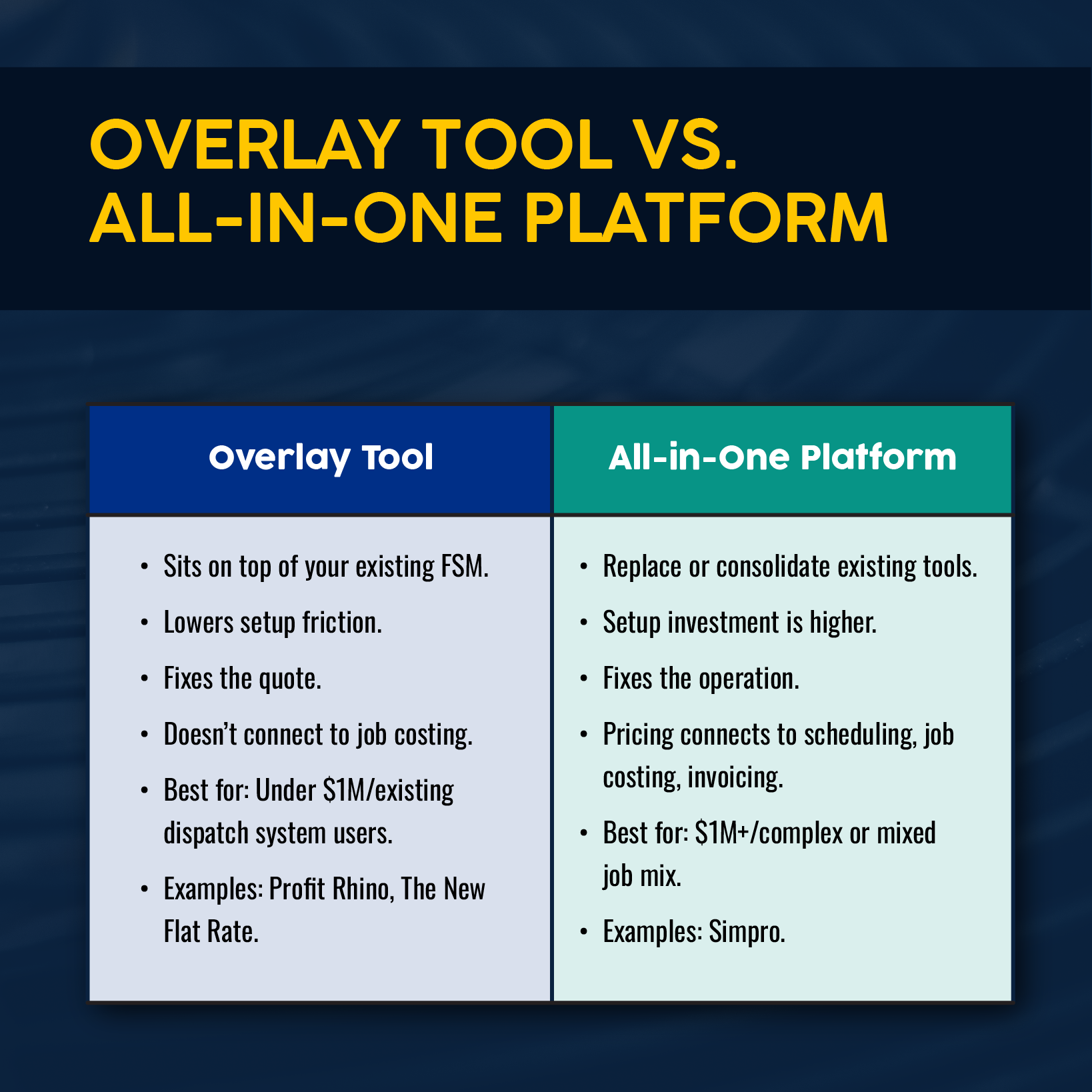
- Works as an add-on to existing tools; no platform migration required
- Training and implementation coaching included
Notable limitations:
- Functions as a pricing/sales overlay — does not replace dispatch, scheduling, or full job management
- Initial setup has a learning curve
Best for: HVAC businesses of any size that want a dedicated, expert-backed flat-rate pricebook without replacing their existing FSM. Especially effective for businesses already on Housecall Pro or other midmarket platforms that need a more professional pricebook.
The New Flat Rate
The New Flat Rate is built around a distinctive five-option menu system — a sales psychology approach where technicians present every repair as a choice between five pre-built tiers, from basic fix to full replacement. The platform was designed for technicians who don't think of themselves as salespeople. The structured presentation doubles as a customer service tool by giving homeowners clear options without pressure.
Key features:
- Five-option menu for every repair and replacement across HVAC, plumbing, electrical, and chimney
- Done-for-you setup: input your hourly rate, parts markup, and fees; menus are generated within 24 hours
- Integrates with 250+ FSM tools and CRMs
- Financing integration (OPTIMUS) for on-site monthly payment presentation
- Sales tracking, reporting, and analytics
- Training library, live implementation classes, and optional in-person ride-alongs
Pricing: Flat rate of $99/tech/month.
Claimed results: 15% higher closing rates and 2x–3x increases in average service ticket; most contractors reportedly recover the first year's cost within the first month.
Pros:
- 24-hour done-for-you menu build — fastest initial setup in the category
- Higher average tickets through five-option presentations, without requiring sales training
- More training and support than software-only tools
Notable limitations:
- Potentially costly for larger fleets paying per tech
- Focused on sales presentation, not full FSM workflow — requires a separate dispatch/scheduling tool
- Potentially higher decision complexity for some homeowners
Best for: Residential HVAC service companies with two to 20 trucks where technicians struggle with pricing confidence. Well-suited for companies where average ticket growth is the primary growth lever.
Housecall Pro
Housecall Pro is a mobile-first FSM built for residential home service businesses, with flat-rate pricing capability enhanced by the option to add a native Profit Rhino integration.
Key features:
- Pricebook importing or building, with automatic factoring of overhead, labor, and materials
- Profit Rhino integration: live pricing updates and a custom pre-built pricebook for HVAC, plumbing, and electrical
- Good/better/best proposal presentation with photos
- Real-time margin visibility on every job
- Mobile app with digital signature capture, customer communication tools, and on-site payment processing
- Wisetack financing integration
- QuickBooks sync
Pricing:
- Basic plan: $59/month (annual, 1 user)
- Essentials plan: $149/month (annual, up to 5 users)
- MAX plan: $299/month (Up to 8 users; extra users $35/month each)
- Profit Rhino add-on: $149/month
- 14-day free trial
Pros:
- Pricing transparency; accessible for businesses with under 10 trucks
- Cost-effective pricebook content via the Profit Rhino integration
- Fast to learn and deploy
Notable limitations:
- Lacks real-time actual vs. estimated cost tracking at the job level
- Less suited for commercial HVAC or multi-phase project management
- Less scalable as user count increases
Best for: Residential HVAC businesses in the $500,000 to $3 million revenue range that want an affordable, mobile-first platform with proven flat-rate pricing.
Service Fusion
Service Fusion is a field service platform for small to midsize trade contractors that offers multiple tiers, all offering unlimited users — a meaningful cost advantage for growing teams.
Key features:
- Pricebook builder for flat-rate services
- Digital invoicing and work orders
- GPS tracking and vehicle management
- VoIP phone integration
- QuickBooks sync
Pricing: Not publicly listed; demo required.
Pros:
- Less costly for growing businesses because of unlimited users
- Requires minimal training
- Works for multi-trade businesses under one umbrella
Notable limitations:
- Less advanced flat-rate capabilities than with dedicated pricing tools
- Lacks depth for complex commercial workflows or enterprise-level reporting
Best for: Small HVAC businesses under $1 million revenue or independent contractors who want straightforward flat-rate pricing without per-user fees.
BuildOps
BuildOps is built specifically for commercial HVAC contractors, a segment that is underserved by residential-first platforms. Flat-rate pricing connects to dispatch, job tracking, asset management, and invoicing within a commercial service workflow.
Key features:
- Flat-rate pricing, integrated with service workflows and quotes
- Advanced dispatch board with technician mobile tools
- Job costing, asset tracking, and automated workflows
- Reporting and field performance analytics
- Multi-location operational support
Pricing: Custom.
Pros:
- Strong commercial HVAC workflow integration
- Visibility across jobs, crews, and multi-site customer history
- Designed for multi-phase service contracts and complex fleet operations
Notable limitations:
- Not built for residential HVAC or smaller operations
- Lacks standalone flat-rate pricing software, functioning within the broader commercial FSM context
Best for: Commercial HVAC companies with large crews, multi-location operations, and complex service contracts.
How to Choose the Best HVAC Flat-Rate Pricing App
The right tool depends on where your business is and where it's going. Here are a few factors that matter more than the feature list:
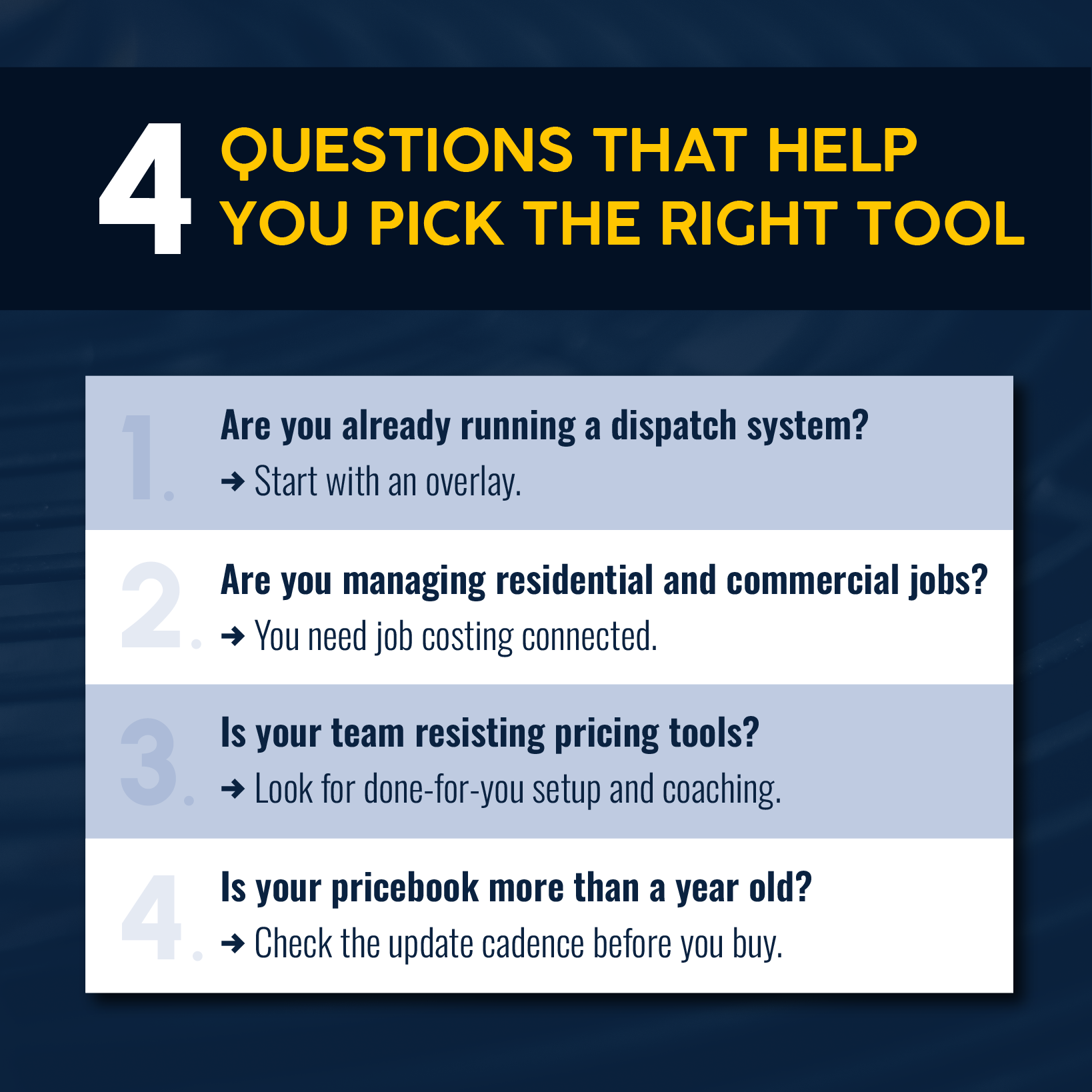
- Start with your current tech stack and growth stage. If you're already running a dispatch and scheduling system, the lowest-friction upgrade is an overlay tool that adds pricebook depth without a platform migration. If you're evaluating a full FSM switch — or scaling from $1 million revenue toward $5 million — consider investing in an all-in-one platform.
- Match the tool to your primary pain point. If the core problem is technician pricing confidence and inconsistent ticket values, a sales-psychology platform can address that directly. If the problem is margin leakage across a complex job mix, an all-in-one platform with real-time job costing is the right fix. Understanding your HVAC profit margins can help you decide.
- Don't ignore update cadence. HVAC parts costs — particularly refrigerants amid the R-410A phaseout — are volatile. A pricebook built on 2023 pricing is a margin liability in 2026. Tools with automated quarterly updates reduce that burden.
- Account for technician adoption. A flat-rate system only works when technicians use it consistently. Consider The New Flat Rate's done-for-you setup and implementation coaching if your team has previously resisted pricing tools.
For more on HVAC pricing strategy and what goes into a well-structured rate, check out our guide to HVAC pricing.
Why Simpro Is the Best HVAC Flat-Rate Pricing App for Contractors Running Complex Operations
When a technician uses Simpro's pre-builds to quote a flat-rate job — say, an evaporator coil replacement at a fixed price of $1,400 — that quote automatically carries the labor hours, materials list, and overhead multipliers into the job.
The scheduling team sees what's needed. The procurement workflow flags the required stock. The job costing view tracks actual hours and materials against the original estimate in real time. If the job runs long or a part is substituted, the Breakdown Table shows the variance before the invoice goes out.
That's a closed-loop system that signifies a platform built for the trades, not merely a tool designed for pricing presentation with a mobile app attached.
Simpro handles service call quoting and multi-phase project estimates in one platform, with good/better/best proposal options built into the estimating workflow. For HVAC businesses that need more than a pricebook, Simpro's HVAC software connects pricing to every downstream step in the job.
Ready to See What a Fully Connected HVAC Operation Looks Like?
Flat-rate pricing solves the quoting problem. But you still need to deal with job costing, the technician utilization, and margin leaks that show up after the invoice goes out. Simpro customers report 25% revenue increases and 30% productivity gains after implementation, with results spanning HVAC businesses of every size.
If your operation has outgrown a standalone pricebook, schedule a demo to see how pre-builds, live supplier pricing, and real-time job costing work together in practice.
Best HVAC Flat-Rate Pricing App FAQs
Is flat rate better than hourly pricing for HVAC?
For most HVAC businesses, flat rate outperforms time-and-materials (T&M) billing. Customers know the total cost upfront — 92% of homeowners prefer it, but as few as 20% of contractors currently offer it. With a flat-rate approach, technicians present pre-set prices instead of defending an hourly rate, and payment collected when the job finishes is better for cash flow than chasing open T&M invoices.
How do you set flat-rate prices for HVAC?
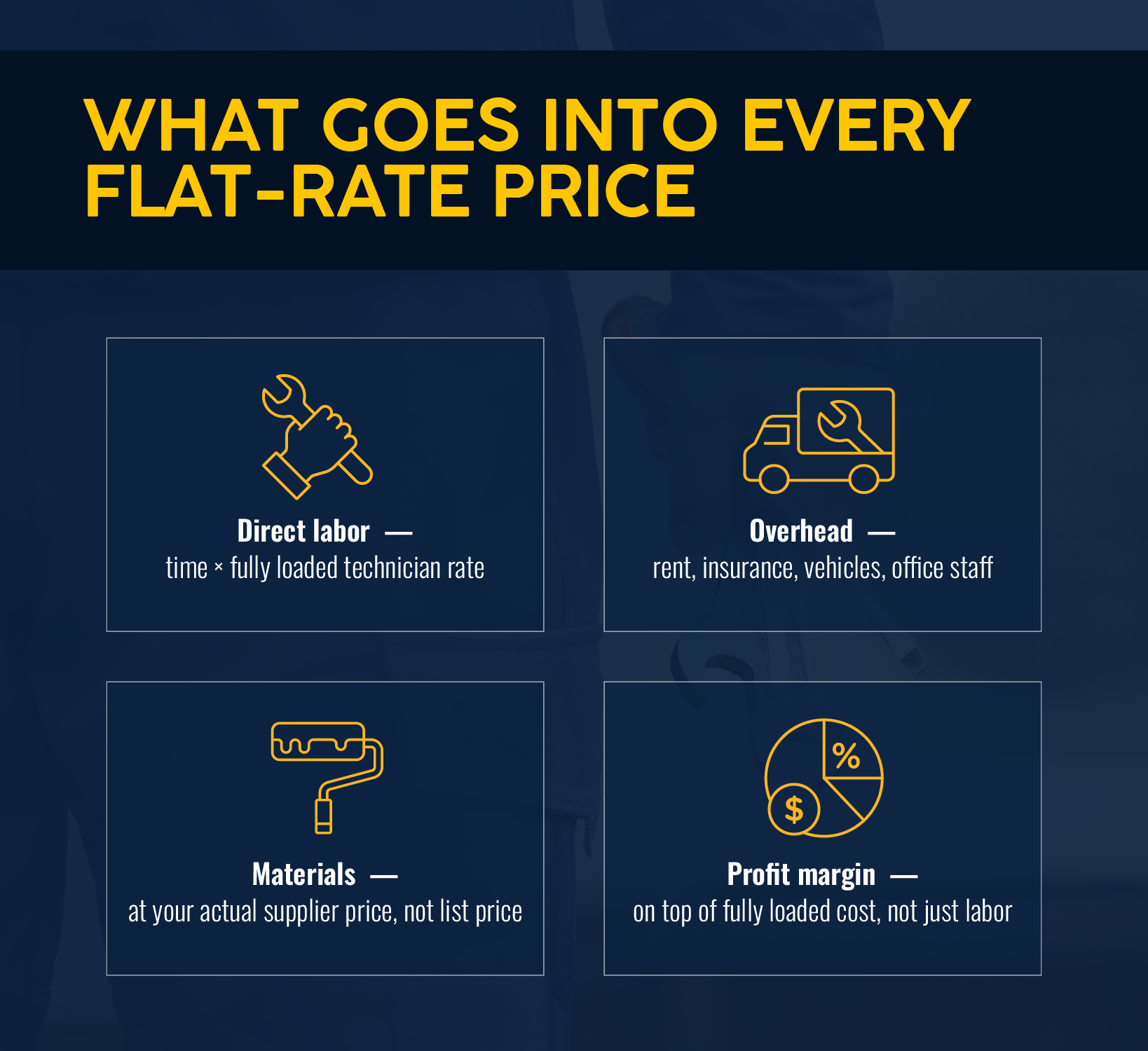
Each flat-rate price has four components:
- Direct labor (time × fully loaded technician rate)
- Material costs at your actual supplier price
- Overhead allocation
- Profit margin
Margin should sit on top of the fully loaded cost. Businesses that skip overhead allocation typically undercharge by 30–50%. Most contractors use a pre-built database as a baseline, and customize from there.
How does Simpro handle HVAC flat-rate pricing?
Simpro's flat-rate pricing is built on pre-builds — templates that bundle materials, labor, and overhead multipliers for common HVAC job types. Technicians select a template on-site, automatically calculate the price, and present the quote digitally. From there, it converts to a job, materials are flagged for procurement, and actual costs track against the estimate in real time.


 Back to top