
Estimating a 30-sheet commercial HVAC bid used to take a day and a half: walking through the drawings, counting diffusers by hand, building unit costs from memory.
Learning how to use AI for HVAC estimating changes the math. AI-assisted takeoff tools read the drawings, count the components, and hand an estimator a workable list of material quantities in a fraction of that time. Instead of spending hours on rote tasks, estimators can focus on the judgment calls that protect bids.
Read on to learn how to use AI for HVAC takeoffs and estimates in six steps. See what to upload, how AI reads plans, what it gets wrong, and how to turn an approved takeoff into a bid that's ready to send. You'll also learn the failure points that show up when contractors skip the review step.
AI HVAC adoption in estimating is still early, and that's the opportunity. Only 47% of commercial contractors use AI for estimating, and many of those are apprentices. Most of the ROI is still available, especially for HVAC businesses that haven't started.
Start With the Right HVAC Estimate Setup
Your commercial HVAC estimating process should address three key areas before applying AI tools.
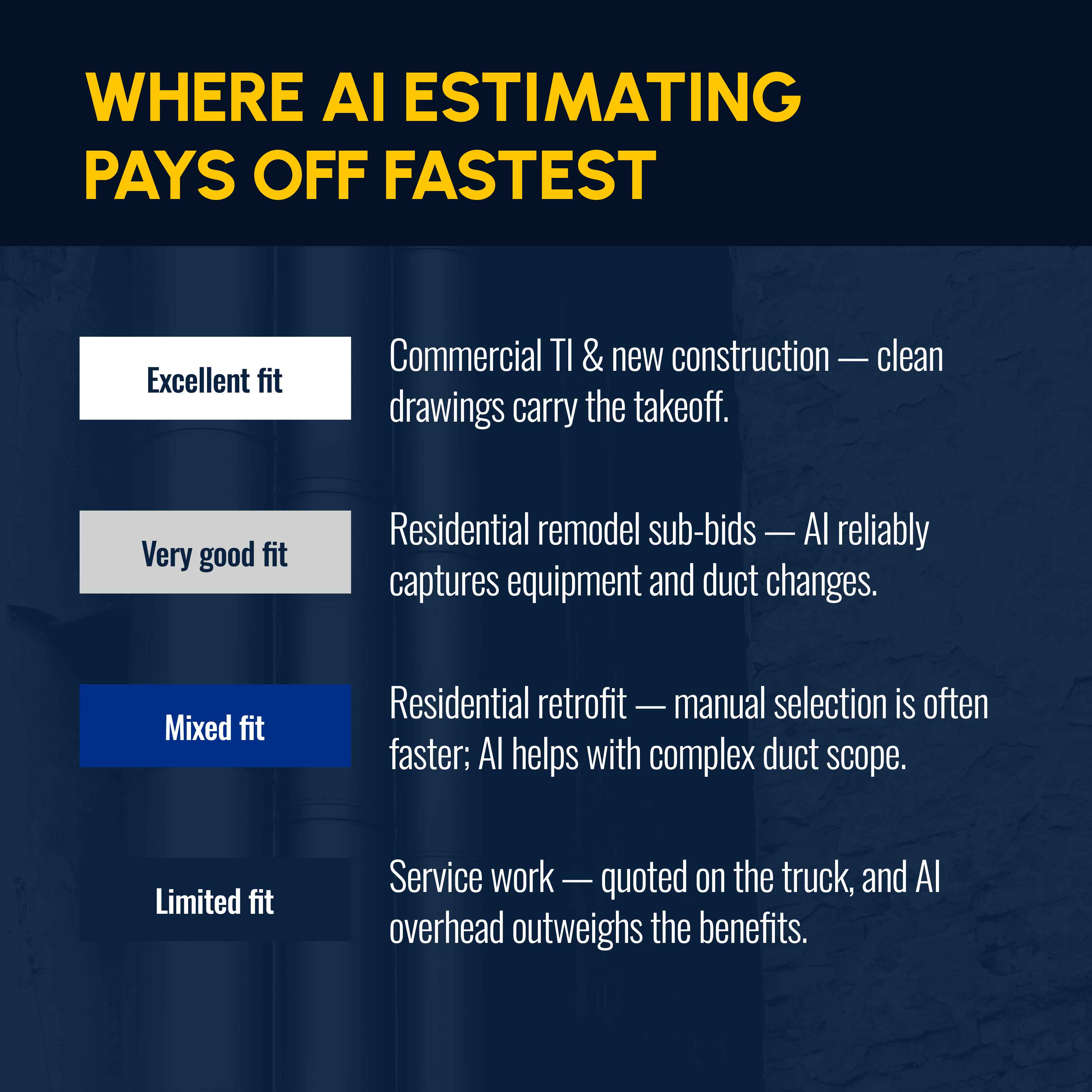
First, the job type. Is it residential replacement, light commercial, commercial install, retrofit, or straight service work? Each requires a different level of AI involvement. A service call gets quoted on the truck in a few minutes, so using a takeoff tool adds more overhead than value. But a commercial mechanical set with 30 sheets of ductwork is the kind of complex project where AI takeoff pays for itself. Commercial contractors running multiple bids a week feel that payoff fastest.
Related: Brush up on HVAC estimating fundamentals if you want the non-AI version of this process before layering on automation.
Second, the AI fit. Commercial tenant improvements (TI) and new-construction sets get the most value from AI, since clean drawings carry the takeoff burden. Residential remodel sub-bids pulled from general contractor (GC) plans also do well, as AI reliably captures equipment and HVAC duct modifications.
Residential retrofit work is mixed: Manual equipment selection is often faster, but AI still helps with complex duct takeoffs. Service work sees the least benefit, since quoting happens on the truck in real time.
You need these documents before uploading anything:
- HVAC drawings and mechanical plans
- Equipment schedules
- Specs and addenda
- Supplier pricing
Lock in these estimating rules ahead of time:
- Labor rates
- Markups
- Waste factors
- Exclusions and contingency
- Preferred suppliers
Having the right documents and rules before starting takeoff matters more with AI in the loop. An AI tool that’s trained on historical job costs and your labor rates produces a tighter estimate than one running on generic benchmarks. Without custom rules, the AI applies its default assumptions instead of yours.
Third, look at your revenue. HVAC contractors under $3 million in annual revenue generally get the most value running the AI estimating features inside their field service management (FSM) platform without layering on separate, standalone takeoff software. Past $3 million, especially with a dedicated estimator on staff, digital takeoff and estimating software integrated into your HVAC project management workflow starts to pay for itself.
Related: Use an HVAC estimate template to lock in labor costs, markups, and exclusions before you touch a takeoff tool.
6 Steps for Using AI for HVAC Estimating and Takeoffs
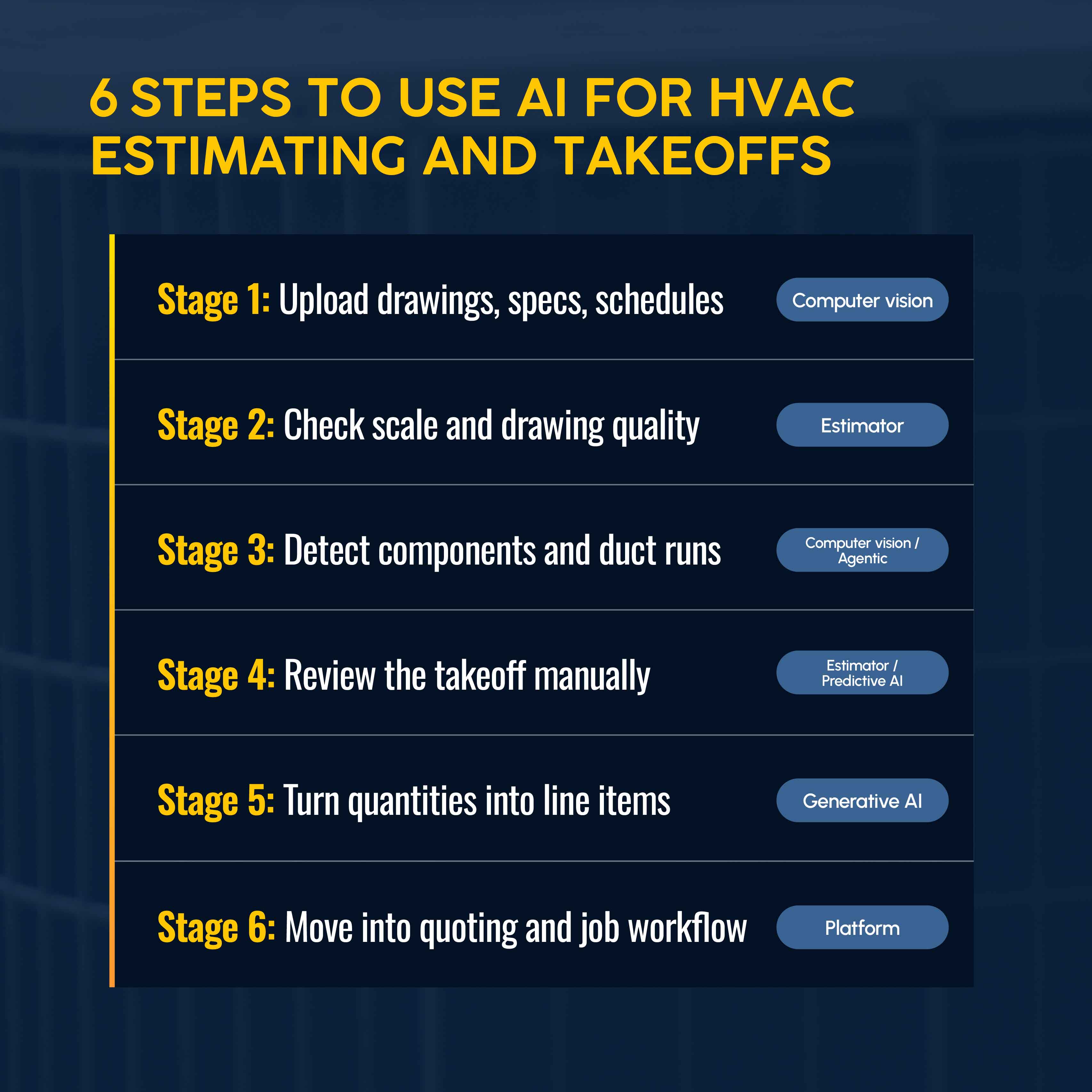
Once the setup is locked in, takeoff estimating follows a six-step sequence, whether you're running a commercial TI package or a residential remodel sub-bid pulled from a GC's plan set.
Four types of AI show up across these steps, and they don't all do the same job:
- Computer vision reads the plans.
- Agentic AI runs the end-to-end takeoff and pulls live pricing.
- Predictive AI flags cost and margin risk.
- Generative AI turns the output into proposal-ready scope language.
Here's how AI for HVAC estimating software fits into a real-life workflow.
1. Upload the HVAC Drawings, Specs, and Equipment Schedules
Start with the complete mechanical set, not a partial one. AI takeoff tools work from what's uploaded, and a missing sheet becomes a missing line item on the quote. Upload the full drawing set, equipment schedules, and any addenda before you run anything. Computer vision AI takes its first pass here, too, scanning the plans and building an initial count of diffusers, pipe runs, fan coils, and duct sizes.
On a commercial TI package with a full mechanical set, this step generates most of the time savings. Clean drawings carry the takeoff burden, and AI scope filtering does the heavy lifting from there.
2. Check the Scale, Scope, and Drawing Quality
An accurate HVAC takeoff starts before you trust a single quantity the AI hands back. Confirm the plan set is complete and the scale is set correctly. Accuracy on a clean, well-scaled drawing set comes close to a manual count. But that reliability drops quickly on crowded commercial sets with overlapping symbols or an unclear scale bar. If a revision came in after the original bid package, or an addendum changed a duct run, confirm the AI tool is reading the updated sheet and not the original. A takeoff built on the wrong scale or an outdated revision might look clean, but it won’t be accurate.
Duplicate detection is as important as scale. AI takeoff tools sometimes count the same rooftop unit twice if it appears on both a mechanical plan and an equipment schedule page. That type of error compounds on a 30-sheet set, resulting in unnecessary parts orders and wasted money.
3. Use AI to Detect HVAC Components and Duct Runs
Computer vision AI does the heavy lifting here, identifying and counting diffusers, pipe runs, fan coils, and duct sizes automatically. That turns hours of manual work into a quantity list an estimator can review in minutes on a typical commercial set. Agentic AI can go further, running the digital takeoff, pulling live vendor pricing, and flagging long-lead equipment before anyone opens the file.
In 2026, such flagging matters: Commercial RTU lead times are commonly 8–14 weeks, with custom AHUs running 16–26 weeks. Catching that on the front end changes how you price and schedule the job. Refrigerant compliance is worth a manual check here too: R-410A is phasing out, and new bids should confirm R-454B approval with your local jurisdiction before finalizing quantities.
4. Manually Review the AI-Generated Takeoff
AI doesn’t replace load calculations or human judgment on critical items where incorrect quantities jeopardize the entire bid. Manually review such items as: site-specific load calculations without field verification, labor estimates on retrofit work in older buildings, anything touching permits with jurisdiction-level variation, and specialty scope like refrigeration or clean rooms.
Sizing, meanwhile, still runs through Manual J or Manual N load-calc software, not AI. Those calculations size equipment against a specific building's heat gain and loss, and no computer-vision tool trained on drawings alone substitutes for that engineering step.
Predictive AI trained on past estimates versus actuals adds another layer here, as it can flag margin risk, price increases for copper and refrigerant, and labor assumptions that look risky based on how similar jobs performed. AI's most consistent failure points also surface during this pass, and they're worth a closer look below.
5. Turn Approved Quantities Into Estimate Line Items
Once quantities are approved, apply unit costs in order: your historical job data, then manufacturer or distributor quotes, then national cost databases as a last resort. Set your markup to hit a target gross margin — ACCA sets gross margin benchmarks of 35–50% for installations and retrofit, and 50–65% on service and repair work. On commercial sub-bids, competitive pressure compresses those numbers, so tracking your actual margin per job type matters more than applying a single markup across the board.
At this step, generative AI can turn a completed material and labor takeoff into proposal-ready scope language with inclusions, exclusions, and assumptions spelled out, ready for the customer to review rather than a raw quantity dump. Additionally, present good, better, and best HVAC pricing tiers to give the customer a reason to compare rather than accept versus walk. It's a small addition to the proposal template and costs nothing to build in once you standardize your line items.
Related: Build and maintain a clean HVAC price book so the labor rates and markups feeding your AI tool don't drift out of date.
6. Move the Estimate Into Your Quoting and Job Workflow
The speed generated by AI is quickly lost when an approved estimate needs to be re-entered into a separate, disconnected system. Simpro® handles this differently: A quote built from your takeoff converts directly into a job once the customer signs off. Online quote acceptance captures the signature digitally, and the accepted quote moves into scheduling, dispatch, and invoicing without anyone re-entering the same numbers twice.
Field technicians can also build and send quotes on-site through Simpro Mobile, pulling from the same supplier catalog, prebuilds, and labor rates used in the office takeoff, and capturing a signature before they leave the job.
Having a single workflow also helps with estimates that don't close right away. On day 1, confirm the quote and offer to answer questions. On day 4, note that pricing or availability may shift. On day 10 or 14, do a final check-in. Simply having a dedicated follow-up workflow gives you a fighting chance to convert languishing estimates into HVAC sales.
What AI Can Get Wrong in HVAC Estimating
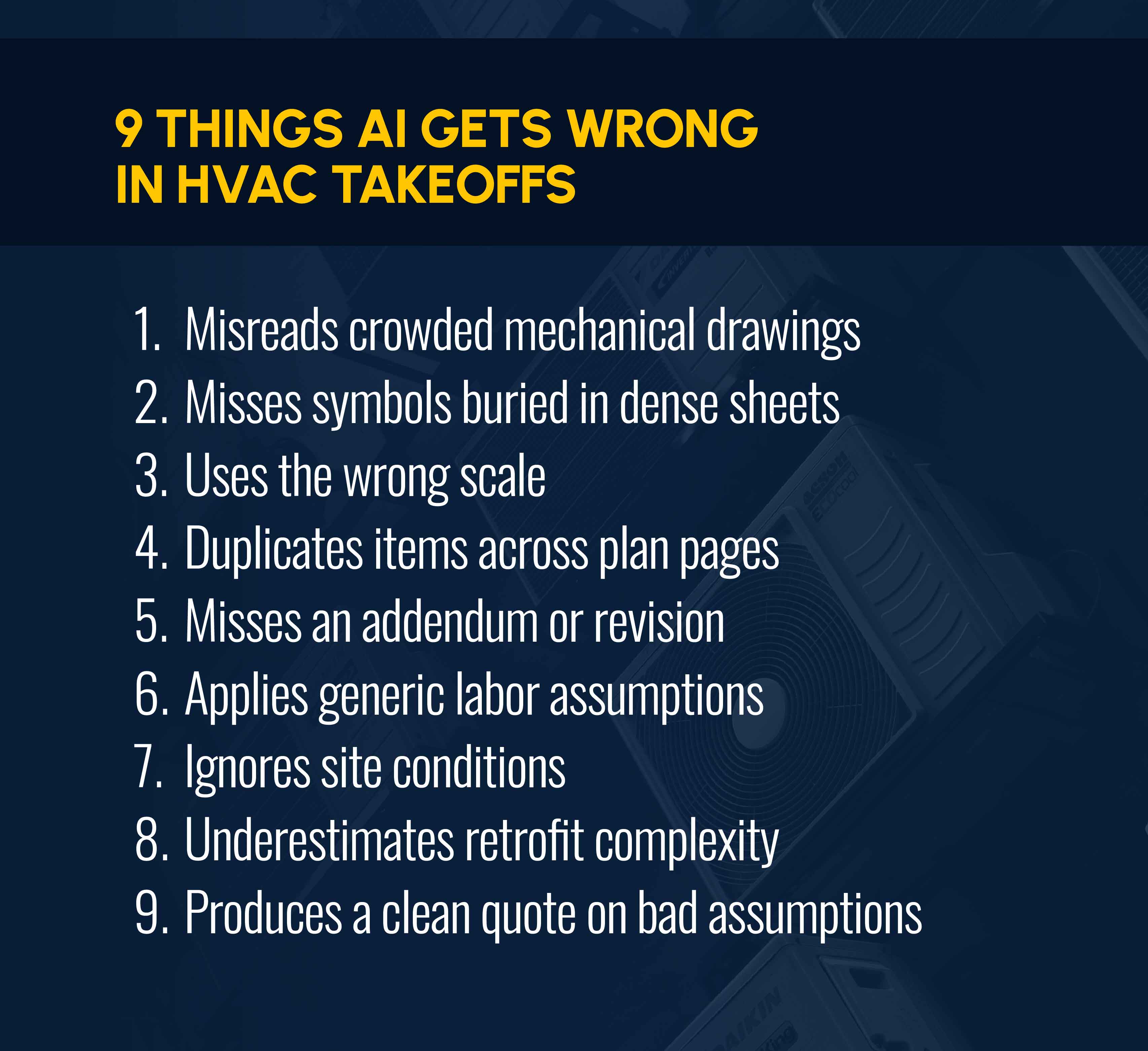
The step-4 review pass exists because AI takeoff tools can make a specific, repeatable set of mistakes, including:
- Misreading crowded mechanical drawings where symbols overlap
- Missing symbols or tags that are buried in dense sheets
- Using the wrong scale on a drawing that was incorrectly calibrated
- Duplicating items that appear on more than one plan page
- Missing addendums or drawing revisions that changed scope
- Applying generic labor assumptions instead of your crew’s productivity
- Ignoring site conditions that only show up on a walk-through
- Underestimating the complexity of retrofit work in older buildings
- Producing a clean-looking quote built on bad assumptions
Overlapping symbols and duplicate items across pages are the two most common, especially on multi-page commercial sets that repeatedly feature the equipment schedule.
The last mistake — clean quotes based on bad info — is the most expensive and hardest to spot. AI-generated proposals can look polished and professional even when the numbers are wrong.
The operational fix: The manual review in step 4 is non-negotiable. Before sending a proposal, make sure a human being examines every AI-generated takeoff for load calculations, retrofit labor, permit variation, and specialty scope.
Related: Looking for an HVAC estimating app? See how Simpro tracks open quotes, review deadlines, and margin impact from a single dashboard.
AI Makes HVAC Estimating Faster, But Process Protects Profit
Learning how to use AI for HVAC estimating lets you complete a takeoff in minutes instead of hours and with quantities you trust because you personally reviewed them. The next question is what happens to that data after you win the job.
AI field service management with Simpro Lightning adds an AI operating layer across the platform, powered by Cooper. JobReady briefs technicians before dispatch with full job history and site details, pushing first-time-fix rates from an industry average of 75% to 90% or higher. JobScribe captures completion notes in the technician's own voice, cutting daily paperwork by 30 to 60 minutes per tech and reducing billing disputes by up to 40%. JobBrief turns that into a professional customer summary automatically, which speeds up payment by 15 to 20 days.
Estimating data doesn't stop working after the job is booked. Every closed job feeds the actual installed cost back into the platform. An AI tool inherits those calibrated numbers and produces a tighter estimate on the next bid. That compounding accuracy can’t be replicated by a standalone and disconnected takeoff tool. This matters even more for contractors running HVAC alongside electrical or plumbing, where a job might touch multiple crews and estimates before it's done.
The right software for HVAC estimating doesn't stop at the takeoff. You won’t realize the full benefit if your estimates live in a different tool that’s not connected to scheduling, procurement, or invoicing. That’s why more than 24,000 trade businesses run that loop on Simpro, a purpose-built platform for the trades.
Centralizing estimating and operations on one platform with AI agents built in has delivered $123,000 to $549,000 in annual savings for contractors making the switch, freeing up 20 to 141 hours a week that used to go into manual re-entry. Similar transitions are documented in Simpro's customer case studies, including a commercial plumbing contractor that cut quote turnaround from three days to same-day and saved more than 17 hours a week on estimating.
Faster takeoffs get a quote out the door. What keeps that job profitable is having the same platform produce the estimate and run the job. Schedule a demo to see how Simpro connects the two.


 Back to top