
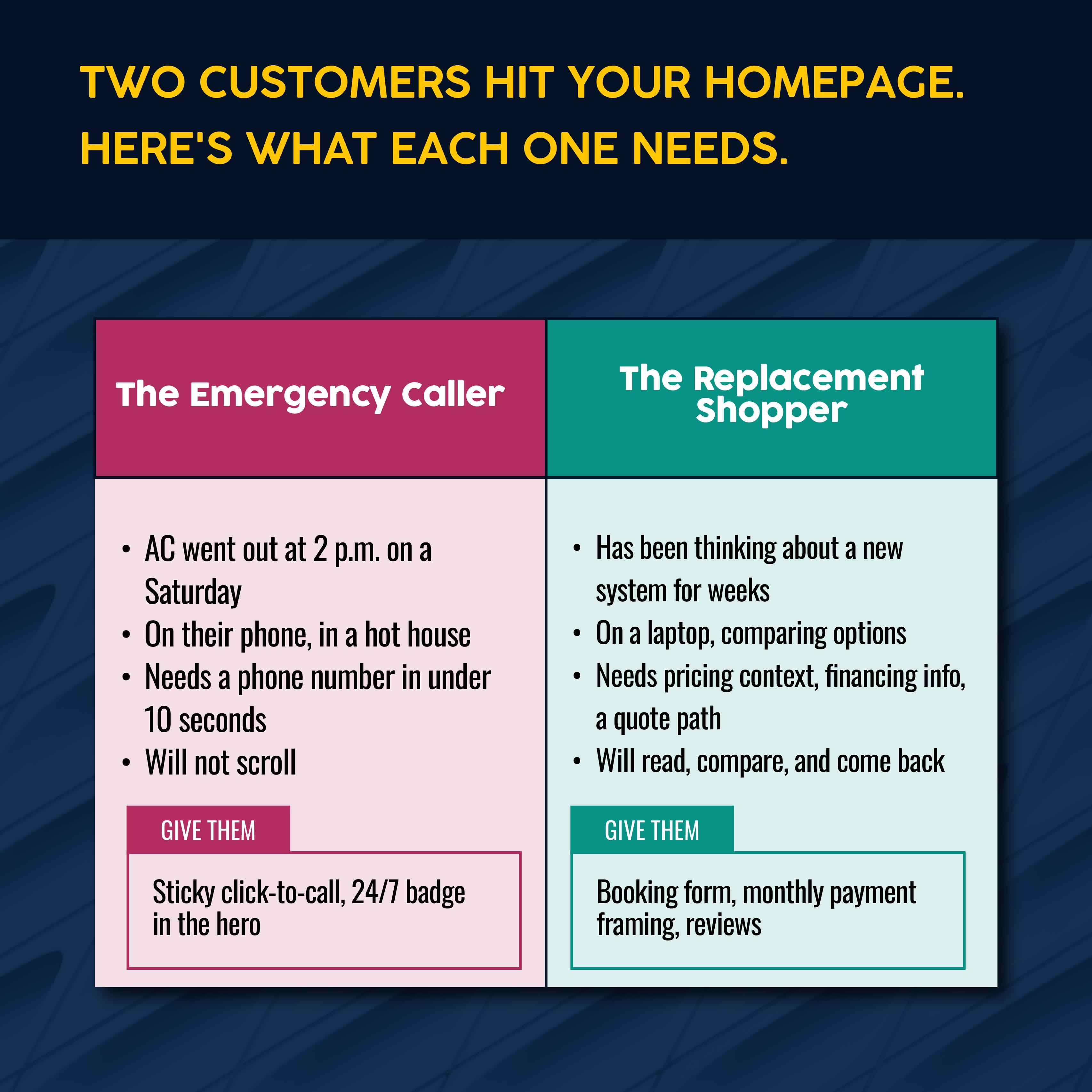
A homeowner's AC dies at 2 p.m. on a Saturday in July. She picks up her phone, searches "AC repair near me," and calls the first HVAC company whose website answers her three questions in under five seconds: What do you do? Do you serve my area? Should I trust you?
That call is worth $400 to $2,500 in emergency repair revenue, and that's before parts.
HVAC websites are where that moment either lands or doesn't. The companies winning those calls don't always have the most experience or the largest fleets. But they have websites that quickly earn the call from homeowners and businesses. And it's much easier to make a website that will help leads trust you when you have some inspiration first.
This guide covers 12 real HVAC websites examples across strengths, including emergency CTAs, service-area SEO, trust signals, maintenance plan promotion, commercial positioning, and lead capture. Plus, we're sharing best practices you can apply to your own site.
What Makes a Good HVAC Website?
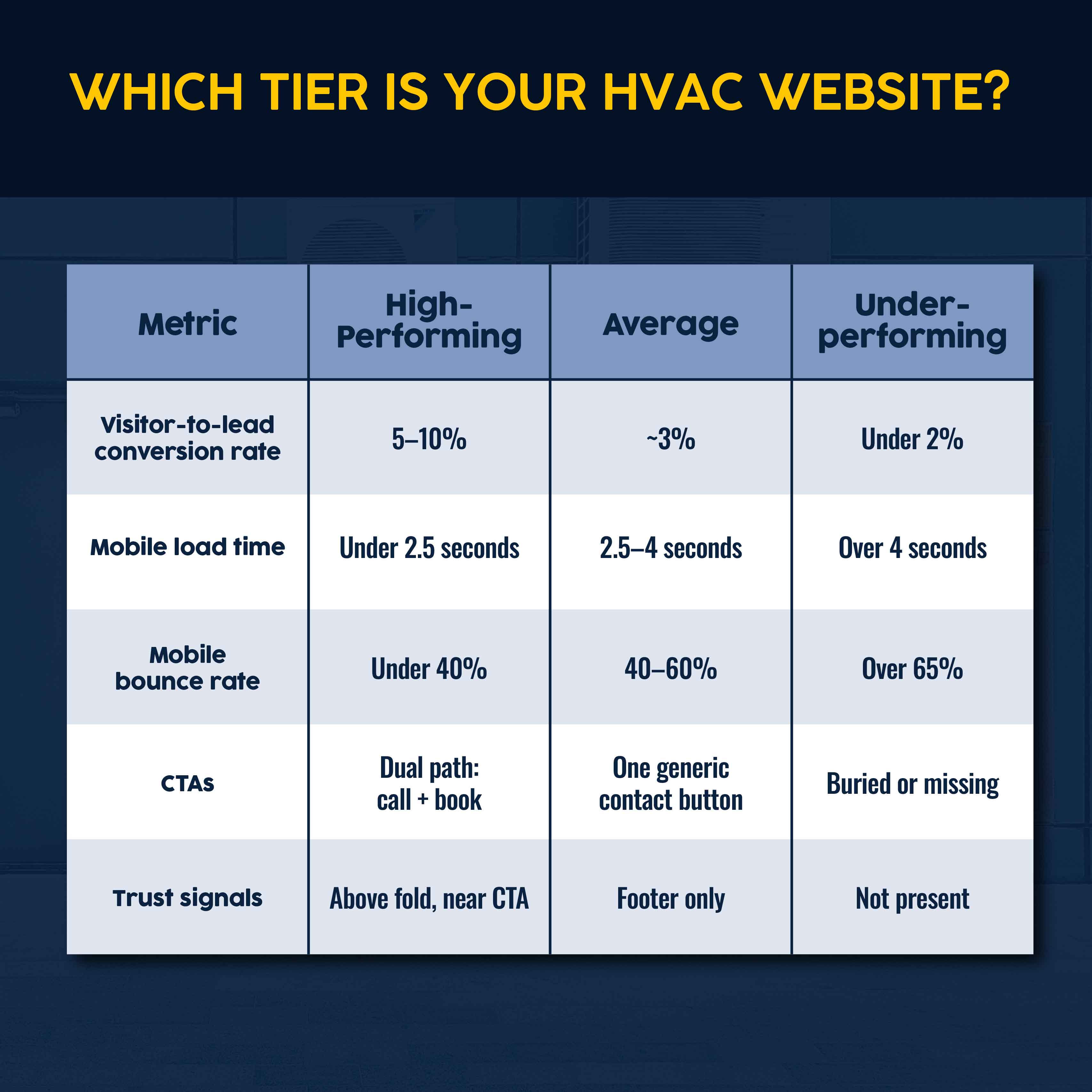
The performance gap between great HVAC websites and average ones is measurable. FirstPageSage, an SEO agency, says HVAC companies convert 2.8% of website visitors, and 3.1% who go to a landing page. Top performers can see multiples of that become leads — but it rarely comes down to HVAC website design.
These three factors drive success:
- Technical performance. How quickly your site loads when someone visits, whether it shows up nicely on mobile devices, and general maintenance/upkeep (like cleaning out dead links when you delete a page) determine whether Google shows your site when someone googles "HVAC technician [my city]" and whether visitors stay. A slow or confusing mobile experience loses prospects with the most urgent needs.
- Conversion architecture. HVAC customers come in two groups: a homeowner in crisis who needs a phone number fast, or someone researching a $12,000 system replacement. A good HVAC website serves both with a click-to-call button for the emergency caller and a booking flow (a form with steps to collect detailed information) for the planned job. A generic "Contact Us" button fails both.
- Trust signals. HVAC is an in-home service with high average job values and real physical stakes. Everything that builds trust — reviews, certifications (NATE, EPA 608, manufacturer authorizations), years in business, service guarantees — is something that will increase your chances of a visitor actually calling or submitting a form and it works best near a "submit" button or phone number. These principles apply whether you're refining an existing site or starting an HVAC business from scratch.
At a Glance: Best HVAC Website Examples to Learn From
| HVAC Website Example | Best For | What Stands Out | Best Practice to Copy |
|---|---|---|---|
| Reddi Heating & Cooling | Overall website structure | Clean service hierarchy, intuitive navigation | Mirror the service page architecture. |
| Anyday Heating & Cooling | Mobile-first booking experience | Sticky CTA bar, fast mobile load | Make click-to-call visible on every screen. |
| Davis Air & Heat | Trust signals | Certifications and reviews positioned near CTAs | Display NATE, BBB, and Google reviews above the fold. |
| United Air Temp | Emergency service positioning | 24/7 messaging in the homepage hero | Carry emergency signals through every relevant service page. |
| Tanous Heating & Cooling | Service-area SEO | City-specific landing pages with unique local content | Build a page for every area you serve. |
| Coastal Heating & Cooling | Simple website for small HVAC businesses | Focused layout, fast load, low bounce rate | Prioritize clarity over complexity. |
| Western Heating, Air & Plumbing | Homepage CTA execution | Dual CTA structure: call vs. schedule | Separate the emergency call path from the booking flow. |
| Gee! Heating & Cooling | Reviews and social proof | Reviews embedded near CTAs, not buried in a tab | Put star ratings and review counts where decisions happen. |
| Anderson Air | Maintenance plan promotion | Dedicated maintenance agreement landing page | Give your maintenance program its own URL and CTA. |
| Air Treatment Company | Financing and offer placement | High-profile financing CTA on the homepage | Surface financing before the customer runs the total. |
| Kalos Services | Commercial HVAC positioning | Separate navigation path and content for commercial work | Route residential and commercial audiences from the homepage. |
| Morris-Jenkins | Lead capture flow | On-site booking integration, no redirect | Keep the booking flow on your own domain. |
12 HVAC Website Examples and What They Get Right
Each of these companies made specific decisions about how to structure their site that produced measurable outcomes. Copy the principle, not the design.
1. Reddi Heating & Cooling: Overall HVAC Website Structure
Reddi Heating & Cooling, based in Wichita, Kansas, appears in HVAC website roundups consistently because the website's information architecture is clean. Every core service has its own page, with clear navigation. The path from the homepage to a specific service takes two clicks.
That structure matters for search engine optimization and conversion. Google crawls the site without hitting dead ends. Meanwhile, customers can find what they need in seconds, so they move down the funnel instead of looking elsewhere.
What to copy: Build navigation around customer intent, not internal categories. Make individual service pages accessible from the top menu, rather than buried under a broad "Residential Services" dropdown.
2. Anyday Heating & Cooling: Mobile-First Booking Experience
Anyday Heating & Cooling's site is built for the scenario where most emergency HVAC searches originate: A customer at home, facing a crisis, looking for a provider on their phone. The site loads quickly. Anyday's phone number is sticky, at the top, on a laptop or mobile. The path to booking doesn't require scrolling through homepage content first.
When a customer can't find your phone number within three seconds, they don't scroll back up — they find the next result.
What to copy: Test your site on your phone, and scroll three full screens. If your phone number and call to action (CTA) disappear, that's a conversion problem. Fortunately, you can create a sticky header without a full redesign.
3. Davis Air & Heat: Trust Signals
Trust is the first transaction in an HVAC sale. Davis Air & Heat starts with sticky CTAs for a phone number and estimate, followed by the signals that accelerate trust: visual links to Google reviews, HomeAdvisor ratings, and BBB accreditation. Visitors can see these signals without scrolling to the footer, navigating to an "About" page, or aimlessly searching.
Each of these signals offers different proof. Reviews signal peer viewpoints, accreditations and certifications offer third-party validation. But when website visitors can't see these signals, they're more likely to look elsewhere.
What to copy: Audit your homepage. If your reviews and certifications are below the fold or in the footer only, move them up. Positive reviews can't convert if website visitors don't know they exist.
4. United Air Temp: Emergency Service Positioning
United Air Temp leads with 24/7 emergency availability in a sticky header and the main headline, rather than tucked away in a sidebar or footer — or absent altogether. You can't visit this company's page without realizing they offer 24/7 availability. The framing is direct: available after hours, same-day, and responsive.
If round-the-clock service is important to your value proposition, make sure potential customers can see that, no matter where they are on your website. Don't make them navigate to a special page when they have an emergency.
What to copy: Prominently display a click-to-call button and "24/7 Available" signal above the fold of every emergency-relevant service page. Consider embedding 24/7 availability in a sticky header on every page.
5. Tanous Heating & Cooling: Service-Area SEO
A "Service Areas" page listing 15 city names in a paragraph won't rank for searches that name-check any of those cities. Tanous Heating & Cooling has individual landing pages for each city it serves across two counties, each with unique local content, list of services, FAQs, and reviews. The result is indexed pages that search engines rank independently for searches like "furnace repair [city]," not just for the primary location.
What to copy: For every city you serve, build a dedicated page: who you are, what you do there, why a local customer should call you, and a CTA.
6. Coastal Heating & Cooling: Simple Website for Smaller HVAC Businesses
Coastal Heating & Cooling has a simple, deliberate website that focuses on a handful of core services and one primary service area, with contact forms that ask for the minimum information needed to initiate a call. While the three main service verticals have pages for individual services, these are also focused and specific.
For a small operator without the need to rank across dozens of keyword variations, a focused site delivers better performance per page than a sprawling one without a clear structure.
What to copy: If your site has dozens of pages but no clear strategy, a focused rebuild around your top services and primary service area may outperform trying to optimize what you already have.
7. Western Heating, Air & Plumbing: Homepage CTA Execution
Western Heating, Air & Plumbing handles the dual-CTA problem by separating the customer journeys that most HVAC sites blend into a single button. There is the emergency path ("Call us 24/7" with a phone number) and a less urgent work path ("Schedule Online").
Routing both into one "Contact Us" button fails both journeys. At $800–$2,500 per emergency job and $8,000–$20,000 per system replacement, the cost of that friction across a month of missed calls becomes a significant drag on the business.
What to copy: Split your primary homepage CTA into two. Design each with distinct visual weight so they're easy to distinguish on mobile.
8. Gee! Heating & Cooling: Reviews and Social Proof
Gee! Heating & Cooling integrates customer reviews into the conversion flow rather than isolating them on a separate "Testimonials" page. Customer reviews, star ratings, and review counts appear near the booking CTA on the homepage, where they can influence the decision being made, rather than sitting unused elsewhere on the site.
97% of local consumers look at online reviews before hiring a local business. Reviews embedded near CTAs reduce the hesitation gap between "I'm interested" and "I'm calling." Putting them somewhere else removes that effect.
What to copy: Sync your Google Business Profile reviews to your homepage and primary service pages. A star rating and review count next to a booking button outperform either element alone.
9. Anderson Air: Maintenance Plan Promotion
Maintenance agreements can be an HVAC business' most predictable revenue stream, but most HVAC websites bury them under a "Services" dropdown where they get no traffic and no conversions. Anderson Air has a dedicated landing page for its maintenance program with a clear value proposition, transparent pricing, and a direct enrollment CTA.
HVAC customers with a maintenance plan return for a second job 89% of the time, versus a 42% average retention rate. The landing page is where that retention relationship starts.
What to copy: Build a standalone maintenance agreement page. Name the plan, list coverage, show the annual cost against a per-incident comparison, and add a direct enrollment CTA.
10. Air Treatment Company: Financing and Offers Placement
System replacements average $8,000 to $20,000. Air Treatment Company surfaces financing options on the homepage, with the "Ask Us About Our 0% Financing" section directing visitors to a dedicated financing page. The company also provides numerous ways to continue the conversation, including live chat.
"New system starting at $X/month with approved credit," positioned next to a scheduling CTA, converts better than providing that information during the estimate.
What to copy: On any service page where jobs exceed $3,000, add a financing callout with monthly payment framing. Don't wait until the estimate, or you'll lose customers who see the total price and stop responding.
11. Kalos Services: Commercial HVAC Positioning
Many HVAC websites try to present residential and commercial HVAC services through the same navigation and service pages. But that shortchanges both.
Kalos Services routes each audience from the homepage via dropdowns at the top and clear CTAs further down. Each line of commercial work has its own service page with descriptions written for facility managers and building owners.
Separate positioning reduces friction for commercial buyers and signals that the company understands commercial project requirements, which is itself a trust signal.
What to copy: If commercial work is 20% or more of your revenue, build it out on your website. That means separate service pages, a commercial-specific CTA, and case studies reflecting actual projects.
12. Morris-Jenkins: Lead Capture Flow
Morris-Jenkins keeps its scheduling service embedded directly on the site — you don't get redirected to a third-party portal or a separate browser window. The form is short, with immediate confirmation. And if you have an emergency, you get redirected to a phone number.
Ideally, your booking form will connect to a field service management (FSM) platform that automatically creates a job, triggers scheduling, and initiates customer communication without manual re-entry. Converting home service leads, especially for emergencies, only happens when the response is fast and thorough.
What to copy: Keep your booking flow on your own domain. Every redirect to an external portal introduces friction and hurts conversions. Evaluate whether a native integration into your field service platform is available.
Related: For more on how to run a successful HVAC business, learn about the operational decisions behind growth.
HVAC Websites Best Practices to Copy
The 12 examples above each isolate one decision. Here's a consolidated view of the HVAC website best practices that show up across the strongest performers.
CTAs and conversion:
- Phone number on every page, visible before you have to scroll at all. And make it sticky, so you can see it even when you scroll. Especially on mobile.
- Dual call-to-action (buttons) on the homepage: One for emergency calls, another for scheduled bookings
- Short forms: Name, phone, ZIP code, service type, and preferred date
- On-site booking, rather than redirecting to a third-party URL
Pages and content:
- Individual pages for every core service: AC repair, AC installation, furnace repair, furnace installation, heat pump service, duct cleaning, maintenance agreements, emergency HVAC, and commercial HVAC, where applicable
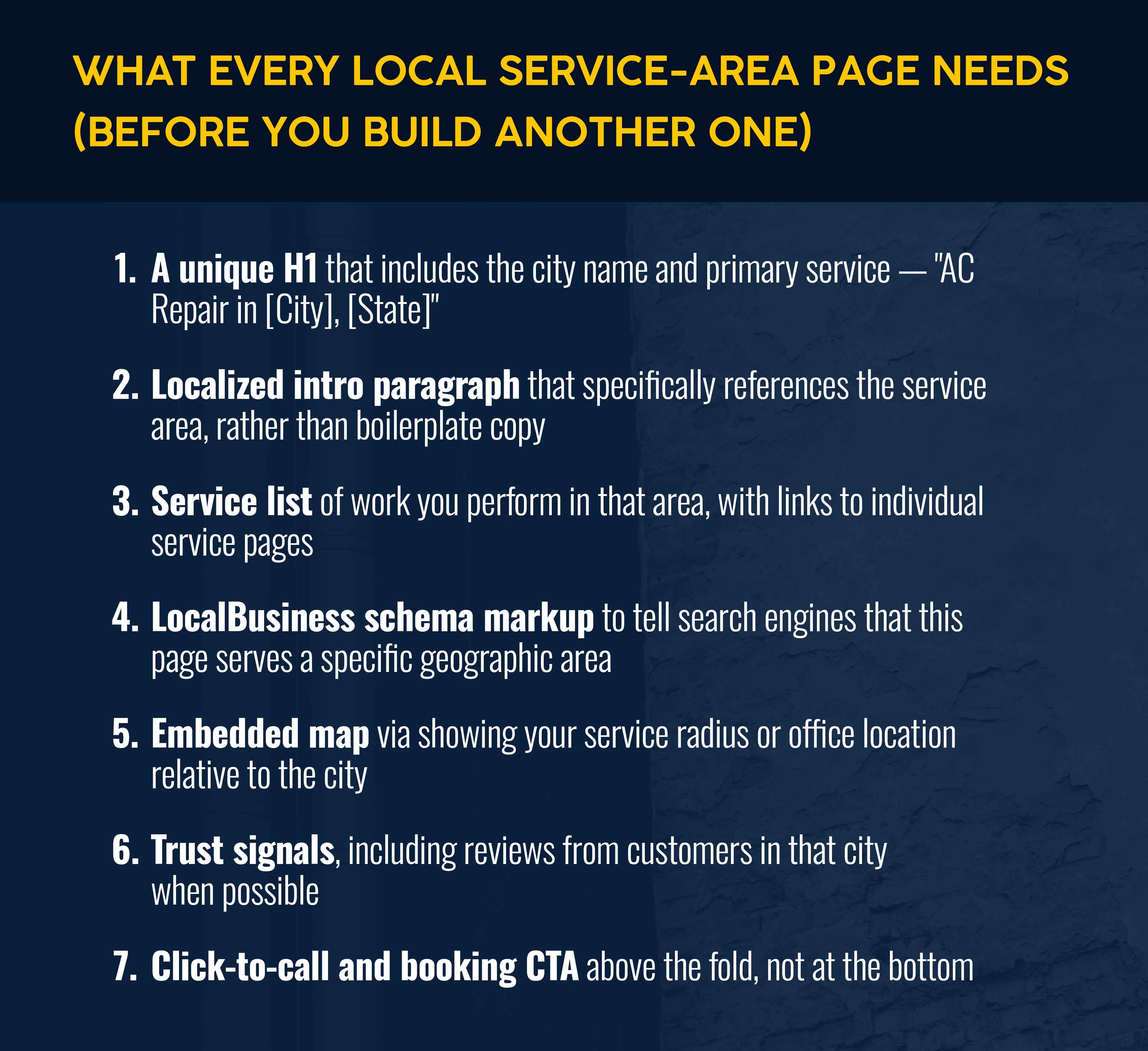
- Dedicated service-area page per city served, each with unique local content (helps you rank for local [my city] searches)
- Standalone maintenance agreement page, with a direct enrollment button
- FAQ sections on service pages addressing questions customers ask before they call (to ensure more of your calls lead to jobs instead of answering questions you could have answered proactively)
Trust and credibility:
- NATE, EPA 608, manufacturer authorizations, BBB, Google reviews, etc., positioned near buttons where you want someone to submit a form or call, not just in the footer
- Real photos of technicians, trucks, and completed work (not stock art, unless necessary as placeholders)
- Financing options or links to more info clearly displayed on any service page where the typical job exceeds $3,000
- Service guarantees and price transparency near where decisions are made (buttons)
- Offers, pricing notes, and seasonal promotions kept current; outdated specials are devastating for trust
Technical:
- Mobile device load times under 2.5 seconds (you can measure this with many free site performance tools)
- LocalBusiness schema markup on all service-area pages (this guide can help you understand and create this yourself using an LLM like ChatGPT)
- The ability to get to any service page within two clicks from the homepage
Tracking:
- Calls, form submissions, quote requests, and online bookings separately tracked based on stage of the lead funnel
Related: HVAC marketing strategies show how to build a lead generation system, including paid search, local SEO, social media, and review management.
How to Know Whether Your HVAC Website Is Working
Most HVAC contractors judge their website by how it looks. The more useful question is what percentage of website visitors convert. But those numbers don't necessarily sync.
- Phone calls from organic search. The most direct measure of whether the site produces high-intent leads. Call tracking with dynamic number insertion attributes calls to specific pages, so you know what traffic generates calls.
- Conversion rate by service page. Your AC repair page may convert at 8% while your furnace installation page converts at 2%. That gap points to a problem with CTAs or content. Without page-level tracking, you're guessing, not optimizing.
- Mobile bounce rate. A high mobile bounce rate points to issues with UX or website speed. If desktop bounce is 35% and mobile is 65%, for example, the experience needs structural work — more copy won't fix it.
- Form submissions versus calls. If submissions are high but calls are low, the phone path has friction. If calls are high but submissions are minimal, the form likely asks for too much information before a prospect is ready to commit.
- Local rankings for core services. Track where you appear in search results monthly for your top service-plus-location keyword combinations to see whether your SEO investment is compounding or stalling.
- Revenue from website-generated jobs. The number that matters most. Capturing revenue requires connecting your website to your FSM platform. Otherwise, you're measuring traffic, not financials.
Turn Your HVAC Website Into a Better Source of Booked Jobs
Your site creates the opportunity, but your back-end operation determines whether it pays off. A HVAC website can rank on page one and carry 400 five-star reviews but still lose revenue if your team can't make the handoff from lead to dispatched job. Speed is essential: Responding within 60 seconds of a lead submission increases conversions by 391%.
Service software for HVAC businesses like Simpro® connects your booking form to job creation, scheduling, quoting, and invoicing without the manual re-entry that slows your office and delays your field team.
The site generates the lead. The platform monetizes it. Schedule a demo to see how they connect.


 Back to top