
A plumbing job sheet template helps your team record each plumbing job in one consistent place. Use it to capture the customer, site, fault, completed work, parts, labor notes, test results, photos, follow-up work, and customer sign-off.
Download the template in PDF, Google Docs, or Microsoft Word format. The file is a general job worksheet template. Plumbing businesses adapt it with fields for fixture details, pipe materials, isolation points, leak checks, pressure tests, and follow-up work.
Download your free plumbing job sheet template
Start here if you need a plumbing job sheet today. Download the generic Simpro job worksheet template, then add plumbing fields for faults, fixtures, parts, test results, photos, and sign-off. It works as a printable PDF, editable Google Doc, or Microsoft Word file before sharing it with the whole team.
Download formats:
- PDF job worksheet template for printing and filling out by hand
- Google Docs job worksheet template for copying and editing online
- Microsoft Word job worksheet template for editing on your computer
Add your company name, logo, license details, phone number, and email address. Then add fields for emergency call-outs, leak repairs, water heater work, blocked drains, gas work, maintenance, and installations.
Keep the same template structure across every plumber and job type. Field staff fill out the form faster. Office staff invoice from a clearer record.
What is a plumbing job sheet?
A plumbing job sheet is the completion record for a service call, repair, install, or maintenance visit. It captures the request, site findings, parts, labor, test results, photos, and sign-off after the work happens. That record gives the office enough detail to invoice, answer customer questions, and reduce extra calls.
The record also goes by plumbing job card, plumbing worksheet, plumbing service sheet, or job completion sheet. The purpose is the same: create a clear field-to-office record.
A job sheet is different from a work order. A work order authorizes the work before starting. A job sheet records what happened during and after the visit. The Cambridge Dictionary definition of job sheet points to a document for recording work and time.
It is also different from an estimate or invoice. An estimate sets out expected costs before approval. An invoice requests payment after the work is complete. The plumbing job sheet sits between those steps and gives the office the evidence needed to bill accurately.
What to include on a plumbing job sheet
Use this section as the checklist for your template fields. Your template needs customer details, job identifiers, fault notes, site conditions, parts, labor, test results, photos, follow-up work, and sign-off. Keep each field short enough for field use and specific enough for billing without slowing technicians down on site visits.
Include these fields on your plumbing job sheet:
- Job or reference number
- Customer name, site address, billing address, and contact details
- Date, arrival time, departure time, and technician name
- Job source, such as booked service, emergency call-out, maintenance visit, or quoted work
- Reported fault in the customer's words
- System, appliance, fixture, or asset details
- Access notes, shutoff points, isolation points, and site constraints
- Diagnosis, make-safe actions, and work carried out
- Parts and materials used, with quantities
- Labor hours, call-out details, and chargeable time
- Test results, such as pressure test, leak check, flow, temperature, or gas soundness where relevant
- Safety notes, compliance notes, certificate references, and made-safe actions
- Before and after photos or attachments
- Recommended follow-up work
- Technician and customer sign-off
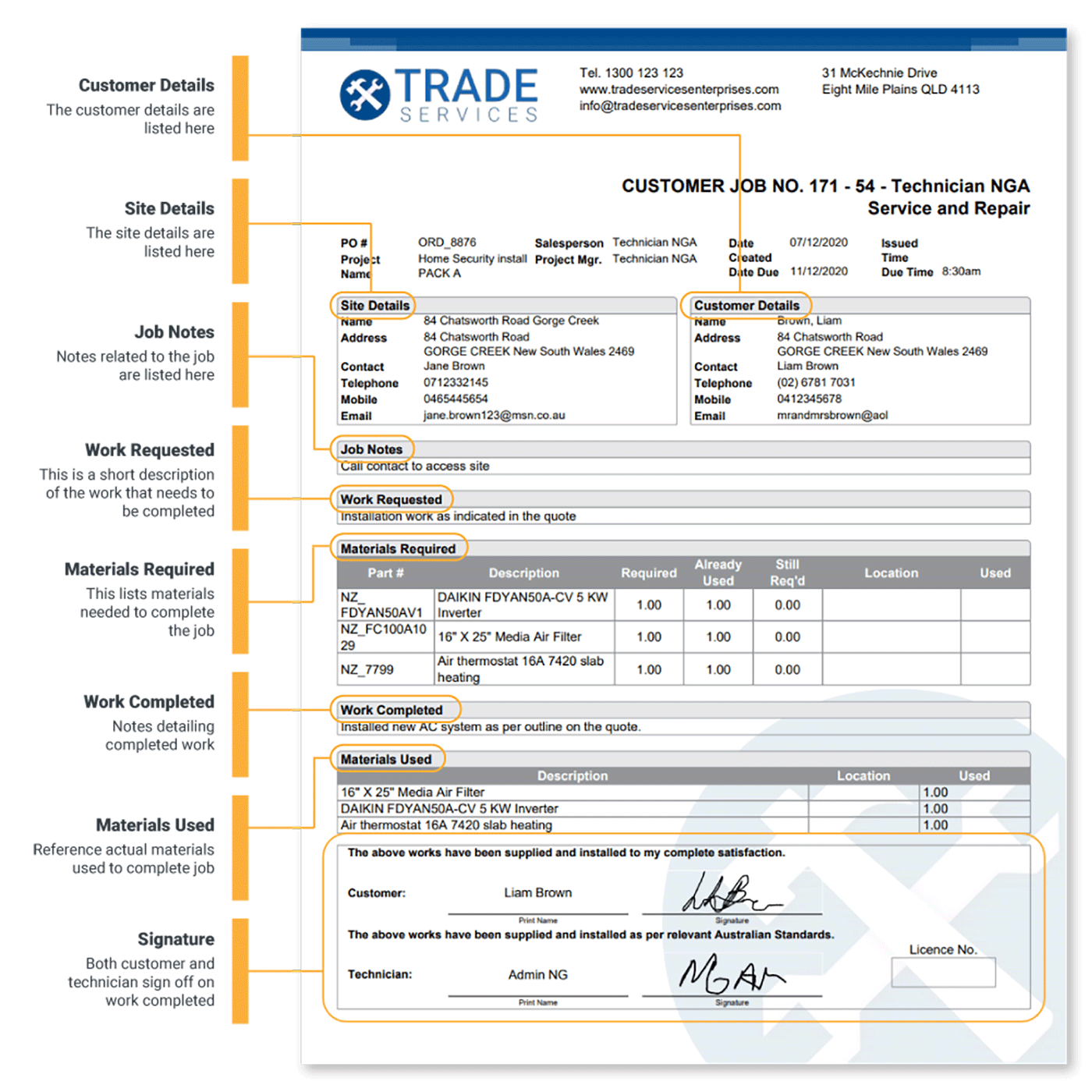
The reported fault matters because it protects scope. In a leaking-sink repair, the plumber finds a failed isolation valve. The job sheet shows how the work moved from request to diagnosis.
Parts and materials matter because small items disappear from memory quickly: seals, fittings, valves, pipe lengths, traps, connectors, tape, and consumables. The job sheet gives the office a billing record and supports stock tracking.
Test results and compliance notes matter because plumbing work needs a record of safety and function. Keep this section factual. Record each check, result, made-safe action, and follow-up item. For wider recordkeeping context, align internal records with OSHA recordkeeping guidance.
How to fill out a plumbing job sheet
Fill out the job sheet during the visit, not after it. Start with the customer and job identifiers, then record the fault, diagnosis, parts, work completed, tests, photos, and sign-off as the job moves. Fresh notes make the office handoff cleaner and reduce invoice follow-up calls while details are fresh.
-
Add customer, site, and job identifiers. Record the job number, customer name, site address, technician name, date, and job type. This ties the sheet to the quote, schedule, work order, and invoice.
-
Record the requested work and known faults. Write the customer's description in plain language, such as "no hot water since this morning" or "blocked drain in rear bathroom." This gives the office a clear starting point if the final work differs from the first call.
-
Note diagnosis and make-safe actions. Capture what the plumber found on site, which services the plumber isolated, and which immediate safety action happened before repairs started.
-
Detail the work carried out. List the actual work in sequence. For example, removed damaged trap, replaced seal, tested for leaks, cleaned work area, and confirmed normal drainage.
-
List parts and materials with quantities. Record each fitting, valve, seal, length of pipe, cartridge, hose, washer, or appliance part. This helps the office invoice accurately and helps the business track common materials.
-
Record test results and follow-up work. Add pressure readings, leak test results, flow checks, temperature checks, photos, certificate references, defects, and recommended future work.
-
Capture customer and technician sign-off. Add signature, printed name, date, and any customer notes. This confirms the job record and gives the office a clean completion point.
-
File the job sheet for invoicing and records. Paper sheets need a reliable return process. Digital sheets need a consistent naming or job-linking process, so the office finds the record without searching through inboxes or photos.
Plumbing job sheet example
A filled-out example shows how the template works on a real plumbing visit. This leaking sink repair touches the main fields: reported fault, diagnosis, material use, labor, testing, photos, follow-up notes, and sign-off. Keep examples unnamed and practical for office handoff without inventing a customer story or unsupported job details.
The office receives a call from a customer reporting water under the kitchen sink. The dispatcher creates the job and fills in the customer name, site address, phone number, job number, and reported fault before assigning the plumber.
On site, the plumber records the arrival time and checks the sink cabinet. The diagnosis notes show a failed trap seal and minor corrosion around the waste fitting. The plumber isolates the water supply, removes the damaged part, fits a new trap seal, tightens the connection, and tests the sink under running water.
The materials section lists the replacement seal, trap fitting, and consumables used. The labor section records the call-out and time on site. The test section notes that the plumber ran the sink for 5 minutes with no visible leak. The photo section includes a before photo of the leak area and an after photo showing the repaired fitting.
The follow-up section records that the cabinet base has water staining and that the customer agreed to monitor it. The customer signs the sheet before the plumber leaves. Back at the office, the completed job sheet gives the invoice team the job record, labor time, materials, and sign-off in one place.
That is the difference between a useful job sheet and a blank form. The template gives structure, but the plumber's notes make the record useful.
Paper, PDF, spreadsheet, or digital plumbing job sheets?
Choose the format that matches your job volume and office turnaround. Paper and editable documents help small teams standardize the work record. Digital forms make more sense when field notes, photos, parts, signatures, and invoices need to move together without retyping.
| Format | Best fit | Watch-outs |
|---|---|---|
| Paper job sheet | Small teams that want a printable form in every van | Sheets get damaged, delayed, or lost before invoicing |
| PDF template | Teams that want a locked layout for printing or email | Hard to update consistently once copies spread |
| Word or Google Docs template | Teams that want to edit fields and branding | Version control gets messy if staff save local copies |
| Spreadsheet | Teams tracking simple job lists and materials | Not ideal for photos, signatures, or field notes |
| Digital form | Growing teams that need field-to-office visibility | Needs setup, training, and a consistent workflow |
Paper and editable templates are a practical starting point. They help your team agree on what a plumbing job record looks like. The problem appears when paper adds admin. Someone returns job sheets to the office. Someone rekeys notes into an invoice. Someone chases missing parts or signatures.
Digital forms remove much of that double handling. Plumbers complete the form on a mobile device, add photos, record required fields, and send the completed job details back to the office without waiting for paper to return.
How plumbing job management software helps when templates stop scaling
A template improves the record. Software improves the workflow. Once plumbing job sheets feed scheduling, parts, photos, follow-up work, customer sign-off, and invoicing, the office gets live job data. The team doesn't wait for paper after every route.
That matters when job volume grows. If the office waits for paper job cards, invoices slow down. If plumbers use separate apps for photos, notes, parts, and signatures, the office still pieces the job together after the visit. If follow-up work sits in handwritten notes, quoted work gets missed.
BOP Plumbing and Gas shows the digital version of this workflow. The team moved away from technicians filling out paper job cards or switching between apps. With connected job tracking and mobile job data across 3 branches, BOP reports invoices issued within 24 hours of job completion across all branches.
Keep that outcome tied to BOP's own process, not as a universal promise. The broader lesson is simple: once job sheets drive scheduling, parts, photos, sign-off, invoicing, and follow-up work, a connected system gives the business better control than loose paperwork.
Manage plumbing jobs end to end with Simpro
Start with the free template when your team needs a shared job sheet structure. Move to Simpro when the same fields need to connect with quotes, schedules, mobile updates, parts, forms, invoices, and reporting. The goal is a cleaner job record from first call to final invoice.
When paper starts slowing the business down, Simpro helps plumbing teams manage the job from booking through completion. Plumbing software connects scheduling, quoting, job tracking, mobile field work, inventory, invoicing, and reporting in one workflow.
Plumbers use the field service mobile app to access job details, update notes, capture site information, and send job data back from the field.
Office teams use job management software to move work from quote to invoice without scattered paper or disconnected files.
If your next bottleneck is estimating, read our guide on how to bid plumbing jobs and build a stronger process before the work reaches the field.
Frequently Asked Questions
What should a plumbing work order include?
Work orders include the job number, customer and site details, requested work, plumber or technician, scheduled date, materials, safety notes, and signature fields. Job sheets add the completion record: diagnosis, work carried out, actual parts used, test results, photos, follow-up work, and customer sign-off.
What formats are available?
This Simpro template is available as a PDF, Google Docs copy, and Microsoft Word template. Choose the PDF for printing, Google Docs for online editing, or Word when your office wants a local editable version. This page does not include an Excel template.
Do I need software to use the Plumbing Work Order Template?
No. You don't need software to use the PDF, Google Docs, or Word versions. Print the PDF or edit the documents with common office tools. Software becomes useful when your team wants job sheets, photos, notes, sign-off, parts, and invoices connected in one field-to-office workflow.


 Back to top