
The best plumbing software depends on job mix, crew size, office structure, and the type of work that fills the schedule. A residential shop that books emergency calls needs a different system than a commercial contractor managing quoted work, maintenance contracts, inventory, assets, and project cost control.
For growing plumbing businesses, Simpro fits the broadest operational need. It connects quoting, scheduling, dispatch, job management, inventory, maintenance, invoicing, and reporting in one platform. That makes it a strong fit when a plumbing company has moved beyond basic scheduling and needs tighter control over the full job lifecycle.
Jobber fits small residential plumbing shops that want straightforward scheduling, quoting, invoicing, and client communication. Housecall Pro fits residential teams that put customer booking and customer notifications near the center of the service experience. BuildOps fits large commercial contractors that need commercial service, project, and account workflows.
This guide compares the original eight tools in the same order as the current article. It also fixes the incorrect electrical-software comparison heading on the live page and keeps the existing URL slug.
Methodology: We assessed each tool by public product pages, pricing transparency, plumbing fit, company size, and workflow coverage.
Key takeaways
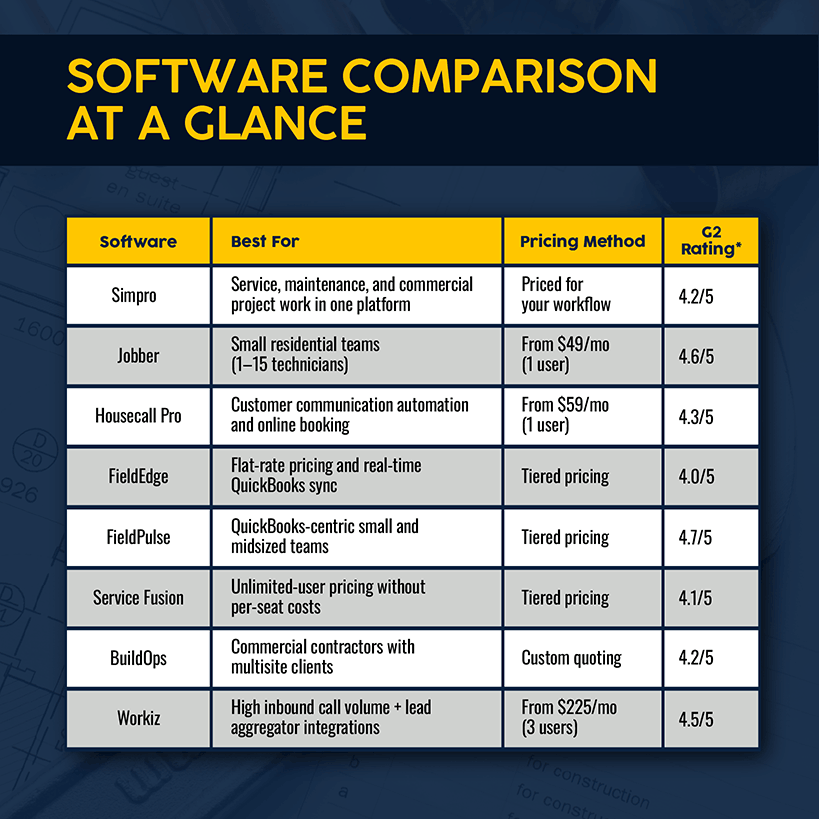
Use these takeaways to match plumbing software to company size and workflow depth. Simpro fits growing contractors that need connected operations. Jobber and Housecall Pro fit smaller residential teams. BuildOps fits commercial complexity, while FieldEdge, FieldPulse, Service Fusion, and Workiz cover narrower service-work needs. Use the table and tool sections for final shortlist decisions.
- Simpro is the best fit for growing plumbing contractors that need connected field service, maintenance, inventory, and job-costing workflows.
- Jobber is a strong fit for small residential plumbing shops that want a clean office workflow and fast client communication.
- Housecall Pro suits residential service teams that need booking, dispatch, estimates, payments, and customer updates in one place.
- BuildOps targets commercial plumbing contractors with complex accounts, larger crews, and project-heavy service work.
- Quote-based tools need a demo or sales conversation before final budget approval.
Best Plumbing Software at a Glance: 2026 Comparison
How to choose plumbing software
Choosing plumbing software starts with the workflow that slows revenue or service quality. Estimate gaps point to quoting. Missed appointments point to dispatch. Stock issues point to inventory. Weak margin visibility points to job costing. Use those problems to decide which platform deserves the first demo for the buying team.
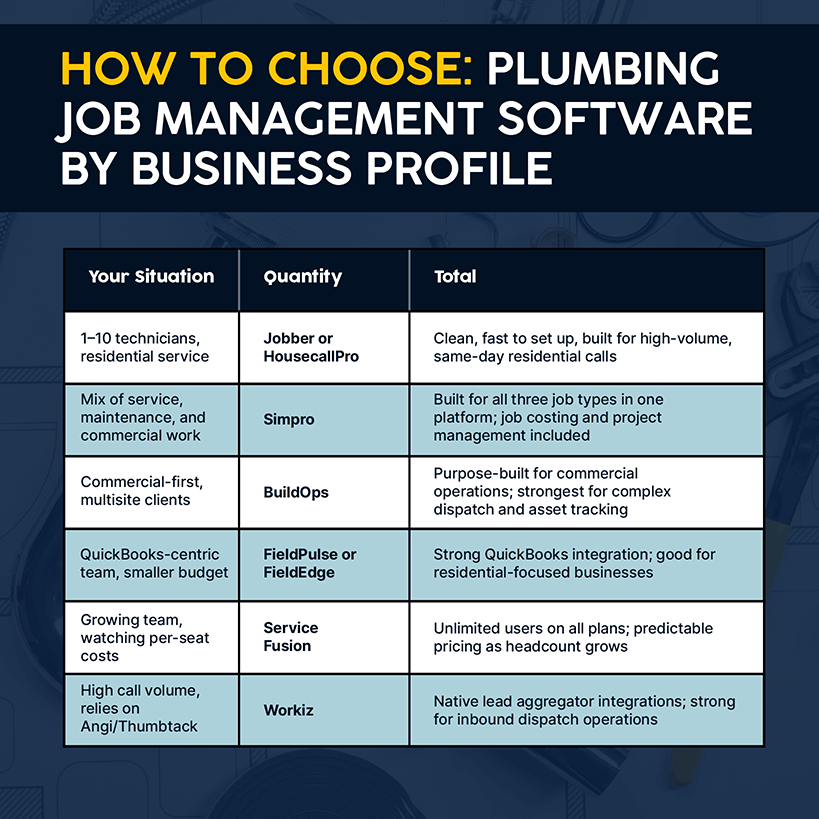
Start with the work that creates the most friction. A plumbing team that loses time between quotes and booked jobs needs stronger estimating and follow-up. Missed appointments point to dispatch visibility. Stock issues point to inventory control. Weak margin visibility points to job costing and reporting.
The right plumbing software also depends on whether the company sells residential service, commercial service, construction projects, maintenance agreements, or a mix. Residential service teams need fast booking, clear technician schedules, customer messages, and simple payments. Commercial teams need account structure, contract history, asset records, purchase order tracking, and reporting that supports longer relationships.
Company size matters as much as feature depth. A two-person shop needs a system that staff learn fast. A larger contractor needs permissions, role clarity, reporting, and process consistency across office and field teams. The wrong tool either slows a small team with extra setup or leaves a larger team short on operational control.
Pricing also needs scrutiny. Published entry plans rarely tell the full cost story for add-ons, users, integrations, onboarding, data migration, and support. A quote-based pricing model is not automatically a drawback. It signals that the vendor needs to understand the workflows, modules, and scale of the plumbing company before pricing the system.
Match each tool to a buyer profile in the sections below. The best choice is the platform that fits the next stage of the business, not the tool with the longest feature list.
1. Simpro
Simpro fits plumbing teams that have outgrown basic scheduling. It connects field work, office work, inventory, maintenance, reporting, and invoicing. A public plumbing customer example is available in the Kiely Plumbing case study. Review Simpro first when growth creates handoff, visibility, or job-costing pressure across the daily service workflow mix.
Simpro fit: Best for: Growing plumbing businesses and commercial plumbing contractors that need connected job management from quote to invoice.
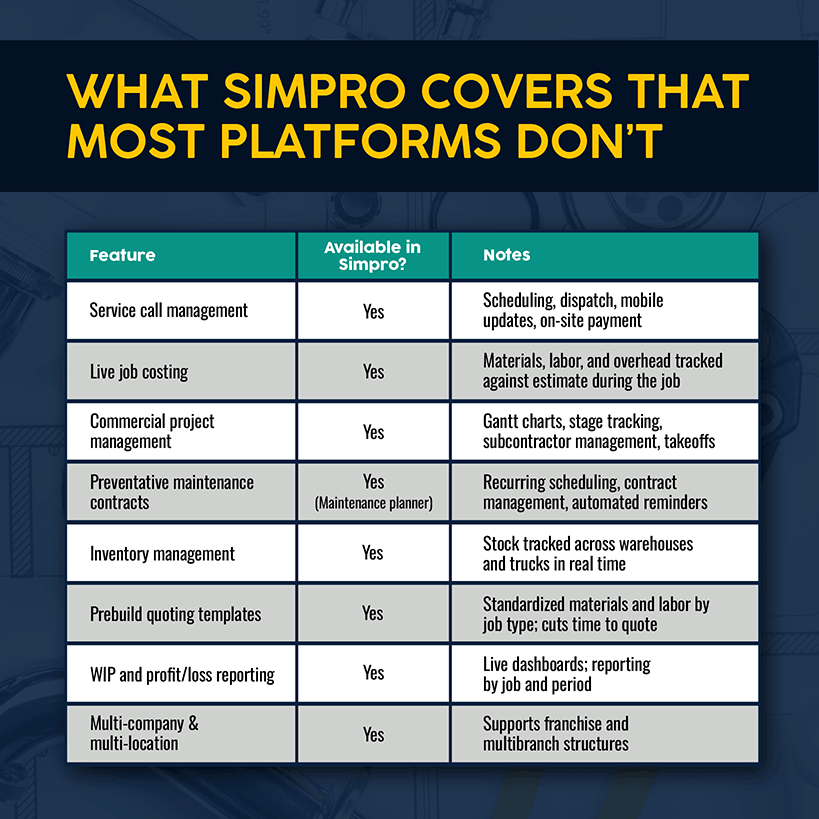
For company context, see the Simpro home page.
Simpro is the strongest fit when a plumbing company needs more than a simple calendar and invoice tool. It supports quoting, estimating, scheduling, dispatch, job management, inventory, maintenance, invoicing, reporting, and customer communication across office and field teams.
Plumbing companies with larger crews need reliable handoffs. The estimator needs scope details to move into the job. The scheduler needs skills, zones, and availability. The technician needs job notes, forms, materials, and asset history. The office needs completed work, billable details, and invoice status without chasing paper.
Simpro brings those workflows into one operational platform. That matters for plumbing teams that handle both service work and larger quoted jobs. It also matters for companies that manage maintenance contracts, recurring work, customer sites, and assets across a broader customer base.
The platform has the most value when the plumbing business has process complexity. Examples include multi-technician jobs, commercial customers, purchase orders, inventory control, job-cost tracking, and reporting across branches or teams. A simple residential shop with one truck and a short job list does not need this level of structure yet.
Simpro also fits teams that want tighter office and field coordination. Field staff need job information on mobile devices. Office staff need completed job details that move into invoicing and reporting. Managers need clearer visibility into workload, profitability, and operational bottlenecks.
The tradeoff is setup depth. A platform with broader workflow coverage needs proper configuration. Plumbing companies get the best result when they define quoting, scheduling, dispatch, inventory, and invoicing processes before rollout.
Pros
- Connects core plumbing workflows across quoting, scheduling, dispatch, job management, inventory, invoicing, and reporting.
- Fits service, maintenance, and commercial plumbing work better than simple appointment tools.
- Supports office and field coordination across larger teams.
- Helps managers track job status, materials, and profitability in one system.
- Gives growing contractors room to add process structure as the business expands.
Cons
- Setup takes more planning than lightweight scheduling tools.
- Smaller residential shops get a better fit from a simpler system.
- Pricing requires a quote, so buyers need a sales conversation before final budget approval.
Pricing: Simpro routes pricing through a tailored quote. Simpro pricing source: Simpro pricing.
Simpro buyer profile: Choose Simpro when the plumbing business needs a serious operating system for service, maintenance, quoted work, inventory, and reporting.
2. Jobber
Jobber fits small residential plumbing teams that want clean daily service management. It keeps the core workflow simple: request, estimate, schedule, message, invoice, and payment. Review Jobber when the team needs customer communication and office control without commercial project depth during the first software shortlist for its next buying step.
Jobber fit: Best for: Small residential plumbing businesses that need scheduling, quoting, invoicing, and client communication without heavy operational setup.
Jobber is a practical choice for plumbing shops that want a clean office workflow and a simple field experience. It focuses on service booking, estimates, scheduling, customer communication, invoicing, and payments. Those workflows match the needs of small residential teams that want less administrative friction.
A small plumbing company needs speed more than deep configuration. The office needs to capture a request, send an estimate, schedule a technician, message the customer, invoice the work, and collect payment. Jobber keeps that workflow approachable for teams that do not need commercial project controls.
The customer experience is one of Jobber's strengths. Its client hub and communication tools support appointment reminders, estimate approvals, and payment collection. That helps residential teams look organized while keeping office work manageable.
Jobber also suits owner-led plumbing shops. The same person handles sales, scheduling, customer messages, and billing. A lightweight system helps that owner keep work moving without building a complex back-office process.
The main limitation is depth at scale. Larger plumbing contractors start to outgrow Jobber when they need inventory control, deeper job costing, complex asset records, or commercial account workflows. Jobber works best when the team needs clear day-to-day service management, not a full operational backbone.
Pros
- Clean workflow for requests, estimates, scheduling, invoices, and payments.
- Strong fit for owner-led and small residential plumbing teams.
- Customer communication tools support reminders, approvals, and payment follow-up.
- Easier to adopt than a heavier field service platform.
- Public pricing page gives buyers a clear starting point.
Cons
- Less suited to commercial plumbing complexity.
- Inventory, project, and job-costing depth fits larger contractors less well.
- Teams with advanced reporting needs need a broader platform.
Pricing: Jobber lists package options on its pricing page. Jobber pricing source: Jobber pricing.
Jobber buyer profile: Choose Jobber when a small residential plumbing team needs an easy office workflow that covers the daily service cycle.
3. Housecall Pro
This option fits residential plumbing teams that compete on fast customer communication. It brings booking, dispatch, estimates, payments, and customer updates into a home-service workflow. Assess it when appointment quality, reminders, approvals, and payment follow-up carry more weight than commercial project controls for the current service model and office process.
Residential-service fit: Best for: Housecall Pro suits plumbing service companies that need customer booking, dispatch, estimates, payments, and customer updates.
This service platform fits plumbing teams that want customer communication and field execution in one workflow. Its workflow covers online booking, scheduling, dispatch, estimates, invoicing, payments, and service communication for home service teams.
Residential plumbing work depends on trust and responsiveness. Customers need arrival windows, updates, estimate approvals, and clean payment options. The tool supports that customer journey while giving office teams a familiar dispatch and billing workflow.
Residential teams that run repeat service calls, small repair jobs, drain work, water heater jobs, and maintenance visits get a strong option here. It gives the office tools to schedule technicians and keep customers informed. Field staff get access to job details and payment steps.
Marketing and growth add-ons also suit teams that want more support around the service workflow. Residential-demand teams value booking tools, customer reminders, and follow-up workflows as much as dispatch itself.
The tradeoff is commercial depth. Larger contractors that need advanced job costing, complex project stages, contract management, and inventory control get a weaker fit from this residential-service orientation. It remains a stronger fit for home service workflows than commercial construction or large account management.
Pros
- Strong customer booking and communication workflows.
- Good fit for residential plumbing service teams.
- Covers scheduling, estimates, payments, and dispatch in one system.
- Supports a polished customer journey from booking to payment.
- Published pricing page supports early budget review.
Cons
- Less aligned with commercial project and account complexity.
- Advanced inventory and job-cost workflows need a broader platform.
- Add-ons and plan differences need careful review before purchase.
Pricing: Housecall Pro publishes pricing options for service businesses. Pricing source for Housecall Pro: Housecall Pro pricing.
Buyer profile for Housecall Pro: Choose Housecall Pro when residential customer communication sits at the center of the plumbing service model.
4. FieldEdge
FieldEdge fits residential service teams that need dispatch, customer history, flat-rate presentation, and accounting workflow alignment. It deserves review when technician option presentation matters during the service call. Confirm pricing, catalog setup, QuickBooks workflow, mobile steps, and invoice handoff during the demo before final vendor selection for the plumbing team.
FieldEdge fit: Best for: Residential service teams that want dispatch, customer history, QuickBooks workflows, and flat-rate presentation support.
FieldEdge has a long presence in home service software and fits residential plumbing teams that want dispatch and office workflows tied closely to customer history and accounting. It supports scheduling, dispatching, customer records, estimates, invoicing, payments, and reporting for service contractors.
FieldEdge is especially relevant when a plumbing team relies on flat-rate service presentation. Technicians need to show repair options, capture approvals, and move completed work into billing. That workflow matters for residential plumbing companies with repeat service calls and a defined pricing book.
The platform also appeals to teams that already rely on QuickBooks. Teams that want their field service system to work closely with accounting workflows need to review FieldEdge during the buying process. The accounting connection is a key reason buyers include it on a shortlist.
FieldEdge works best for teams that want a structured residential service workflow. It is less likely to fit a contractor that needs commercial account management, complex projects, branch-level controls, and deeper job-cost reporting.
The buying process needs attention. FieldEdge routes buyers through pricing and demo flows, so teams need to confirm plan scope, onboarding, accounting setup, data migration, and flat-rate catalog needs before signing.
Pros
- Strong fit for residential service dispatch and office workflows.
- Flat-rate presentation support suits plumbing service calls.
- Customer history and accounting workflows help office teams.
- Works for companies that want technician sales support in the field.
- Demo-led buying process gives room to confirm accounting and catalog needs.
Cons
- Pricing requires buyer follow-up.
- Commercial project and job-costing depth fits larger contractors less well.
- Teams need to validate accounting setup and implementation scope before purchase.
Pricing: FieldEdge routes buyers through a pricing request. FieldEdge pricing source: FieldEdge pricing.
FieldEdge buyer profile: Choose FieldEdge when residential plumbing service depends on dispatch, customer history, flat-rate options, and accounting workflow alignment.
5. FieldPulse
FieldPulse fits small to midsize plumbing contractors that need CRM, estimating, scheduling, service agreements, and team communication. It works best when the team wants more structure than spreadsheets but less complexity than a commercial contractor system. Confirm reporting, inventory, and project requirements before purchase with the buying group during demos.
FieldPulse fit: Best for: Small to midsize plumbing contractors that want CRM, estimates, scheduling, service agreements, and team communication.
FieldPulse fits plumbing teams that want a flexible service platform without stepping into heavy enterprise setup. It covers customer management, estimates, scheduling, dispatch, service agreements, invoicing, payments, reporting, and field communication.
FieldPulse makes sense for teams that have moved beyond spreadsheets and basic calendars. A plumbing company needs stronger customer records, better estimate follow-up, field notes, and clearer service agreement tracking at that stage. FieldPulse gives those workflows a single place to live.
FieldPulse also appeals to teams that value communication. Office staff, technicians, and managers need updates on job status, schedule changes, customer details, and approvals. A shared system reduces the need to move job details through texts, calls, and disconnected notes.
For plumbing contractors, the best fit is small to midsize service work. FieldPulse stays practical for teams that want CRM and field workflow depth but do not need the most complex commercial contractor controls.
The limitation is scale and specialization. A larger commercial plumbing business with deep project controls, inventory requirements, and advanced profitability tracking needs a platform with heavier operational structure.
Pros
- Combines CRM, estimates, scheduling, dispatch, and invoicing workflows.
- Fits small to midsize plumbing service teams.
- Service agreement tools support recurring customer relationships.
- Team communication features help office and field staff stay aligned.
- Quote-based package review helps match setup to team needs.
Cons
- Less suited to large commercial plumbing operations.
- Vendor conversation required before final budget approval.
- Deep inventory and project-costing workflows need close review.
Pricing: FieldPulse publishes package guidance and custom quote details. FieldPulse pricing source: FieldPulse pricing.
FieldPulse buyer profile: Choose FieldPulse when a growing service team wants CRM depth, field coordination, and service agreement tracking without enterprise complexity.
6. Service Fusion
This service-management option fits plumbing companies that want broad office workflows and pricing visibility. It covers dispatch, customer records, estimates, invoices, payments, reporting, and call-related workflow needs. Assess it when the buying team wants package visibility before choosing between lightweight tools and deeper operational systems for service management software review.
Service Fusion fit: Best for: Plumbing service companies that want broad field service workflows and published package pricing.
This broad field service platform supports contractors that need dispatch, estimates, customer management, invoicing, payments, reporting, and office tools. It fits plumbing businesses that want a practical system for daily service operations and buyer-visible pricing.
A broad workflow supports teams that need more than a simple calendar. To run the office workflow, staff need to take job requests, schedule technicians, manage customer records, produce estimates, send invoices, and collect payment. The tool brings those workflows into one service-business toolset.
Call-heavy companies get useful communication features around the core service workflow. Teams with a steady inbound call volume need a system that helps the office capture work accurately and move it into the schedule.
The strongest fit is a service company that values broad coverage and clear package review. Buyers that dislike quote-only pricing prefer Service Fusion's package visibility during early vendor comparison.
Commercial fit is the tradeoff. Large commercial accounts, project phases, job-cost detail, and inventory control demand close review before purchase.
Pros
- Broad service workflow coverage for dispatch, estimates, invoicing, and payments.
- Published package pricing helps early budget review.
- Customer management and reporting support office workflows.
- Useful for teams with call intake and daily service scheduling needs.
- Good shortlist option for service-first plumbing contractors.
Cons
- Commercial project depth needs careful validation.
- Buyers need to inspect package limits and add-ons.
- Larger contractors need deeper inventory, job costing, and account controls.
Pricing: Service Fusion publishes package pricing for service companies. Current pricing source: Service Fusion pricing.
Service-focused profile: Choose Service Fusion when a plumbing company wants broad office workflows and pricing visibility during the shortlist stage.
7. BuildOps
Commercial contractors use BuildOps for larger accounts, project work, technician coordination, and site history. This is the most commercial-oriented option in this list. Select BuildOps when residential service tools lack the account, project, and reporting structure required for complex commercial work across multiple jobs and customer sites at scale.
BuildOps fit: Best for: Large commercial plumbing contractors that manage service, projects, customer accounts, and technician workflows at scale.
BuildOps targets commercial contractors, which makes it different from residential-first plumbing platforms. It focuses on commercial service management, project workflows, customer accounts, dispatch, technician execution, reporting, and operational visibility.
Commercial plumbing work has different software needs than residential repair work. Teams manage building relationships, service agreements, assets, account history, purchase orders, and longer work cycles. They need tools that support complex customers and larger field teams.
Commercial service and project work fit this tool best. A contractor serving property managers, general contractors, facilities teams, or commercial buildings needs account context and job information that travels across the organization.
Commercial-contractor orientation also suits teams that want a system built around larger accounts rather than home service. That distinction matters when the work involves larger customers, repeated site visits, project follow-up, and technician coordination across complex jobs.
Buyer fit is the tradeoff. BuildOps is not the best starting point for a small residential shop that needs basic scheduling and invoicing. Its value appears when the company has commercial complexity and enough process maturity to use the platform's structure.
Pros
- Strong commercial contractor orientation.
- Supports service, project, account, and field workflows.
- Good fit for plumbing contractors with larger customers and site history.
- Helps commercial teams organize technician work and customer context.
- Custom pricing suits complex contractor requirements.
Cons
- Too much platform for a simple residential plumbing shop.
- Sales process required before final budget approval.
- Buyers need to validate project, accounting, and implementation scope.
Pricing: BuildOps uses custom pricing for commercial contractor needs. BuildOps pricing source: BuildOps pricing.
BuildOps buyer profile: Choose BuildOps when a commercial plumbing contractor needs software designed around complex accounts, projects, and field execution.
8. Workiz
For call-driven residential teams, Workiz connects scheduling, customer messages, estimates, and payments. The fit is stronger for appointment-driven service work than commercial project control. Choose Workiz when communication speed and follow-up quality matter more than inventory depth or job-costing detail during the buying process for managers.
Workiz fit: Best for: Residential plumbing teams that need scheduling, communication, estimates, payments, and call-focused workflows.
Workiz fits service businesses that want communication and scheduling tools around the customer journey. For plumbing companies, that means job booking, dispatch, estimates, payments, technician updates, and customer follow-up.
This option is relevant for teams with high call volume and appointment-driven work. Plumbing businesses that handle urgent residential requests need quick intake, clear scheduling, and customer communication. Workiz gives those teams a workflow centered on moving requests into booked jobs.
Workiz also suits teams that want automation around service operations. Dispatchers need help with reminders, follow-ups, job updates, and payment steps. Technicians need job details and field workflow tools that support the visit.
The strongest fit is a residential service team that values communication and speed. A contractor with commercial projects, advanced job costing, inventory depth, and branch-level reporting needs a broader system.
The buying process needs plan review. Workiz lists packages and request-pricing routes, so buyers need to confirm users, call features, automations, payment features, and support needs before rollout.
Pros
- Fits residential service communication and scheduling.
- Call-focused workflows help teams capture demand and book work.
- Covers estimates, payments, job updates, and customer communication.
- Automation features support reminders and follow-up.
- Useful for appointment-driven plumbing teams.
Cons
- Commercial contractor depth fits larger plumbing companies less well.
- Pricing and package fit need buyer review.
- Advanced inventory and job-costing needs require close validation.
Pricing: Workiz lists request-pricing packages for service teams. Workiz pricing source: Workiz pricing.
Workiz buyer profile: Choose Workiz when residential plumbing work depends on fast call intake, scheduling, customer updates, and payment follow-up.
Where Simpro fits in the software short list
Simpro belongs on the shortlist when the current plumbing process creates rework between the office and field. Its value grows as the team adds technicians, maintenance work, quoted jobs, inventory, and reporting needs. Use this section to decide whether a heavier operating system fits the next stage of growth for the company now.
Simpro stands out when the plumbing company needs an operational system rather than a light service app. The fit becomes clearer as the business adds technicians, handles larger jobs, manages commercial customers, or needs tighter reporting.
For a residential startup, a lightweight tool covers the early workflow. The owner books work, the technician completes jobs, and invoices go out. That model changes once the business adds crews, maintenance work, inventory needs, account complexity, and margin pressure.
At that stage, plumbing software needs to support decisions. Managers need to know which jobs sit in progress, which parts need ordering, which technicians have capacity, and which work affects profitability. Teams get fewer manual handoffs and clearer field information.
Simpro fits those needs by connecting the major workflow steps. Through that connection, plumbing contractors manage service jobs, quoted work, maintenance, inventory, and reporting without rebuilding the job record across disconnected tools.
That does not make Simpro the best answer for every plumbing company. A solo residential operator gets a better fit from Jobber or Housecall Pro. A commercial-only enterprise evaluates BuildOps. The right choice depends on the work mix and the next stage of operational maturity.
Growing plumbing teams review Simpro first when the current process relies on paper, spreadsheets, double entry, disconnected accounting handoffs, or poor visibility across field work and office work.
Plumbing software features to compare before purchase
Compare features by workflow, not by checklist length. Scheduling, estimating, dispatch, mobile work, inventory, maintenance, invoicing, accounting, reporting, and job costing matter only when they fit the way the plumbing team sells and delivers work. Treat the H3 sections below as demo checkpoints for each finalist platform before purchase approval.
For a broader buying framework outside plumbing-specific tools, use the compare field service management software for trade businesses guide to check how each platform handles multi-trade operations, pricing models, and workflow depth.
The feature list matters less than workflow fit. A vendor page lists scheduling, estimates, dispatch, and invoicing, but the buyer needs to know how those features work together for plumbing work.
Scheduling and dispatch
Plumbing dispatch needs more than an open time slot. The dispatcher needs to match technician skills, location, availability, urgency, and job duration. For commercial work, the schedule also needs site access details, customer contacts, asset history, and compliance notes.
A useful dispatch view gives the office enough context to assign the right technician. A good view also gives technicians the job information they need before arrival. The record includes scope, notes, history, parts, forms, and customer details.
Estimates and approvals
Estimates sit close to revenue. Estimating workflows need clear line items, fast approvals, and a way to convert approved work into scheduled jobs. Residential teams value option presentation. Commercial teams need more detail, customer account context, and purchase order steps.
The estimate workflow needs to reduce rework. Details captured during sales or diagnosis need to move into the job without manual rewriting. That protects the office from errors and gives technicians a clearer start.
Mobile technician workflow
Onsite staff need practical job information on the device they use onsite. The mobile workflow needs job notes, forms, photos, materials, tasks, customer signatures, and completion details. A weak mobile workflow pushes the technician back to calls and paperwork.
The mobile experience also affects billing speed. When technicians capture work details accurately, office staff have fewer gaps to resolve before invoicing.
Inventory and materials
Inventory depth separates lighter service tools from broader operational platforms. Plumbing teams that carry stock, manage parts, order materials, or track job materials need stronger inventory workflows.
Inventory matters most when lost parts, poor stock visibility, or manual purchasing slows job completion. Confirm whether the software tracks the materials workflow at the level the business needs.
Maintenance and recurring work
Plumbing businesses that manage maintenance agreements need recurring job schedules, service history, site details, and renewal visibility. The software needs to support planned work, not only one-off calls.
Maintenance workflows also need clear customer records. Teams need to know what work happened, what assets need attention, and what future visits sit on the schedule.
Invoicing and accounting handoff
Invoicing works best when job details move cleanly from the field to the office. The software needs to capture billable labor, materials, notes, and approvals. Accounting workflows need review before purchase, especially for teams that rely on QuickBooks or Xero.
The accounting handoff deserves a live walkthrough. Review invoice timing, tax handling, payment collection, reconciliation steps, and integration limits.
Reporting and job costing
Reporting turns service activity into management insight. Plumbing contractors need visibility into open work, completed jobs, technician productivity, margin, materials, and invoice status.
Job costing becomes critical as work grows more complex. Without cost visibility, managers struggle to see which work types, customers, or crews perform well. Software that connects job activity to cost and revenue data gives leaders better operational control.
FAQ
What is the best plumbing software?
For a growing contractor, choose Simpro when the team needs quoting, scheduling, dispatch, job management, inventory, invoicing, and reporting in one system. FeaturedCustomers lists Simpro at 4.8/5.0, based on reference ratings. Smaller residential teams get a better fit from Jobber or Housecall Pro for simple scheduling, estimates, updates, and payments.
What is the best software for a small plumbing business?
Small plumbing businesses get a strong Jobber fit when the team needs a simple service workflow. The workflow covers requests, estimates, scheduling, customer communication, invoices, and payments without heavy setup. Teams focused on booking and notifications also get a strong Housecall Pro fit.
How much does plumbing software cost?
Plumbing software cost depends on users, plan level, add-ons, onboarding, integrations, and workflow depth. The Simpro pricing page routes buyers to a tailored quote. Vendor-quoted platforms need a sales conversation before final budget approval, especially when inventory, reporting, maintenance, or commercial workflows matter.
Is there plumbing software that handles flat-rate pricing?
Yes. Plumbing software for residential service teams supports flat-rate presentation, estimate options, and technician-led approvals when the vendor includes those workflows. FieldEdge is a common shortlist option for flat-rate service workflows. Buyers still need to confirm catalog setup, accounting workflow, mobile presentation, and invoicing steps during a demo.
Does plumbing software work with QuickBooks or Xero?
Accounting integrations differ by vendor and plan, including QuickBooks and Xero workflows. Review the Simpro Xero integration to confirm Simpro's Xero connection path. Before purchase, review invoice sync, payment handling, tax setup, customer records, reconciliation steps, payment deposits, and reporting rules with the office team.
What's the difference between plumbing software and field service management software?
Trade-specific plumbing platforms focus field service management around plumbing workflows. The workflow centers on plumbing jobs, estimates, dispatch, materials, maintenance, and service history. General field service management software covers broader trade workflows and needs configuration before it fits plumbing-specific work.
What software do commercial plumbing contractors use?
Commercial plumbing contractors use software that handles service work, projects, customer accounts, site history, technician workflows, reporting, and cost visibility. Simpro fits growing commercial plumbing teams that need connected operations. BuildOps is another shortlist option for contractors focused on large commercial service and project workflows.
The Bottom Line
Choose plumbing software by company size, job mix, and operational depth. Connected operations make Simpro the first review for growing contractors. Residential shops with simpler needs choose Jobber or Housecall Pro. Commercial complexity points to BuildOps. The shortlist works best when workflow pressure leads and starting price follows during final vendor review.
Choose software that matches the company's work mix and operating maturity. Small residential shops need simple scheduling and customer communication. A growing plumbing contractor needs stronger control across estimating, dispatch, inventory, invoicing, reporting, and field execution.
Growing and commercial plumbing businesses start with Simpro when connected operations matter. For simple residential workflows, Jobber and Housecall Pro fit well. FieldEdge and Workiz fit residential service workflows with specific dispatch, flat-rate, and communication needs. FieldPulse and Service Fusion serve teams that want broad service management. For commercial contractor complexity, BuildOps fits well.


 Back to top