The best GPS fleet tracking for a field service business is the system that puts vehicle data on the job, the timesheet and the asset record. Simtrac 360, the GPS fleet tracking built inside Simpro, and ServiceTitan Fleet Pro suit trade businesses that want vehicle visits tied to jobs or time entries. Samsara and Motive suit fleets that want near-continuous telematics.
If your budget's tight and you only need to see where vans are, a standalone tracker from One Step GPS or Linxup publishes its price up front. Trackers built into field service software come with that platform, so choosing one means choosing the platform too. Simpro makes Simtrac 360, so it faces the same questions as every other tool in this guide.
Best GPS fleet tracking at a glance
Your best GPS tracker for fleet vehicles sits in one of three groups. Trackers inside field service software link vehicle data to jobs or time entries, telematics platforms go deep on vehicle data, and low-cost trackers show where vans are. Start with the group that matches your business, then compare install type and published prices.
| Tool | Best for | Where the vehicle data lands | Install and updates | Starting price (as of November 2026) |
|---|---|---|---|---|
| Simtrac 360 GPS fleet tracking | Trade businesses that want site visits matched to Simpro jobs | Jobs, sites and asset records inside Simpro | OBD plug-in or hardwired tracker | Ask Simpro |
| ServiceTitan Fleet Pro | ServiceTitan users checking time entries before payroll | Time entries inside ServiceTitan | Ask the vendor | Ask the vendor |
| Service Fusion | Teams that want tracking inside their field service software | Service Fusion field service software | Ask the vendor | Starter plan $208 per month billed annually, confirm GPS pricing with the vendor |
| Jobber | Home service crews that want a live map in Jobber | Jobber, with FleetSharp devices | FleetSharp tracking devices | Ask the vendor |
| GPS Insight | Service, construction and utility fleets of 10-200 vehicles | A fleet platform with scheduling, dispatch and invoicing bundled in | Ask the vendor | Ask the vendor |
| Samsara | Fleets that want continuous real-time visibility | Samsara dashboard | Location data every second | Ask the vendor |
| Motive | Fleets that want geofence alerts | Motive dashboard | Updates every 1-2 seconds | Ask the vendor |
| Geotab | Fleets that want engine, speed and idling data | Geotab platform | GO device | Device plus monthly service, priced by resellers |
| Verizon Connect | Dispatch teams routing the closest technician | Verizon Connect | Ask the vendor | Ask the vendor |
| One Step GPS | Small fleets that want month-to-month tracking | One Step GPS app | Updates every 1-30 seconds | $13.95/month, no contracts |
| Linxup | Small fleets comparing hardware and contract options | Linxup app | Plug-in tracker | $25 per vehicle per month |
| Azuga | Fleets that want core tracking on a per-vehicle plan | Azuga app | Ask the vendor | Basic Fleet $25 per vehicle per month |
| US Fleet Tracking | Fleets that want published hardware prices | US Fleet Tracking app | Hardwired ATv4+ $129 or OBD plug-in QWKv4 $75 | Ask the vendor about service plans |
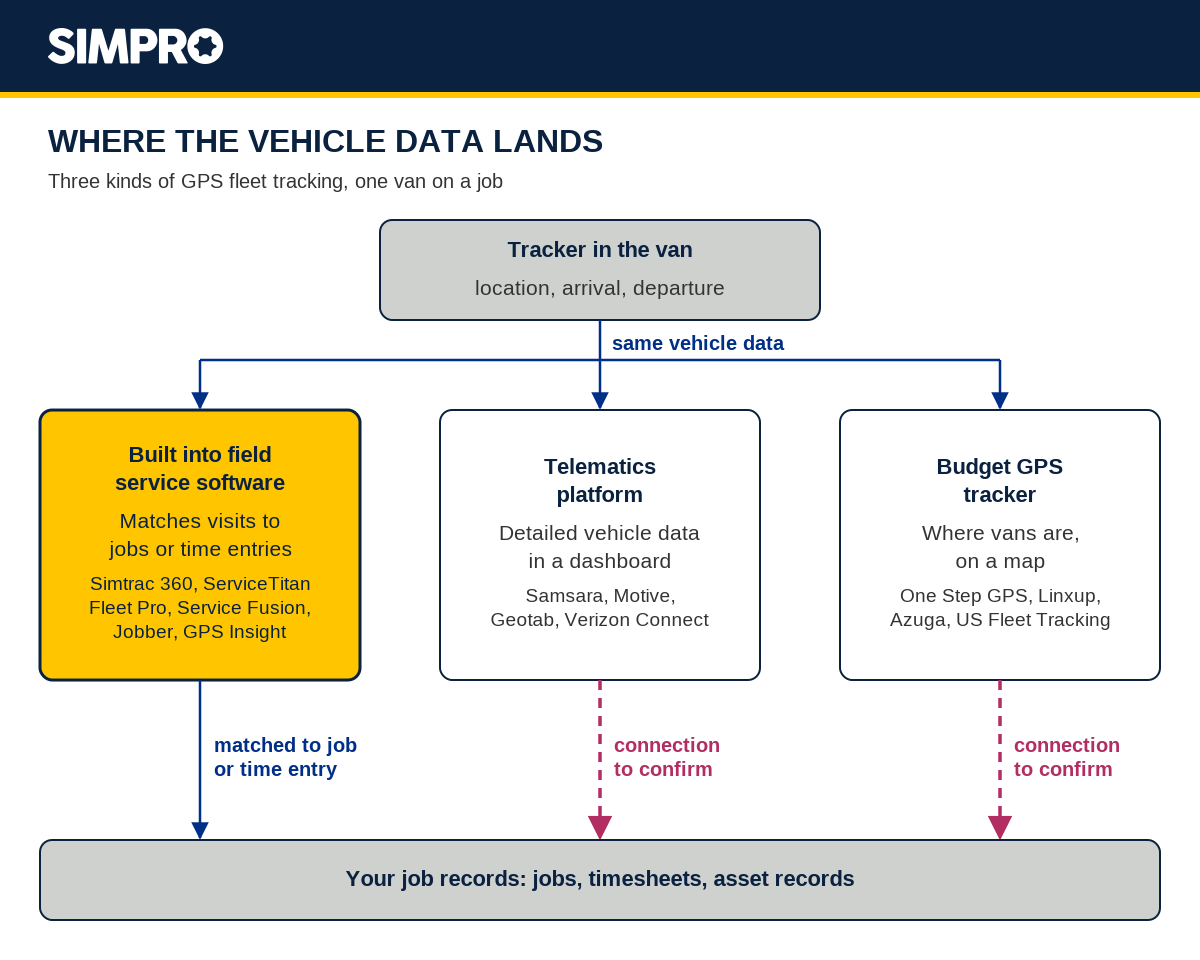
Key takeaways
- Decide where vehicle data needs to land before you compare trackers: on the job, in payroll, in asset records or in a separate map.
- Trackers built into field service software, such as Simtrac 360 and ServiceTitan Fleet Pro, tie vehicle location to jobs or time entries. That matters most when you bill time and materials.
- Size the choice to your fleet. A few vans on a tight budget suit a budget tracker, and larger mixed fleets of vans and trucks suit a telematics platform.
- Check employee tracking notice rules in each state you operate in before you install a single device.
- Run a short trial on a few vans and compare the hours the tracker records with the hours your team logs.
What is GPS fleet tracking for field service?
In field service, GPS fleet tracking records where work vehicles are and when they arrive at and leave job sites. Each tracker reports the vehicle's position, and software turns those positions into a map, trip history and site events. For the office, the useful output is the record of each site visit.
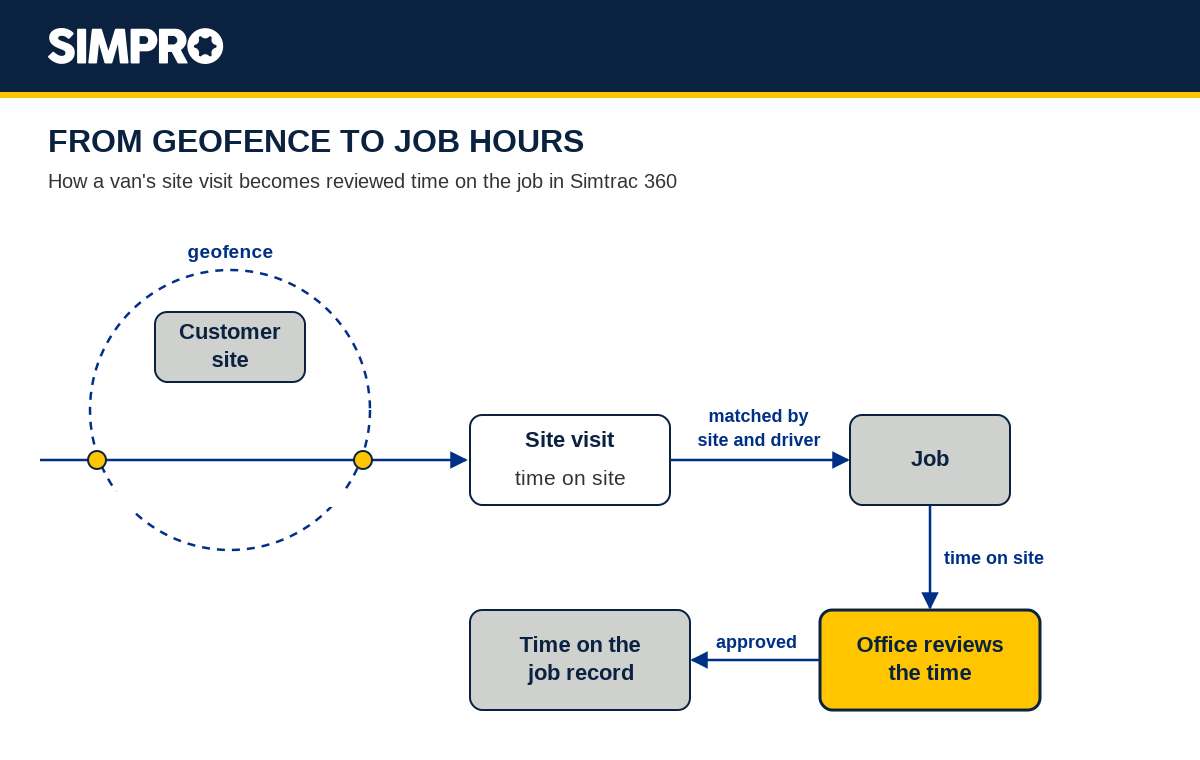
A geofence is a digital boundary around a specific location, such as a customer site. When a tracked van crosses that boundary, the software logs an arrival or a departure. That's the step that turns raw location data into something your office uses, such as time on site for a job.
Field service fleets carry technicians whose time you bill to a customer, so the record of each site visit matters as much as the route. That's why a plumbing, electrical or HVAC business needs to ask where the data lands before it compares raw update speed.
How to choose: where does the vehicle data land?
To compare the best fleet GPS tracking systems, start with where the vehicle data ends up, then look at hardware and update speed. A tracker that keeps its data in a separate portal tells you where a van went. A tracker connected to your job records helps your office check time against the job.
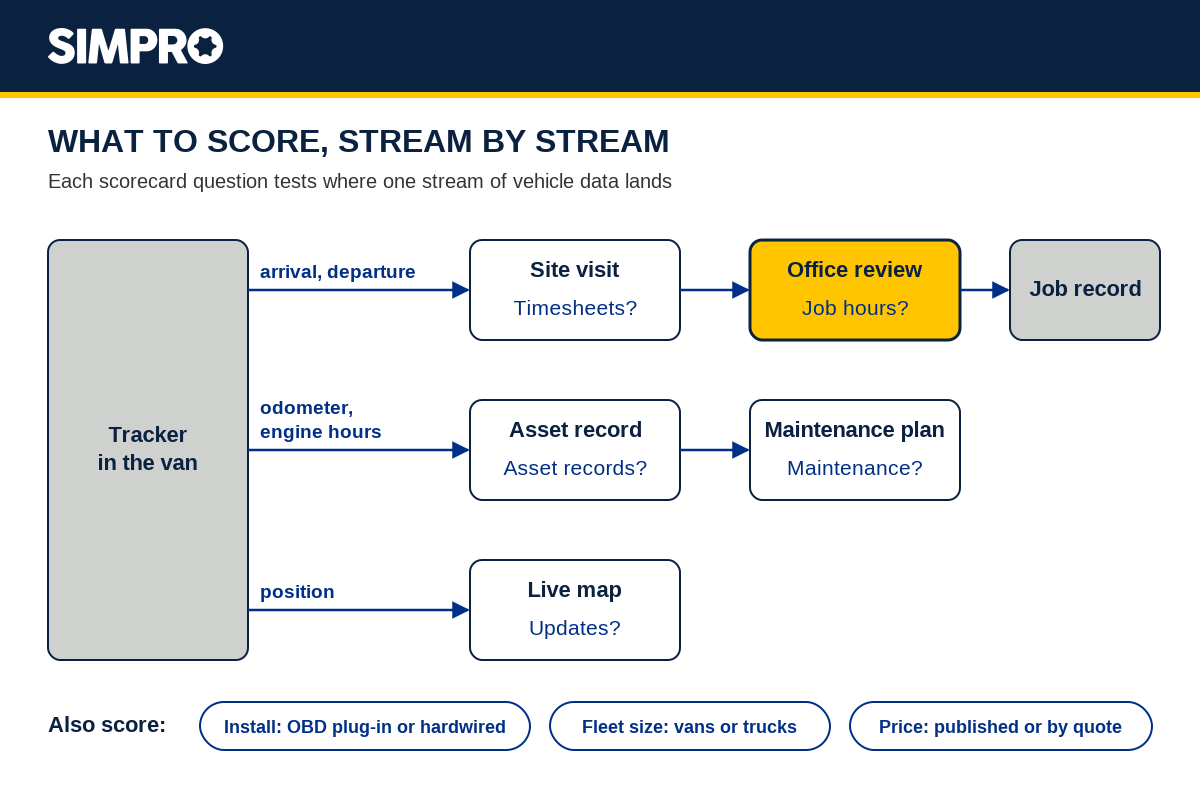
Score each tool you shortlist on these questions:
- Job hours: Does a site visit link to the job at that site, and does the office review the time before it becomes part of the job record?
- Timesheets and payroll: Does the system compare GPS time on site with the hours technicians log, and flag gaps?
- Asset records: Do odometer readings and engine hours update the vehicle's record, so service schedules stay current?
- Maintenance: Does it schedule servicing by date, mileage or engine hours?
- Install: Is the tracker an OBD plug-in you fit yourself, or a hardwired unit for tamper resistance?
- Fleet size: What's your vehicle count, and are they light vans or heavier trucks?
- Updates: What's the location refresh interval while the vehicle is moving?
- Price: Does the vendor publish a price, and is hardware bought, rented or bundled into a contract?
GPS fleet tracking built into field service software
These trackers live inside, or bundle, field service software. Their strength is that a vehicle's arrival and departure connects to the job or the technician's time inside the same software. The trade-off is that each one comes with its platform, so compare the field service software as well as the tracker before you commit.
Simtrac 360 by Simpro
Simtrac 360 is fleet tracking built inside Simpro, so vehicle data lands on the sites, jobs and assets you already run on. When a vehicle arrives at and leaves the geofence on a Simpro site, Simtrac 360 records the visit and matches it to the job by site and driver. Vehicle positions report every 30 seconds, so the live map in Simpro's Simtrac 360 fleet tracking shows where vehicles are now.
The office reviews the captured time before it becomes part of the job record. Vehicles link to Plant & Equipment, and odometer and engine hours update the asset on a schedule. Each vehicle supports multiple maintenance plans, each triggered by date, odometer or engine hours, so an inspection and a service are free to run on separate cycles.
For hardware, the AX300 plugs into the vehicle's OBD port, and the hardwired AK300 suits covert or tamper-resistant installs. Simtrac 360 is an add-on built inside Simpro and signs in through your Simpro account. It suits businesses that run, or plan to run, Simpro as their field service software.
Proguard Protection Services, a Simpro field service software customer, reports that technician productivity improved by 30% with Simpro. That result reflects the wider software, not a fleet tracker.
One Simpro user described the mobile app's geostamping in a G2 review of Simpro. The user wrote: "With the mobile app geostamping the location, we know when a technician is onsite, reducing the amount of time having to review chargeable hours." Simtrac 360 adds the van's arrival and departure to that picture.
ServiceTitan Fleet Pro
ServiceTitan Fleet Pro connects vehicle location data directly to time entries in ServiceTitan and flags discrepancies before they hit payroll. Its geofencing tracks when vehicles enter and leave job sites, yards and restricted areas. Ask ServiceTitan for a quote. Fleet Pro suits businesses that already run ServiceTitan or are evaluating it as their platform.
Service Fusion
Service Fusion GPS Fleet Tracking is fully integrated into its field service management software. It tracks the number of trips, total distance, total idle time, GPS location on a map view and driving behaviors. The Starter plan is $208 per month billed annually with unlimited users. Confirm with Service Fusion what the GPS fleet tracking module adds to that plan before you budget.
Jobber
Jobber shows a live map view of your team when you install FleetSharp tracking devices in your vehicles. Without vehicle devices, Jobber's GPS waypoints also show a team member's exact location on a map. They record it every time the team member clocks in and out, adds a note or attachment to a job, or completes a visit. That suits small home service crews that mainly want to see where people are during the day.
GPS Insight
GPS Insight approaches the problem from the fleet side. It bundles field service management, including scheduling, dispatch and invoicing, directly into its fleet platform. GPS Insight says it is best suited for service, construction, utility and government fleets of 10-200 vehicles. Request a quote from GPS Insight for your fleet size.
Telematics platforms for larger and mixed fleets
Telematics platforms focus on the vehicle: location, speed, engine data, idling and driver behavior. They suit larger or mixed fleets with trucks and heavy equipment, and businesses that want detailed data for each vehicle. Ask each vendor how its data would reach your jobs, timesheets and asset records before you sign a contract.
Samsara
Samsara's GPS collects location data every second, giving fleets continuous real-time visibility in the Samsara dashboard. Ask Samsara for a quote.
Motive
Motive provides real-time visibility with GPS and telematics updates every 1-2 seconds. Fleets set up geofences around sites and get notified when vehicles and assets enter and leave them. Ask Motive for a quote that matches your fleet.
Geotab
Geotab's GO device records data on vehicle location, speed, engine idling and distance as soon as the vehicle starts driving. Geotab pricing combines an upfront payment for the GO device with an ongoing monthly service payment, and buyers contact a reseller for current pricing. Budget for both the device and the monthly service when you compare Geotab with other tools.
Verizon Connect
Verizon Connect tracks the precise location, heading and ignition status of an entire fleet from a single interface. For dispatch, it identifies the route closest to an available technician during emergency calls. The company's own 2026 fleet technology trends report found that fleet technology users achieved average decreases of 11% to 19% in fuel, accident, labor and maintenance expenses. Treat vendor-run report results as a prompt for your own trial, not a forecast for your fleet.
Budget GPS trackers for small fleets
Budget trackers suit small fleets that want to see where vans are, replay past trips and get basic alerts. Their prices are easy to compare because each vendor below publishes one. Ask each vendor how visits and hours would reach your job records before you buy hardware or sign a contract.
If you're weighing the best GPS fleet tracking small business budgets cover, start with the published prices below.
One Step GPS
One Step GPS lists real-time GPS tracking at $13.95/month with no contracts. Its trackers update every 1-30 seconds out of the box. That makes it a simple starting point for a small fleet that wants month-to-month terms.
Linxup
Linxup GPS vehicle tracking costs $25 per vehicle per month. A Linxup plug-in GPS vehicle tracker costs $69.99 on a no-contract plan, $29.99 with a 2 year contract, and is free with a 3 year contract. It's worth comparing the total cost over the contract term as well as the monthly fee.
Azuga
Azuga prices its Basic Fleet plan at $25 per vehicle per month, with the core tracking features included. Azuga GPS tracking shows each vehicle's movement and events, including job, driver, speed and location details. Check which Azuga plan covers the alerts and reports you need.
US Fleet Tracking
US Fleet Tracking sells the hardwired ATv4+ tracker for $129 and the OBD plug-in QWKv4 for $75. It also offers GPS fleet tracking on an iPhone for $10 per month without extra hardware. Ask about the service plan that goes with each device before you buy hardware.
Employee GPS tracking laws and driver privacy
The rules on tracking employees who drive work vehicles vary by state. Before you install trackers, write a policy, tell drivers what you track and when, and check the law in each state you operate in. Two state laws show why notice and consent matter. This section is general information, not legal advice.
In California, Penal Code Section 637.7 says no person or entity in the state shall use an electronic tracking device to determine the location or movement of a person. The section doesn't apply when the registered owner, lessor or lessee of a vehicle has consented to the use of the electronic tracking device on that vehicle. A violation of the section is a misdemeanor.
New Jersey prohibits employer use of a tracking device in a vehicle operated by an employee under certain circumstances. The law penalizes an employer that makes use of a tracking device in a vehicle without providing written notice to the employee. An employer that violates it faces a civil penalty not to exceed $1,000 for the first violation and not to exceed $2,500 for each subsequent violation.
Privacy features help with personal use of vehicles. Samsara, for example, offers a Privacy Button that lets drivers turn location and GPS tracking on and off when conducting personal activities. Whichever tool you pick, get written acknowledgment from drivers and speak with an employment lawyer about the states where you work.
Do service vans need an ELD or just a GPS tracker?
An electronic logging device (ELD) and a GPS tracker solve different problems. An ELD records a driver's duty status for federal rules, while a GPS tracker shows where a vehicle is and when it reaches a site. Whether the ELD rule applies depends on whether you operate commercial motor vehicles and on the rule's exceptions, so check both first.
Under Section 395.8 of the federal motor carrier rules, a motor carrier operating commercial motor vehicles must install and require each of its drivers to use an ELD to record duty status. The rule lets a motor carrier require manual records instead when the driver's operation requires a record of duty status on not more than 8 days within any 30-day period. The exception also covers a vehicle manufactured before model year 2000.
If your vehicles count as commercial motor vehicles under federal rules, check that any system you choose includes an ELD, as Section 395.8 requires. If they don't, a GPS fleet tracker that feeds your job records fits better.
Buyer checklist before you install trackers
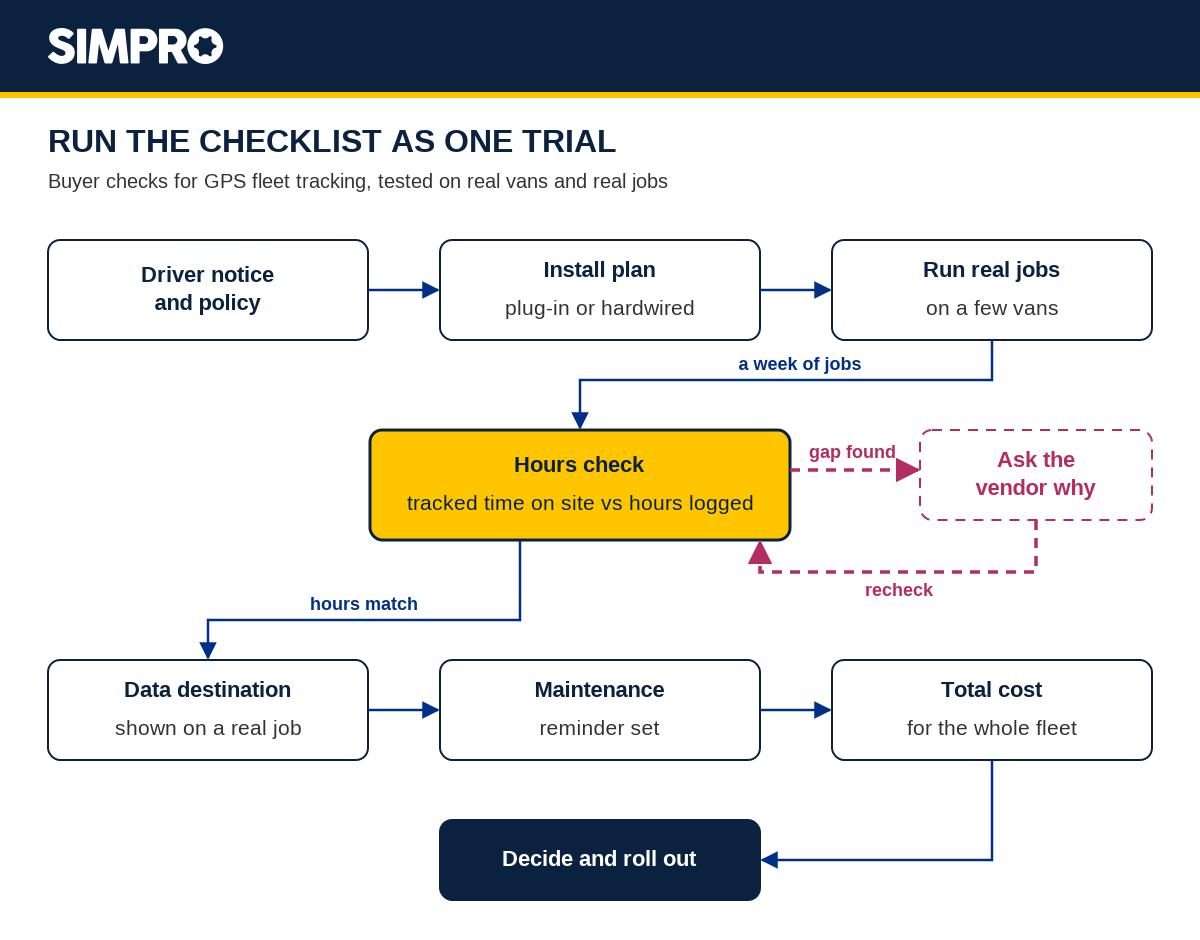
Use this checklist to test the scorecard questions above on two or three shortlisted tools. Run each check during a trial or demo, on real vans and real jobs. The goal is to see whether the vehicle data reaches the jobs, timesheets and asset records your office works from every day, and what it costs in total.
- Data destination: Ask each vendor to show a site visit matched to a job and where the office reviews the time.
- Hours check: Compare a week of tracked time on site with the hours technicians logged for the same jobs.
- Install plan: List every vehicle and decide between OBD plug-in and hardwired units.
- Update interval: Confirm the location refresh interval while vehicles are moving.
- Maintenance: Set up one service plan by mileage or engine hours and check the reminder.
- Total cost: Add hardware, install, monthly fees and contract length for your whole fleet.
- Notice and policy: Write the driver policy, get acknowledgment and check state rules.
- Trial: Run the trial on a small group of vans before you roll out to the whole fleet.
When you're ready to see vehicle visits land on the job they belong to, book a Simpro demo.
Frequently asked questions
What is GPS fleet tracking for field service?
GPS fleet tracking for field service, also called field service telematics, records where work vehicles are and when they arrive at and leave job sites. Simpro's Simtrac 360 page uses that definition. For trade businesses, the value comes from matching each site visit to a job so the office reviews hours.
What is the best GPS fleet tracking for a field service business?
The best GPS fleet tracking for a field service business is one that connects site visits to the job. Pick a system that lets the office review the captured time before it becomes part of the job record. Then compare install type, update interval and published price across two or three tools.
For larger fleets that need deep vehicle data, telematics platforms such as Samsara and Motive are worth a trial. For a few vans on a tight budget, compare One Step GPS, Linxup and Azuga.
Is it legal to track employees with GPS?
In California and New Jersey, the rules center on consent and notice. California's Penal Code Section 637.7 bars using an electronic tracking device to determine a person's location, except where the vehicle's registered owner, lessor or lessee has consented. Write a driver policy, give notice and check each state's rules.
New Jersey penalizes an employer that makes use of a tracking device in a vehicle without providing written notice to the employee. Speak with an employment lawyer before you roll out trackers in more than one state.
Should I choose a plug-in OBD tracker or a hardwired GPS tracker?
Choose a plug-in OBD tracker when your vehicles have a standard OBD port and you want a simple install, and a hardwired tracker when tamper resistance matters. In Simpro, for example, the AX300 tracker plugs into the vehicle's OBD port, while the hardwired AK300 suits covert or tamper-resistant installs.
Vehicle types differ, so it's worth checking each van and truck in your fleet before you order.
What is the best fleet maintenance tracking system?
A good fleet maintenance tracking system schedules servicing from real vehicle data and keeps the asset record current. In Simpro, for example, each vehicle supports multiple Simtrac 360 maintenance plans, each triggered by date, odometer or engine hours. An inspection and a service are then free to run on separate cycles.
Do service vans need an ELD, or is a GPS tracker enough?
A GPS tracker doesn't replace an ELD where the federal rule applies. Under Section 395.8 of the federal rules, a motor carrier operating commercial motor vehicles must install and require each of its drivers to use an ELD to record duty status. Limited exceptions apply.
For vans outside that rule, choose a GPS tracker by where its data lands in your job records.


 Back to top
