
The best contractor management software for a specialty contractor depends on the work you run. Simpro fits contractors who handle service calls, projects and maintenance in one system, and Housecall Pro suits home service businesses such as HVAC, plumbing and electrical. BuildOps targets commercial contractors, Procore serves construction project teams, and Jobber and Contractor Foreman publish plan prices.
The Nitty Gritty
Contractor management software can mean a system to run your contracting business or a tool to vet outside contractors. Decide which one you need first.
Specialty contractors who mix service calls, projects and maintenance need job costing, scheduling, asset records and invoicing in one place.
Score every tool against the same checklist and budget for setup and migration, not just the subscription.
Simpro publishes this guide, so it holds its own product to the same questions as every other tool. Find your segment in the quick picks below. Then read the scorecard before you book a single demo.
| Tool | Best fit | Published price (as of November 2026) |
|---|---|---|
| Simpro | Specialty contractors running service, projects and maintenance together | Custom quote, tailored to team size and add-ons |
| ServiceTitan | Contractors who want pricing per technician | Per-technician pricing |
| BuildOps | Commercial contractors | Custom quote, tailored to each operation |
| Procore | Construction project teams, from owners to specialty contractors | Annual fee by product, based on Annual Construction Volume |
| Jobber | Pros who want to build and grow their business on one platform (Core plan) | $29/mo billed annually, or $49/mo monthly (Core plan) |
| Housecall Pro | Home service businesses such as HVAC, plumbing and electrical | $59/mo billed annually |
| Contractor Foreman | All-in-one construction management, from 1 user to 100 | Plans starting at $49/month |
Key Takeaways
- The phrase "contractor management software" covers two different products. One runs a contracting business. The other helps a company vet and track outside contractors. Decide which one you need before you compare.
- Specialty contractors who mix service calls, projects and planned maintenance need job costing, scheduling, asset records and invoicing in one place.
- Several tools quote or price by team size, technician or project volume rather than a flat plan. Budget for setup and a migration plan as well as the subscription.
- Score every tool against the same checklist.
What is contractor management software?
Contractor management software runs a contracting business from first call to final payment. It handles quoting, scheduling and dispatch, job costing, field updates and invoicing. The same phrase also describes compliance tools that companies use to onboard and monitor outside contractors. A specialty contractor almost always needs the first kind, because it runs the jobs that pay the bills.
Search results mix both meanings. That's why a "best contractor management software" list can put a construction scheduling app next to a freelancer payroll platform. The table sorts them by who uses them and what they manage.
| What you need | Who it's for | What it manages | Example tools |
|---|---|---|---|
| Business management for contractors | Specialty and service contractors | Quotes, jobs, schedules, technicians, materials, invoices, maintenance contracts | Simpro, ServiceTitan, BuildOps, Jobber, Housecall Pro |
| Construction project management | General contractors, owners and project teams | Project schedules, budgets, documents and coordination between companies | Procore, Contractor Foreman |
| Contractor compliance and onboarding | Facility owners and host employers using outside contractors | Prequalification, insurance documents, safety records, payments | Compliance and workforce platforms |
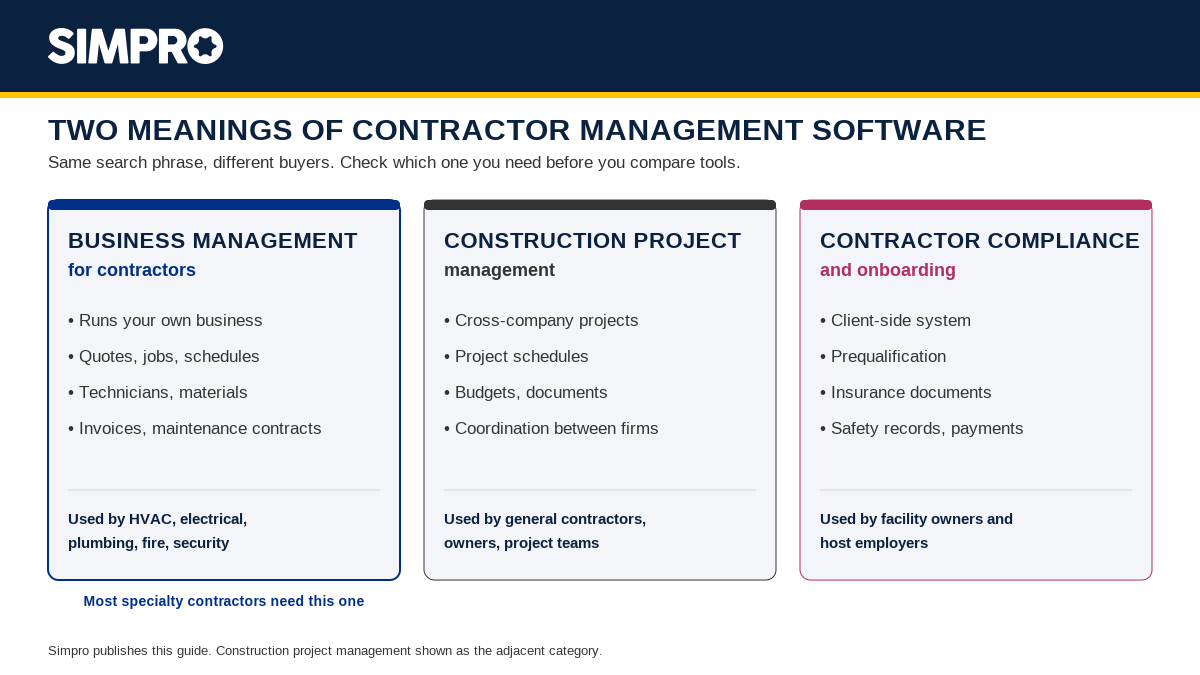
The compliance meaning matters when you work on someone else's site. A facility owner or general contractor may ask you to register in their contractor compliance system before you start. That system sits on their side, not yours.
Safety duties get shared too: OSHA explains that staffing agencies and host employers are jointly responsible for maintaining a safe work environment for temporary workers. That shared duty is one reason large clients track every contractor they bring on site.
From here on, contractor management software means the system you run your own business on. Chasing paperwork, double-entering jobs, guessing at job profit and waiting weeks to invoice are the problems it fixes.
How to choose: a trade contractor scorecard
Choose contractor management software by scoring every tool against the work you do. Check quoting, scheduling and dispatch, job costing, project and subcontractor tracking, maintenance and asset records, the mobile app, accounting sync, pricing model and onboarding. Weight each item by how often it touches your revenue. Then compare every tool on the same sheet.
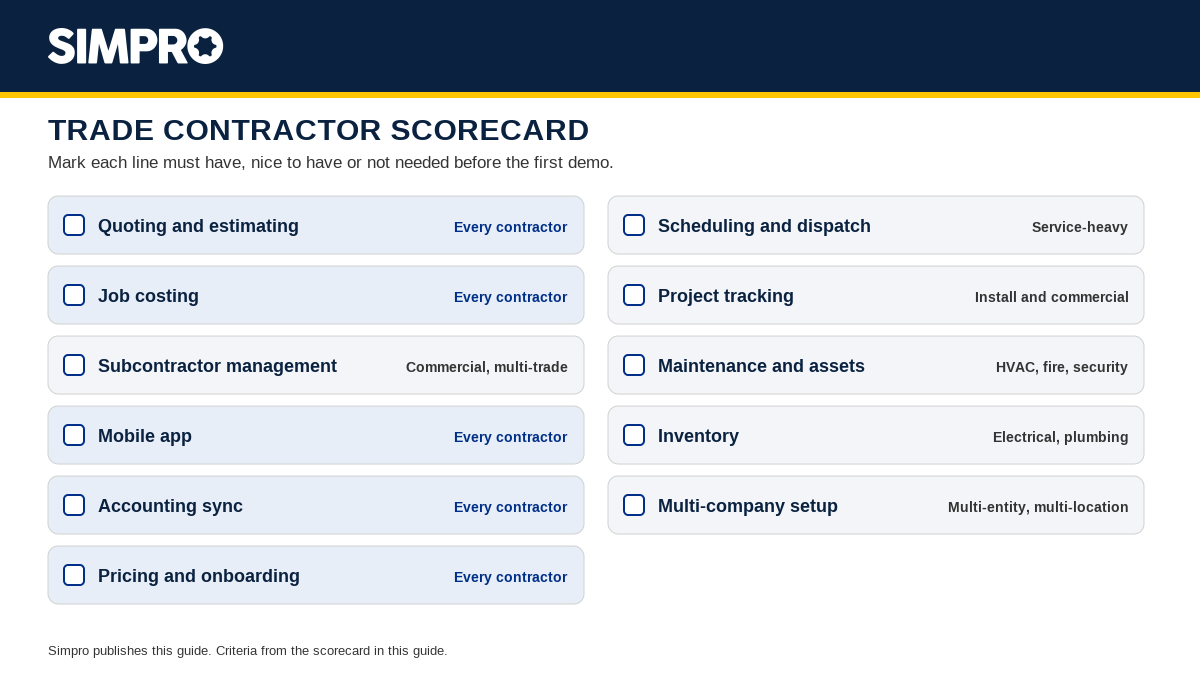
Use this scorecard in every demo. Mark each line as must have, nice to have or not needed before the first call. That way a polished demo won't rewrite your priorities.
| Criterion | What good looks like | Question to ask in the demo | Must have for |
|---|---|---|---|
| Quoting and estimating | Quotes built from your own price book, labor rates and markups, with options the customer approves | Do approved quotes turn into jobs without retyping? | Every contractor |
| Scheduling and dispatch | A live board that shows skills, location and availability and pushes changes to the technician's phone | What happens on the board when a job runs long? | Service-heavy contractors |
| Job costing | Labor, materials and subcontractor costs posted against each job as they happen | Where does a job's profit show before it's invoiced? | Every contractor |
| Project tracking | Stages, progress billing and variations for multi-week installs | How do you bill a project in stages? | Install and commercial contractors |
| Subcontractor management | Subcontractor costs and work tracked inside the job, not in a separate spreadsheet | Where do subcontractor costs land on the job? | Commercial and multi-trade contractors |
| Maintenance and assets | Recurring service agreements, asset history by site and scheduled inspections | Does the technician see the full history of this asset on site? | HVAC, fire protection and security |
| Mobile app | Job details, forms, photos, signatures and time capture that work in a basement with no signal | What does the app do offline? | Every contractor |
| Inventory | Stock tracked across warehouse and vans, with purchase orders tied to jobs | How do you know what's on each truck? | Electrical and plumbing |
| Accounting sync | Invoices and payments that post to your accounting system without double entry | Which accounting systems do you sync with, and in which direction? | Every contractor |
| Multi-company setup | Several companies, branches or locations in one system, with reporting you can split by entity | How do you separate companies and locations in reporting? | Multi-entity and multi-location contractors |
| Pricing and onboarding | A clear quote, a setup plan, data migration and training | What does the setup fee include? | Every contractor |
Two scorecard lines deserve extra weight because they hit margin directly. The first is finishing the job on the first visit. Ask each vendor how the tool puts asset history, past job notes and the right parts in front of the technician before they arrive.
The second is the cost of going back. Every repeat trip burns labor, fuel and a schedule slot that paying work needed. When you score dispatch, mobile and asset features, ask each vendor to show how the tool helps prevent a second visit.
A few habits keep the scorecard honest. Bring a real job from last month to every demo and ask each vendor to walk it from quote to invoice. Invite the person who runs your schedule, because they'll spot friction a sales demo hides. And score your favorite vendor last, once you know what good looks like elsewhere.
Best contractor management software by segment
Start from your revenue mix, not the vendor list. When service calls, installs and maintenance contracts all pay the bills, Simpro is built for that blend. Home service businesses can start with Housecall Pro, commercial trade contractors with BuildOps and construction project teams with Procore. Smaller teams that want a visible price can start with Jobber and Contractor Foreman.
Each pick below says who the tool is built for and what to test before you sign.
Simpro: best for specialty contractors who run service, projects and maintenance
Simpro is field service management software for contractors whose week mixes reactive service calls, multi-stage installs and recurring maintenance. The Simpro pricing page lists its scope: service repair job management, project management, asset maintenance, estimating and quoting, and scheduling and dispatching. The same page lists accounting and finance and reporting and business intelligence. It also says Simpro is multi-company compatible, which is useful when you run several companies.
That combination matters most to commercial and multi-trade contractors. An electrical contractor quotes a tenant fit-out, runs it as a project, then schedules the building's ongoing maintenance in the same system.
Test in your demo: very small owner-operator teams that only need simple scheduling and invoicing should compare setup time against a simpler tool.
ServiceTitan: per-technician pricing for contractors at any size
ServiceTitan says it's trusted by over 100,000 contractors. Its per-technician pricing is designed to fit your business and goals at any size.
Questions to ask: how projects, subcontractor costs and maintenance agreements work for your trade, and what onboarding the price includes.
BuildOps: best for commercial contractors
BuildOps describes itself as built to grow with commercial contractors. That makes it a natural shortlist entry when most of your work is commercial.
Before you sign, confirm how any residential work fits the setup. BuildOps pricing is tailored to each contractor's operation, with no one-size-fits-all number, so plan for a scoped quote.
Procore: best for construction project teams
Procore partners with owners, general contractors, specialty contractors and other project stakeholders in the construction industry. It fits contractors whose work runs inside construction projects.
What to test: if you also run a service and maintenance book, walk a reactive service call and a maintenance visit through the demo. Procore charges an upfront annual fee by product, based on your Annual Construction Volume (ACV).
Jobber: best for small teams that want a published price
Jobber publishes its plan prices. Its Core plan costs $49/mo, or $29/mo billed annually, and its Grow plan targets contractors who want to win bigger jobs. If you're searching for the best job management software for small trade contractors, it's one of the published-price options to test.
Ask in the demo: commercial contractors with projects, site assets and subcontractors need to test those workflows before committing.
Housecall Pro: best for home service businesses
Housecall Pro is designed for home service businesses like HVAC, plumbing, electrical, cleaning and landscaping. It publishes a price of $59/mo billed annually.
For commercial work, test commercial projects and maintenance contracts closely before you commit.
Contractor Foreman: best for budget construction management
Contractor Foreman is all-in-one construction management software with plans starting at $49/month. It positions itself for companies that need 1 user or 100.
Check before buying: if service dispatch and recurring maintenance drive your revenue, test both in the trial.
Comparison table: pricing model and who each tool is built for
Jobber, Housecall Pro and Contractor Foreman publish plan prices. Simpro, BuildOps, ServiceTitan and Procore price by team size, operation, technician or construction volume. Compare pricing model and target customer together, because a low monthly price means little when the tool doesn't fit your work. Use the table to match both.
| Tool | Pricing model | Built for, in the vendor's words |
|---|---|---|
| Simpro | Tailored quote by team size and add-ons, with an initial setup fee | Field service companies running service repair, projects and asset maintenance |
| ServiceTitan | Per-technician pricing | Contractors at any size |
| BuildOps | Tailored quote, no one-size-fits-all number | Commercial contractors |
| Procore | Annual fee by product, based on Annual Construction Volume | Owners, general contractors, specialty contractors and other project stakeholders |
| Jobber | Core plan at $49/mo, or $29/mo billed annually | The pro who wants to build and grow their business (Core plan) |
| Housecall Pro | $59/mo billed annually | Home service businesses like HVAC, plumbing and electrical |
| Contractor Foreman | Plans starting at $49/month | Companies that need 1 user or 100 |
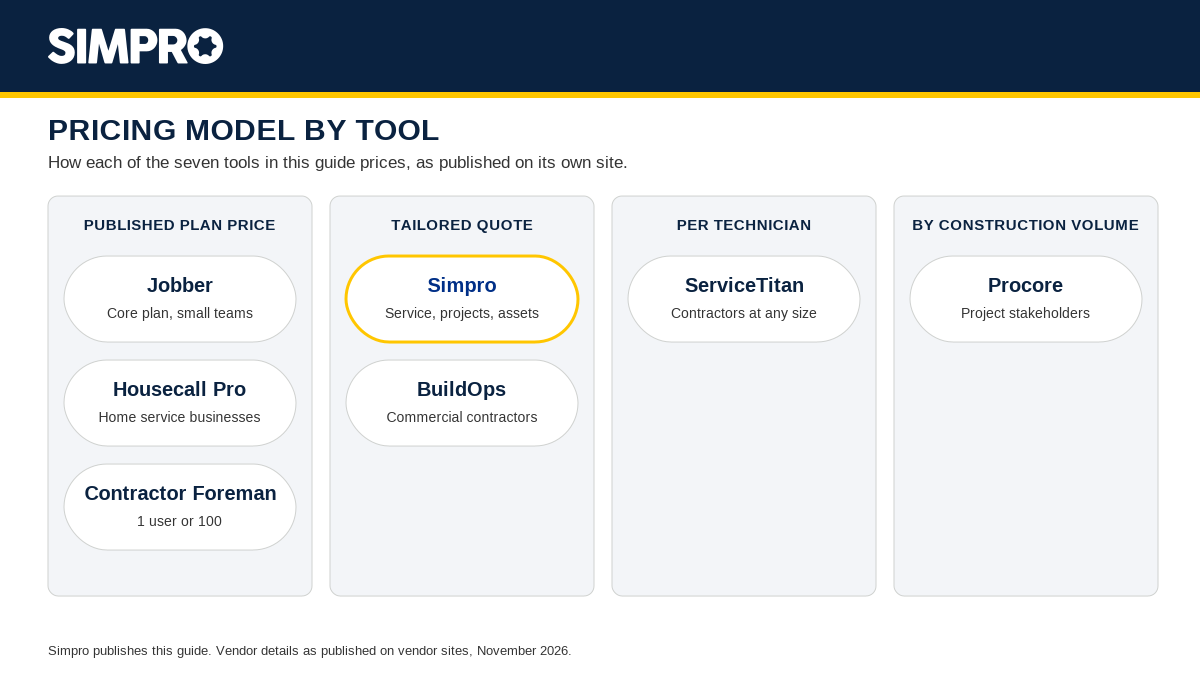
Read the table by your revenue mix. When most of your revenue is home service work, start with the tools that say they're built for it. When you bill projects and also carry maintenance contracts, put both workflows side by side in every demo.
What each trade needs
Each specialty trade loads the scorecard differently. HVAC and fire protection contractors lean on maintenance agreements and asset history. Electrical contractors lean on estimating and project billing, plumbing contractors on fast dispatch and van stock, and security contractors on recurring service and site records. Pick software that's strong where your trade earns its margin.
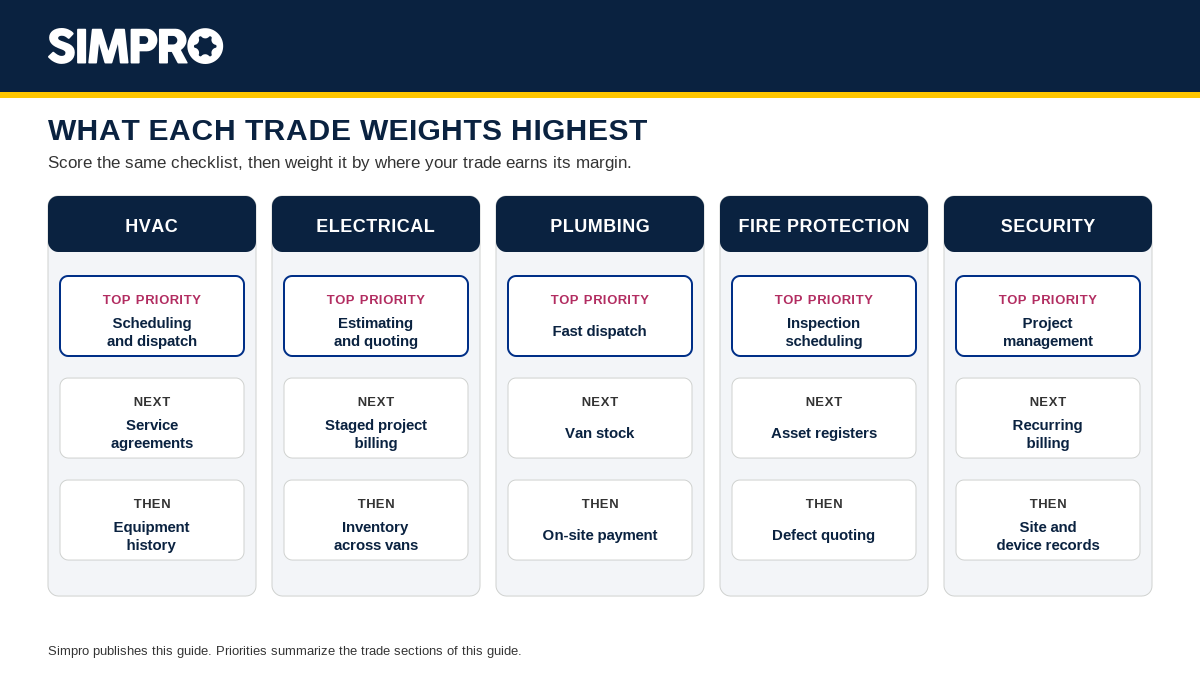
HVAC contractors
HVAC work swings between emergency calls in peak season and planned maintenance the rest of the year. Score scheduling and dispatch, service agreements, equipment history by site and the mobile app highest. A technician who sees every past visit to a rooftop unit arrives with the right parts. See how purpose-built HVAC software connects maintenance contracts to the dispatch board.
Electrical contractors
Electrical contractors often run the widest mix: small service calls, tenant fit-outs and long commercial installs. Estimating and quoting carry the most weight, followed by staged project billing, inventory across vans and job costing. Look for electrical contractor software that takes a job from takeoff and quote to progress claims without a second system.
If your bids start with a takeoff, check how the tool handles plans. Estimators use Simpro Takeoffs to count symbols and mark up plans for jobs, quotes and tenders.
Plumbing contractors
Plumbing revenue depends on speed: answering, dispatching and finishing the job on the first visit. Weight dispatch, van stock, mobile forms and on-site payment highest. Then check how the tool handles larger installs that need staged billing. Compare dedicated plumbing software against general tools on exactly those workflows.
Fire protection contractors
Fire protection contractors live on recurring inspections, testing records and compliance reporting for each site. Asset registers, inspection scheduling, digital forms and defect quoting carry the most weight. Good fire protection software turns an inspection defect into a quote and a job without retyping.
Security contractors
Security and low-voltage contractors combine installation projects with recurring service and monitoring contracts across many sites. Weight project management, recurring billing, site and device records and service scheduling. In the Proguard Protection Services case study, the company reports that margins improved by 10%. Compare security company software on how it links installs to the service contracts that follow.
Managing the subcontractors you hire
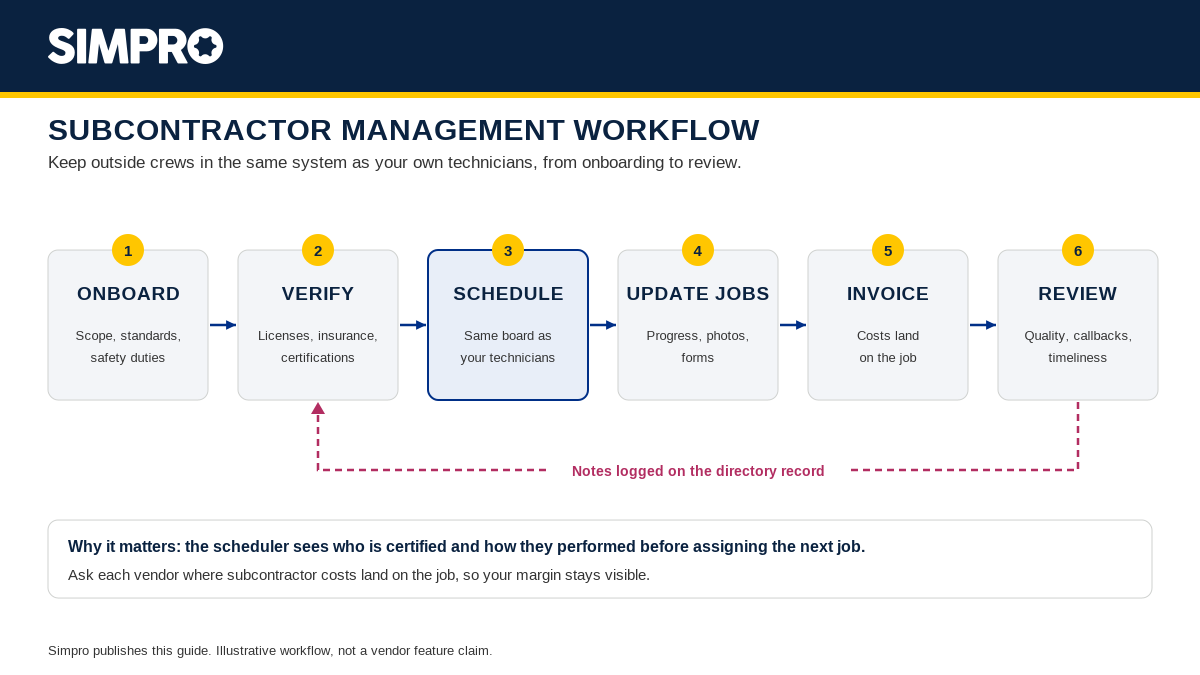
The scorecard's subcontractor row matters most when you hire outside help for overflow work or skills you don't have in-house. Agree on scope and standards up front and keep licenses and certifications on file. Schedule subcontractors like your own crew. Then get their job updates and invoices into the same system as your jobs.
Set the rules before the first job
Agree on the scope of work, workmanship standards, site safety duties and the completion dates you've promised the customer. Subcontractors represent your business on site, so share your policies and procedures before they meet your customers.
Keep a contractor directory
Record each subcontractor's skills, licenses, insurance and certifications in one place, with expiry dates. When a job needs a specific certification, the scheduler sees who qualifies without digging through spreadsheets.
Schedule them alongside your team
Simpro's base plan includes field and contractor scheduling, along with quoting and estimating and real-time inventory management and purchasing. Whichever tool you pick, check that subcontractor jobs show on the same board as your own technicians.
Take updates and invoices in one place
Ask each vendor how subcontractors report job progress, attach photos and forms, and submit invoices. Then ask where those costs land on the job, so your margin stays visible.
Review performance
Track quality, callbacks, timeliness and safety on each job, share feedback and train subcontractors on your processes. Log those notes against the subcontractor's directory record, so the next scheduler sees them.
Contractor management software vs construction PM and compliance tools
Your contractor management system runs your own jobs, people and money. Construction project management software coordinates a building project across many companies. Contractor compliance tools let a client vet the contractors on its site. A specialty contractor typically runs its own business system and logs into a client's project or compliance platform when a contract requires it.
If you're a commercial trade contractor managing subcontractors on large projects, you may wonder whether contractor project management software should be your main system. Make it your main system only when most of your revenue comes from large projects. That means you're the general contractor or you work inside a general contractor's process. The category is built around coordinating a project across companies, so test it hard on reactive service work, such as dispatching a technician to an early-morning no-heat call.
Pick a business management system when your revenue comes from a steady mix of service calls, maintenance and installs that you manage end to end. That's the usual shape of an HVAC, electrical, plumbing, fire protection or security business.
Expect to use compliance tools on the client side. When a facility owner or general contractor requires prequalification, you upload insurance, licenses and safety records to their platform. That doesn't replace your own system. It adds a step to winning and starting the job.
Cost and rollout: what to budget and plan for
Budget for three costs: the subscription, a one-time setup and the time your team spends learning the new system. Published plan prices cover the subscription only, so ask every vendor what onboarding, training and data migration cost. Then compare first-year totals, not monthly figures. That's the number that hits your cash flow.
Setup is a real line item. Simpro states that there's an initial setup fee to cover onboarding, training, and data migration, as explained on its pricing page. Ask each vendor the same three questions: what data they migrate, who trains your office and field teams, and what happens if go-live slips.
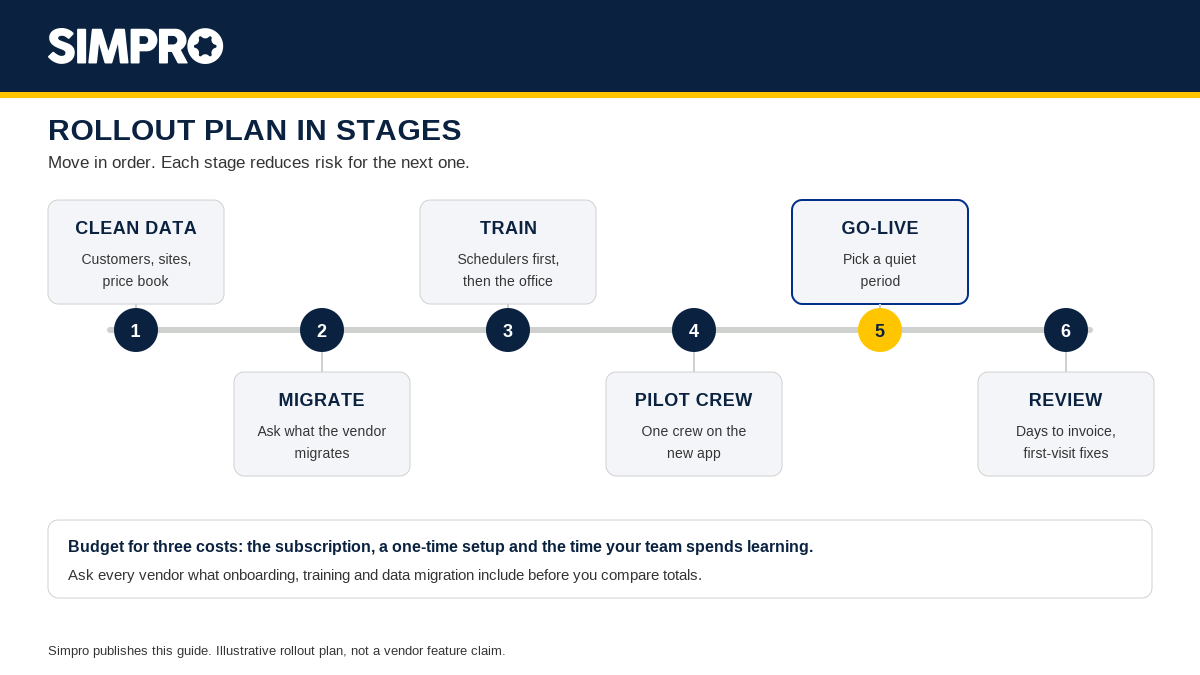
Plan the rollout in stages. Clean up your customer, site and price book data before migration, because bad data moves with you. Pick a quiet period for go-live, train the schedulers first and run one crew on the new app before switching everyone. Then watch a few measures after go-live, such as days from job completion to invoice or the share of jobs finished on the first visit.
FAQ
What is contractor management software?
Contractor management software is the system a contracting business uses to run jobs from quote to payment: estimating, scheduling and dispatch, job costing, field updates and invoicing. Simpro's published scope shows a typical mix: service repair, project management and asset maintenance. The same phrase also describes client-side tools that companies use to vet outside contractors.
What are the benefits of contractor management software?
The main benefit is one connected record from quote to invoice. The office stops retyping work and sees job profit sooner, and technicians carry job and asset history on their phones. Simpro's pricing page lists service repair, project management and asset maintenance in one system.
What's the best field service management software for contractors?
Pick by work mix. Specialty contractors who run service calls, projects and maintenance together should shortlist Simpro, whose published scope covers service repair, project management, asset maintenance and dispatch. Home service teams should compare tools built for residential work. Construction project teams should compare project platforms, using the scorecard above.
How much does contractor management software cost?
Expect a monthly subscription plus a one-time setup fee. Some platforms, such as Simpro, quote instead of publishing prices. Simpro's pricing is tailored to team size and add-ons, with an initial setup fee to cover onboarding, training, and data migration. Compare total first-year cost, not the monthly figure alone.
Find the right fit for your business
The right contractor management software matches your work mix, your size and the trade you run. Score every tool on the same sheet, bring a real job to every demo and ask what setup includes. If your business runs service, projects and maintenance together, see how Simpro handles all three.
See how Simpro works, then book a demo and walk one of your real jobs through the system.


 Back to top
