
Quick Answer: Adopting AI for a plumbing business means using tools that handle repetitive, data-heavy tasks so your team's judgment gets used where it counts. According to 2025 industry data, a 10-technician plumbing operation running AI-driven dispatching, automated follow-up, and voice documentation can generate $180,000 to $280,000 in additional annual revenue without hiring anyone new. The best starting point is AI voice answering, since missed after-hours calls are the easiest revenue to recover, followed by a phased rollout of tools to dispatch techs, write job reports, and invoice.
Somewhere between the customer asking why nobody picked up at 9 p.m., the invoice still sitting half-finished from Tuesday's job, and another ad promising AI will "transform" your plumbing business, you've probably landed on the same conclusion: everyone's talking about this, and you still don't know what it does. You may even be worried that technology is leaving you behind.
This beginner's guide to adopting AI for plumbing business owners is meant to change that for you. You don't want to figure out a bunch of jargon. You just need a plain explanation of what AI actually does in a plumbing business, what changes day-to-day when you turn a tool on, and what setup is required. That's what follows, in the order it makes sense to tackle it.
What Does AI Mean for a Plumbing Business?
If the loudest voices on this topic are either selling you something or predicting robots will run your dispatch board by next year, you can ignore both. What's actually happening inside plumbing companies right now is smaller, and more useful, than either extreme.
A few terms worth knowing, since "AI" gets used as a catch-all for things that work very differently:
- Artificial intelligence (AI) is software that understands what you're asking for and acts on it, instead of just following a rigid set of rules.
- Generative AI creates something new from what you give it, such as turning a tech's spoken notes into a finished job report.
- Machine learning improves at a task by studying patterns in your own job data, like which service calls tend to need a callback.
None of this replaces the judgment of a licensed plumber diagnosing a strange noise in someone's basement. AI handles the repetitive, data-heavy work — like answering common questions or retyping the same notes for the third time — so your judgment gets used where it counts.
Here's the number that matters to you more than any definition: a 10-technician plumbing operation running AI-driven dispatching, automated follow-up, and voice documentation can realistically generate $180,000 to $280,000 in additional annual revenue without hiring anyone new. That's recovered time and closed jobs already available to you.
Related: AI platforms for plumbing businesses — what's changed in 2026 and what to look for when evaluating your options.
7 Practical Ways to Start Using AI in Your Plumbing Business
Each of these solves a familiar, specific problem, and none of them ask you to trust a black box. You'll know exactly what's happening before you turn anything on. Start at the top of this list, not the middle.
1. Use AI to Respond to Customer Inquiries Faster
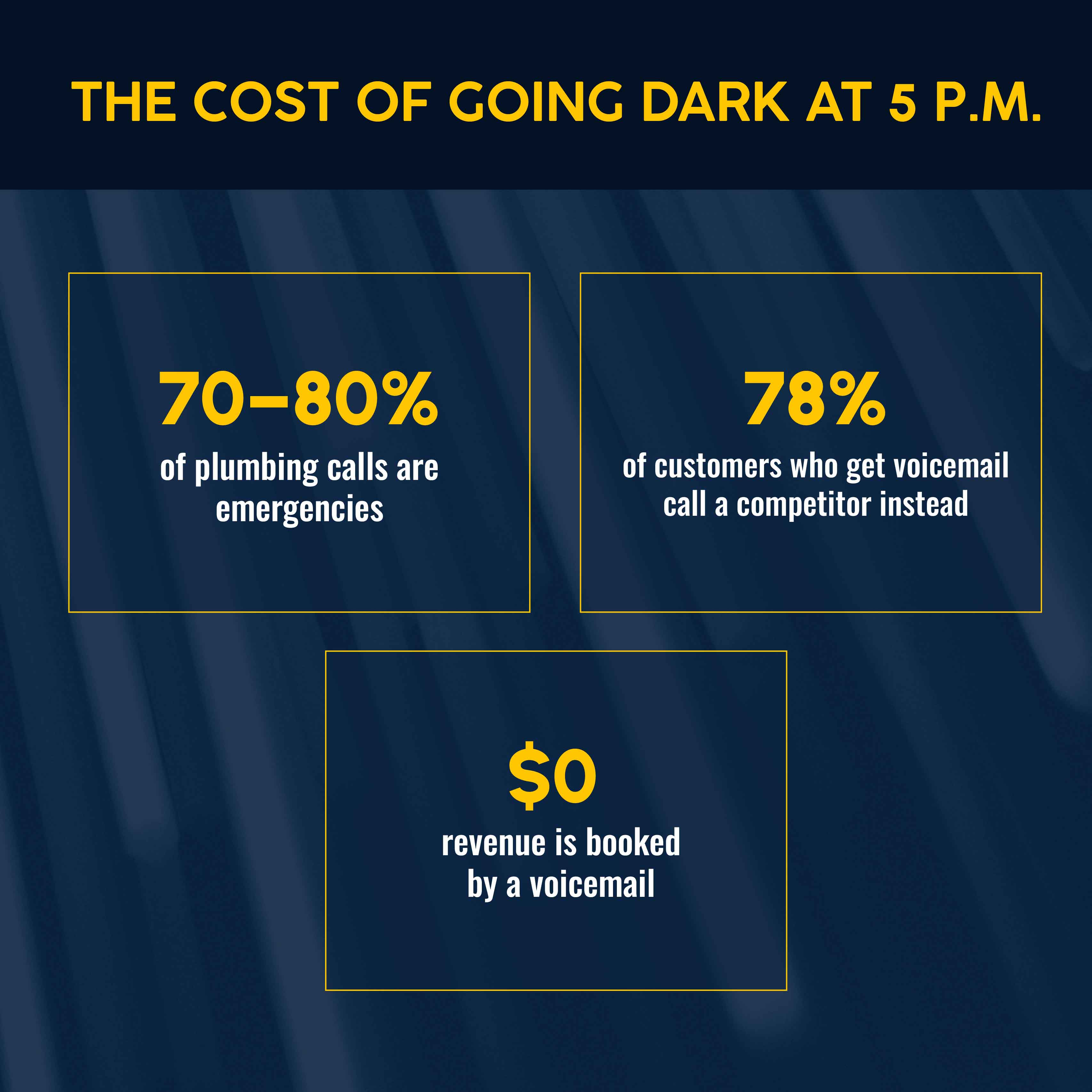
Roughly 70–80% of plumbing calls are emergencies, meaning the phone can ring at any hour. When it goes to voicemail, 78% of customers just call the next plumber instead of leaving a message.
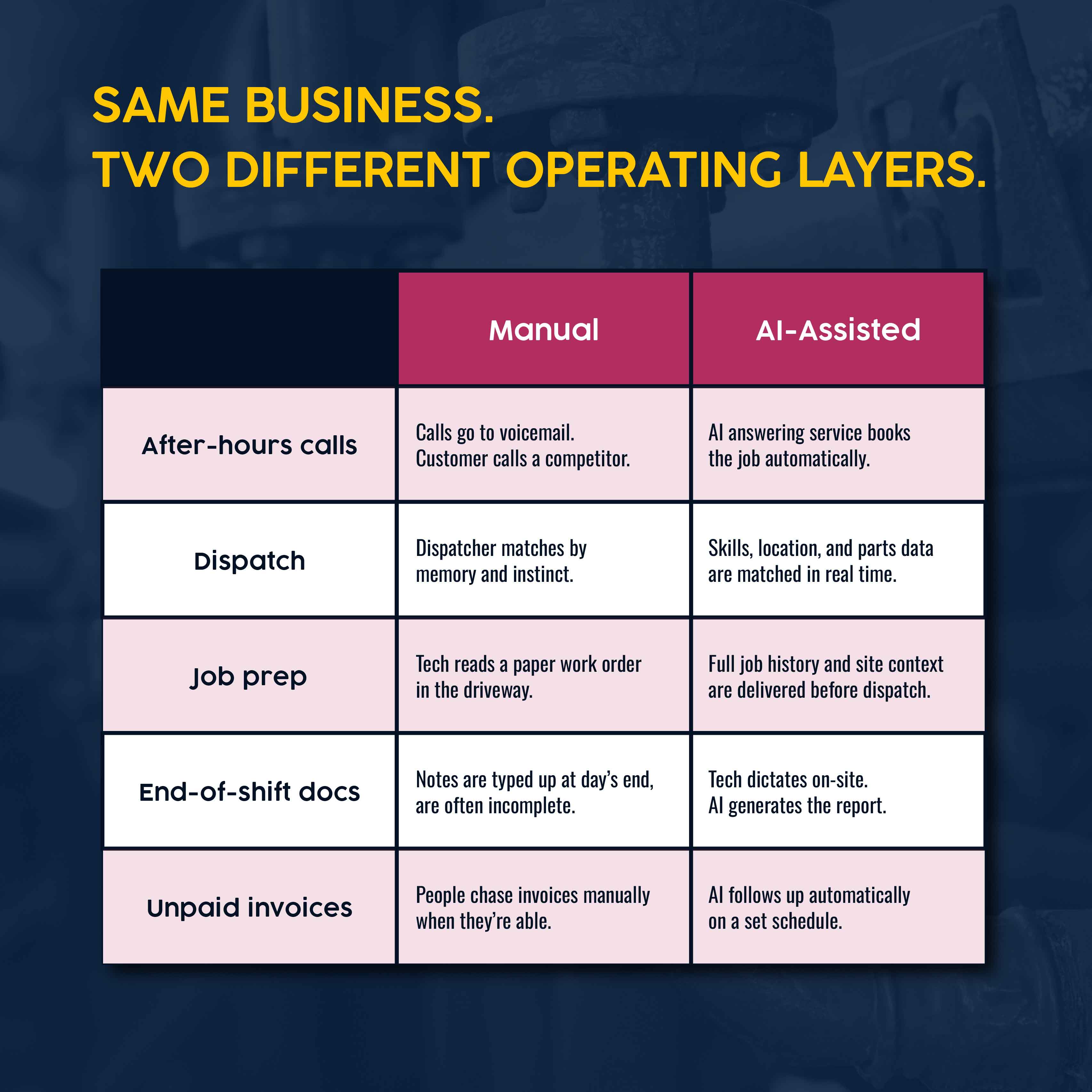
How AI helps you: An AI answering service picks up when nobody on your team can. It's not a robot reading a script. It holds a real conversation, figures out what the customer needs, and books the job or texts your dispatcher a summary. It handles this kind of customer service the same way a good office manager would, just without the overtime.
What changes day to day: Right now, a call after hours is a coin flip. With this running, every call gets answered or texted back within seconds, whether it's 2 p.m. or 2 a.m., and booking jobs happens without anyone getting pulled off a job site.
What setup looks like: You connect the tool to the phone number you already use — no new number to learn, no new hardware. Most plumbing businesses see it working within the first week.
The operational fix: Deploy AI voice answering first. It closes the customer communication gap between "answered" and "missed," and that's the easiest revenue you'll recover from adopting AI at all.
2. Use AI to Improve Scheduling and Dispatch
Manual dispatching runs on memory and instinct to match jobs to techs and juggle last-minute changes over the phone. An IFS report found the average service business manages schedules 30% suboptimally.
How AI helps you: AI-driven dispatch matches technicians to service calls automatically, based on skill set, certifications, location, and parts already on the truck. Your dispatcher still makes the final call. AI scheduling for field service management is the RAIN context for that matching work.
What changes day to day: The best-fit tech gets surfaced in real time the moment a job comes in, instead of your dispatcher working the phones and a whiteboard. Less double-booking, more billable hours per tech.
What setup looks like: This depends on technician profiles already logged somewhere your field service software can read. If that data exists, this is mostly a settings decision.
The operational fix: Turn this on once voice answering is stable. If your platform already tracks technician availability, you're closer to ready than you think.
3. Use AI to Prepare Technicians Before They Arrive On-Site
Most callback trips trace back to the same cause: a tech showed up without enough context, the right parts, or the previous visit's notes.
How AI helps you: AI job prep pulls together job history, scope, site notes, and parts data before dispatch. The tech reviews it on their phone before pulling out of the driveway, instead of piecing it together from a paper work order.
What changes day to day: A newer tech walks in with the context a 20-year veteran would carry in their head. First-visit completion goes up. Repeat trips — the ones that eat your margin — go down.
What setup looks like: This runs on job history your team is likely already generating. The main requirement is that techs log notes consistently.
The operational fix: If pre-dispatch briefings aren't standardized yet, this is a high-leverage fix for techs without years of institutional memory to lean on.
4. Use AI to Reduce Paperwork and Improve Job Documentation
End-of-shift paperwork is one of the most consistent complaints from field techs across every trade. After a full day of service calls, notes get shorter, vaguer, and less useful for billing or the next visit.
How AI helps you: AI handling job documentation means the tech talks through the job out loud, including what was done, parts used, and meter readings. The software builds the written report. Nothing is invented. It's turning what the tech already knows into a document, which is where you actually save time.
What changes day to day: Techs talk instead of type, using the phone they already carry. No new device, no new habit beyond narrating out loud.
What setup looks like: You turn the feature on inside your field service software. There's a short adjustment period, but nothing to configure beyond flipping the switch.
The operational fix: If job notes are inconsistent across your team, start here. It removes a task your crew already hates, so adoption tends to happen naturally.
5. Use AI to Create Clearer Estimating and Follow-Up
A quote that takes 45 minutes to build often goes out a day late, even if you follow a plumbing estimating template. More often than not, it doesn't go out at all once the phone starts ringing again.
How AI helps you: AI-assisted estimating uses your price book, supplier catalogs, and past quote history to cut build time from 15–45 minutes down to under a minute. When quotes do go out on time, businesses often go quiet afterward. Automation tools handle the follow-up sequence on a set schedule so nobody has to remember to do it manually.
What changes day to day: The estimator still owns the bid and reviews every number. An hour of manual math becomes a few minutes of review, and quotes stop sitting in a drafts folder.
What setup looks like: Your price book and labor rates get loaded once. After that, the tool builds against them automatically, and follow-up runs on its own.
The operational fix: If quotes are your bottleneck, fix this before anything downstream. A faster quote today beats a perfect one in three days.
Related: Capture value with AI from the jobs already in your pipeline before spending on new leads.
6. Use AI to Support Invoicing, Payment Follow-Up, and Cash Flow
Too many plumbing businesses are slow to get a summary to the customer after a job wraps up, which delays payment and leaves cash flow tighter than it needs to be.
How AI helps you: An AI assistant generates a job summary — what was done, parts used, what the charges reflect — the moment the job closes, and sends it within hours. The same kind of tool follows up on unpaid invoices automatically, adjusting its approach based on how that customer tends to pay.
What changes day to day: The invoice goes out the same day the job closes, and nobody in the office is manually chasing 10 open invoices at once.
What setup looks like: You set the summary format and follow-up cadence once. After that, it runs the same way every time a job closes.
The operational fix: In the real world, this shows up fast. Zebra Plumbing saw quote times drop from 15–45 minutes to under a minute and 90% of jobs paid same-day after adopting this kind of automation, which doubled profit in the process.
7. Use AI to Understand Business Performance Faster
Most plumbing business owners get a financial picture from an accountant that's already two weeks old. By then, a margin problem has already cost you money.
How AI helps you: An AI assistant for business intelligence lets you ask plain questions about your own operation — "What's my average job value by technician this month?" — and get an answer in seconds instead of pulling a report by hand.
What changes day to day: You catch a margin slip or a scheduling bottleneck while it's still small, instead of finding out a month later.
What setup looks like: This connects directly to the operational data you're already generating through quoting, dispatch, and invoicing — nothing separate to build.
The operational fix: Before spending on any tool, write down your starting point: jobs per tech per day, invoice-to-payment cycle, after-hours booking rate. You can't measure a return on AI adoption without a number to compare it to.
A Simple AI Adoption Roadmap for Plumbing Business Owners
Turning on all seven at once is the fastest way to lose your team's trust in the process. A phased rollout, where one workflow stabilizes before the next starts, beats doing everything simultaneously.
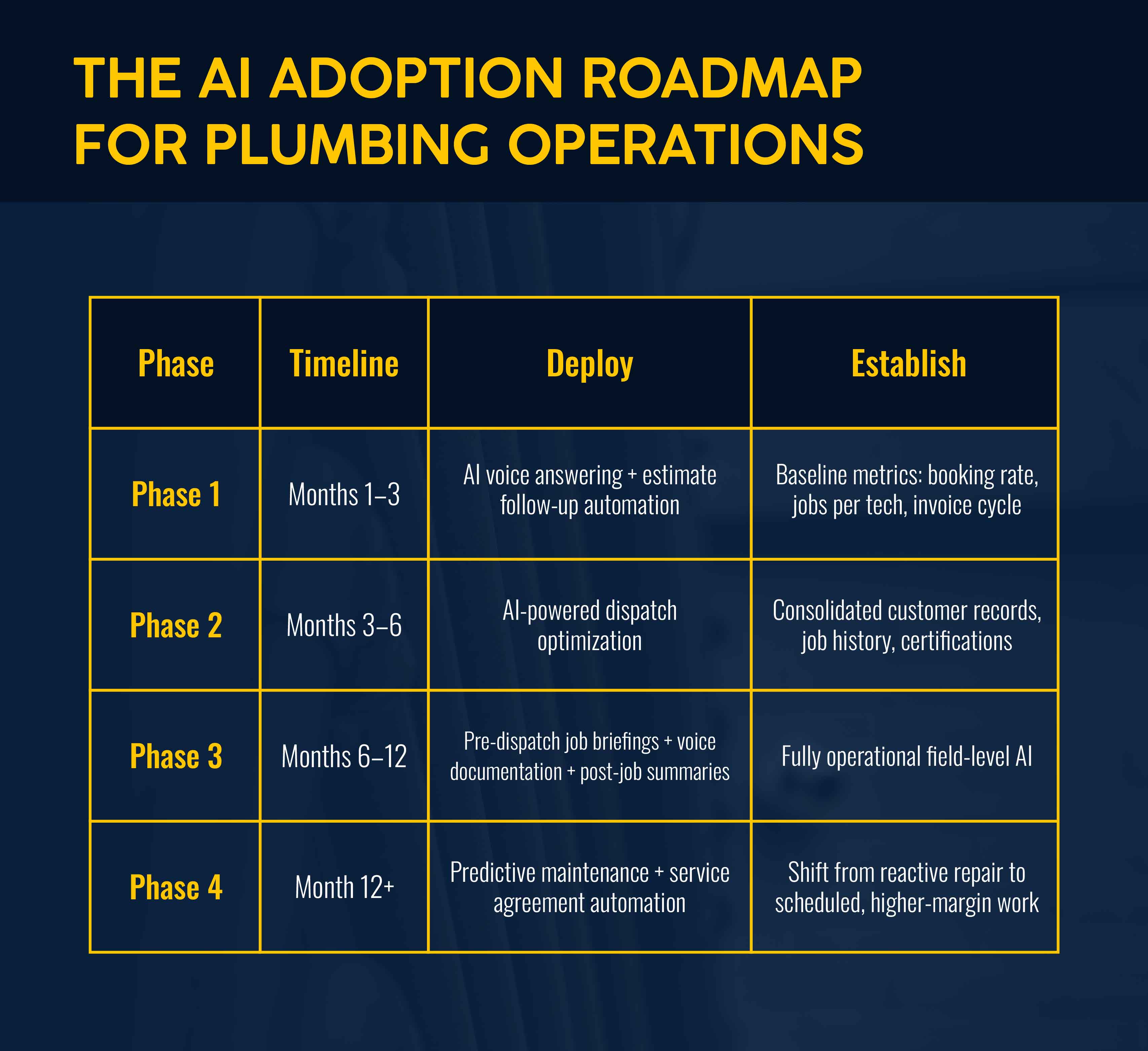
For a plumbing service business with 3–15 technicians:
- Months 1–3: Turn on AI voice answering and estimate follow-up. Track jobs per tech, booking rate, and invoice cycle time first.
- Months 3–6: Add AI-driven dispatch. Get customer records, job history, and certifications into one system if they aren't already.
- Months 6–12: Expand to pre-dispatch briefings, voice documentation, and automated post-job summaries.
- Month 12+: Layer in predictive maintenance and service agreement automation, shifting revenue toward scheduled work.
Data cleanup isn't optional. A Simpro survey found that 98% of companies are prioritizing data centralization. Don't skip it. If your job history is scattered across spreadsheets, expect two to four months of cleanup before phase two. That's normal, not a sign you're behind.
Common Mistakes to Avoid When Adopting AI in Your Plumbing Business
- Skipping training. Technician resistance is almost always a change management problem, not a technology one. Designate one person to learn the tool first and train the rest.
- Using disconnected tools. A standalone chatbot that doesn't talk to your field service software only sees half the picture.
- No baseline before starting. If you don't know your current booking rate or invoice-to-payment cycle, you can't prove the tool worked.
- Doing everything at once. Pick the area costing you the most and let it run 60 to 90 days before adding the next one.
Simpro Helps Plumbing Businesses Adopt AI Across the Job Lifecycle
Simpro® is an AI-first field service software platform built specifically for trade businesses, including plumbing. Instead of bolting AI onto a scheduling app, Simpro connects quoting, dispatch, inventory, invoicing, and reporting in one system, so its AI tools work from full context.
In May 2026, Simpro launched AI field service management with Simpro Lightning, an AI operating layer built on the core platform:
| AI Agent | What It Does | Plumbing Business Impact |
|---|---|---|
| JustAsk | Answers plain-English questions about your operation | Get answers on margin and cash flow without pulling a report |
| JobReady | Preps techs before dispatch | Techs arrive with job history and parts already in hand |
| JobScribe | Turns spoken job notes into a full report | Cuts paperwork time and improves billing accuracy |
| JobBrief | Sends automatic post-job summaries | Fewer disputes, faster payment |
| FieldReady | Onboarding and training agent | New techs train on your processes from day one. |
Simpro's plumbing software is used by more than 24,000 trade businesses and 250,000 users globally, with customers reporting 10x faster estimates and 30% productivity gains after adoption.
Start Small, But Build Toward Connected AI
Getting started with AI as a plumbing business owner doesn't mean you need to understand every term or trust every claim. You need one starting point and a plan to let it prove itself before you add the next one.
If missed phone calls, slow quotes, or late invoices are keeping you up, explore Simpro AI for field service management and see what a connected version of this looks like in a plumbing business your size.


 Back to top