

Written by: Corey O'Donnell

Corey O'Donnell is Chief Brand & Strategy Officer at Simpro Group, leading platform strategy, brand, and market narrative for its AI-first platform. With over 20 years of experience scaling software companies, he specializes in turning complex technology into narratives that drive adoption and growth.
AI field service software applies AI to defined operational tasks while keeping governed records and an accountable person in control. Use this list to compare intake, scheduling, job preparation, guidance, documentation, maintenance, customer updates, reporting and data entry, then verify exception handling and current availability before buying.
| AI feature | Operational task | Evidence to request | Human checkpoint |
|---|---|---|---|
| 1. AI customer intake and request triage | Capture, clarify and route requests | Source fields, escalation logic and difficult transcript | CSR confirms urgency and promises |
| 2. AI scheduling and dispatch | Match technicians and rebuild schedules | Constraints, match reason and schedule audit | Dispatcher approves material changes |
| 3. AI job preparation | Assemble job, asset, parts and access context | Source-linked brief with visible gaps | Technician confirms readiness |
| 4. AI technician guidance and training | Retrieve approved task procedures | Cited source, refusal and escalation | Technician owns diagnosis and the final action |
| 5. AI job notes and documentation | Structure speech, text and approved images | Original input, proposed fields and history | Technician approves the record |
| 6. Predictive service and asset risk | Flag assets for maintenance review | Signal, threshold and false-positive test | Qualified employee decides the response |
| 7. AI customer updates and follow-up | Prepare arrival and closeout messages | Job references, open items and delivery log | Staff approve sensitive messages |
| 8. AI reporting and operational insights | Answer questions from governed data | Calculation, filters and source records | Manager validates definitions and outliers |
| 9. AI data entry and operations automation | Update records across the job lifecycle | Read/write map, approvals and failed-sync queue | Process owner controls recovery |
| 10. AI permissions, approvals and auditability | Limit access and automated actions by role | Role test, approval path, log and stop control | Owner reviews access and exceptions |
The Nitty Gritty
- Choose the office or field task that creates the most friction, not the broadest AI promise.
- Test an exception before you test the ideal path.
- Make the vendor show every record the feature reads and every field the feature changes.
- Separate available, preview and roadmap capabilities in your business case.
- Pilot one workflow with a baseline, a named owner and a stop condition.
What makes an AI field service feature useful?
Useful AI field service features have a clear starting record, a visible output and a person who owns the decision. They fit a defined operational task and preserve the records needed to check the result. If a vendor fails to show what a feature reads, writes or does with missing information, it's a label, not an operating capability.
Connected context matters. In a buyer demo, trace each answer or action back to the customer, job, asset, technician, inventory or financial records that informed it.
Availability matters as much as capability. Request the exact feature name, package, region, language, account setting and release status. Put a preview in a controlled pilot and a roadmap item in a future-state discussion. Weight a feature most heavily when your team tests it in its own environment today.
For a broader introduction before using this checklist, read how AI is used in field service.
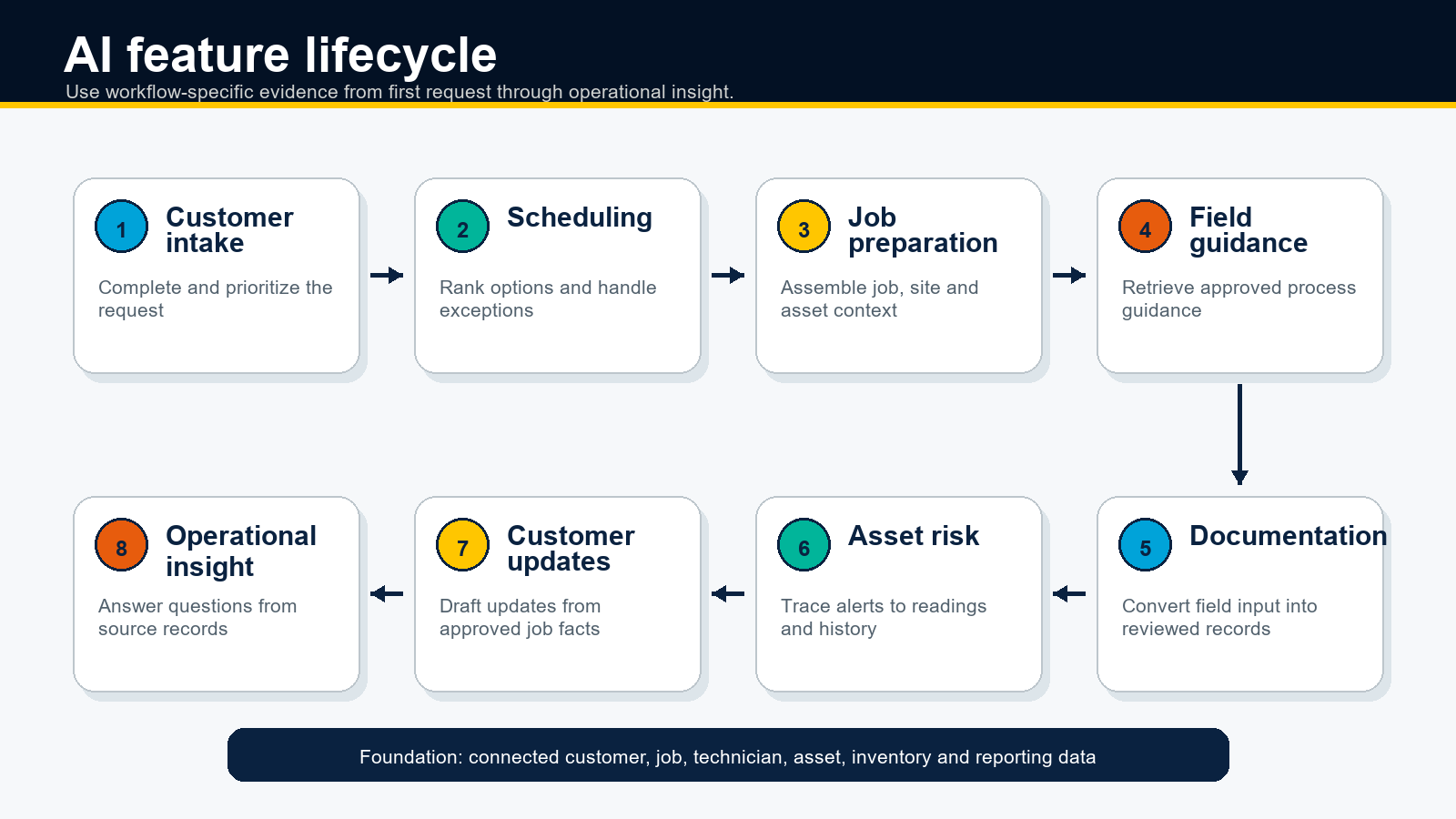
1. AI customer intake and request triage
In my view, useful AI intake captures a request, asks the next useful question and routes the customer to an approved outcome. In a demo, I ask for a proposed category, assigned queue and next action without unreviewed changes. I also name the CSR who reviews urgency, scope and customer promises before any record changes.
Skip the perfectly described maintenance request. Submit a vague problem, an address outside the service area and an incomplete description. Inspect the questions asked, the fields created and the point where a person takes over. Have a CSR review urgency, scope and every promise made to the customer.
Confirm the channels and languages the feature supports, whether it identifies an existing customer and how it handles simultaneous requests. A transcript-only result still leaves rekeying to a person, so classify it as call review rather than automated intake.
2. AI scheduling and dispatch
Microsoft's field service scheduling overview connects requirements, resources and bookings in a scheduling system. I use that relationship to test job requirements, resource characteristics, current availability, location, duration and customer windows. Inspect every input, the proposed assignment and final booking record, then ask the dispatcher to approve or reject material changes.
For my exception test, I remove the assigned technician, delay the active job and remove a part from the job. Then I ask the system to generate new options, expose the operational trade-offs and preserve the dispatcher's ability to change or reject the result.
Ask whether optimization runs on demand, on a schedule or continuously. Confirm which changes get human approval and whether the activity history shows the original recommendation, the human decision and the final schedule.
3. AI job preparation
For job preparation, ask the vendor for a concise, source-linked brief before travel. Have it bring together the request, prior visits, site notes, asset history, planned work, materials and access instructions. Ask it to identify missing information with a visible warning, name the source behind each detail and record when the brief was last refreshed.
Use a repeat job with an incomplete parts list for the demo. Open every source record behind the brief, check the dates on old notes and confirm that the missing material is visible. Let the technician or coordinator correct the brief and retain a record of the change.
Ask which job types the feature covers, when the brief refreshes and what happens offline. Keep source-linked context in one view without accepting a static summary that is already stale when the van leaves.
4. AI technician guidance and training
In my view, useful AI guidance retrieves an approved procedure that matches the technician's role, task and equipment context. Review the source citation, the distinction between company procedure and general information, and the stop behavior when available material does not support an answer.
I ask one supported procedural question, then introduce an unsupported model or contradictory condition. I review the source, refusal and escalation behavior. The technician owns the final decision and work performed, so I look for evidence and limits that remain easy to see in the field.
Confirm mobile access, offline behavior, content ownership and update controls. Flag any demo where two versions of a manual look equally authoritative or staff struggle to identify the source behind an answer.
5. AI job notes and documentation
AI job documentation needs to turn a technician's speech, typed notes and approved images into a proposed job record, not an unreviewed block of polished prose. A strong workflow separates the original input from suggested fields and previews each change before writing it to the system of record or triggering a final action.
Request structured outputs that the office uses: work performed, asset readings, tasks completed, materials used, follow-up work, customer-visible notes and closeout fields. Mark uncertain details rather than accepting an invented part number, diagnosis or commitment. Open the edit history to see what the technician accepted, changed or rejected.
For the demo, dictate a note that includes a correction, an uncertain part and an unresolved customer question. Compare the transcript, proposed fields and final write. Then test poor connectivity, two speakers and terminology specific to your trade. Get technician approval before signoff. Have an administrator control retention, consent and the fields available for AI updates.
6. Predictive service and asset risk
For predictive service, look for an asset condition that deserves review before a failure or missed maintenance event. Feed the test time-stamped inputs such as readings, fault codes, age, inspection results, maintenance criteria and service history. Ask the output to name the asset, show the supporting signal and explain the threshold or reason for the alert.
Change a reading, remove recent history and introduce a known false-positive scenario. Watch how priority and confidence change. A qualified employee decides whether to inspect, schedule, monitor or dismiss the alert. Record that decision in the operating system instead of a separate dashboard.
Confirm supported asset classes, minimum data requirements and model-monitoring practices. Predictive claims are easy to demonstrate with clean sample data. The real buying question is whether your current records are complete enough to support the result.
7. AI customer updates and follow-up
For customer communication, ask AI to prepare an accurate update from approved job information and preserve open items. Have the message cover arrival status, work completed, findings and the next step for the customer. Reject any draft that invents a diagnosis, price, warranty position or completion date when the record does not support one.
Close a test job with a pending part and an unanswered customer question. Check whether the message keeps both items open and routes the follow-up to the right person. Staff approve commitments, recommendations and sensitive messages before sending them.
Confirm supported channels, templates, consent settings and delivery history. The most useful automation closes the gap between field activity and customer communication without hiding who approved the message or where its details came from.
8. AI reporting and operational insights
For AI reporting, ask a plain-language business question and let the manager inspect the calculation, filters and source records. Test questions about backlog, repeat visits, overdue work, technician capacity or job performance. Apply the same permissions used by the underlying data and reject an answer that hides its definitions.
Repeat the same question with two date ranges, an excluded branch and a deliberately unusual record. Open the contributing records and challenge the outlier. Reject an answer that fails to reveal its definitions or lead back to the report before using it for a staffing, budget or customer decision.
Confirm included data domains, refresh timing and access controls. Natural-language reporting saves time only when it keeps the audit trail that a conventional report would provide.
9. AI data entry and operations automation
AI data entry automation needs to capture information once, structure it for the right records and move the approved result into the next operational step. In the demo, create a job from intake, update a work order from field notes, record materials, route follow-up work and prepare closeout data. The objective is a controlled workflow, not faster copy and paste.
Request a field-level map of every read and write. Follow one sanitized job from request to invoice and identify the customer, job, asset, technician, inventory and communication fields that the system creates or changes. Then interrupt an integration. Review the failed handoff, preserved source data and recovery path for the owner.
This is where connected field service management software matters. Keep governed operational records and write-back controls inside the workflow. Treat a detached assistant as an information tool, not operations automation, when someone still has to interpret its answer and rekey it into the operating system.
Separate native automation, configured workflow and custom integration in the business case. Confirm who owns field mappings, duplicate detection, approval thresholds and failed-sync queues. Equip the process owner to limit automation by role, job type and field, then stop or reverse it without losing the source record.
Confirm the package, region, account configuration and release status for every proposed write-back. A workflow that only runs in a preview tenant or depends on an unscoped integration does not belong in the current-state savings case.
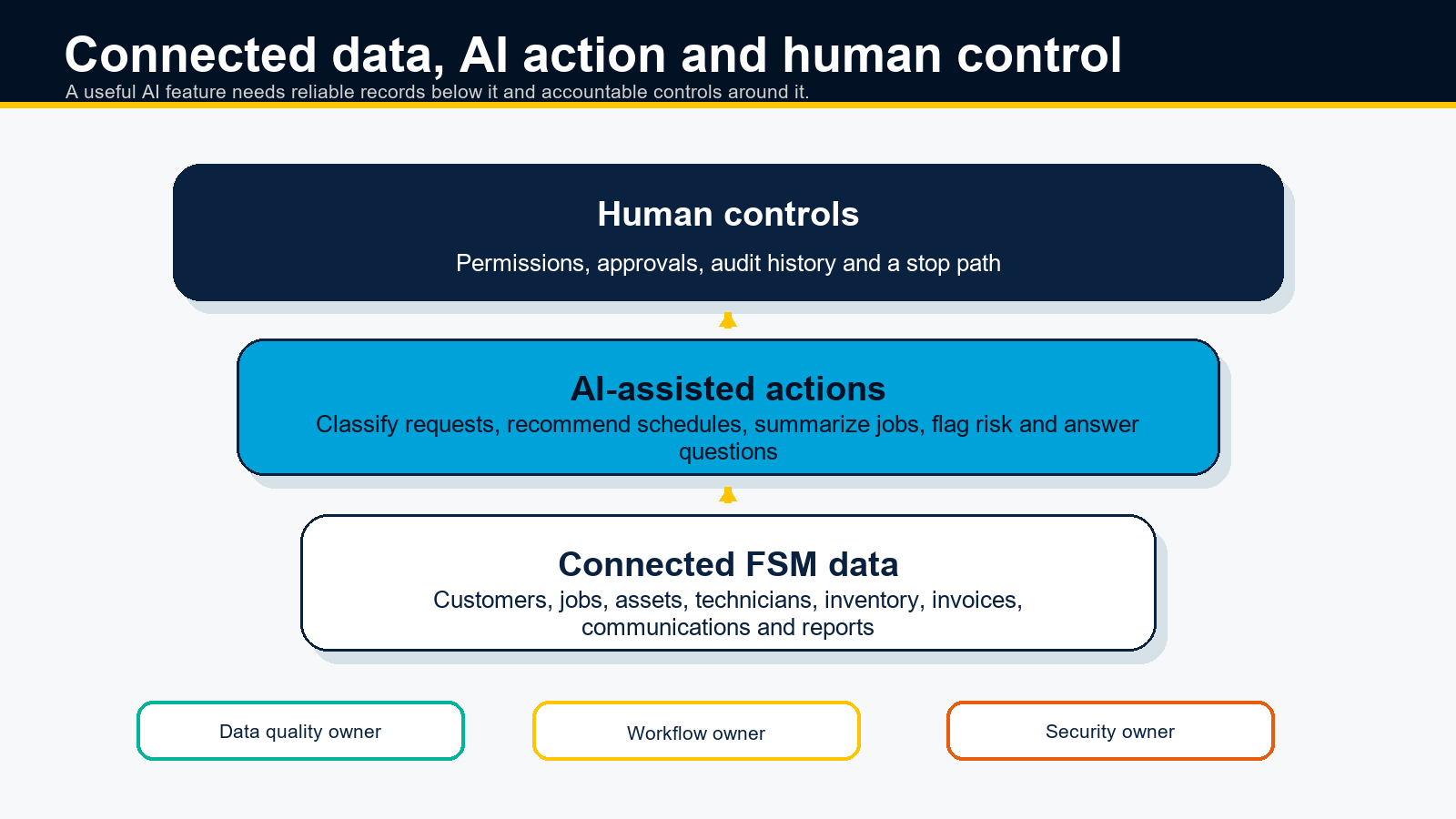
10. AI permissions, approvals and auditability
Use AI governance to control who sees information, the actions available to each feature and the points where people approve changes. At minimum, evaluate role-based access, action limits, activity history, data retention, model-training terms and a clear stop path.
Sign in as a dispatcher, technician and manager. Attempt an unauthorized action, inspect the approval flow and export the activity record. Use the NIST AI Risk Management Framework as a checklist for role ownership, documentation, testing and ongoing risk management when AI changes customer or job records.
Name an accountable owner before the pilot. Have that person review access, exceptions and incidents, while workflow owners decide which recommendations or write-backs get human approval.
Verify that these controls apply to the exact package, region, account and release status under evaluation. Ask the vendor to show the settings in your test environment, not a separate demonstration account.
How should you test AI field service software in a demo?
Test AI field service software with the same sanitized job, the same exception and the same pass condition for every vendor. Use a repeat service call that includes a customer window, asset history, technician certification, material dependency and closeout field. Before the feature runs, inspect its source records.
Run the normal path once. Then cancel a job, remove the qualified technician or remove a part from the job. Record the recommendation, explanation, approval, write-back and audit entry. A polished result without an exception path only proves the vendor prepared the demonstration.
Use a pass-fail demo scorecard
| Test area | Pass condition | Evidence to retain |
|---|---|---|
| Workflow fit | The feature completes the defined task in the sanitized job | Input record and completed output |
| Data fit | The vendor identifies every operational source and write-back field | Source view, field map or integration record |
| Exception handling | The feature detects the introduced problem and follows an approved path | Warning, reranking, queue or escalation |
| Human control | The named role reviews, changes, rejects or stops the action | Approval screen and role configuration |
| Availability | Current documentation confirms status, package, region and account requirements | Release note or product documentation |
Finish with a controlled pilot. Choose one workflow, a limited user group and a fixed review period. Capture a task-specific baseline such as completion time, corrections, escalations or missed fields. Expand after the feature meets the agreed pass conditions and the review workload stays within that baseline.
Where Simpro fits
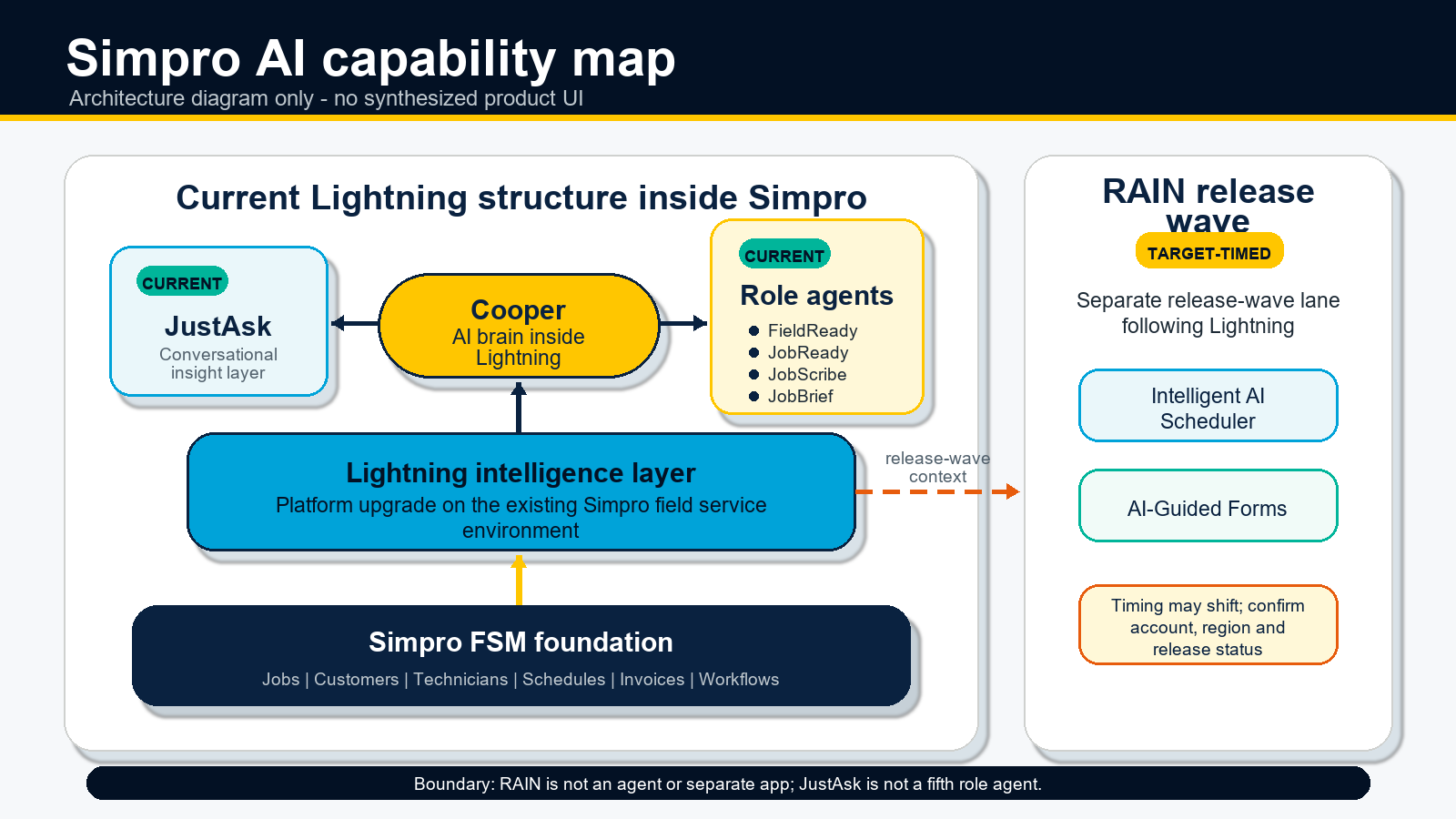
Simpro publishes this guide, so treat this section as a disclosed product example rather than a universal recommendation. Simpro Lightning and Simpro RAIN show how Simpro frames AI across field and office workflows. Use those live pages to check current names and availability for your US account before a demo.
| Buyer need | Current Simpro source | What to verify |
|---|---|---|
| Scheduling and dispatch | Current product update page | Confirm operating constraints, approval steps, account, region and configuration |
| Job preparation and guidance | Current AI feature page | Confirm available source records, permissions, content ownership and refresh timing |
| Job notes and customer closeout | Current AI feature page | Confirm capture method, review step, supported fields and retention |
| Operational questions | Current AI feature page | Confirm included data, permissions, refresh timing and links to underlying records |
| Guided field records | Current product update page | Confirm target form types, administrative configuration and current account availability |
Focus on operating evidence, not product names. Ask Simpro to run the same sanitized scenario, exception test and pass-fail scorecard used for every other vendor.
Frequently Asked Questions
What AI features should field service management software include?
Field service management software needs AI for intake triage, scheduling, route recommendations, job preparation, field guidance, job notes, predictive maintenance, customer updates, reporting, data entry and governance. IBM's field-service AI guide supports scheduling, routing, data-driven automation, technician enablement and customer-experience uses. During a Simpro demo, ask for each output, write-back and approval step.
Can AI automate field service data entry?
Yes, AI automates field service data entry when it captures data from forms, notes, images or operational systems, structures it, and writes only approved values to the right record. IBM describes AI in field service as automating repetitive work-order and data-driven processes. For Simpro, verify the field map, failure queue and human approval before trusting automation.
Can AI write field service job notes?
Yes, AI drafts field service job notes, but the workflow needs technician review before it finalizes the customer or job record. IBM describes NLP and voice interfaces that help workers file logs and process service information. Have Simpro show whether the original note, proposed fields, edits and final write-back are all visible.
How should field service teams review AI-generated outputs?
Field service teams review AI-generated outputs with a named owner, source record, exception path and approval log. Require that control before AI changes a schedule, price, customer message or job record. NIST's AI RMF Core calls for teams to define human-AI roles, oversight, testing and documentation. Make that review step part of the Simpro demo.
How do you test AI features before buying field service software?
Test AI features before buying by running one sanitized job from intake through dispatch, field work, closeout and reporting, then forcing an exception. NIST's AI RMF Core supports documenting AI scope, expected benefits, costs, oversight and testing. Have Simpro compare the suggested action, source data, human override and audit trail.
Choose evidence over the AI label
Build the shortlist around a real task, governed data, a visible output, an exception path and a human owner. Don't buy the broadest AI promise. Choose the workflow that costs your team the most avoidable effort, then test it with your records and operating constraints before you expand.
Ready to evaluate AI field service workflows against your jobs, data and controls? Request a Simpro demo.


 Back to top