
Ever had to chase a payment weeks after a job's finished? Or realize too late that an invoice was never sent? For field service businesses operating with tight margins, these frustrating slip-ups often stem from inconsistent or outdated invoice tracking practices. They ripple through your entire operation, disrupting cash flow and putting pressure on every part of the business.
Invoice tracking might sound simple, but when you’re managing dozens (or hundreds) of jobs each month across multiple crews and regions, the admin gets messy, fast.
Field service businesses that lack an efficient, accurate invoice tracking process are leaking revenue every single day. The work might be getting done, but the paperwork isn’t.
This guide breaks down what invoice tracking really means, why it’s critical to your business’s financial health, and how to do it right, so you can stop chasing payments and start making smarter decisions.
The Nitty Gritty
Understand what invoice tracking is and why it’s essential for field service businesses
Discover how tracking invoices supports better cash flow and fewer costly mistakes
Learn key steps to improve your invoicing process using smart tools
Get practical tips for gaining financial visibility
Explore how modern platforms like Simpro can simplify your invoice tracking efforts
What Is Invoice Tracking and Why Does It Matter?
Invoice tracking is the process of overseeing the status of invoices, from draft to delivery to payment. It’s a way to actively manage your cash flow, improve operational accuracy, and reduce revenue leakage.
In the context of field service, invoice tracking becomes more complex because:
- Jobs are often completed on the move
- Field staff may not have clear visibility of invoicing protocols
- Admin teams are stretched thin, often managing job data, payments, and customer queries simultaneously
Poor invoice tracking can trigger a chain reaction of issues across your business:
- Missed invoices = missed revenue
- Duplicate or incorrect invoices = payment disputes
- Late payments = poor cash flow
But beyond just reducing errors, strong invoice tracking allows you to spot trends. Are specific job types frequently invoiced late? Are certain clients always paying beyond terms? This insight helps you take action to plug the gaps.
Invoice Tracking: 7 Steps to Stay Organized and Efficient
1. Centralize Your Invoices
The first step to effective invoice tracking is eliminating silos. When data is stored across spreadsheets, email chains, and disconnected apps, mistakes are inevitable.
Centralization means keeping all invoice tracking activities within one ecosystem, ideally connected directly to your job management platform. This ensures that invoices are always tied to real, completed jobs, with the right scope, pricing, and approvals attached.
It also means your team can quickly find what they need, no more wasted time.
Invoicing software, such as Simpro, streamlines the entire billing process, from quotes and job details to invoices and payments. This centralization eliminates the need for your team to switch between multiple tools to access a customer's billing history.
2. Use Real-Time Tracking Tools
Real-time visibility into invoice tracking status is crucial for fast decision-making. You need to know:
- Which jobs are complete but not yet invoiced
- Which invoices have been sent but not paid
- Which payments are overdue
Relying on manual checks or dated reports creates blind spots. Modern systems allow you to see invoice lifecycles in real time so you can prioritize actions, whether that’s sending reminders, escalating accounts, or unblocking internal workflows.
This transparency also builds accountability. When everyone from admin to management can see what’s outstanding, it’s easier to flag issues early.
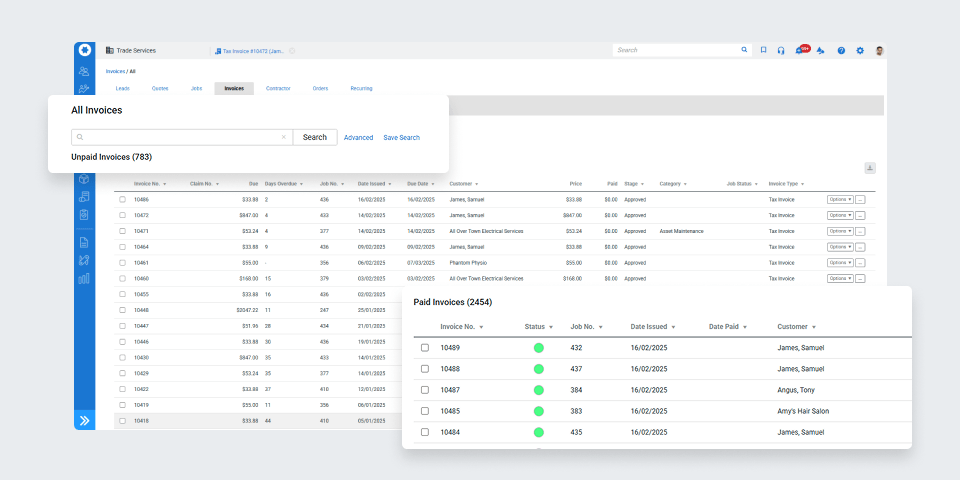
For example, Simpro users can view invoice status at a glance, including uninvoiced jobs, overdue payments, and outstanding balances, making it easy to take action before issues arise.
- Automate Recurring Processes
Manual invoicing is not scalable. The more jobs you have, the more vulnerable you are to human error and processing delays. That’s where automation comes in.
Recurring tasks like scheduled maintenance jobs or monthly service plans should trigger invoices automatically. Set rules based on job completion, contract dates, or billing cycles, and let the system do the work.
This helps to:
- Reduce admin burden
- Ensure consistency in payment terms
- Speed up cash flow
You can also automate reminders for overdue payments, so chasing debtors becomes a built-in part of your invoice tracking process.
Simpro lets you set up recurring invoices and automated payment reminders based on your service schedules, so no invoice gets forgotten, no matter how busy your calendar gets.
Want to see how this works in practice? Our guide on automated recurring invoices shows how field service businesses can simplify billing with a set-and-forget approach.
4. Integrate Your Systems
Disjointed systems slow down cash flow. When job data lives in one tool, invoicing in another, and accounting in a third, your team wastes time copying, syncing, and checking data.
Integrating your systems eliminates double-handling and makes invoice tracking more accurate. It ensures job completion data flows directly into invoicing workflows, and payment statuses sync back into your central dashboard.
For example, integrating your job management platform with your accounting software allows for:
- Instant invoice generation upon job completion
- Real-time payment status updates
- Reduced risk of errors due to manual entry
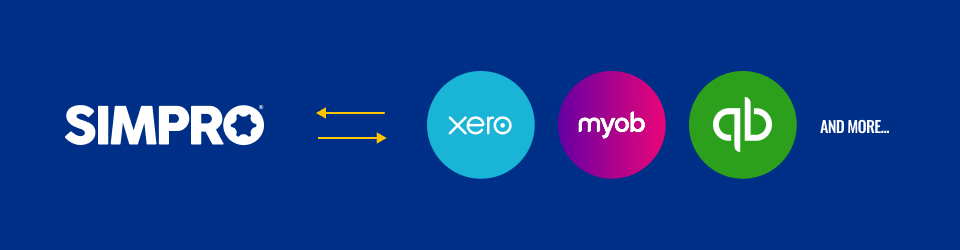
Simpro integrates with leading accounting packages like Xero, QuickBooks, and MYOB, giving you a connection between field operations and finance.
5. Set Alerts for Overdue Payments
Even well-meaning customers can forget due dates. It's not always malicious, just easy to overlook. That’s why relying solely on manual reminders or last-minute chases isn’t enough.
A mature invoice tracking system builds follow-up into the process automatically. Think scheduled reminders before due dates, real-time notifications for overdue accounts, and escalation workflows for long-outstanding payments. Alerts create consistency, improve cash flow predictability, and help maintain professional relationships with clients.
Proactive alerts show clients you run a tight ship and keep your cash flow healthier.
Use alerts to:
- Notify your team when an invoice is nearing due
- Auto-send reminder emails before and after due dates
- Flag high-risk accounts with repeat late payments
6. Monitor Key Metrics That Drive Action
You need to measure the health of your entire invoicing cycle and identify where delays, errors, or bottlenecks are costing your business money.
Moving from reactive to proactive is possible when you track the right metrics. Rather than dealing with issues as they arise, you can anticipate late payments, quantify team performance, evaluate customer payment behavior, and improve cash flow forecasting.
To get started, track metrics like:
- Days Sales Outstanding (DSO): How long it takes to collect payment.
- Invoice dispute rate: Percentage of invoices that require clarification or correction.
- Time from job completion to invoice sent: A lag here often leads to cash flow problems.
- Recurring late payers: Helps identify which clients need better terms or communication.
Use these metrics to uncover patterns. If certain job types or teams consistently generate delays, that’s where your process needs fixing.
Dashboards in Simpro allow managers to track KPIs like DSO, invoice errors, and dispute rates across teams, so performance reviews are backed by real data.
7. Assign Clear Ownership and Roles
Invoice tracking requires cross-team coordination. Without clear responsibilities and documented processes, it’s easy for tasks to be forgotten, delayed, or duplicated, especially when multiple teams are involved.
Rather than assuming someone will pick up each step, create a structured workflow that leaves no room for ambiguity. This should clearly define:
- Who marks the job as complete in your system
- Who reviews job and invoice details for accuracy
- Who is responsible for sending the invoice to the client
- Who monitors payment status and follows up on overdue accounts
- Who handles disputes or escalations when invoices are challenged
Assigning ownership can help build accountability and enable faster turnaround. When clients reach out with a billing question, your team should know exactly who’s in charge, eliminating delays and projecting professionalism.
As your business grows, roles may shift, but maintaining clarity around invoice tracking responsibilities ensures that your systems scale effectively with your team.
Tips for Effective Invoice Tracking
- Set Clear Payment Terms With Clients: Outline expectations early, including due dates, late fees, and accepted payment methods, to minimize confusion and avoid delays.
- Use Invoice Templates: Templates standardise key details like job description, PO number, and payment terms, reducing errors and saving time.
- Batch Process Invoices When Possible: Group similar invoices together to speed up admin and streamline weekly or monthly billing cycles.
- Include Multiple Payment Options: Make payments easier by accepting credit cards, EFT, direct debitor other online methods.
- PRO TIP: Simpro Payments makes it super easy to accept various payment types and meet your customers where they are. Your team can take payments in the field, over the phone, or via invoice links in the Customer Portal.
- Prioritize High-Value Invoices: Chase invoices with the greatest impact on cash flow before tackling smaller accounts.
- Track Invoice Disputes Separately: Keep a simple log of disputed invoices to speed up resolution and identify recurring issues.
Looking for industry-specific advice?
Check out our guide to HVAC invoicing for detailed tips tailored to the needs of HVAC businesses.
If you're in the electrical trades, our electrical invoice template guide offers practical advice and downloadable templates to help you bill faster and more accurately.
And if your team works on the go, our insights on mobile invoicing and payments explain how to speed up billing and boost cash flow straight from the field.
Take Control of Your Invoices Today
Invoice tracking is often overlooked, but it’s one of the most powerful ways to strengthen your cash flow, sharpen your operations, and build long-term financial stability. For field service companies, getting it right means fewer surprises, faster payments, and more time focused on the work that matters.
With the right systems in place, you can:
- Eliminate delays and reduce human error
- Gain real-time visibility into what’s outstanding
- Build scalable processes that grow with your business
That’s where Simpro comes in. As one of the best invoicing software solutions for field service businesses, Simpro streamlines invoice tracking by connecting job data, billing, and payments within one platform. It removes the friction of double-handling, cuts down on errors, and accelerates the time between job completion and payment. With automation, real-time reporting, and integrations with popular accounting tools, Simpro equips your team with the tools to track invoices efficiently, spot issues early, and maintain full control of your cash flow, without the chaos of spreadsheets or manual follow-up.

Ready to take control of your invoice tracking and bring greater efficiency to your entire operation?
Book a tailored demo with one of our experts. Smarter tracking starts today.


 Back to top