
Simpro is the best field service software for security installers who run installation projects and recurring service in one system. BlueFolder, Fieldpoint, Field Force Tracker, ServiceTitan and Service Fusion each fit narrower needs, from equipment-centered service to monitoring billing. Compare all six against the job that gives your team the most trouble.
Picture a camera added halfway through a commercial install. It changes the estimate, the parts order, the technician's hours and the final invoice. Months later, a service tech needs to find that camera, its location, its warranty and its history before the next visit. That handoff from installation to service is where weak software shows.
Key takeaways
- Simpro fits security installers who run installation projects, installed-device service and recurring billing in one system.
- BlueFolder suits equipment-centered service teams, and Fieldpoint suits large-scale installations with service agreements.
- Field Force Tracker fits monthly monitoring billing, ServiceTitan fits recurring-service-led alarm businesses, and Service Fusion fits teams that want every user licensed.
- Compare the configuration your workflow needs, not the entry plan, because seats, modules and onboarding change the total.
- Run the same five-task demo with every vendor: scope change, parts and labor margin, service handover, agreement to billing, and an offline visit.
Best field service software for security installers at a glance
These six tools differ most on installation projects, equipment records, recurring work and pricing. Simpro covers projects, equipment service and recurring billing in one system, while the other five lead on narrower needs. Prices show each vendor's published entry point as of October 2026 where one exists, so confirm the plan, users and add-ons you need.
| Product | Best for | Installation projects | Installed equipment and service | Recurring work and billing | Mobile | Starting price (as of October 2026) |
|---|---|---|---|---|---|---|
| Simpro | Installers running projects, service and monitoring contracts together | Multi-stage project billing in Simpro Premium | Field staff view asset tests and service history | Maintenance Planner and automatic invoicing for recurring jobs | Simpro Mobile with service jobs, audits and signatures | Custom quote, tailored to team size and add-ons |
| BlueFolder | Equipment-centered service teams | Confirm in demo | Equipment records with photos, manuals, warranty info and serial numbers | Recurring jobs create work orders | Confirm in demo | Pro: $62.50 per user per month, 2-user minimum. Pro Plus: $92 per user per month, 3-user minimum |
| Fieldpoint | Large-scale installations with service agreements | Large-scale security system installations in one platform | Confirm in demo | Work orders created automatically from service agreements | MobilePro works online and offline | Custom quote |
| Field Force Tracker | Alarm companies billing monthly monitoring | Confirm in demo | Service contracts, NFPA 72 forms, inspections and warranties | Automated monthly monitoring invoices with auto-charging | Confirm in demo | Starter Plan: $59.99 per month plus optional industry modules |
| ServiceTitan | Recurring-service-led alarm businesses | Confirm in demo | Confirm in demo | Enhanced recurring-services management | Confirm in demo | Custom quote, with per-technician pricing |
| Service Fusion | Teams that want every user licensed | Confirm in demo | Confirm in demo | Recurring invoicing as a Starter add-on | Companion mobile app for alarm businesses | Starter: $208 per month, billed annually, unlimited users |
A cell reading "Confirm in demo" means the vendor's public pages don't settle the point. Treat it as a question for the demonstration, not as a missing feature.
Which software fits your security installation work?
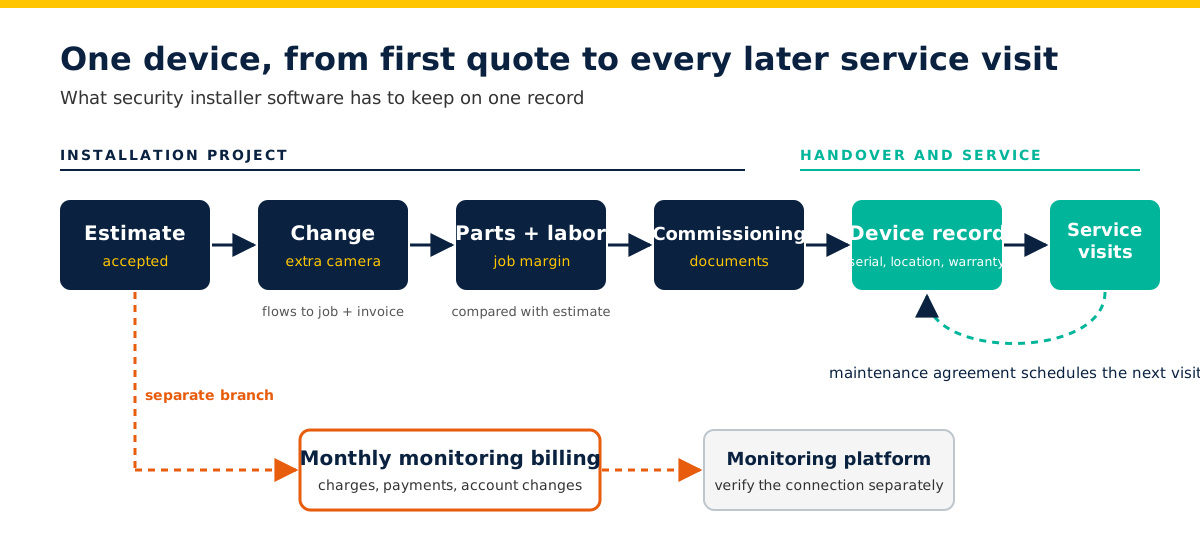
Pick the workflow that creates the most risk or admin in your business, then shortlist the security installer software built for it. A company installing access control in phases needs different evidence from a team running repeat alarm service. Whichever need leads, the software has to follow each device from the first quote through installation, handover and every later service visit.
Installers install, program, maintain and repair security and fire alarm wiring and equipment to code. Weight your shortlist toward the stage of that work that costs you the most.
| Your main need | Tools to evaluate | What the demo has to prove |
|---|---|---|
| Installation projects with changing scope | Simpro, Fieldpoint | The accepted estimate, change, purchasing, labor and staged billing stay on one job |
| Service on equipment already installed | Simpro, BlueFolder, Field Force Tracker | The tech finds the right site and device, its warranty and its history before the visit |
| Recurring maintenance and inspections | Simpro, Fieldpoint, BlueFolder, ServiceTitan | Agreed service turns into scheduled work, with test results kept against each asset |
| Recurring monitoring billing | Simpro, Field Force Tracker | Monthly charges, payment collection and account changes stay in step |
Verify the connection to your monitoring platform separately. Recurring monitoring invoices don't make business software a central-station platform.
What changes when you run a small security business?
A small team still carries complex projects, a large installed base and demanding service agreements. So judge each tool on the share of your work it covers and the admin time it asks of your team. Count everyone who needs access, name who'll run the system, and get the tier, seats and onboarding terms in writing before you sign anything.
Licensing changes the math. BlueFolder prices per user with a minimum, Field Force Tracker's Starter Plan includes 2 users, Service Fusion licenses unlimited users, and ServiceTitan prices per technician. An owner who estimates and installs needs different access from an office coordinator or a subcontractor, so ask each vendor how those roles affect the quote.
Then assign an owner to the system itself. Someone keeps parts prices current, corrects equipment records, manages contract renewals and reconciles accounting exceptions. Bring that person to the demo. A workflow that needs daily adjustment looks different when the owner also spends the day on site.
Three examples help frame the decision:
- An owner-led install business tests estimate changes, parts and invoicing before paying for features it rarely uses.
- A small commercial integrator examines project costing, purchasing and handover records, even with only a few technicians.
- A service-led installer prioritizes device history, recurring work and what happens when a contract changes or a visit slips.
Field service software options for security installers
Simpro comes first as the option built to run installation, service and monitoring work together. Each of the other five leads on one specific need, so demo the one whose strength matches your main pain point. Every profile covers who the tool suits, what the vendor documents, how pricing works and what to confirm in a demo.
1. Simpro: best for installation projects and recurring service in one system
Simpro suits installers who quote, install, service and bill monitoring contracts in the same business. Its security company software brings scheduling, estimating, quoting, dispatch, mobile field updates, invoicing, reporting and monitoring contract workflows together, and manages service, monitoring and installation work in one operating platform.
For projects, Simpro Premium manages the lifecycle from lead tracking and complex estimating to multi-stage project billing. Simpro also connects to supplier price files and invoices to keep device and parts costs current. For recurring work, Simpro's maintenance planning and asset testing handles preventative maintenance scheduling at sites with multiple service-level agreements. In the field, the Simpro field service mobile app lets staff view asset tests, service history and failure points, create service jobs, record reports and photos, and capture customer signatures.
AI options in Simpro: the Simpro Lightning digital workforce puts AI agents to work for field service teams. Alongside them, JustAsk lets you ask about technician margins, overdue invoices or customer history in plain language and get a direct answer.
The Pulse AI receptionist answers inbound calls 24/7, places jobs on your schedule for your team to confirm, and transfers safety-critical calls to your on-call technician. Fast Cash accounts receivable automation scores customers by payment risk and times collection outreach. The Delight AI customer marketing agent uses your customer and job data to reactivate past customers and follow up on open quotes. Ask which of these your proposal includes.
When its owners purchased SL Security Pros, a Simpro security customer, in 1987, the business had one employee in a 1,500 square foot building. Today the company has 25 employees and 10 service vehicles, and operates out of an 8,000 square foot facility.
A security and investigations user on G2 named "debtor tracking, ability to increase recurring invoices by an annual percentage" as a strength, which matters when monitoring contracts renew every year.
In the demo: follow an approved change through purchasing, labor and invoicing, then open a service job for the installed equipment and locate its asset history. Simpro pricing depends on team size and add-ons, with monthly or annual billing, so request a personalized quote that separates office users, field users and implementation.
2. BlueFolder: best for equipment-centered service teams
BlueFolder suits teams whose buying decision centers on work orders, equipment records and repeat service. It tracks the equipment needing service with photos, user manuals, warranty information and serial numbers. Its recurring jobs automatically create work orders at the intervals you set for repetitive work and preventive maintenance.
Check the plan before you budget. BlueFolder Pro costs $62.50 per user per month with a 2-user minimum. Pro Plus costs $92 per user per month with a 3-user minimum and adds equipment tracking and contract management. That puts the equipment features a security installer wants above the entry plan.
Test in the demo: run a mixed installation-and-service job if projects matter to you, and have a technician complete the mobile tasks your team needs without connectivity. Test migration of your service history as well as your equipment records.
3. Fieldpoint: best for large-scale installations with service agreements
Fieldpoint suits integrators running large installations that turn into ongoing maintenance. It manages large-scale security system installations in a single platform and creates work orders automatically from your service agreements, so you don't miss an inspection or service appointment. Its MobilePro app works online and offline, letting technicians access, update and complete work orders.
Request an itemized quote with an implementation plan and named responsibilities. Don't rule it out on size. Smaller integrators with large commercial installations have good reason to evaluate it.
Ask to see: one purchase order moving through receipt, job allocation and billing, plus which steps depend on a connected accounting or ERP system. Test your own forms, attachments and offline sync.
4. Field Force Tracker: best for alarm companies billing monthly monitoring
Field Force Tracker suits alarm businesses whose service and monitoring revenue sits in the same buying brief. It sends automated monthly fire alarm or security monitoring invoices with auto-charging, and keeps service contracts, regulatory NFPA 72 forms, inspections and warranties together.
The Field Force Tracker Starter Plan costs $59.99 per month plus optional industry modules and includes 2 users, 1 admin and 1 mobile. Request one quote for the complete workflow, including the modules, migration and training you need, rather than comparing the entry price with another vendor's full subscription.
Demo check: follow a monitoring customer's change of service through the contract, invoice and payment record. Verify central-station connectivity and alarm-account administration separately from the billing workflow.
5. ServiceTitan: best for recurring-service-led alarm businesses
ServiceTitan suits alarm businesses that want recurring service at the center of the service department. Its alarm business software offers enhanced recurring-services management, and it uses per-technician pricing that it says fits a business of any size.
Ask how office users, technician types, onboarding and selected modules affect the proposal. Don't budget from a comparison article's estimate as though it were a quote.
Before you sign: test the exact field workflow with connectivity disabled, then reconnect and inspect the office record. For installation projects, demonstrate a scope change and the handover of equipment information into future service visits.
6. Service Fusion: best for teams that want every user licensed
Service Fusion suits small teams where office staff and technicians all need access. Its Starter plan costs $208 per month, billed annually, with unlimited users, and its alarm business software supports technicians and operators from anywhere with a companion mobile app.
Progressive billing and recurring invoicing appear as an add-on on Starter, alongside inventory management and job costing. Get written confirmation of what your required configuration includes before you compare it with a per-user plan.
Questions to settle: distinguish a recurring invoice from a service agreement that creates work and tracks obligations. Test your equipment records, installed-device history and offline mobile tasks.
Five tasks to run in every software demo
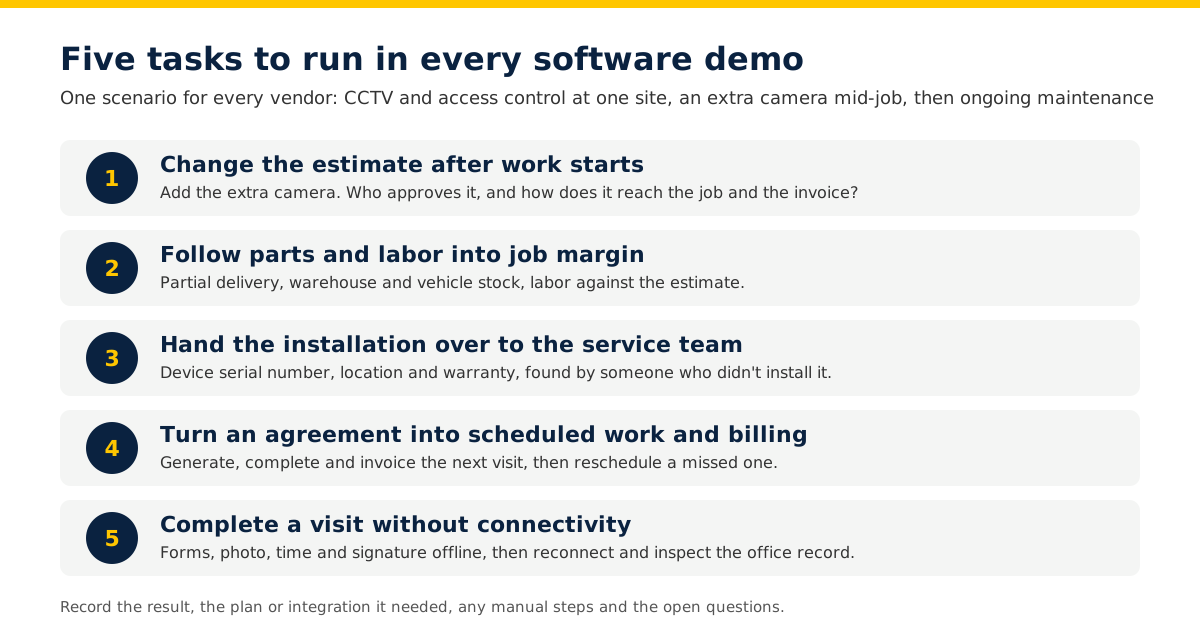
Give every vendor the same scenario and ask the people who'll use each workflow to run it. A customer needs CCTV and access control installed at one site, adds a camera mid-job and wants ongoing maintenance. Record the result, the plan or integration it needed, any manual steps and the open questions, so you finish each demo with comparable records.
Use sample records rather than live customer credentials or access codes.
1. Change the estimate after work starts
Build and accept an estimate for the original installation, then add the extra camera with its equipment and labor. Check who approves the change and how it flows to the job and the invoice. Then ask what happens if the customer rejects the change after someone's already ordered the camera.
2. Follow parts and labor into job margin
Order equipment, receive part of the delivery and allocate items from both the warehouse and a technician's vehicle. Enter the labor and compare it with the estimate. Inspect the job's cost and margin view and note any spreadsheet work you'd still need.
3. Hand the installation over to the service team
Create the customer, site, system and device records needed for future visits. Attach commissioning documents and record a device's serial number, location and warranty. Then open a new service job and have someone who didn't create the installation find its history and documents.
4. Turn an agreement into scheduled work and billing
Create a maintenance agreement with a set service interval. Generate the next visit, complete it, raise the invoice and inspect the renewal record. Then reschedule a missed visit and change the agreement. If you bill monitoring, run that separately and show how account changes reach your monitoring platform.
5. Complete a visit without connectivity
Load the job as a technician, disconnect the device and try the required tasks: read instructions, complete forms, add a photo, record time and capture a signature. Reconnect and inspect the office records. Note what had to download in advance and what stayed unavailable.
If a vendor shows AI, run it on one real after-hours call or one overdue invoice, then open the job and check what it wrote back. Useful AI leaves a record your team trusts and acts on.
Compare the complete cost before you choose
Ask every vendor to quote the configuration that passed your demo, not the entry plan. Keep licenses, add-ons, one-time services and your own implementation work visible side by side. A subscription comparison misleads when one proposal includes onboarding and another leaves it to your team, so put these questions to every vendor in writing.
- Which tier, industry modules and add-ons does the demonstrated workflow need?
- What number of office and field users does the price cover, and is there a minimum?
- What do implementation, configuration and data migration cost, and who does the work?
- What training comes with the plan, and what does training a new hire cost later?
- Which accounting, payment and monitoring integrations add fees?
- What payment processing or usage charges apply?
- How do renewal increases, cancellation and data export work?
For internal work, estimate hours and apply your own cost assumptions. Keep expected savings in a separate calculation so an optimistic productivity estimate doesn't hide a cash commitment.
Before you commit, trial one representative installation and a follow-up service visit with the people who'll run them. Confirm who cleans existing customer and equipment data, validates the migration and supports the first billing cycle.
Frequently asked questions
What features should security alarm installation software include?
Security alarm installation software needs estimating, scheduling, dispatch, invoicing and a service record for every installed device, plus recurring maintenance and billing. Simpro brings these together for security businesses, and its field service mobile app lets field staff view asset tests, service history and failure points on site. Test each feature with one of your own jobs.
Can field service software handle recurring alarm monitoring billing?
Yes. Field service software handles recurring monitoring billing when it automates invoices and payments for repeat work and ties them to the customer's contract. Simpro offers automatic invoicing for recurring jobs, with payments automated too. Ask each vendor to show a monitoring account change flowing through to the next invoice and payment.
How does field service software manage recurring inspections for security systems?
Field service software manages recurring inspections by scheduling repeat visits against each site's assets and keeping results with the contract. Simpro's maintenance planning and asset testing schedules assets and recurring jobs, assigns technicians, and keeps asset reports, test dates and contract info up to date. Record each test against the device it covers.
How much does field service software for security installers cost?
Costs for field service software for security installers range from per-user monthly subscriptions to custom quotes, and Simpro prices by quote. Simpro pricing depends on your team size and the add-ons you need, with monthly or annual billing. Ask every vendor to quote the configuration that passed your demo, not the entry plan.
Bring your hardest job to the next demo
Shortlist two or three tools that match your main operational need, then compare the configurations your team would run. Bring an installation estimate, a sample equipment record and a service agreement to each demonstration. The best field service software for security installers is the tool that handles your hardest job without workarounds, whatever its entry price.
For a closer look at Simpro, explore its security company software and book a Simpro demo using the five tasks above. Ask for a proposal that names the required configuration, implementation work and ongoing costs for your business.


 Back to top