
A missed filter change doesn't feel urgent until it turns into a $6,000 compressor replacement six months later that nobody can explain because the documentation doesn’t exist.
A better approach starts with splitting maintenance planning and scheduling into separate jobs. Planning defines the scope, parts, labor, and safety steps for a piece of work, and scheduling decides when that work happens and who does it.
This article covers the eight-step process for building maintenance planning and scheduling together, what a schedule should include, where these programs break down, and the metrics worth tracking once yours is running.
Key Takeaways
- Planning defines what, why, and how. Scheduling defines when and who. Both suffer when you conflate the two.
- A real schedule gives maintenance managers more than a date: asset, job plan, frequency, crew, parts, priority, status.
- The program follows eight steps: register, work requests, backlog review, job plans, resource confirmation, scheduling, dispatch, closeout.
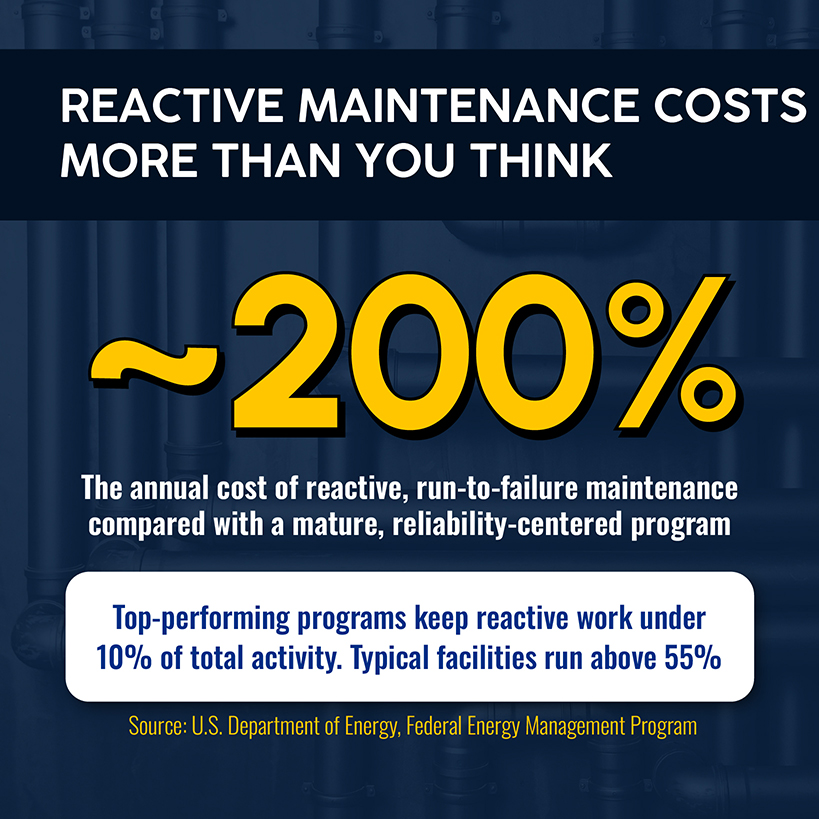
- Federal data puts reactive maintenance at roughly 200% the annual cost of a mature, reliability-centered program.
- NFPA 70B and ANSI/ASHRAE/ACCA 180 make planned maintenance a documented, code-referenced obligation, not a nice-to-have.
Maintenance Planning vs. Maintenance Scheduling
Planning and scheduling both provide answers to different questions within your maintenance operations. Planning scopes the job, including the procedure, parts, tools, and safety steps. Scheduling comes later, as it decides when that already scoped work happens and which technician will perform it.
A planner works days or weeks ahead, building job plans that don't need reinventing whenever a task recurs. A scheduler focuses on the near term, matching ready-to-go jobs against technician availability, parts, and site access. Blur the two, and jobs get planned reactively from the truck while the calendar runs on guesswork.
| Maintenance Planning | Maintenance Scheduling | |
|---|---|---|
| Answers | What, why, and how | When and who |
| Defines | Scope, parts, labor, tools, safety steps | Date, technician, sequence |
| Time horizon | Days to weeks ahead | Current week |
| Output | A complete job plan | A locked schedule |
| Breaks down when | Jobs get planned on the truck | The calendar runs on guesswork instead of real estimates |
That job plan has to live somewhere before it can be scheduled. That’s why the schedule’s structure matters.
What a Planned Maintenance Schedule Should Include
A planned maintenance schedule is more than just a calendar with technician names on it. Each entry needs enough detail that anyone can look at a scheduled task and know what's supposed to happen:
| Field | Example |
|---|---|
| Asset / Location | RTU-6, north wing rooftop |
| Job plan | Quarterly preventive maintenance: filter swap, coil inspection, refrigerant check |
| Frequency | Every 90 days |
| Assigned crew | 2-person HVAC team |
| Estimated duration | 60 minutes |
| Parts required | MERV-8 filters, coil cleaner |
| Priority | Priority 2, customer-facing space |
| Status | Scheduled |
Multiply that row by every asset under contract, and you have a structure everyone on your team can view, understand, and work from.
8 Steps to Build a Maintenance Plan and Schedule
To create a schedule the team can deliver on, none of these steps in the maintenance process are optional. Each builds on the one before it, starting with the foundation: knowing what you're actually maintaining.
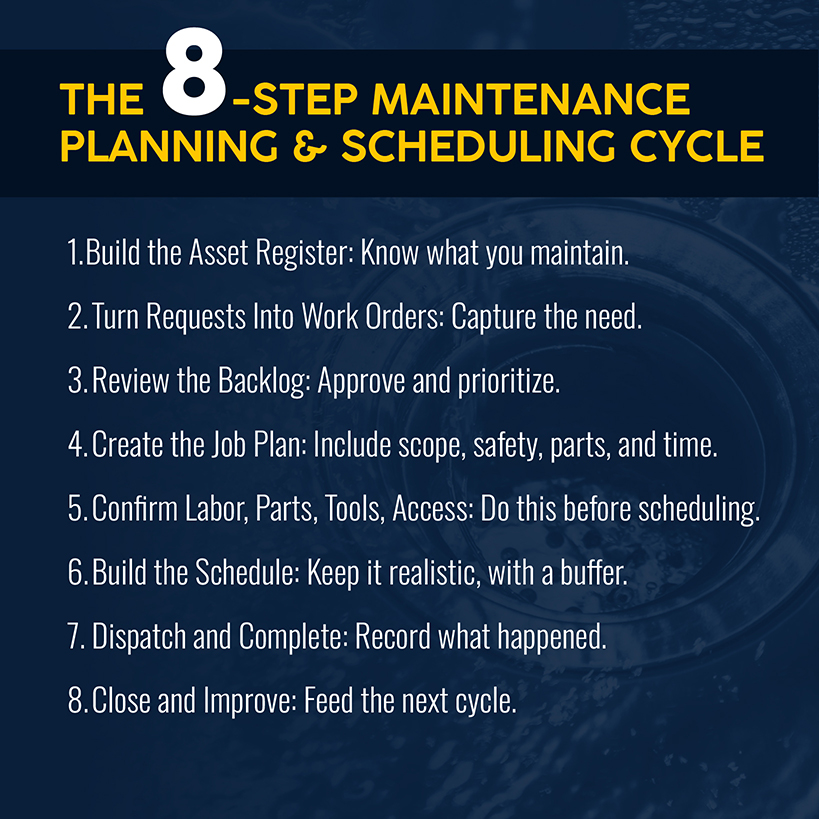
1. Build a Complete Asset Register
Every piece of equipment you maintain — HVAC units, electrical panels, backflow preventers — needs a record that includes location, make and model, install date, service history, and warranty status. Skip this, and all the other steps function on incomplete information. Techs show up not knowing what they're walking into, planners can't confirm parts, and nobody can prove what was tested or when.
Next, make this register functional with criticality ranking. Score each asset against the consequences of failure, safety, compliance, cost of downtime, and cost to repair. For example, critical assets, like life-safety panels on a 40-panel electrical contract, get thermal scanning and a tighter interval, while a break room panel runs longer.
That prioritization isn't really optional. NFPA 70B was reclassified from a recommended practice to a mandatory standard in 2023. Building owners are directed to document a formal electrical maintenance program (EMP) with a designated coordinator and a survey to set priorities.
The operational fix: Build the register and criticality scores before writing a job plan. A job plan for an asset you haven't ranked is a guess dressed up as a procedure.
2. Turn Maintenance Requirements Into Clear Work Requests
A work request is the raw input: a problem someone noticed, a due-for-service alert, a customer call. It only needs to capture what's wrong, where, and the urgency. That request needs to be scoped before sending to dispatch, or else you’re asking techs to make guesses after they’re already in the truck.
The operational fix: Route every request, preventive maintenance (PM) alert or one-off complaint through the same intake. Nothing should skip planning just because it came in via a phone call.
Related: The work order process breaks down how a request becomes an authorized, trackable work order your team can act on without guessing at scope.
3. Review, Approve, and Prioritize the Maintenance Backlog
Every request sits in the backlog until it’s scheduled, which means successful planning programs must actively manage the backlog. Review on a fixed cadence, sort by age and criticality, and approve or reject each item before it's eligible for scheduling.
For a plumbing contractor running backflow preventer testing across two dozen commercial properties, that backlog acts as a compliance calendar. A missed test is a code violation that puts a customer's water service at risk.
The operational fix: Put backlog review on the calendar as a recurring task. That way, nobody has to remember to flag it manually.
4. Create a Complete Job Plan
A job plan is what gets attached to the work order before it's scheduled: scope, safety steps, tools and parts, and a realistic time estimate. Build it once as a reusable template — applicable to quarterly rooftop service, annual panel maintenance, backflow testing, and more — and you’ll get back time previously spent rebuilding scope from scratch.
Templates also standardize what technicians do on-site, so everyone runs the same checklist even at the height of busy season.
The operational fix: Build the job plan library for your 10 most common recurring tasks. That's where most of the volume lives.
Related: Use a maintenance work order template to capture the job plan’s details consistently.
5. Confirm Labor, Parts, Tools, and Site Access
This is the step most planning programs skip, and it’s also the one with the biggest payoff. Before scheduling the job: Confirm the parts are in stock or ordered, the right tools are available, the technician holds the right qualifications, and site access is arranged.
When a three-person HVAC crew shows up to a rooftop unit replacement without confirming whether the freight elevator is booked, they can lose the afternoon, all while you’re paying technicians to stand around. Kitting the job in advance is what separates strong labor utilization from a program that burns half its hours on logistics.
The operational fix: nothing moves from backlog to schedule until parts, tools, and access are confirmed. No exceptions, even for a job that looks simple.
6. Build a Realistic Planned Maintenance Schedule
With confirmed job plans in hand, schedule maintenance tasks by matching the crew, day, and sequence.
A realistic schedule doesn’t mean filling to capacity. Then you have no headroom for the emergency call that shows up Tuesday morning, much less how that emergency call affects the rest of the week.
This is where the Simpro® Maintenance Planner add-on earns its place. It tracks service levels and testing frequency per asset, flags jobs the moment they come due or whenever an asset fails testing, and forecasts technician hours against upcoming work so the schedule gets built against real demand.
The operational fix: Build the schedule to a load your team can actually hit, then protect the reserved capacity for emergency work instead of letting it get absorbed by more planned jobs.
7. Dispatch and Complete the Scheduled Work
Dispatch is where the plan meets reality. In one work order, the technician receives the job plan, confirmed parts, and access details. They work the job and record what happened in real time: time on-site, parts used, condition notes, and any follow-up needed.
Consider the alternative: A technician notices a coil corroding faster than expected but doesn't log it. That valuable information isn’t preserved, which hurts the next planning cycle.
The operational fix: Make the completion record simple enough that a technician can update it in the field. If it’s too complex or not intuitive, your people won’t use it.
8. Close Work Orders and Improve the Next Schedule
Closing the work order feeds the next planning cycle. Compare estimated time and parts against what happened. A job plan that consistently runs 20 minutes long isn’t your techs’ fault. The plan needs correcting.
This step is also where continuous improvement happens. A task with a full pass rate over a year is a candidate for a longer interval. A checklist item that never gets checked is a candidate for removal. While extending asset life is always the goal, you also want to identify overmaintained assets. The hours you reclaim can improve capacity without adding headcount.
The operational fix: Set a cadence for reviewing closed work order data against the job plan, rather than just reacting when something goes wrong.
Common Maintenance Planning and Scheduling Mistakes
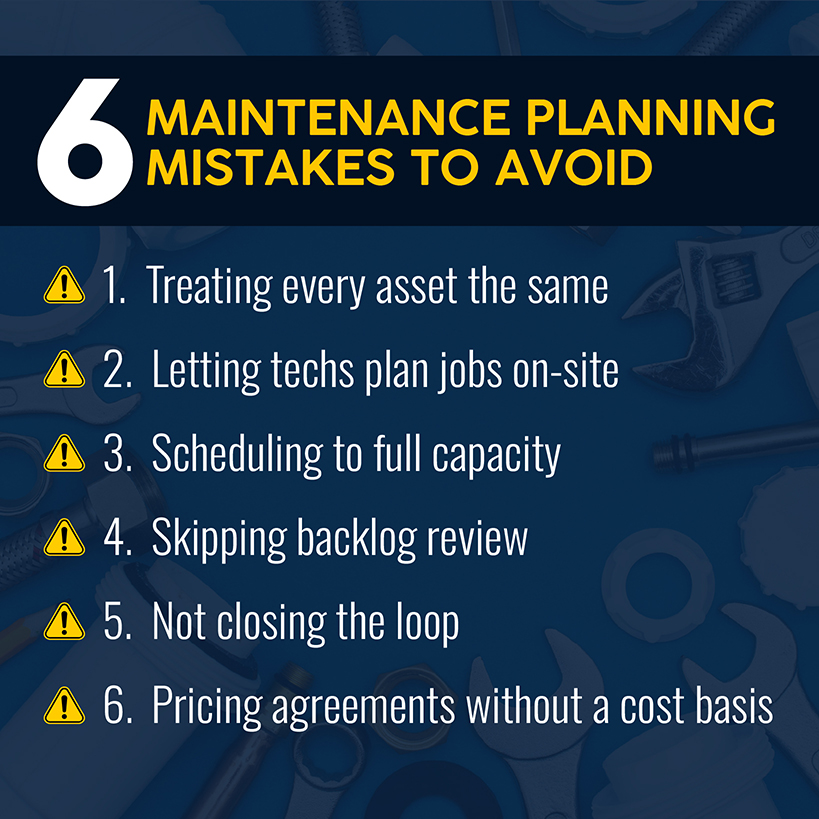
Maintenance teams make a handful of mistakes that account for most failed programs:
- Treating every asset the same. Skipping criticality ranking spreads the budget thin instead of focusing on the biggest risks.
- Letting technicians plan their own jobs on-site. This feels efficient in the moment, but it leads to inconsistent scope and a failure to log job plans.
- Scheduling to full capacity. Overscheduling leaves no room for the emergency repairs that inevitably show up and wreck the rest of the schedule.
- Lacking a backlog review cadence. Requests pile up until a customer asks why their PM visit is late.
- Failing to close the loop. Skipping the estimate-versus-actual comparison means job plans don’t get fixed. As a result, PM intervals aren’t optimized.
- Pricing agreements without an operational cost basis. Selling a contract before you have job plans and time estimates is how a seemingly high-margin job turns unprofitable.
Related: Our guide to scaling recurring maintenance covers the business side of maintenance agreement programs.
Maintenance Planning and Scheduling Metrics to Track
A few numbers indicate whether your maintenance planning and scheduling program is working.
Planned-versus-reactive mix is the clearest signal. Federal Energy Management Program data puts reactive, run-to-failure maintenance at roughly 200% the annual cost of a mature reliability-centered program, with preventive maintenance alone trimming 12–18% off a purely reactive cost base.
Predictive maintenance and condition-based maintenance can unlock even more savings. Top-performing programs keep reactive work under 10% of total activity, compared with more than 55% at a typical facility. Planning can reduce downtime and cost.
Schedule compliance and PM completion measure whether the plan actually happened. Review these weekly rather than at the end of the quarter, as both can drift from the target without anyone noticing.
Backlog age tells you whether you have a healthy pipeline feeding the schedule.
The Society for Maintenance & Reliability Professionals publishes standardized definitions for dozens of maintenance metrics, giving contractors a common vocabulary for reporting to commercial clients.
How Software Connects Maintenance Planning and Scheduling
The above steps depend on information moving cleanly across stages: from the asset register to the job plan to the calendar. That’s a job for a computerized maintenance management system, not a spreadsheet. A spreadsheet doesn't alert anyone when an asset is due, provide a labor forecast for upcoming work, or carry over a technician's field notes to the next planning cycle.
Simpro's recurring job templates let you define a task once, including materials, labor, and frequency. The system generates and alerts on new jobs automatically instead of someone tracking due dates by memory. The Maintenance Planner add-on adds alerts when assets are due or fail testing, plus labor forecasting. A searchable asset register (per customer and per site )supports barcode and QR scanning. Technicians log test results directly from Simpro Mobile.
In addition, Asset Maintenance Contracts handle service levels, contract-specific labor rates, and inflation escalators, while reports like Customer Asset List and Asset Test History give you the data foundation to calculate metrics instead of estimating them.
Related: This is the infrastructure behind work order software that has more than 250,000 users across 24,000+ businesses.
Turn Maintenance Plans Into Work Your Team Can Complete
The gap between your maintenance plan and what happens in the field is your firm’s reliance on spreadsheets, whiteboards, and people’s memory. All three methods are imperfect and can be overlooked until a missed service date turns into a customer complaint or a bigger repair bill.
The eight steps above work on paper or in software, but given the volume of most $1 million-plus trade businesses — dozens of assets per site across dozens of sites — manual tracking usually creates the bottleneck.
Simpro connects your asset register, job plan, schedule, and completed work order into one system, automating what used to be someone remembering to check the spreadsheet every Monday. That's what turns a maintenance agreement from a line item into a stable, recurring piece of the business you can build forecasts on.
Schedule a demo to see how Simpro handles maintenance planning and scheduling for your specific mix of assets and contracts.
Frequently Asked Questions
How far in advance should maintenance work be scheduled?
Most planned work gets locked onto the schedule 1–2 weeks ahead after the job plan is complete and parts, tools, and access are confirmed. A preventive maintenance schedule with a known frequency can be forecast and pre-scheduled months out, but the confirmation step still happens shortly before dispatch.
How much scheduling capacity should be reserved for emergency work?
Enough that one unplanned call doesn't blow up the week's plan. There's no universal number, since it depends on how emergency-driven the business is. But in general, a schedule built to full capacity is vulnerable to one emergency becoming several missed PM visits.
Who is responsible for maintenance planning and scheduling?
In larger operations, these are distinct roles: A planner builds job plans and manages the backlog, while a scheduler matches work to technician availability. But for many trade businesses, a service manager or operations lead handles both.
Can a planned maintenance schedule be managed in Excel?
For a small number of assets, yes. It stops working when the volume includes automatic recurrence, cross-referencing contract assets, service-due alerts, and labor forecasting, because none of that happens automatically in a spreadsheet setup. That bottleneck is usually when contractors move to software.


 Back to top