
Looking for a reliable field service management software comparison? You're in the right place. Whether you're after powerful features, ease of use, or scalability, we've broken down the top tools for field service teams to help you make the best decision for your business.
The Nitty Gritty
Discover the best field service management software options for 2025.
Learn how field service software can streamline scheduling, dispatch, and inventory management.
Explore the pros and cons of different field service management software vendors tailored to small and large businesses.
Understand the key features that make software like Simpro and AroFlo stand out.
Find the best field service software fit for your trade, whether you're in HVAC, plumbing, electrical, or another field.

Ready to take your field business to the next level?
Who Needs Field Service Management Software?
If your business relies on dispatching teams out in the field, think HVAC, plumbing, electrical, landscaping, or any other mobile trade, field service management software is essential. It centralises your operations, improves communication, and boosts efficiency.
You’ll benefit from:
- Streamlined scheduling and dispatching
- Mobile access and offline capabilities
- Real-time visibility through your inventory management system
- Integrated communication tools
- Efficient field service management operations
- Improved customer relationship management
- Robust reporting and analytics

Our top picks
AroFlo
Job management, timesheets, GPS tracking, invoicing
BigChange
Scheduling, invoicing, CRM, quoting
AroFlo
Job management, timesheets, GPS tracking, invoicing
BigChange
Scheduling, invoicing, CRM, quoting
Top Field Service Management Software Vendors in 2025
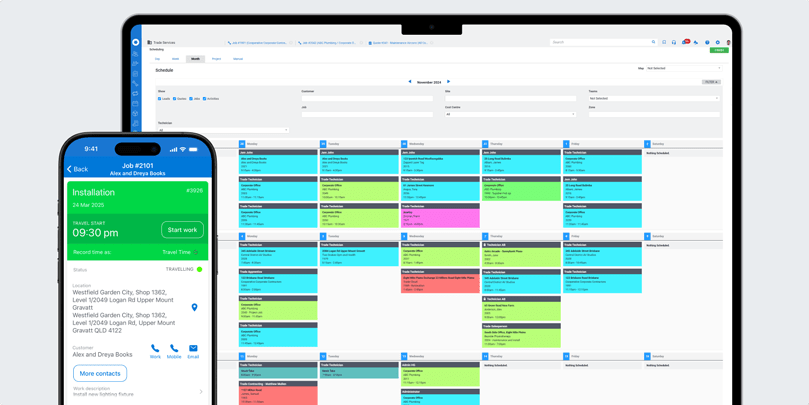
Simpro is one of the best field service management software options on the market, specially tailored for industries like HVAC, plumbing, electrical, and more. Whether you’re running a small business or a larger operation, Simpro offers a solid set of tools designed to streamline your workflow and boost efficiency.
Key Features
- Job management: Keep track of all your jobs from start to finish, including scheduling, dispatching, and invoicing.
- Quoting and estimating: Quickly generate accurate quotes and estimates, helping you win more jobs.
- Scheduling and dispatching: Efficiently assign jobs to your team and track their progress in real-time.
- Mobile access: Your team can access job details, update progress, and communicate with the office from anywhere.
- Reporting and analytics: Get detailed reports on job performance, employee productivity, and more, helping you make data-driven decisions.
Pros
- Comprehensive features: Simpro covers all the bases, from job management to quoting, scheduling, inventory management, invoicing, payments and reporting.
- Integrations: Simpro has over 100 integrations with other software platforms and suppliers ready to go. This ensures that your field service workflows are optimised without the need for costly development or extensive IT involvement.
- Partner Network: Simpro's extensive partner network can help customise your setup, build custom integrations through the Simpro API, or enhance your reporting with extra insights tailored to your needs. Simpro's network of Accounting Partners and Business Consultants can help unlock insights to make your business more efficient and profitable than ever.
- Excellent support: Simpro offers strong customer support, implementation and training options to ensure your business gets the most out of the software.
Cons
- Higher learning curve: With so many features, it can take some time to get used to the software.
- Cost can add up: Depending on your needs, the cost can increase, especially if you’re adding extra features.
Best for:
Medium to large field service teams needing an end-to-end solution (e.g. electrical, plumbing, HVAC, security).

Ready to take your business to the next level?
Explore how Simpro’s Software can help make work easier, speed up quoting, get paid quicker, and boost your bottom line. Book a demo today and start heating up your leads!


AroFlo
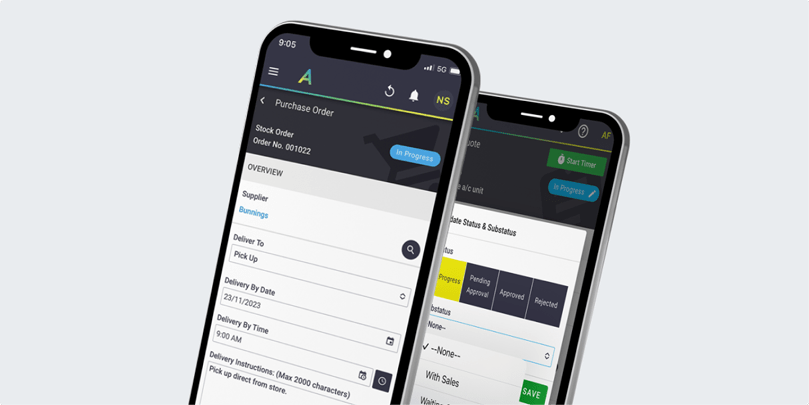
AroFlo is another strong field service management software vendor, known for its robust mobile app and GPS tracking capabilities. It’s particularly well-suited for businesses that need to keep a close eye on their team’s location and job progress.
Pros
- Strong mobile app: AroFlo’s mobile app is powerful and easy to use, making it a great choice for teams on the go.
- GPS tracking: Keep track of your team’s location in real-time, helping you manage your workforce more effectively.
- Continuous platform updates: Users benefit from regular feature upgrades without additional cost.
- Strong customer support: Responsive and knowledgeable help desk makes onboarding smoother.
Cons
- Overwhelming UI: Some users have reported that the user interface is a bit overwhelming, especially for new users.
- Time-consuming setup: Getting AroFlo up and running can take some time, so be prepared for a bit of a learning curve.
- Search functionality: Users report that searching within the system can be tedious and less intuitive over time.
Best for:
Mobile-first trade businesses with remote teams that need robust GPS and compliance tools (construction, maintenance).
BigChange
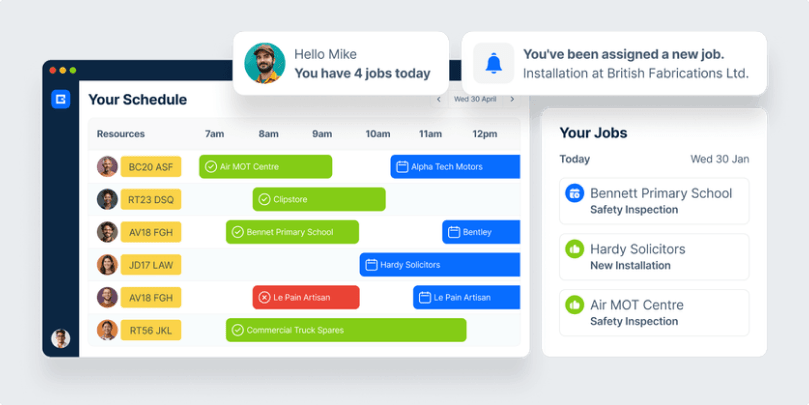
BigChange is an all-in-one job management platform designed to support field service businesses with everything from customer relationship management and job scheduling to invoicing and reporting. It brings together core capabilities that help field service teams reduce paperwork, improve job visibility, and deliver a more consistent customer experience. Positioned within the broader field service management software comparison, BigChange is often selected by businesses looking for a scalable, centralised solution that bridges both field and office operations.
Pros
- All-in-one platform: Combines CRM, job scheduling, fleet tracking, and financial tools.
- Mobile workforce app: Helps keep field teams connected and efficient.
- No upfront costs: Pricing is typically subscription-based, with no large initial fee.
- Great fleet tracking: Built-in vehicle tracking helps optimise routes and fuel use.
- Digital job cards: Automated job cards and customer notifications save admin time.
Cons
- Some features can feel basic: Compared to more mature platforms, some features lack depth.
- Requires ongoing training: Users note a learning curve, especially for advanced functionality.
- Sat-nav and navigation tools: Can lag or disconnect, according to some users.
Best for:
Mid-sized to enterprise-level companies looking for a unified platform with fleet and CRM capabilities (multi-region operators).
Jobber
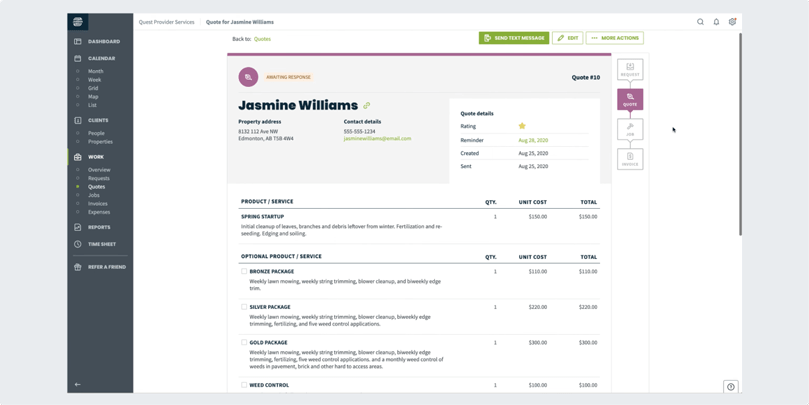
Jobber is known for its user-friendly interface and strong customer support, making it a popular choice for small to medium-sized businesses. It offers a range of features, including scheduling, invoicing, and CRM.
Pros
- User-friendly: Jobber’s interface is clean and easy to navigate, making it accessible for users of all skill levels.
- Great customer support: If you run into any issues, Jobber’s customer support team is there to help.
- Drag-and-drop scheduling: Makes booking and rescheduling jobs simple and efficient.
- Streamlined quote-to-job workflow: Converts estimates into active jobs with minimal clicks.
Cons
- Limited customisation: While Jobber is easy to use, it doesn’t offer as much customisation as some other options.
- No advanced inventory management: If you need detailed inventory management, you might find Jobber lacking in this area.
- Branding and customer email tools: Could be more flexible.
Best for:
Small service-based businesses that need simple scheduling, quoting, and invoicing (cleaning, lawn care, handyman).
Compare Simpro vs Jobber
ServiceTitan
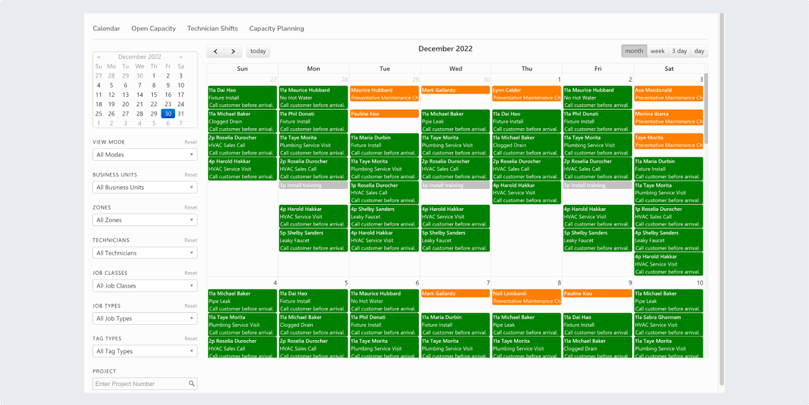
ServiceTitan is a powerhouse for field service teams, particularly larger businesses. It offers a wide range of features, from scheduling and dispatching to CRM and reporting.
Pros
- Robust features: ServiceTitan offers everything you need to manage a large field service business effectively.
- Good for larger businesses
- In-platform financing options: Enables technicians to offer financing at the point of service.
- Powerful reporting tools: Offers in-depth analytics for job costing, revenue, and performance.
Cons
- Expensive: ServiceTitan is on the pricier side, which might be a stretch for smaller businesses.
- Complex to implement: The breadth of features can make it complex to set up and use initially.
- Customer support can be inconsistent: Some users report difficulty getting timely help.
- Inventory and timecard features: May be unreliable depending on the company setup.
Best for:
Enterprise-level HVAC, plumbing, and electrical companies with high-volume operations and complex workflows.
Compare Simpro vs ServiceTitan
Housecall Pro
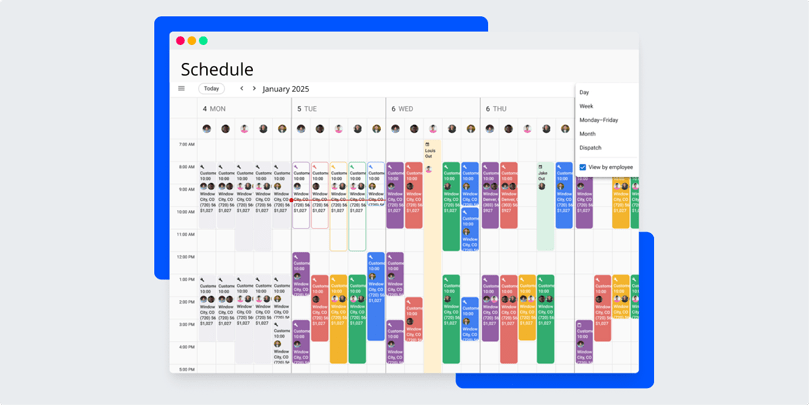
Housecall Pro is a versatile platform built to help small and mid-sized businesses manage their day-to-day field service operations more efficiently. It offers tools for scheduling, dispatching, invoicing, customer relationship management, and payment processing. As part of the wider group of field service management software vendors, Housecall Pro stands out for its accessibility and ease of use, making it a strong option for growing businesses that want to digitise their workflow without overcomplicating it.
Pros
- Easy to use: The software is straightforward, making it accessible for businesses without extensive tech resources.
- Integrates with QuickBooks: Seamless integration with QuickBooks helps streamline your accounting and invoicing processes.
- Built-in payment processing: Accept payments via card or bank transfer directly in the field.
- Onboarding support: Helpful training and setup resources for new users.
Cons
- Limited reporting: The reporting features are somewhat basic compared to other options.
- Can get pricey: Costs can add up depending on the features and number of users.
- Limited job costing functionality: Compared to more advanced platforms.
Best for:
Cost-conscious independent contractors and small businesses that want simple invoicing and mobile payments (HVAC, cleaning, home repair).
Compare Simpro vs Housecall Pro
FieldEdge
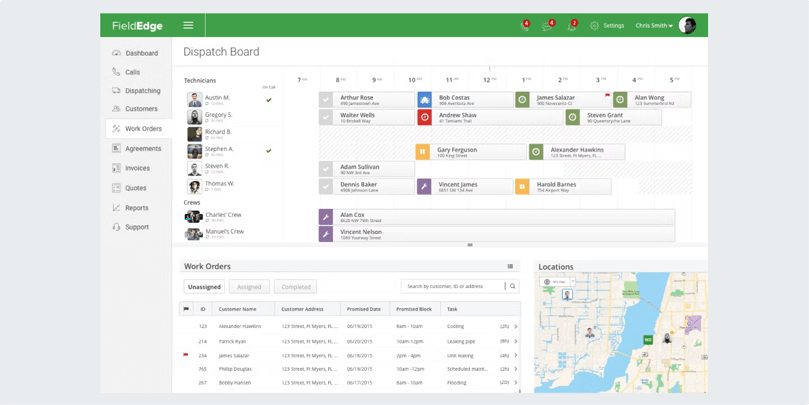
FieldEdge is a solid choice for smaller businesses, offering features like dispatching, CRM, and invoicing. It’s particularly noted for its strong customer support and ease of use.
Pros
- Strong customer support: Field Edge is known for its excellent customer service, which is invaluable when you need assistance.
- Good for small businesses: It provides a robust set of features without being overwhelming for smaller operations.
- Real-time job tracking: Technicians and office staff can see updates as they happen.
Cons
- Limited integrations: It may not integrate with as many other tools as some of its competitors.
- Costly for small teams: Pricing can be a bit high for small teams, especially if you need additional features.
- Limited customisation for workflows and reporting.
Best for:
Small to medium HVAC and plumbing businesses needing strong CRM and real-time job tracking.
Compare Simpro vs FieldEdge
Field Nation
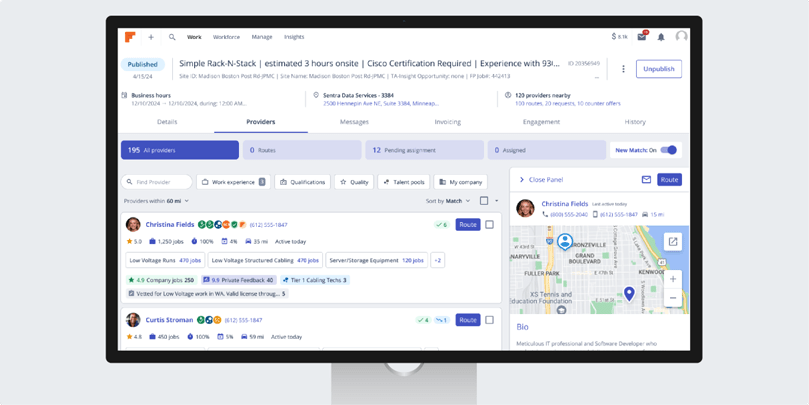
Field Nation is geared towards managing a large pool of contractors. It excels in contractor management and payment solutions, making it ideal for businesses that rely heavily on external workers.
Pros
- Great for contractors: Excellent tools for managing and paying contractors, which is a plus if you work with a lot of external labour.
- Comprehensive workforce management: Offers strong capabilities for handling a large workforce.
- Access to a large contractor marketplace: Quickly find skilled subcontractors for specific job types.
- Built-in payment processing: Automates payments and approvals for external labour.
Cons
- Limited features for smaller companies: Smaller businesses may find it overkill if they don’t need extensive contractor management features.
- Expensive: The cost can be high, particularly for businesses that don’t fully utilise all features.
- Limited field service-specific tools: Not ideal if you rely on in-house technicians.
- Complex navigation: Some users find the platform UI takes time to master.
Best for:
Enterprises and MSPs relying on a large pool of independent contractors across regions (IT services, telecom).
mHelpDesk
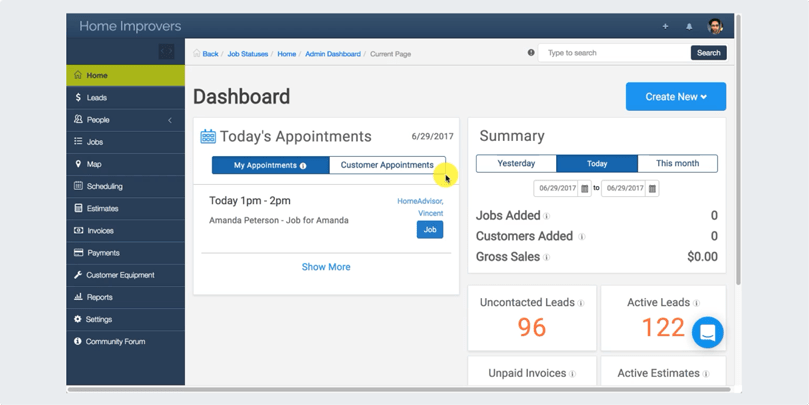
mHelpDesk is a comprehensive platform designed for service businesses that want to manage every part of their workflow in one place. It offers features like job scheduling, billing, customer relationship management, time tracking, and mobile access. As part of the wider landscape of field service management software vendors, mHelpDesk helps streamline both back-office operations and field service tasks, making it a solid choice for businesses aiming to scale efficiently. mHelpDesk helps streamline both back-office operations and field service tasks, making it a solid choice for businesses aiming to scale efficiently.
Pros
- All-in-one solution: Combines multiple functions into a single platform, reducing the need for multiple tools.
- Good mobile app: The mobile app is effective, making it easier for field technicians to stay connected.
- Built-in time tracking: Helps teams track hours in the field more accurately.
Cons
- Expensive: Higher price point, which might be a concern for smaller businesses.
- Steep learning curve: The range of features can make it challenging to learn and implement.
- Interface can feel dated compared to newer tools.
Best for:
Mid-sized service teams that need a comprehensive tool including customer management, quoting, and mobile access.
ServiceM8
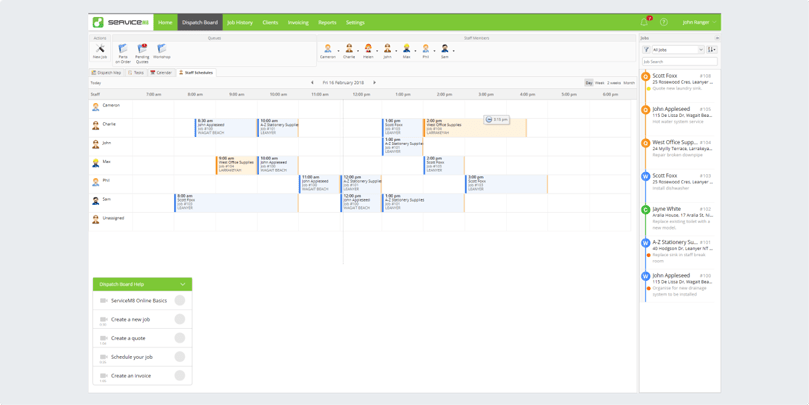
ServiceM8 is a cost-effective option built specifically for small businesses that need help managing jobs in the field. It offers core features like job management, staff scheduling, quoting, invoicing, and real-time updates, all designed for ease of use. ServiceM8 stands out in the field service management software comparison by prioritising mobile-first design and automation, helping field service teams stay productive while on-site. It's a strong entry-level option for businesses starting their digital transformation journey.
Pros
- Affordable: One of the more budget-friendly options available.
- Easy to use: Simple and intuitive, making it easy to get started without a lot of training.
- Smart job reminders and automation: Automates recurring tasks and reminders.
Cons
- Limited features: It may not offer the advanced features found in more expensive software.
- Best for small businesses: The features are more tailored to smaller operations, which may not scale well for larger teams.
- Limited Android support: Full functionality is mainly available on Apple devices.
- No built-in CRM: Requires third-party tools for deeper customer management.
Best for:
Solo operators or small teams looking for affordability and ease of use (appliance repair, cleaning, pest control).
Compare Simpro vs ServiceM8
Field Promax
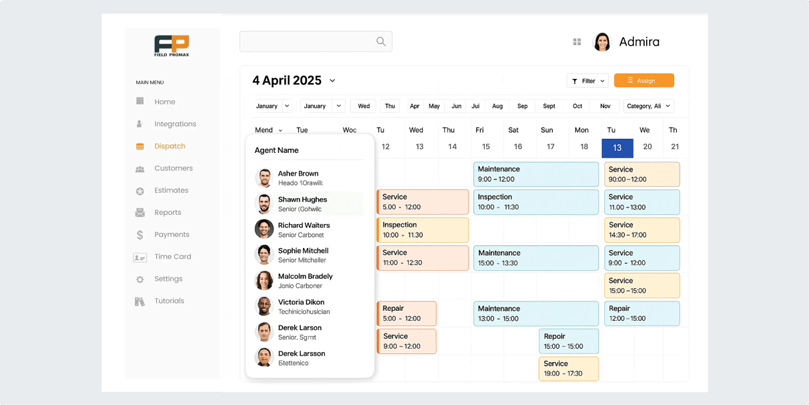
Field Promax is a cloud-based platform included among the best field service management software options for small to mid-sized service businesses. It offers tools for scheduling, dispatching, work order management, invoicing, and QuickBooks integration. It's particularly favoured for its affordability and mobile app functionality, helping teams stay connected and organised on the go.
Pros
- The software features an easy-to-use interface, which allows for quick adoption with minimal training.
- Affordable pricing: Compared to many competitors, with a 14-day free trial.
Cons
- Limited advanced features: Workflow customisation. Larger companies with complex operational needs may need a more robust FSM platform.
- Reporting features: Basic compared to more enterprise-focused platforms.
- Limited third-party integrations: Outside of core accounting tools.
Best for:
Small to mid-sized service businesses needing mobile-friendly scheduling and QuickBooks integration (HVAC, electricians, general contractors).
RazorSync
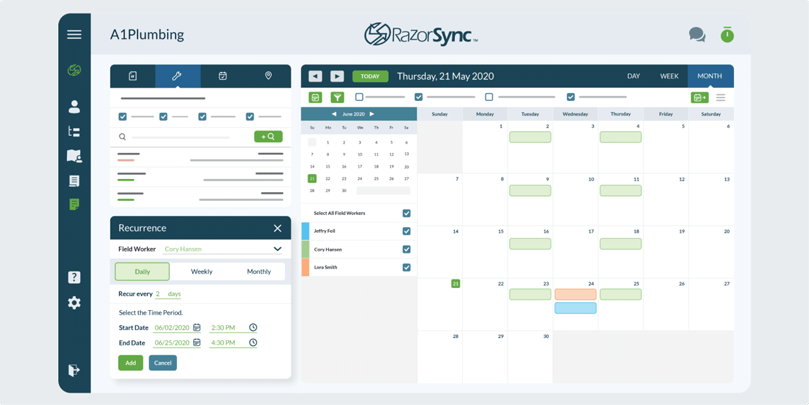
RazorSync provides one of the best field service management software options with scheduling, billing, and customer management features. It’s known for being a solid choice for businesses of all sizes, particularly those looking to streamline their field service management operations without breaking the bank. RazorSync has earned its place among the best field service software vendors for offering strong core functionality at a competitive price.
Pros
- Good value: Offers a range of features at a relatively low cost.
- Easy setup: The setup process is straightforward, making it easier to get started.
- Invoicing and payment flexibility: Accepts credit cards and ACH payments directly in the platform.
Cons
- Limited reporting: Reporting capabilities are not as advanced as some other options.
- Outdated UI: The user interface could use a refresh to improve usability.
- Limited advanced customisation: Compared to larger platforms.
Best for:
Budget-conscious businesses needing quick setup and basic customer relationship management (janitorial, pool service, maintenance).
Skedulo
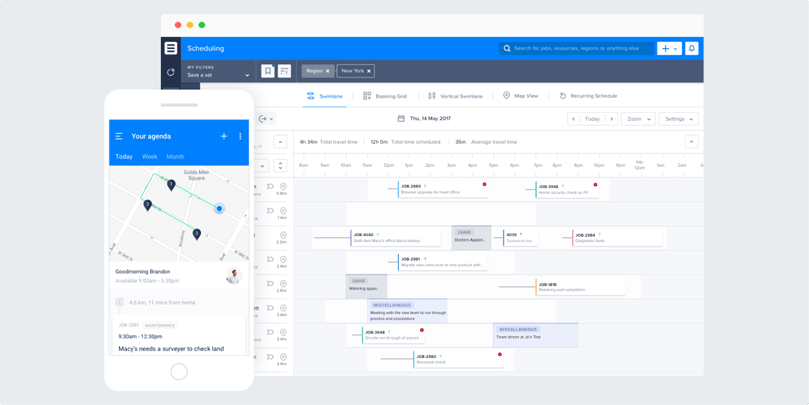
Skedulo specialises in workforce management and scheduling, with strong mobile capabilities. It’s a great option for businesses with large teams that need to manage complex schedules.
Pros
Strong mobile capabilities: Excellent for managing a mobile workforce. Complex scheduling: Great for handling intricate scheduling needs. Flexible for unique workflows. Offline functionality: Enables remote workers to access schedules without an internet connection. Strong resource allocation: Helps manage high volumes of appointments and distributed teams.
Cons
Expensive: Higher costs may be a barrier for smaller businesses. Complex setup: Skedulo may require more time to implement effectively. Requires internal admin expertise: Customising the platform effectively may need dedicated IT resources.
Best for:
Large, distributed teams in healthcare, energy, or utilities with complex field service scheduling requirements.
Benefits of Implementing Field Service Management Software
Faster, Smarter Scheduling & Dispatch
With the right field service software, you can streamline scheduling and dispatching, assign jobs faster, avoid overlaps, and keep field teams in sync with live updates. Platforms like Simpro's scheduling tools help reduce admin time and ensure the right technician is assigned every time.
Accurate Inventory & Asset Management
Track parts, tools, and assets in real time to eliminate double handling and reduce costly errors. Simpro’s inventory management ensures teams are fully stocked for each job and helps avoid unnecessary trips back to HQ.
Instant Communication & Job Updates
Replace phone tags and paperwork with mobile job updates, digital signatures, and in-field notes. With features like Simpro's mobile app, technicians stay connected and your office team remains in the loop.
Improved Cash Flow & Invoicing
Automated invoicing and real-time job costing help you get paid faster and keep revenue flowing. Simpro’s invoicing tools let you generate and send invoices straight from the field, reducing delays and improving customer satisfaction.
Scalable for Growing Businesses
Whether you're managing five techs or fifty, FSM software grows with you. Solutions like Simpro are built to support complex operations as you scale, with advanced reporting, project management and integrations designed for expansion.
Comparison Chart: Quick Overview
| Simpro | AroFlo | BigChange | Jobber | ServiceTitan | Housecall Pro | FieldEdge | Field Nation | mHelpDesk | ServiceM8 | Field Promax | RazorSync | Skedulo | |
|---|---|---|---|---|---|---|---|---|---|---|---|---|---|
| Key Features | Job management, quoting, scheduling, mobile access, and reporting | Job management, timesheets, GPS tracking, invoicing | CRM, job management, fleet tracking | Scheduling, invoicing, CRM, quoting | Scheduling, dispatch, CRM, reporting, mobile access | Scheduling, dispatch, invoicing, payments | Dispatch, CRM, invoicing, reporting | Workforce management, contractor management, payments | Scheduling, billing, CRM, time tracking | Job management, scheduling, invoicing, payments | Scheduling, dispatching, work orders | Scheduling, billing, time tracking, customer management | Workforce management, scheduling, mobile access |
| Monthly Cost | Varies | Varies | £79.95-£109.95 | $35-$145 | Varies | $49-$279 | Varies | Varies | $169-$374 | $9-$149 | $99-$299 | $40-$160 | Varies |
| Pros | Comprehensive features, customisable, great support | Strong mobile app, GPS tracking | Fleet tracking, route optimisation, rugged mobile devices | User-friendly, great customer support | Robust features, good for larger businesses | Easy to use, integrates with QuickBooks | Strong customer support, good for small businesses | Great for managing contractors | All-in-one solution, good mobile app | Affordable, easy to use | Ease of use, free trial | Good value, easy setup | Strong mobile capabilities, great for large teams |
| Cons | Higher learning curve, can be more expensive than others | UI can be overwhelming, setup can be time-consuming | Some features UK-focused, limited project workflows | Limited customisation, no advanced inventory | Expensive, complex to implement | Limited reporting, can get pricey | Limited integrations, costly | Limited features for smaller companies | Expensive, steep learning curve | Limited features, best for small businesses | Lacks advanced workflows | Limited reporting, outdated UI | Expensive, complex setup |
Get Demo
|
|||||||||||||
Get Started with a Smarter Field Service Solution
Choosing the right field service management software vendor can transform how your business operates. From scheduling and dispatch to quoting and invoicing, Simpro delivers the tools you need to run a smarter, more efficient field service business.
Ready to see it in action? Book a free Simpro demo tailored to your business needs.


 Back to top