

Written by: Toby Mortaro

Toby started his Simpro journey in support. He learned the product inside out, in order to provide best-in-class customer support. As a key member of the support team, Toby built internal relationships as well as those with our customers. After a couple of years and fancying a creative challenge, he jumped ship to the marketing team.
When a job goes over budget or a client disputes what was agreed, there is usually one thing missing: a clear work order process. A missed material, a task that was never documented, a sign-off that never happened.
These are not random problems. They are the predictable result of running jobs without a proper work order.
A well-structured work order keeps your team accountable, your costs on track, and your clients informed at every stage. This guide covers what work orders are, how to build them correctly, and how to manage them as your job volume grows.
The Nitty Gritty
What is a work order?
What are the different types of work orders?
What essential things must you always include in your work orders?
What effective steps can you follow to create efficient work orders?
How to organize work orders?
A bonus work order template
Top work order FAQs
What Is a Work Order?
A work order is a formal document that defines what work needs to be done, who is responsible, what materials and labor are required, and when it needs to be completed. It creates a shared record between your office, your field team, and your client so that everyone is working from the same information.
Work orders are used across field service industries, including plumbing, electrical, construction, fire safety, and HVAC. They matter because jobs without them tend to run over budget, miss deadlines, and generate disputes that are nearly impossible to resolve after the fact.
When you track labor and materials against every work order, you always know what a job actually costs versus what you quoted. That visibility is what keeps your margins intact and your clients coming back.
What a work order does for your business:
- Prevents scope disputes by documenting exactly what was agreed upon before work begins
- Gives technicians everything they need before they arrive on site, reducing return trips
- Creates a timeline so clients know what to expect, and you have a record if deadlines shift
- Tracks who completed what and when, so accountability is built into every job
- Gives you accurate cost data to quote similar jobs more confidently in the future
Work orders are widely used across the field service industry including plumbing, construction, fire safety and HVAC maintenance and installation. There are many benefits in having a work order process, one of them being the ease of tracking labour and materials used in the completion of a job.
By having this detailed record associated with each job, you can ensure they stay within budget. Additionally, tracking progress with work orders allows you to ensure jobs are completed on time, and are able to give your customers an accurate estimate of a completion date. That also leaves you with a bunch of happy customers.
Different Types of Work Orders
There are four main types of work orders, and each one is best for a different type of job or business need. A construction work order may be different from a maintenance or emergency work order, depending on what kind of work it is. Let's look at the most common types and how they work in different fields.
General Work Order
Used for routine tasks that are not tied to a maintenance issue or emergency. This covers new equipment installation, painting, minor fit-outs, or any work that does not involve repairing or preventing a fault.
Field Service Example: A general work order for a scheduled HVAC inspection at a commercial property. The technician checks performance and cleans filters as part of a planned visit. Without a work order, there is no documented record of what was inspected, which becomes a problem if the client later questions whether the service was completed.
Corrective Work Order
This revolves around maintaining systems, equipment or machinery that is already set up. Sometimes specialised equipment and tools may be required, or perhaps maintenance staff with a specific skill set. There may also be occasions where corrective work is required at the same time as a preventative maintenance visit. The purpose of corrective maintenance is to restore the functionality of the equipment, machinery or systems so it can be restored to the correct condition.
Field Service Example: A corrective work order for a leaking pipe in a restaurant kitchen. Every hour the repair is delayed costs the client money in downtime and potential water damage. A detailed work order gets the right plumber with the right parts to the site the first time.
Preventive Work Order
This type of work order is scheduled in advance for routine maintenance tasks that are required within a specific time frame. It’s usually work that needs to be completed in order for the equipment to function as intended, to prevent further costs to the business and other unexpected malfunctions.
Field Service Example: A preventive work order for inspecting fire safety systems in a commercial building. Missing this scheduled visit does not just risk equipment failure. It risks compliance violations and the liability that comes with them.
Emergency Work Order
There are always going to be times when equipment, machinery and systems go down unexpectedly. It’s times like these when an emergency work order is required. It’s reactive maintenance, so extremely important that you gather all the correct information and send out the right maintenance team for the job, as it could be time-critical.
Field Service Example: An emergency work order for a malfunctioning electrical panel in a factory. The risk of fire means there is no room for miscommunication. A well-structured emergency work order gets a qualified electrician dispatched with the correct information before they leave the yard.
10 Key Elements You Need to Include in Your Work Orders
A work order is a document that lists all the important information about a job or service that needs to be done. A work order should have important details like a description of the task, service requirements, materials needed, and the date by which the work is expected to be done.
It's good practice to include these key details in addition to setting up a good work order management system coupled with job scheduling software for field service, so that your team and customers are on the same page. Let's go into more detail about the important information that makes a work order work.
Task and service requirements
Detail what asset requires maintenance work and the service required, depending on what type of work order you’re creating.
Resources and materials needed
There may be specific skill sets required for the work, which you can detail here. As well as the materials that may be required. This ensures you assign the right person to the job and they have everything they need on the day.
Overview of the issue
Make sure you have a description of the issue at hand. This way, there can be no confusion for the customer about what’s expected from the work.
Date requested
This will be the date the customer initially made the enquiry or booked in the work. This shows your business is organized and starts a timeline for the work to be completed.
Expected completion date
Forecast when you expect the work to be completed. It’s always tentative, as there may be unexpected delays. Such as, material shortages, weather delays or site closures.
Actual completion date
Here, you can outline when the work was completed, even if it’s the same date as the expected timeframe. This type of detail also helps with forecasting similar work in the future.
Checklist of tasks
This helps maintenance technicians and other employees know what is expected to complete the task, as well as giving the customer a clear understanding of the process. The tasks can be marked off as they’re completed.
Health and safety protocols
Different jobs require different health and safety legislation. It’s important to detail these terms so your employees can keep themselves and others safe.
Business details
Ensure you list your contact details as well as your business address. This gives your customer an opportunity to reach out if they have any questions about the work during its progress or after completion.
Sign off area
An area for both the customer and the employee to sign. This is essentially a written agreement that all parties are happy with the work completed.
How to Create Effective Work Orders Step-By-Step
To make your business run more smoothly, you need to know how to organize work orders and follow a work order process, as well as make use of field service job scheduling. It may take some trial and error to get it right, but following field service management best practices can make your work orders much more efficient and effective.
Using field service management software like Simpro can also automate a lot of this work, making sure that tasks are tracked, deadlines are met, and resources are used correctly. Let's go over these best practices one by one.
1. Identify the scope of the project
The first step in creating an effective work order is to determine the scope of the project. This includes outlining specific tasks that need to be completed, what materials, labour, and services are needed, and any relevant instructions or safety concerns. It's important to make sure that everyone involved understands exactly what needs to be done in order for the job to be completed.
2. Assign due dates
Once you have identified the scope of the project, it's time to assign due dates for each task. These due dates should account for any unforeseen issues that may arise during the course of completing a job, within reason. As there’s always the risk of an unexpected delay that’s impossible to see ahead of time. Additionally, assigning due dates helps ensure that all parties are working towards completing the work or project in an efficient manner. And it shows your customers that you run a well-oiled, tight ship.
3. Specify the labour and materials required
After you've identified what needs to be done and set due dates for each task, it's important to specify which materials, labour or services will be required for each job. This ensures that everyone involved knows exactly what supplies need to be purchased or rented before beginning a job so they can plan accordingly and budget properly. It also allows businesses owners to accurately track their costs associated with each job.
4. Include relevant safety instructions
It's important to not only include details about tasks needing completion but also any relevant instructions or safety concerns associated with those tasks. Such as personal protective equipment (PPE) requirements or hazardous chemicals being used onsite. This helps protect your employees from potential harm while ensuring compliance with regulations related to safety standards in the industry.
5. Establish a payment timeline
Lastly, you need to establish a clear payment timeline for the completion of any work. This way, both you and your contractors or employees know when payments will be made upon completion of a job. This helps avoid confusion further down the line with customers as well.
Work Order Management: How to Organize Work Orders
Managing one work order is straightforward. Managing fifty in a week, across multiple crews and job types, is where things break down without the right system in place.
Work order management covers the full lifecycle of every job from the moment it is created to the moment it is signed off and invoiced. The goal is to make sure nothing gets lost, delayed, or handled inconsistently as your job volume grows.
Best Practices for Work Order Management
To make sure that everything runs smoothly and efficiently, it's important to use these field service management best practices for handling work orders. These strategies help make workflows more efficient, cut down on mistakes, and keep tasks in order. Here are some important ways to organize and handle work orders well:
- Categorize work orders by type. Separating preventive, corrective, general, and emergency work orders from the start means your team always knows the urgency and approach required for each job, without having to read through the full details every time.
- Set priority levels. Not all jobs carry the same urgency. Assign clear priority tiers so your team knows which work orders need to be actioned immediately and which can be scheduled around existing commitments.
- Assign roles before the job starts. Every work order should have a named technician and a named supervisor before it goes live. Ambiguity about who owns a job is one of the most common reasons tasks slip through the cracks.
- Use consistent templates. Standardizing your work order format means every job is documented the same way, every time. It also makes it significantly easier to review completed work orders for patterns, recurring issues, or cost trends.
- Monitor progress in real time. Check the status of open work orders regularly. Catching a delay early gives you time to reassign resources or communicate with the client before the situation becomes a problem.
- Automate where you can. Manual work order management works at low volume. As your business grows, the time spent creating, assigning, and tracking work orders manually becomes a real cost. Tools like simPRO automate the administrative side of work order management so your team spends less time on paperwork and more time on billable work.
Simpro has a complete platform for work order management for field service. This makes it simple to organize, assign, and keep track of work orders in real time.
Bonus Work Order Template
Even before you invest in work order management software, having a structured template gives your team a consistent starting point for every job. The template below covers all the essential information you need to document a field service job properly, from site details through to client sign-off.
Use it as a foundation. As your job volume grows and manual management becomes harder to sustain, it is also a useful reference point for understanding what fields your software needs to capture.
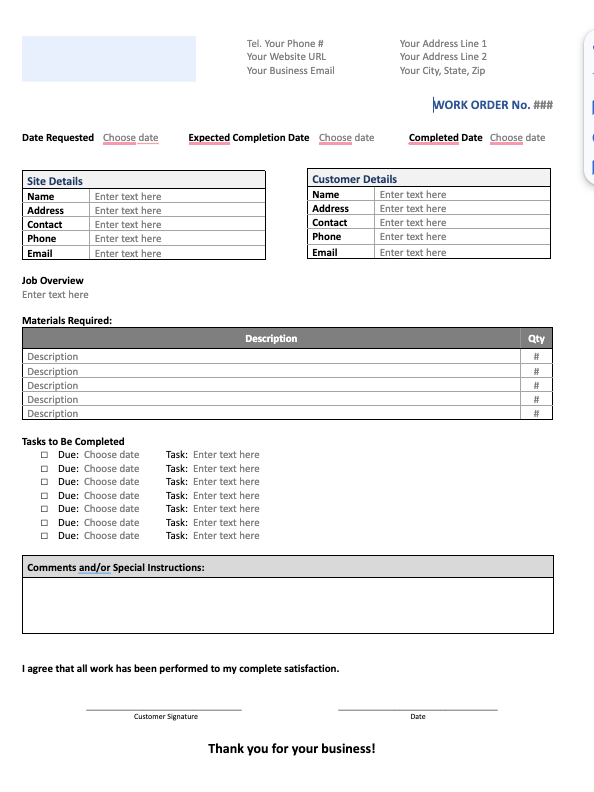
This work order template includes all the essential fields needed to effectively track and manage service tasks, ensuring clear communication between you, your team, and your customers. Here's a breakdown of the key sections included:
Site Details:
- Name, Address, Contact, Phone, Email: Fill in the site-specific information to ensure you know where and who the job is being performed for.
Customer Details:
- Name, Address, Contact, Phone, Email: Include customer information for quick reference and to ensure proper communication.
Job Overview:
- Job Description: A brief overview of the work being done or the issue to be addressed.
Materials Required:
- Description and Quantity: List out all the materials needed for the job with their quantities to ensure the right supplies are available.
Tasks to Be Completed:
- Task, Due Date: Specify the tasks that need to be performed, their due dates, and any related details to track progress and ensure timely completion.
Comments and/or Special Instructions:
- Space for Additional Notes: Add any additional instructions or considerations that are relevant for the task.
Signature Area:
- Customer Signature and Date: Space for the customer to sign off and confirm satisfaction once the work is completed.
For more templates, visit our free work order templates page.
Stop Managing Work Orders Manually
Creating work orders that are both useful and quick is a process. Now that you have the right structure, the next step is to repeat it. If you keep the right framework and best practices in mind, you can easily create work orders that always keep your business running smoothly.
The next step is to automate this process, making it more efficient and reducing the risk of error.
If your current work order process depends on memory, spreadsheets, or paperwork that lives in someone's truck, it will eventually cost you. A missed detail becomes a disputed invoice. An unlogged material becomes a margin loss. A job with no sign-off becomes a client complaint with no resolution.
The good news is that fixing this does not require a complete overhaul of how you work. It requires a consistent structure and the right tools to support it.
Simpro’s work order management tools give you full visibility across every job from creation to completion, with automated task assignment, real-time progress tracking, and accurate cost recording built in. The result is fewer errors, faster invoicing, and a clear record of every job your business has ever completed.
Ready to take the manual work out of work order management? Book a demo of Simpro’s work order tools to see how they work in practice.
Work Order FAQ
A work order is a document that lists the tasks, services, or repairs that need to be done. It is often used in maintenance or field service. Software such as Simpro which provides field service automation for trade businesses, can assist in generating and organizing work orders.
What is the difference between a work order and a purchase order?
A work order specifies the tasks, services, or repairs required to complete a job. A purchase order is a formal request to a supplier to provide goods or services. The two documents serve different purposes: a work order drives the execution of a job, while a purchase order handles the procurement of the materials needed to complete it. In practice, a single job may generate both.
Is a work order the same as an invoice?
No. A work order is created before or at the start of a job and outlines what work will be done. An invoice is issued after the work is complete and requests payment for the goods or services provided. Think of the work order as the job plan and the invoice as the financial record of what was delivered.
What are the four types of work orders?
The four main types are general, corrective, preventive, and emergency. General work orders cover routine tasks with no maintenance component. Corrective work orders address faults or failures that need to be repaired. Preventive work orders are scheduled in advance to maintain equipment and avoid future problems. Emergency work orders are raised when something fails unexpectedly and needs immediate attention.
How do you automate work orders?
Work order automation means using software to handle the administrative tasks that would otherwise be done manually. Instead of creating work orders by hand, assigning them individually, and chasing updates by phone, the software handles creation, assignment, notifications, and progress tracking automatically. For a business running multiple crews across multiple job types, this removes a significant amount of daily admin and reduces the risk of jobs being missed or misdirected. simPRO automates this entire process, from the moment a job is created through to completion and invoicing.


 Back to top