
Managing work orders and multiple teams within a field service business can be tough. You need to know what projects are being worked on, who's carrying out the work, and everything else that comes with it. A well-built work order template takes the guesswork out of the process, giving you a consistent way to keep every team on the same page.
Below you can download free work order templates for maintenance, service, and construction jobs in Word, Excel, Google Docs, and Google Sheets. In this blog, we'll cover the key components of a generic work order template and dive deeper into the maintenance and construction versions. We'll also look at how to get the most out of an adaptable work order template.
The Nitty Gritty
Three free work order templates to download: maintenance, construction and adaptable, each available in Word, Excel, Google Docs and Google Sheets.
Field-by-field guidance on what to include in each template, by trade and job type.
A clear decision table to help you pick the right format for the way your team works.
Signs that your business has outgrown templates and is ready for dedicated work order software.
Download Free Work Order Templates
Pick the template that fits your job type and how your team works. Technicians on phones or tablets find Google Sheets and Excel easiest to update on site.
Word and PDF suit office admin who can print and file these documents.
All three templates below are free to download and customise.
| Template | Best for | Download |
|---|---|---|
| Maintenance work order template | Preventive maintenance, reactive repairs and asset servicing | |
| Construction work order template | Project work, contractor jobs, materials and labour tracking | |
| Adaptable work order template | Flexible form for varied job types, simple repairs or printable field forms |
Key Components of a Generic Work Order Template
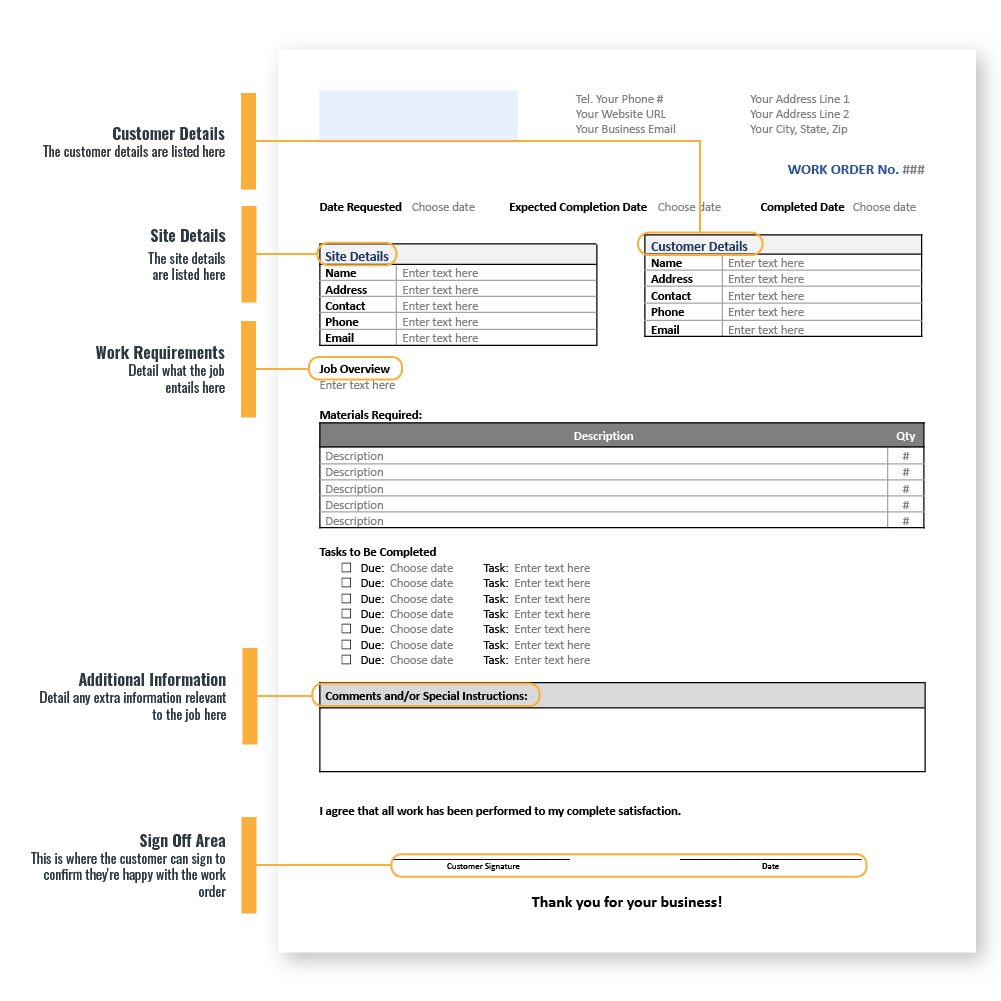
A work order template (also called a job order form) helps you document work requests, track progress, and communicate clearly with customers. It keeps every job organised, ensures work is completed professionally, and gives customers a clear record of what has been agreed.
A standard work order template should include:
- Customer details: Name, contact information, and service address.
- Job description: A clear outline of the requested work.
- Pricing: Estimated or quoted costs, plus payment terms where applicable.
- Materials and labour: Space to record parts used and time spent on the job.
- Special instructions: Customer requests or site-specific requirements.
- Sign-off section: Approval from both the technician and customer to confirm the work has been completed.
These fields create transparency throughout the job, helping build trust while reducing the risk of misunderstandings.
Depending on your industry, you may need to customise your template. For example:
- Maintenance and repair businesses may include job location, asset details, or estimated completion time.
- Construction businesses often require more detailed scopes of work to support accurate quoting and project planning.
Work order templates are used across many service industries, including:
- HVAC technicians completing scheduled maintenance.
- Plumbers installing or repairing fixtures.
- Construction teams managing landscaping or building work.
Capturing the right information from the start helps your team stay organised, reduces errors, and improves the customer experience. A well-designed work order also makes it easier to track jobs, manage costs, and keep projects moving efficiently.
The Maintenance Work Order Template: Diving Deep
A maintenance work order template helps technicians capture the information they need to complete jobs safely, accurately, and efficiently. It can also function as a service work order template for field service businesses, including HVAC maintenance, plumbing repairs, electrical inspections, and fire and security servicing.
A well-designed template should include all the essential job details in one place, such as:
- Work order number
- Customer or site details
- Asset or equipment ID and location
- Maintenance type: preventive, corrective or emergency
- Priority level
- Description of the issue or scheduled task
- Assigned technician
- Parts or materials required
- Labour hours (estimated and actual)
- Safety notes and hazard checks
- Technician notes and photos
- Completion status
- Customer or manager sign-off
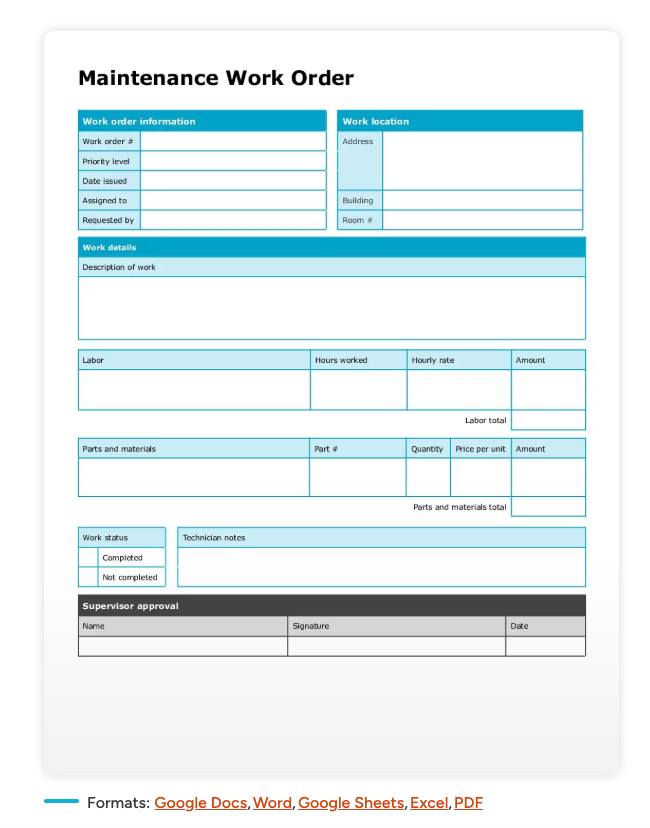
Including detailed job instructions helps technicians complete work without needing clarification, reducing delays and costly mistakes. Recording parts used and labour hours also improves cost tracking, inventory management, and future job estimating.
Safety information is just as important. Adding space for hazards, required PPE, lockout/tagout procedures, or other site-specific precautions helps technicians prepare before work begins and supports compliance with safety requirements.
To make your template even more effective, consider adding checklists, diagrams, or asset-specific inspection points. These help ensure important information is captured consistently, reduce the chance of missed steps, and make it easier to identify recurring maintenance issues before they become expensive repairs.
The more structured and complete your work order is, the easier it becomes to streamline maintenance processes, improve communication, and deliver a better customer experience.
To speed up data collection for your work orders and give customers peace of mind, consider including checklists and diagrams that make every job easier to complete accurately.
Download the maintenance work order template: Google Doc | Google Sheet | Microsoft Word | Microsoft Excel
Construction Work Order Template: Building Strong Foundations
A construction work order template is best suited to larger, project-based jobs, but the same structure can also support field service businesses like HVAC, plumbing, electrical, fire protection, security, and solar. It gives everyone a clear understanding of the work required, individual responsibilities, project deadlines, and estimated costs before work begins.
A strong construction work order template should include:
- Contractor or business details
- Customer details
- Project name and reference
- Job site address
- Scope of work
- Materials required
- Equipment required
- Labour requirements and crew assignments
- Timeline and key deadlines
- Cost estimate
- Change order notes
- Safety or compliance notes
- Approval signatures
Capturing this information at the start of a project keeps technicians, subcontractors, and office staff informed throughout the job. It also helps prevent scope creep, reduces miscommunication, and provides a clear record if project requirements change.
Construction projects often involve multiple phases and additional approvals. Including dedicated sections for change orders and compliance requirements makes it easier to track updates, document decisions, and keep everyone accountable.
Every work order should also include safety information. Recording site hazards, required PPE, permits, or other compliance requirements helps technicians arrive prepared and complete work in line with workplace regulations.
Whether you're managing a construction project or coordinating a large installation, a detailed work order improves visibility across the job and gives customers confidence that every stage has been planned.
Once you've established a consistent work order process, pairing it with a service ticket system can help improve scheduling, simplify job tracking, and reduce downtime between projects.
Download the construction work order template: Google Doc | Google Sheet | Microsoft Word | Microsoft Excel
Adaptable Work Order Templates: Versatility at its Best
A simple work order template is ideal for routine jobs, but not every service call follows the same process. As work becomes more complex, your template should be flexible enough to capture the right information without creating unnecessary paperwork.
A customizable work order template allows you to tailor fields to suit different job types while maintaining a consistent process across your business. It can also double as a service work order template for a wide range of field service jobs, including:
- Simple repair jobs
- One-off service calls
- Printable field forms for technicians
- Plumbing installations
- HVAC servicing
- Electrical inspections
- Solar maintenance
- Fire and security service jobs
- Multi-stage jobs with multiple tasks or approvals
For straightforward work, you may only need customer details, the job description, labour hours, and a customer signature. More complex projects often require additional fields for staged work, contractor responsibilities, safety requirements, inspections, or approval checkpoints.
Many businesses also rely on printable work order forms when technicians need a paper copy on site or when customers require a signed record of the completed work.
The key is to use a template that can adapt as jobs change without forcing your team to start from scratch each time. A flexible work order helps standardise your processes, improves communication between the office and the field, and ensures every job captures the information needed to complete the work efficiently.
Download the adaptable work order template: Google Doc | Google Sheet | Microsoft Word | Microsoft Excel
What is a Work Order Template?
A work order template is a reusable document that captures every detail of a job, such as the customer, the site, the scope, the materials, the labour, and the sign-off.
Trade businesses use it to give technicians clear instructions on site, record what was done, and pass the right information back to the office for invoicing.
How to Choose The Right Work Order Template
The right template comes down to the job type. The table below covers the three most common scenarios.
| If your work is mainly... | Use this template | Best format |
|---|---|---|
| Recurring servicing or reactive repairs on customer assets | Maintenance work order template | Excel or Google Sheets for tracking; PDF for printing |
| Project-based with defined scope, materials and deadlines | Construction work order template | Word or Excel |
| A mix of small jobs that do not follow a fixed pattern | Adaptable work order template | Word or Google Docs |
How to Use a Work Order Template in a Field Service Business
A template only adds value when it is used the same way every time. The workflow below covers the six steps most field service businesses follow, from first call to invoice.
1. Receive the work request. Capture the customer, site, job type, urgency, and requested service. Confirm site access before scheduling.
2. Create the work order. Add job details, technician assignment, materials, estimated costs, and safety notes. Attach photos, plans, or asset history if needed.
3. Assign to the right technician or team. Check skills, licences, and availability. A good template lists the qualifications upfront.
4. Track materials, labour and progress. Record parts used, hours worked, and any variation to scope. This is where templates start leaking value if technicians cannot update in real time.
5. Capture customer or manager sign-off. Use signatures, photos or written approval as proof of completion.
6. Use the work order for invoicing and reporting. Connect completed work back to billing, job costing and planning.
The faster the work order moves through these six steps, the faster you will get paid.
If a job sits at step four or five for days because the paperwork is on a clipboard, that is cash flow you are losing.
When Should You Move From Work Order Templates to Work Order Software?
Templates work well when your job volume is manageable, your team is small, and most work orders are one-touch.
Once any of those conditions change, the admin overhead starts to outweigh the benefit. The table below shows the warning signs.
| Templates are fine when... | It is time to switch to software when... |
|---|---|
| You complete fewer than 20 work orders a week | Admin spend half their day re-typing job details into accounting |
| One person handles all the paperwork | Technicians are calling the office to ask which job is next |
| Jobs are mostly one-visit and one-invoice | You cannot tell which jobs are profitable without manual reporting |
| You rarely deal with recurring assets | Customers expect digital sign-off, photos and instant updates |
| Customer expectations are simple | Work orders, quotes, timesheets and invoices live in different files |
If three or more of the right-hand items sound familiar, the cost of staying with templates is already higher than the cost of moving to dedicated software like Simpro.
Ready to Move Beyond Work Order Templates?
Work order templates are a great starting point. They give your team a consistent process, capture the right job information, and help keep work organised. As your business grows, however, managing jobs with spreadsheets or printable forms can become time-consuming and difficult to scale.
Simpro's work order software brings your entire workflow into one connected system. From the moment a job is created through to invoicing, your office staff and field technicians have access to the same real-time information.
With Simpro, you can:
- Create work orders from customer calls, emails, or scheduled maintenance plans.
- Assign jobs based on technician skills, licences, and availability.
- Capture labour hours, parts used, photos, and customer signatures from a mobile device.
- Track asset service history across recurring maintenance jobs.
- Generate invoices directly from completed work orders.
- Report on technician productivity, job profitability, and outstanding work without relying on spreadsheets.
For businesses moving away from printable work order forms, the transition is straightforward. The information you already collect stays the same, but instead of manually re-entering data, it flows automatically through scheduling, invoicing, and reporting.
If you're spending more time managing paperwork than managing jobs, it may be time to move beyond work order templates.
Book a Simpro demo to see how maintenance, construction, and field service workflows can be managed from one connected platform.
Free Work Order Template FAQs
What is the difference between a work order and a service order?
A service order is usually raised by a customer to request work. A work order is the internal document the business creates from that request to tell the technician what to do, what materials to use, and how to complete the job.
In small businesses, the two often overlap. As you scale, keep them distinct so customer-facing and technician-facing details do not get confused.
What is the difference between a work order and an invoice?
A work order describes what work is to be done or has been done. An invoice is the bill for that work.
A well-built work order template makes invoicing faster because the labour hours, parts and approvals are already captured in one place.
What is the best format for a work order template?
It depends on how your team works. Excel and Google Sheets are best when you need to track labour, parts and totals automatically.
Word and Google Docs are easier to print and hand to a technician.
PDF is best for read-only forms or customer sign-off copies. The free downloads above come in all four formats.
What is the easiest work order template for simple jobs?
The adaptable work order template is the simplest option for short jobs and call-outs.
It has the core fields without the extra detail a maintenance or construction job needs, so technicians can complete it in minutes.
Are printable work order forms enough for a growing field service business?
They are enough for a while. Most trade businesses start with printable forms and outgrow them between 20 and 50 jobs a week.
If your team is at that point, the next step is a digital system that keeps the same job structure but removes the double entry. See how Simpro handles it.


 Back to top